10 Executive Summary Examples (and a Free Template)
Ten executive summary examples sorted by business type, from a startup investor update to a 10-K and a grant request. Open any one and edit it free.

A good executive summary example tells a busy reader the conclusion of a longer document, the few facts behind it, and the decision you need from them, all before they turn the page. Below you'll find ten one-page examples, sorted by the kind of business that writes them. You can open any example, edit it free and download it as a PDF. Start from a free one pager template.
One‑Pager examples
Real One-Pagers made with MakeOnepagers. Open any one to edit it as your own.
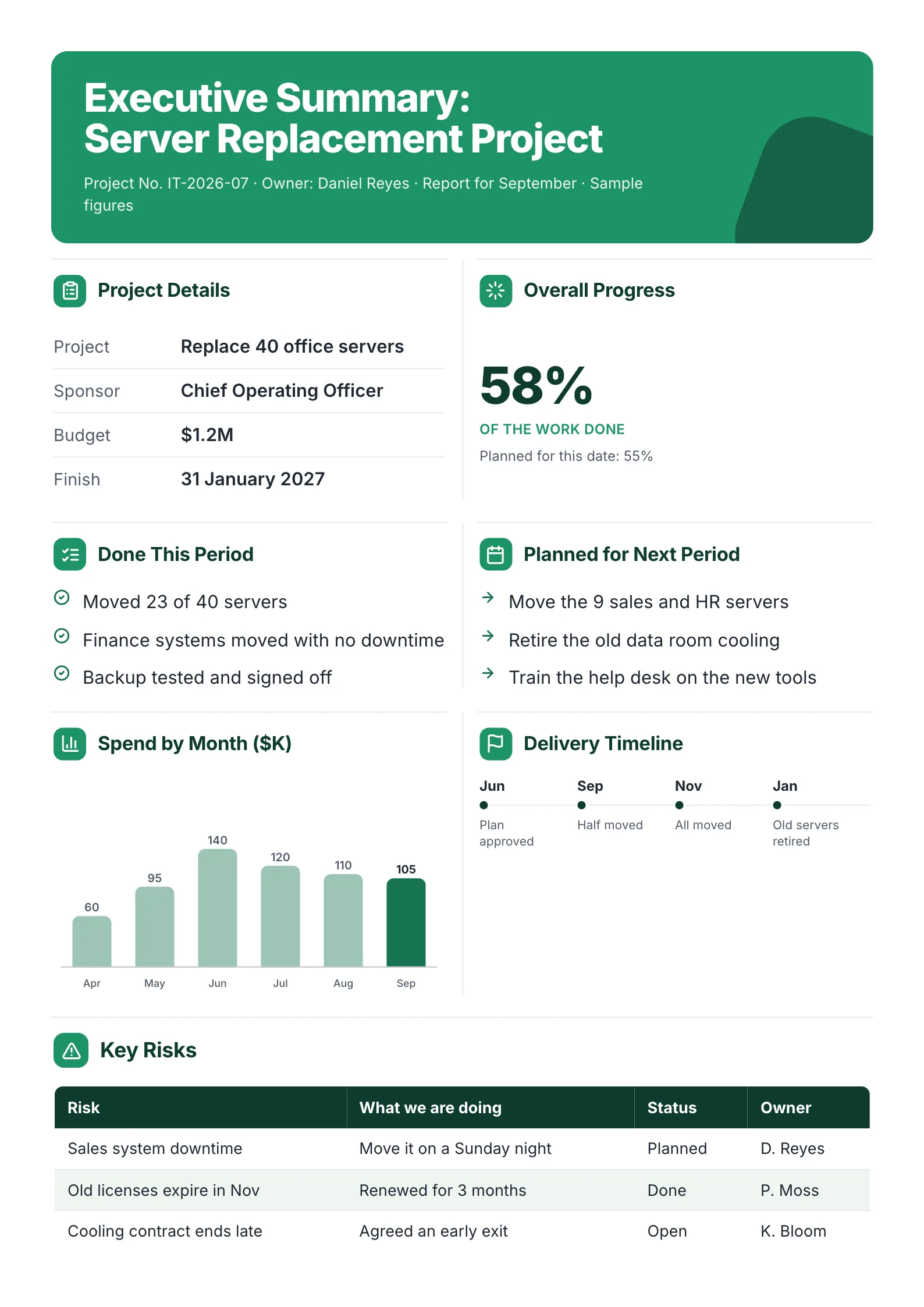 Executive Summary of a Project ReportEdit for free(opens in a new tab)
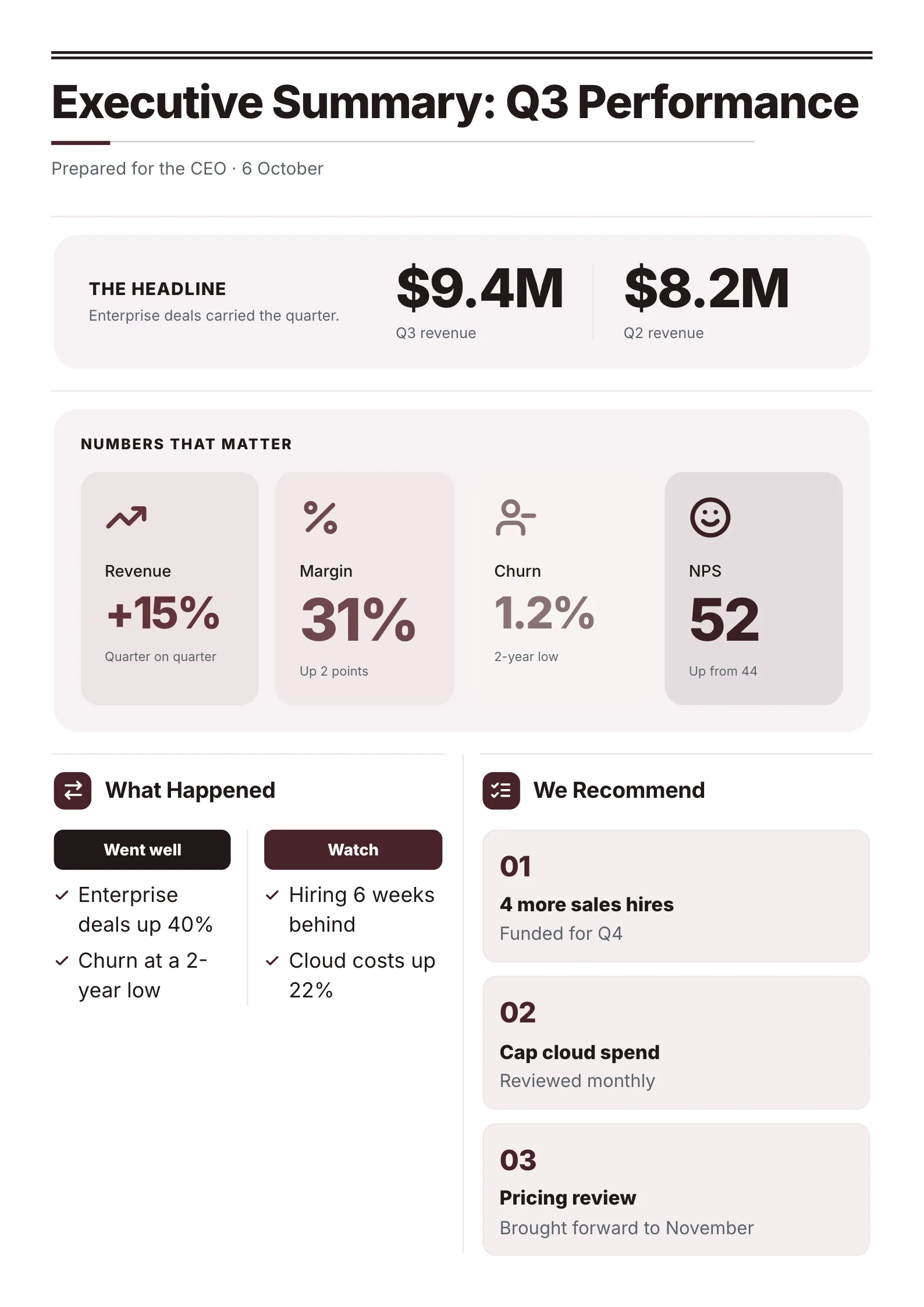 Executive SummaryEdit for free(opens in a new tab)
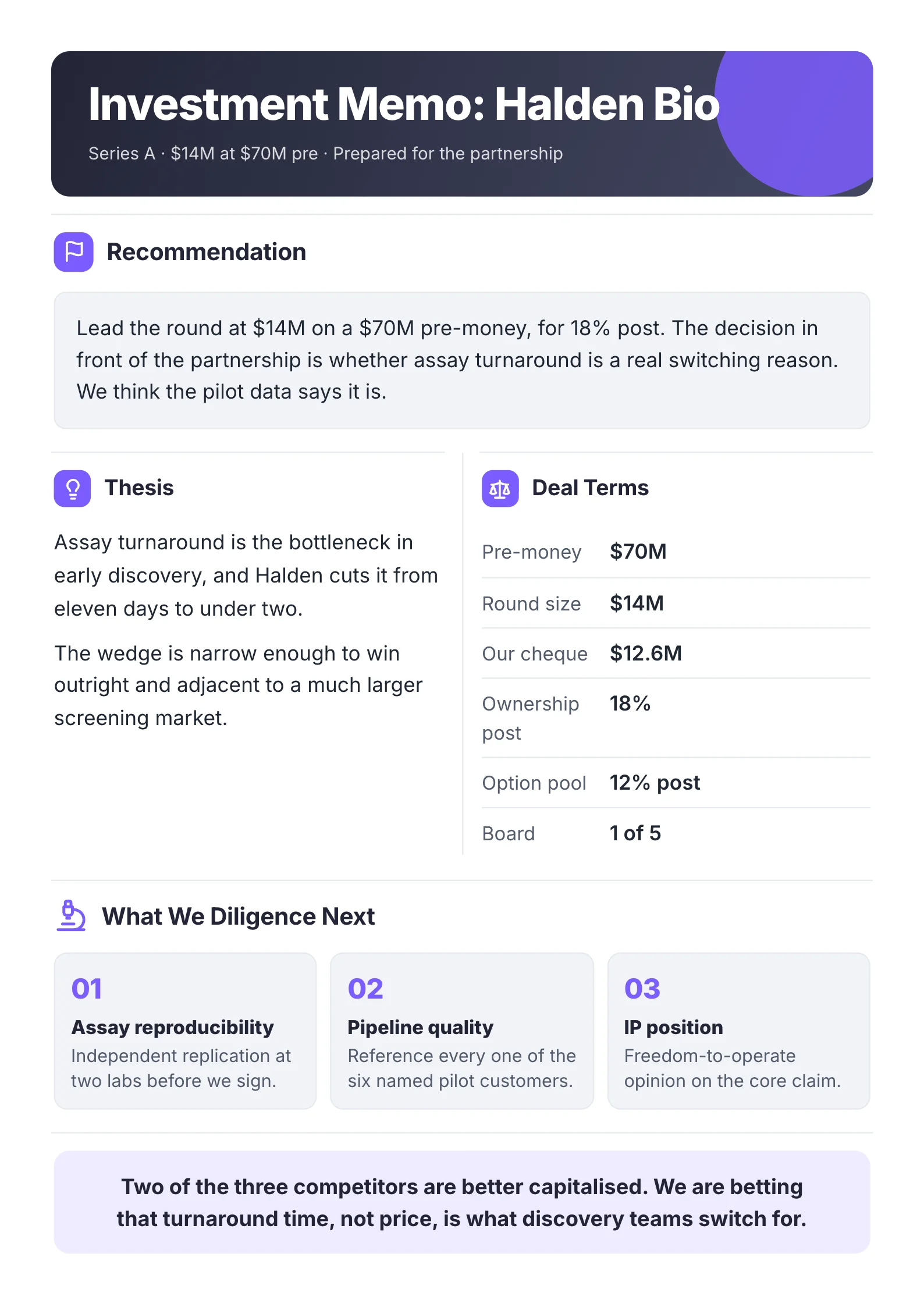 Investment MemoEdit for free(opens in a new tab)
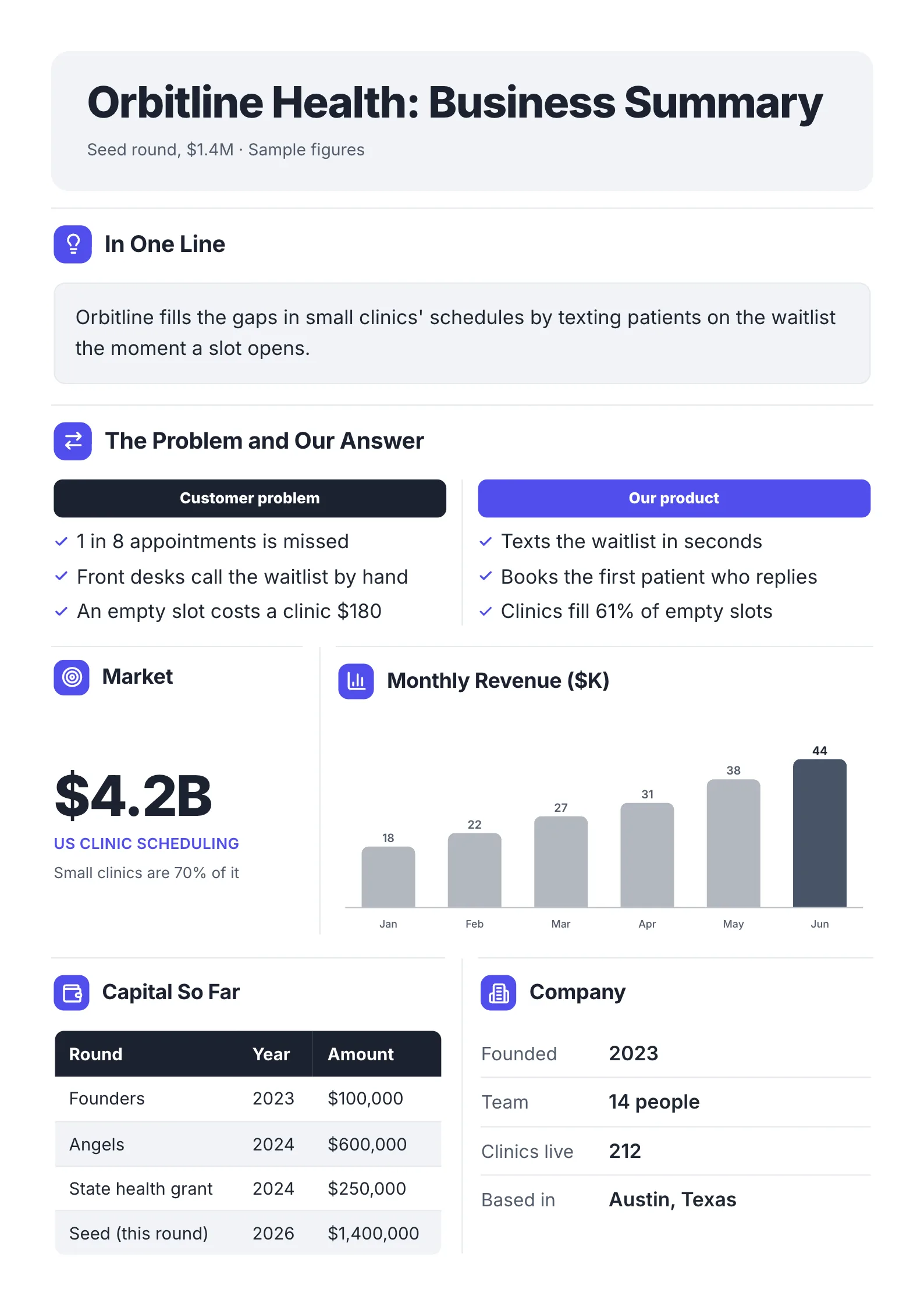 Business Summary for InvestorsEdit for free(opens in a new tab)
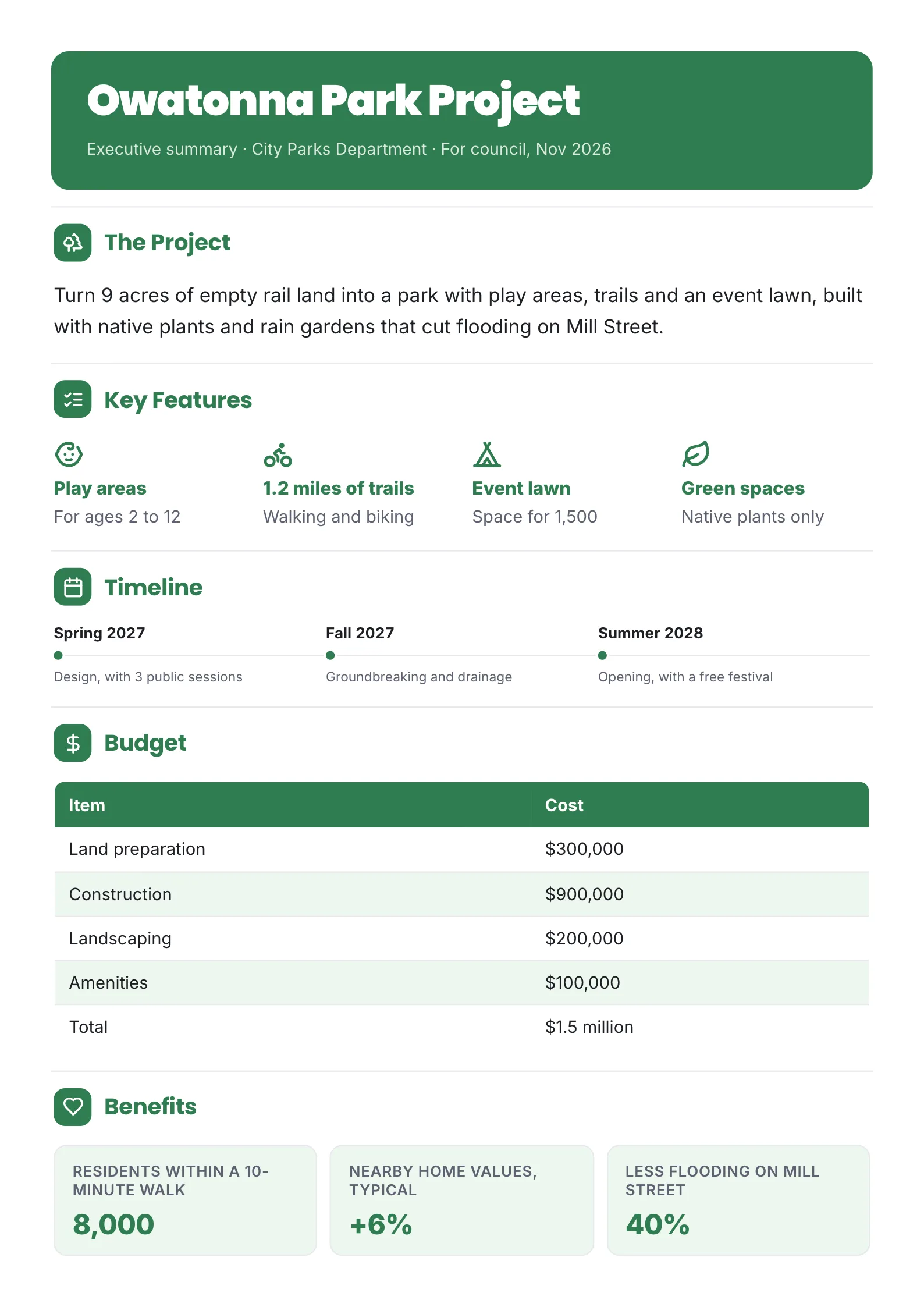 Project Executive SummaryEdit for free(opens in a new tab)
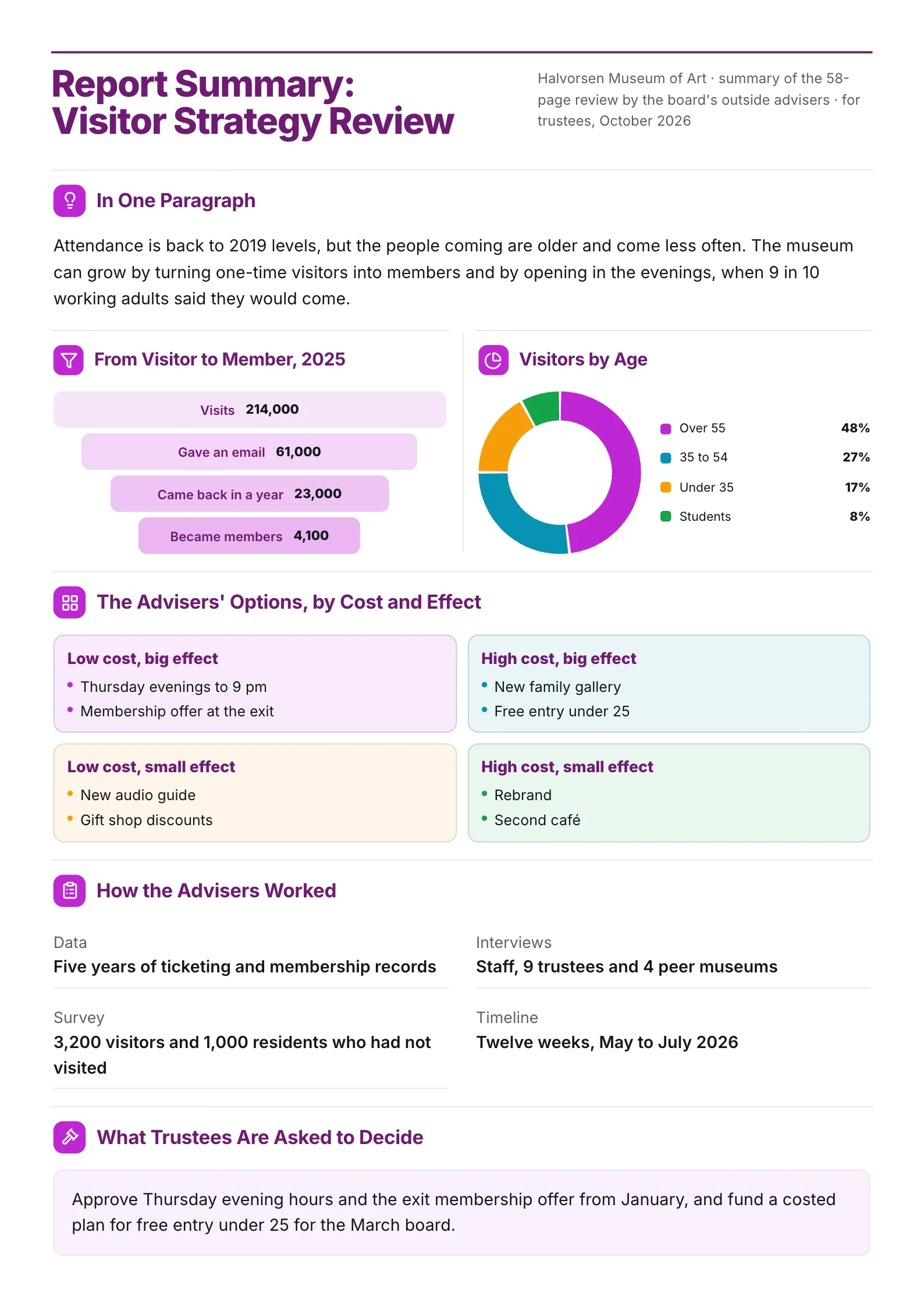 Report Summary: Consultant Strategy ReviewEdit for free(opens in a new tab)
Each example comes with two short notes. The first says what it shows, and the second says what you can copy into your own summary. Every one was made with MakeOnepagers, and each layout follows what readers in that field expect to see.
The 5 parts every good executive summary example shares
Put the ten examples side by side and you'll see the same five parts in all of them, in the same order:
- The answer as the title. Not "Q3 Review" but what happened in Q3 and what it means.
- The context, in one or two lines. Who this is for and why it is on their desk now.
- Three to six key figures, each with its comparison. Against last year, the plan, the target or the alternative. A number on its own is a claim. A number beside its baseline is evidence.
- What changes because of it. The recommendation, the plan or the options, with the one you back marked clearly.
- The ask, with a date. The decision, the approval or the introduction you need, and by when.
If your draft is missing one of these, your reader has to dig for it in the full report, and most won't.
10 executive summary examples, by business type
The examples start with startups and big companies, move through client work and operations, and end with the nonprofit and public sector. Jump to the one closest to your own report.
1. Investor update executive summary (startup)
 Edit this template
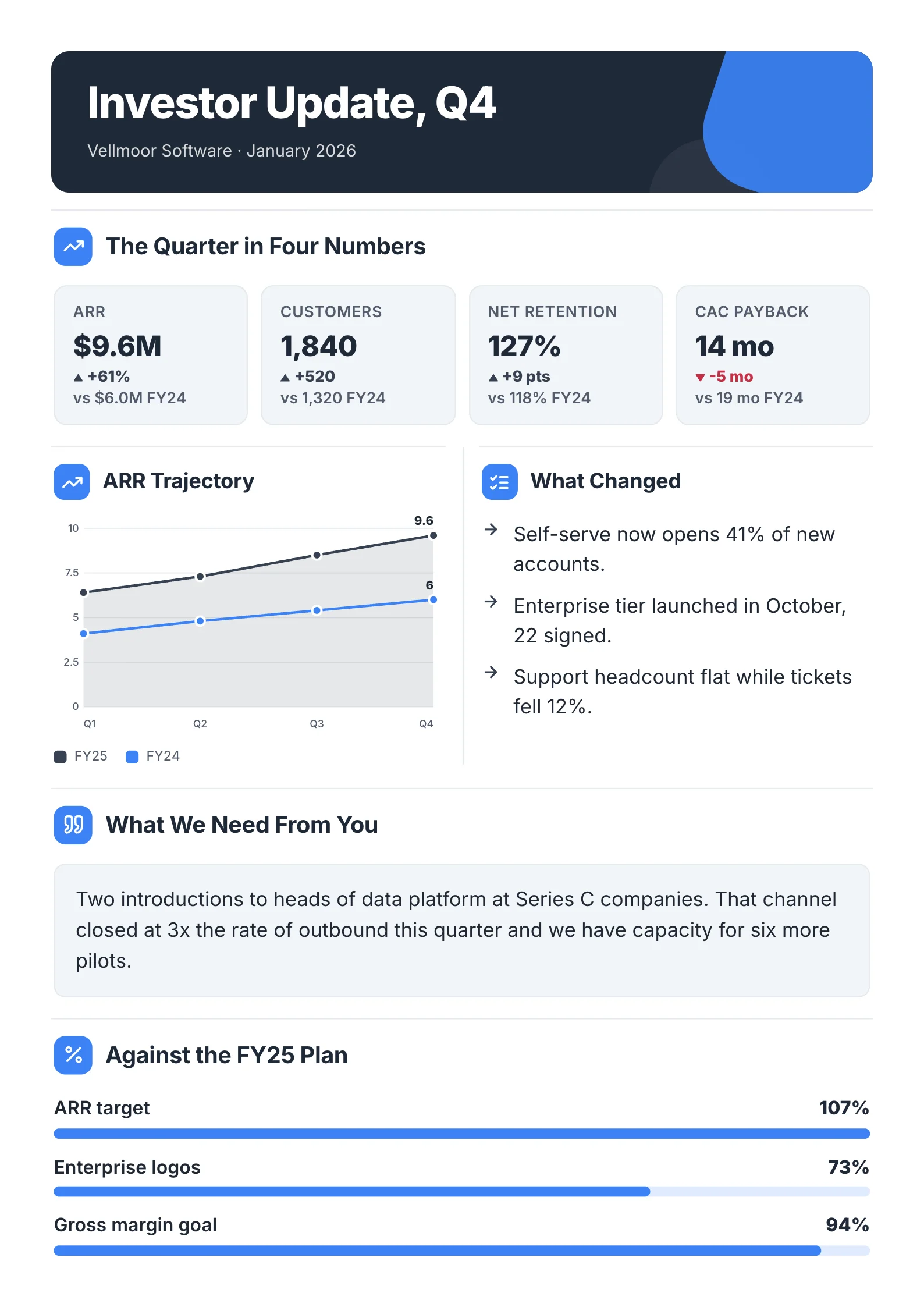
What it shows. A startup's quarter, written for its investors. Four figures sit across the top, each with last year beside it, and a box near the end asks investors for two specific introductions.
What to copy. Put your quarter in four numbers with the year before next to each, so an investor knows in five seconds whether it went well. Make your ask just as specific, and give the reason for it. Then show your misses too. Enterprise logos sit at 73% of target right beside 107% on revenue, and seeing the miss is what makes the hit believable.
2. Board executive summary (logistics company)
 Edit this template
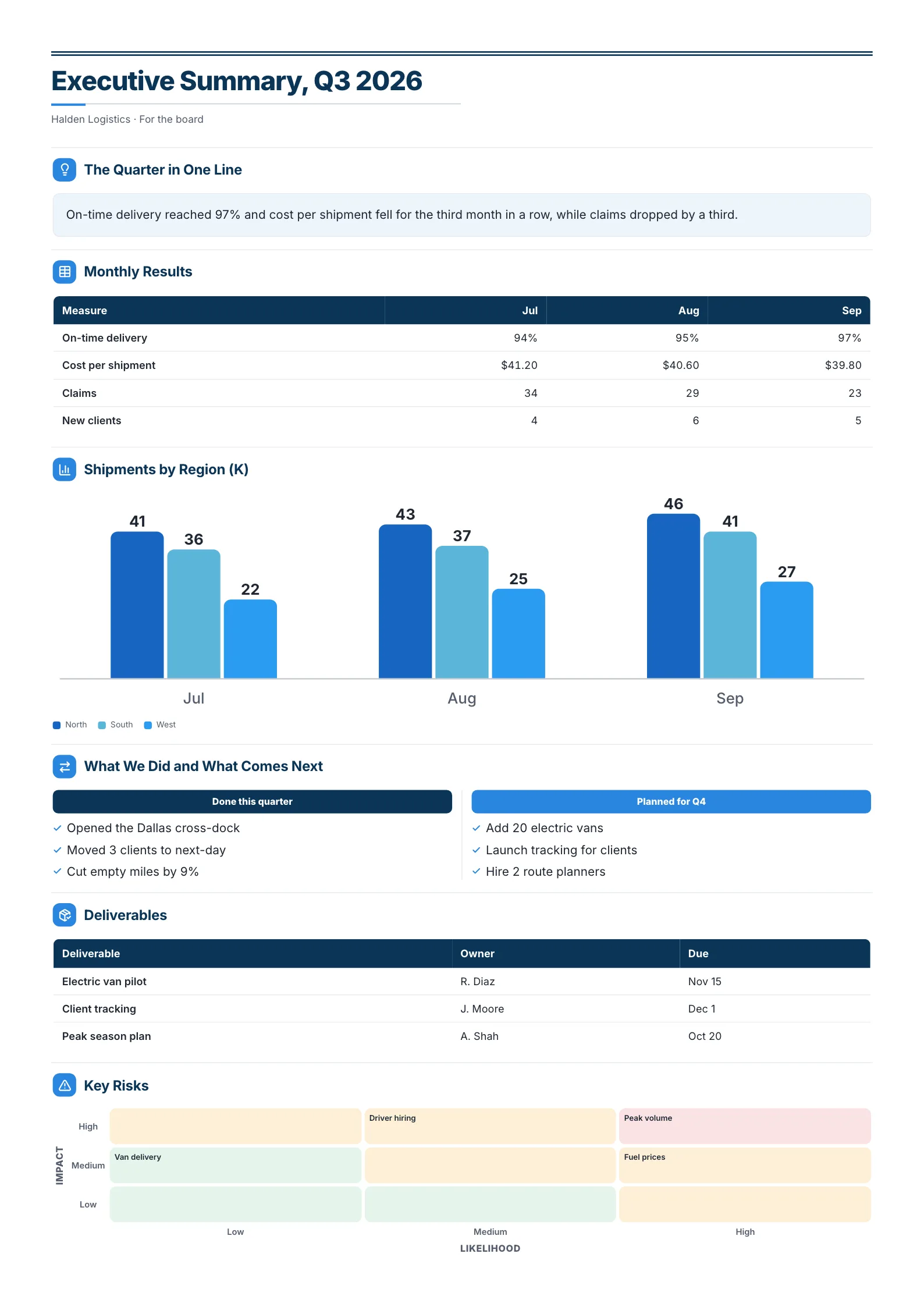
What it shows. A quarterly summary written for a company board. One sentence at the top sums up the quarter, a small table tracks four measures month by month, and a risk grid sits at the bottom.
What to copy. Write your quarter as one line before you show any number. Your board reads that sentence first, and the table only has to back it up. Then give every next step an owner and a date, the way the deliverables table does, so nobody has to ask who is on it.
3. 10-K summary executive summary (public company)
 Edit this template
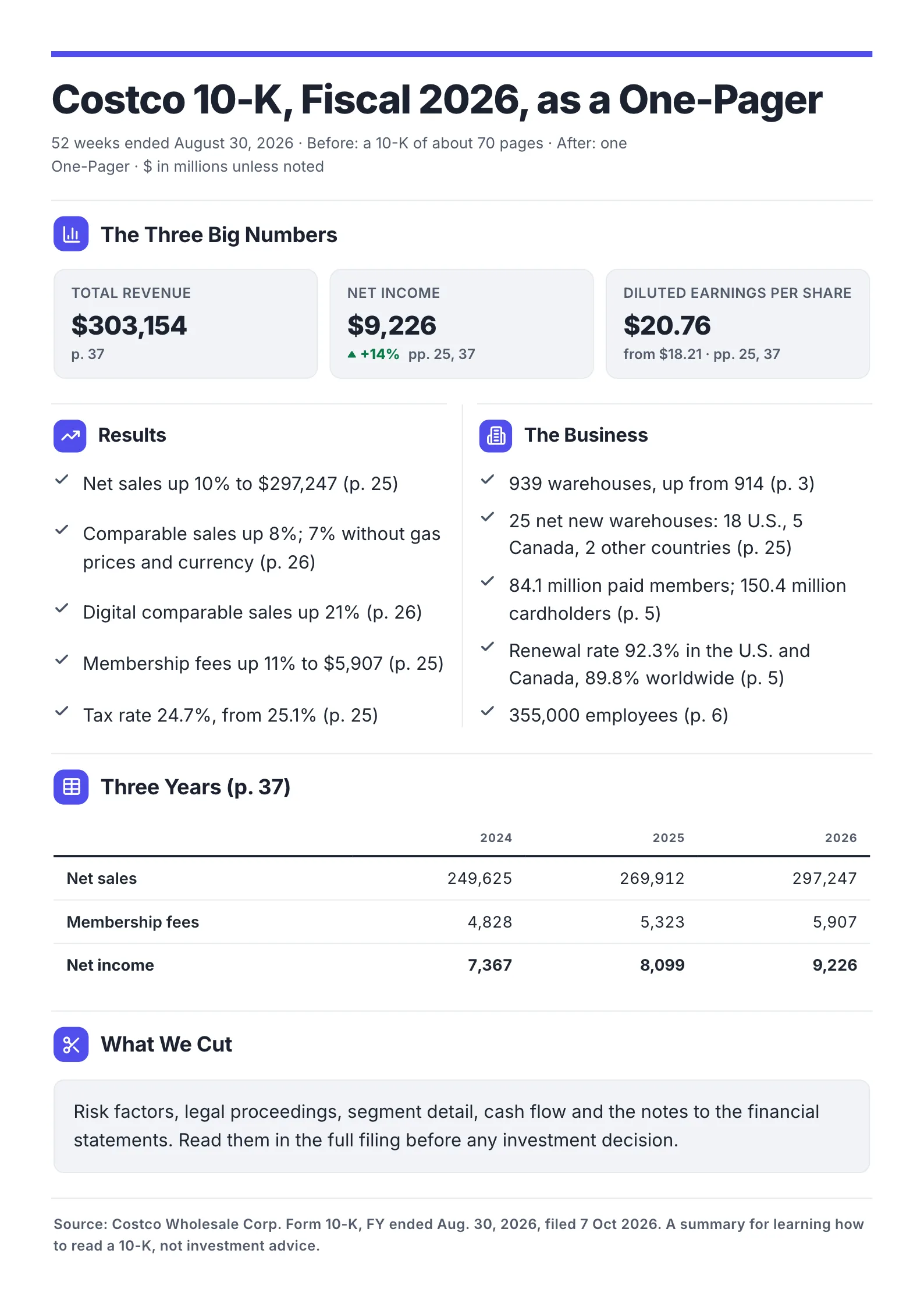
What it shows. A 70-page annual filing cut down to one sheet. Three big numbers lead, results and business facts follow, and a three-year table shows the trend.
What to copy. Put the source page next to every figure, like "(p. 25)", so your reader can check any number in seconds. Then add a short note on what you left out. Here it's the risk factors and the notes to the accounts, and naming them tells your reader where to look before they decide anything.
4. Annual report summary (design agency)
 Edit this template
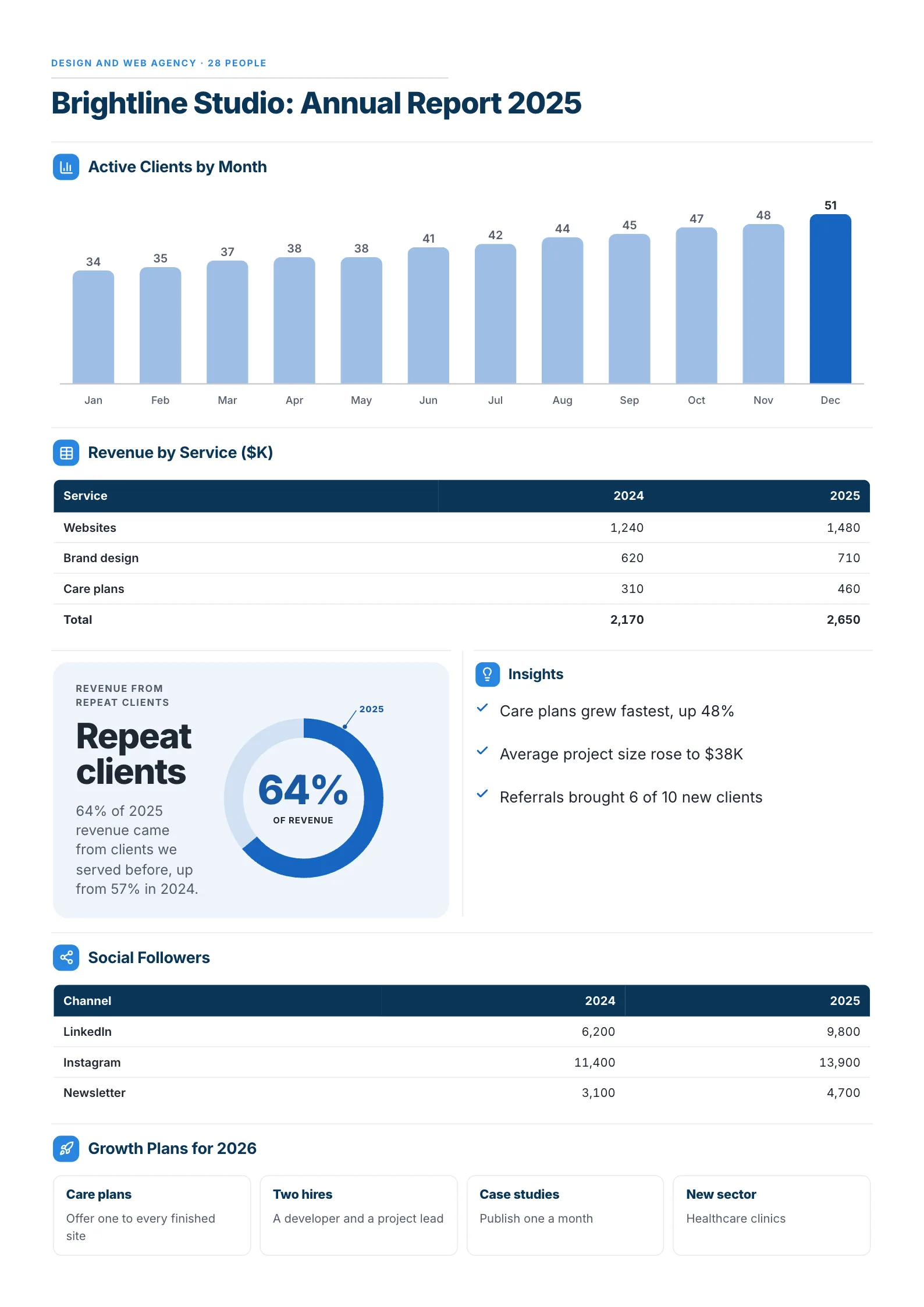
What it shows. A small agency's whole year on one sheet. Active clients climb from 34 to 51 month by month, revenue by service sits beside last year, and repeat clients get one big number.
What to copy. Pick the one number that says the most about your year and give it the most room. For this agency it's the 64% of revenue from repeat clients, up from 57%. Then end with your plans for next year as short boxes, so your summary looks forward as well as back.
5. Client account review (quarterly business review)
 Edit this template
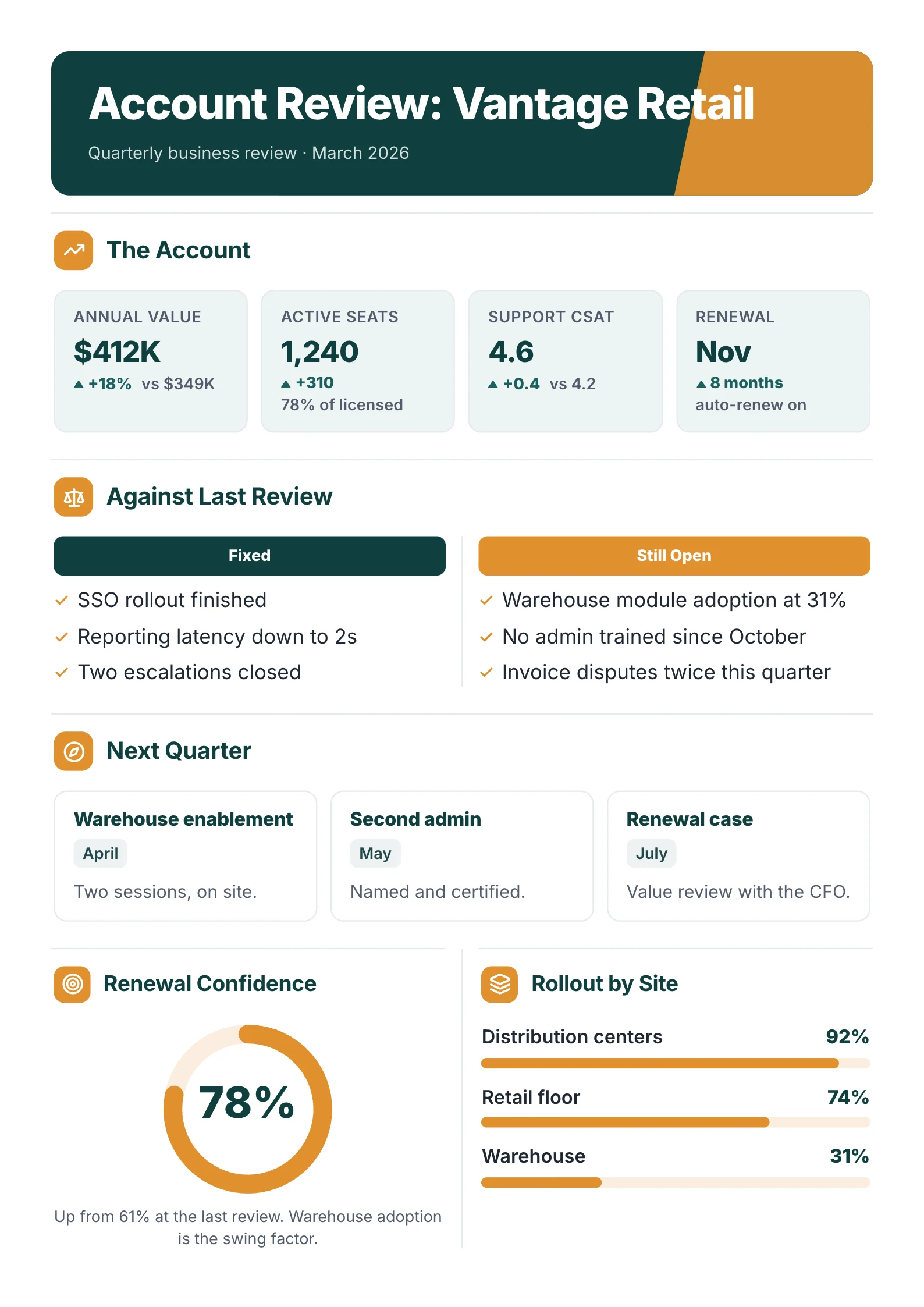
What it shows. A quarterly review written for one client. It puts annual value, active seats and support scores at the top, then a list of what was fixed beside what is still open.
What to copy. Show your client both lists, so they can see you aren't hiding the problems. Give renewal confidence as one number, 78% here, and name what decides it. Then end on next quarter as three dated steps, so nobody leaves the meeting wondering what happens next.
6. Marketing campaign report executive summary
 Edit this template
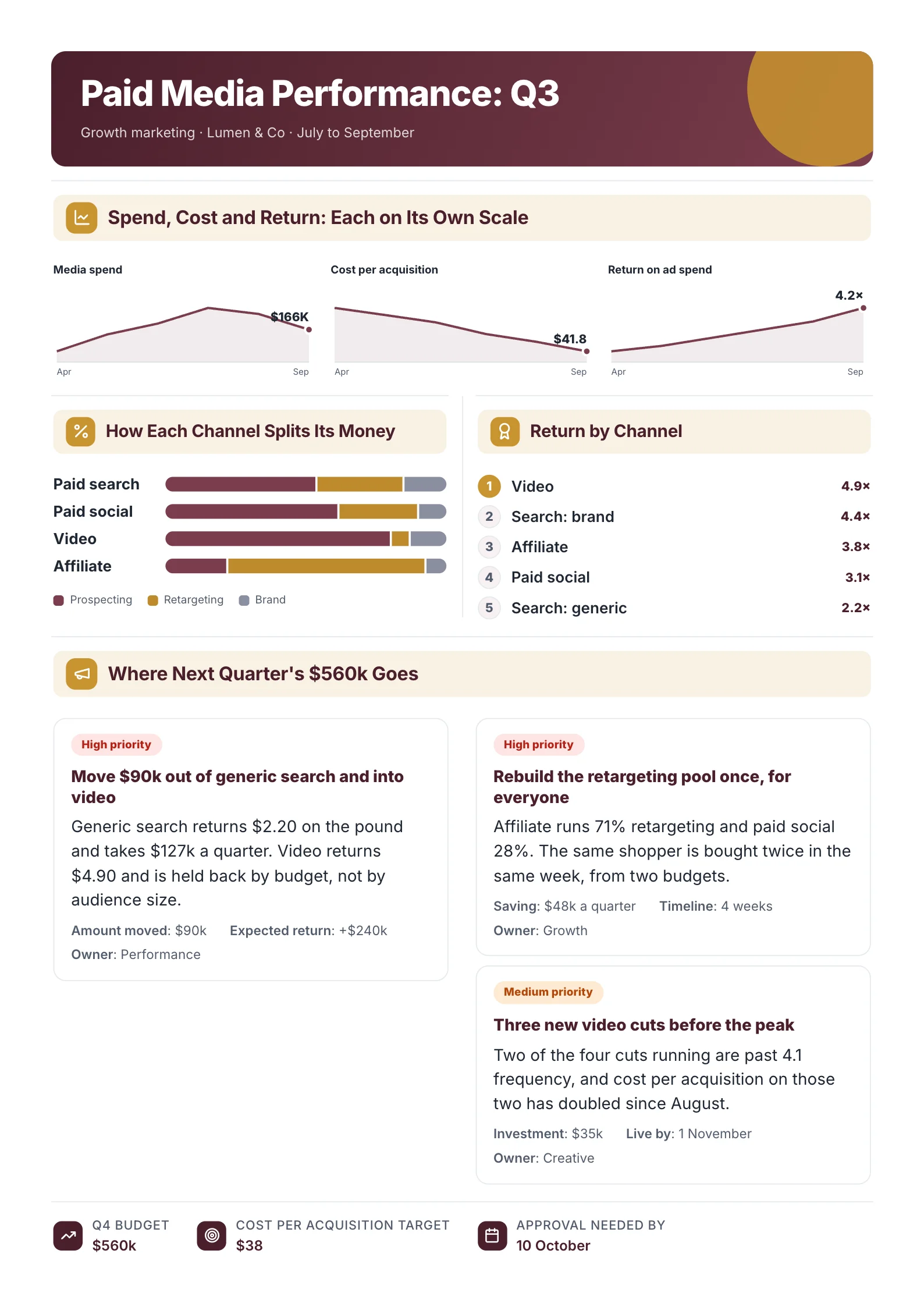
What it shows. A paid media report for one quarter. Spend, cost per acquisition and return each get a chart, and the channels are ranked by return from video at 4.9x down to generic search at 2.2x.
What to copy. Rank your channels by return, and your recommendation almost makes itself. Put a number on each move you suggest, like shifting $90k from search to video for an expected $240k more. Then end on next quarter's budget and the date you need approval by.
7. Operations review executive summary
 Edit this template
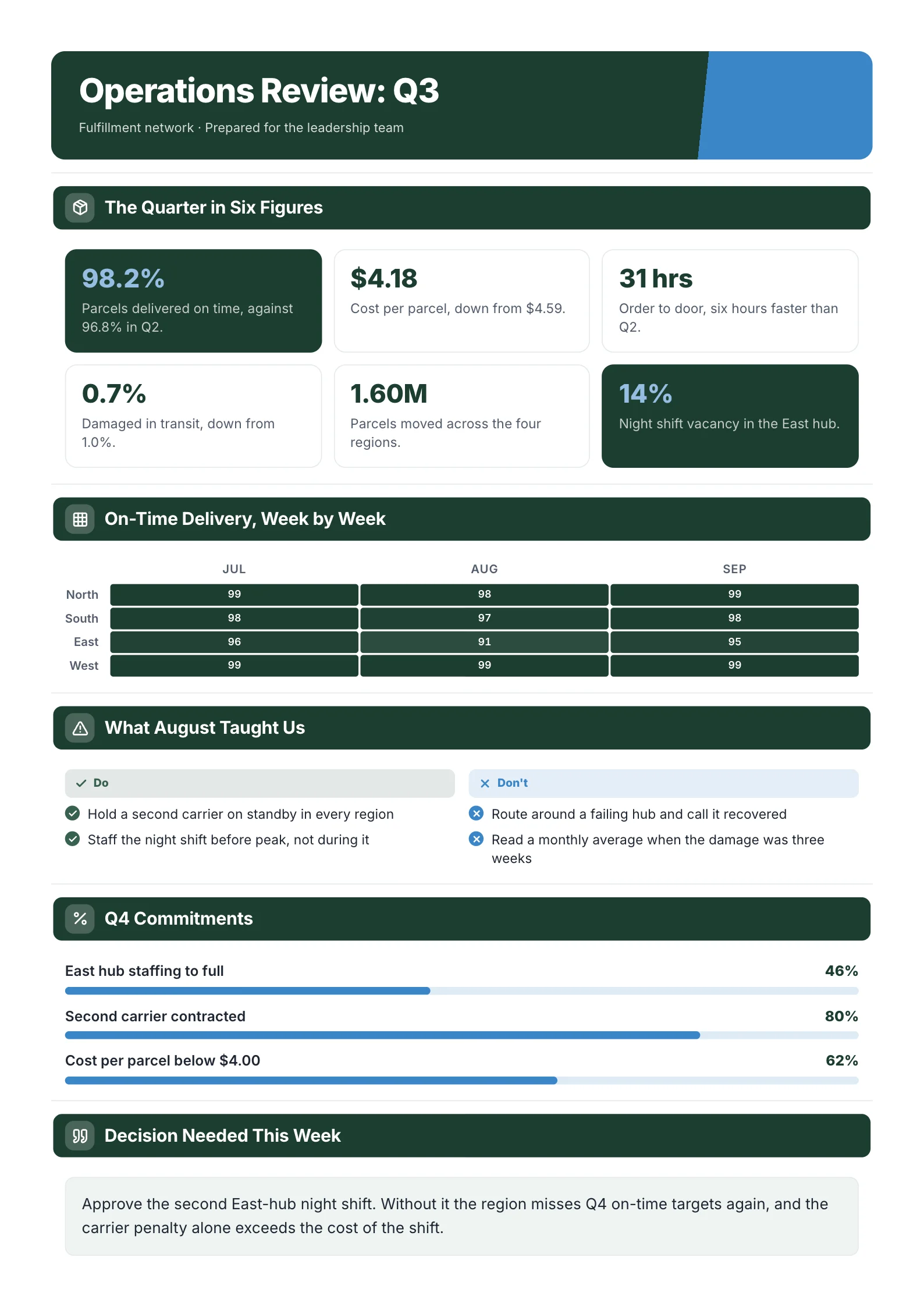
What it shows. A quarterly operations review for a delivery business. Six figures sit across the top, on-time delivery is charted week by week for each region, and a decision is needed this week.
What to copy. Give your bad number the same weight as your good ones. Here, 14% night shift vacancy sits in the top row right beside 98.2% on time. Write your lessons as plain do and don't rules your team can follow next quarter. Then close with the decision you need, and say why it pays for itself.
8. Budget summary report (university library)
 Edit this template
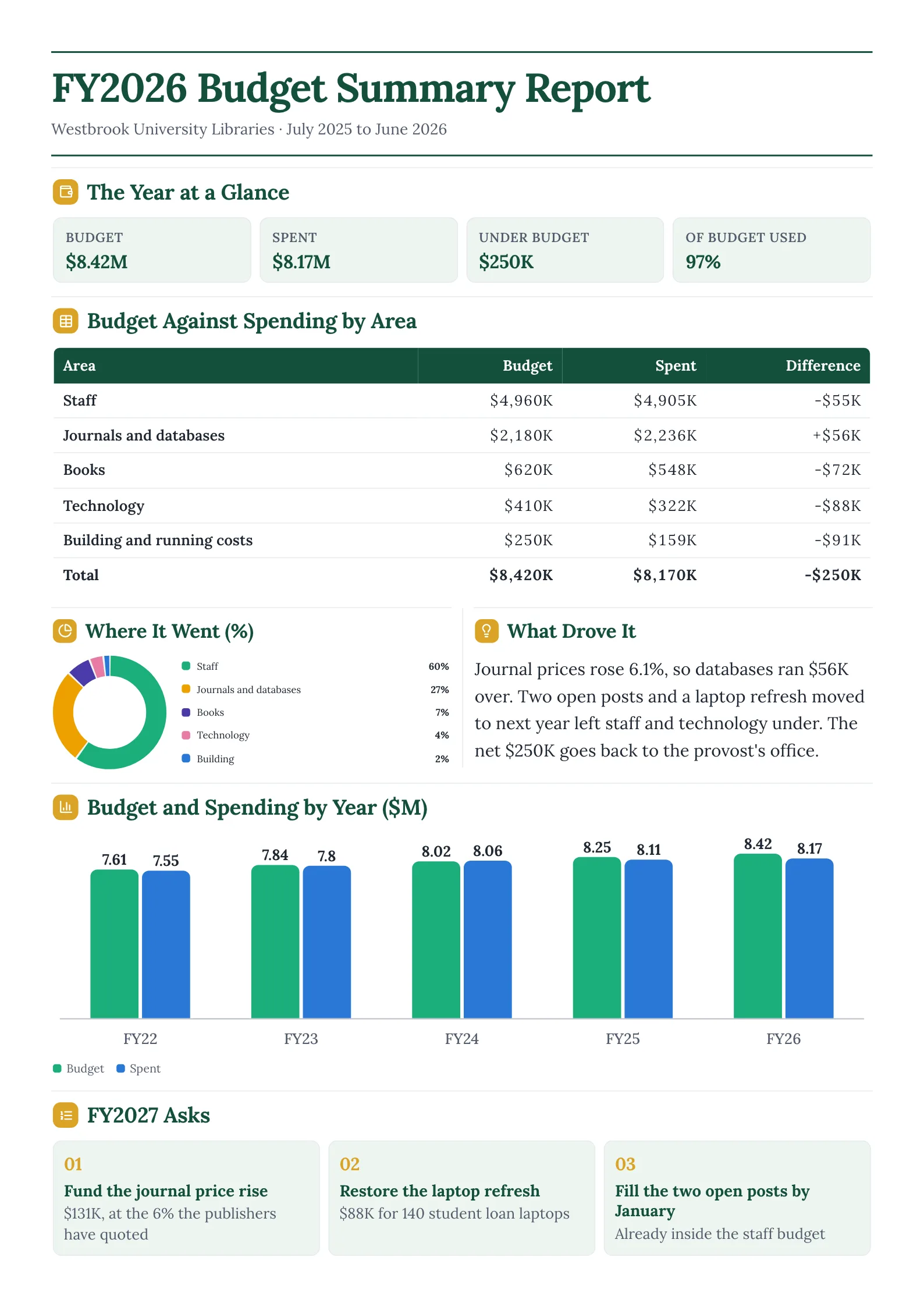
What it shows. A year-end budget summary for a university library. Four tiles give the budget, the amount spent, what was left over and the share used. A table then lines up budget and spending for each area.
What to copy. Explain every gap in a sentence or two, the way the "What Drove It" box covers the rise in journal prices. Your reader will ask about the biggest overspend first, so answer it before they do. Then turn next year's needs into numbered asks, each with its own cost.
9. Grant request executive summary (nonprofit)
 Edit this template
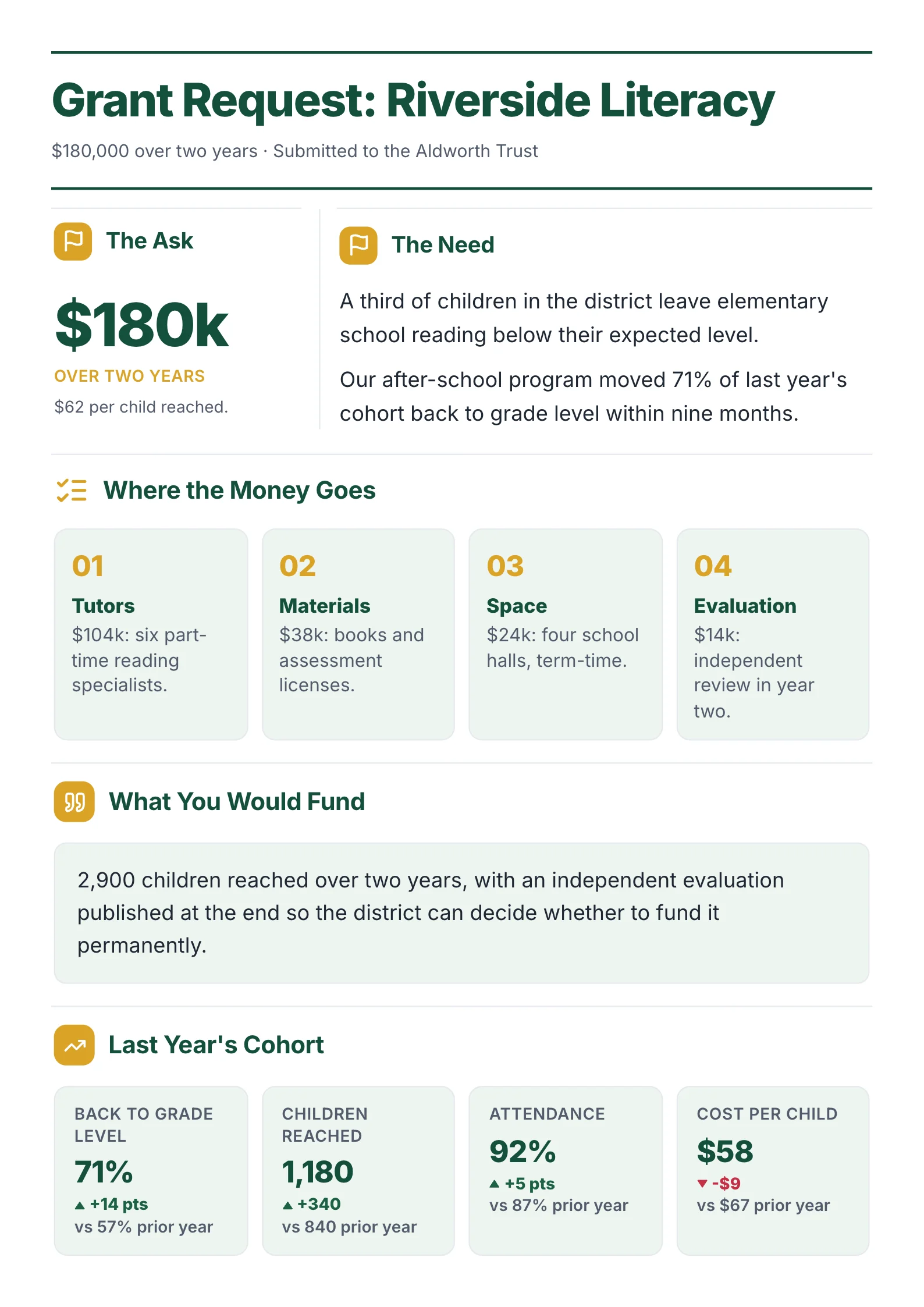
What it shows. A two-year funding request for a literacy program. The $180,000 ask is in the largest type, and the budget below it shows where every dollar goes.
What to copy. Put your ask first and break it down per person, here $62 per child reached, since funders compare cost per outcome. Split the money into a few lines that add up to the ask. Then show last year's result, 71% of children back to grade level against 57% the year before, so the funder doesn't have to take your word for it.
10. Policy brief executive summary (public sector)
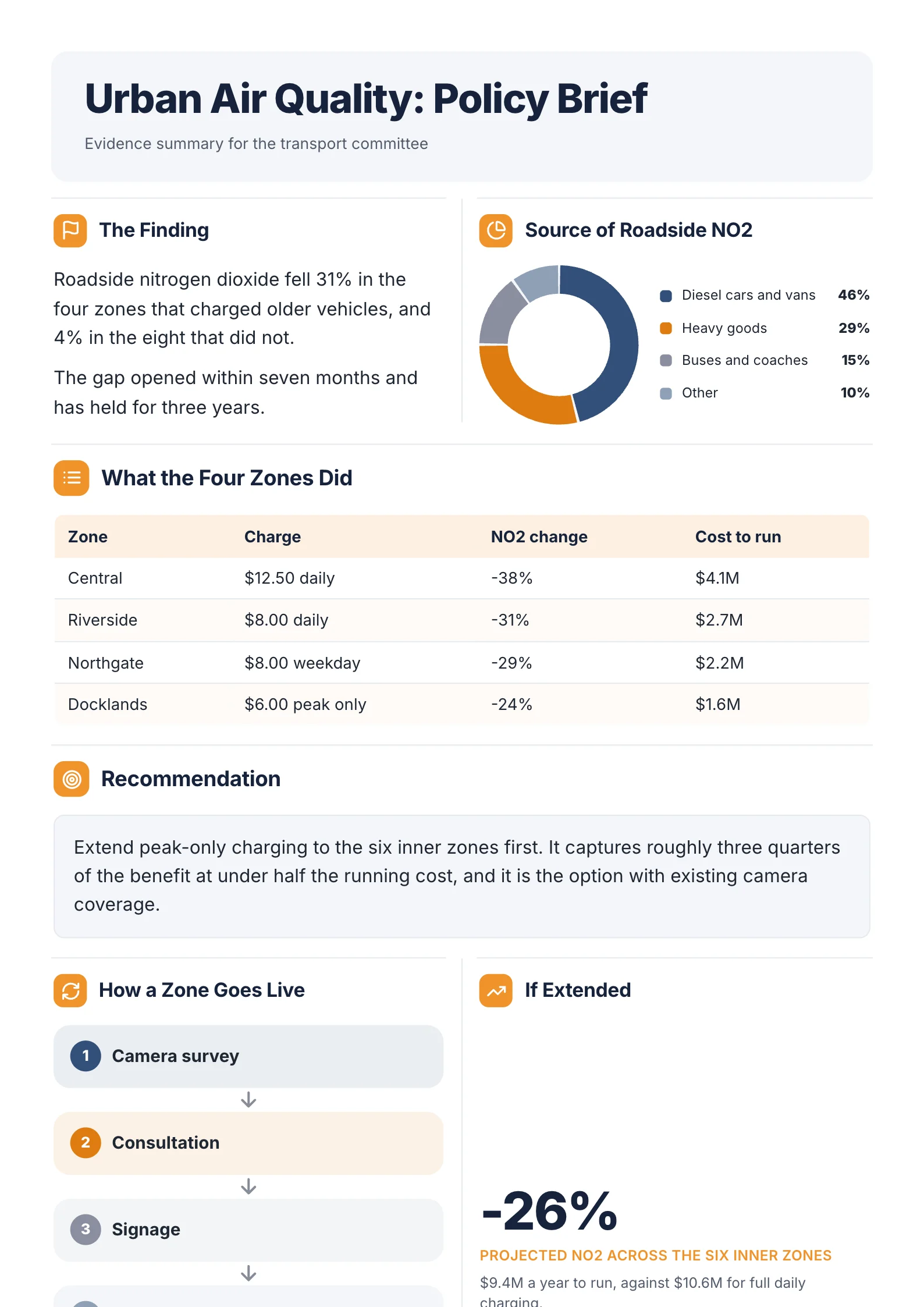
What it shows. An air quality brief for a city committee. It compares four zones that charged older vehicles with eight that did not, then gives one recommendation and its likely effect.
What to copy. Give your finding a comparison group. Pollution fell 31% in the zones that charged and 4% in the ones that didn't, and that gap is your whole argument. Make one recommendation with its trade-off, and put the evidence in a small table your committee can scan in seconds.
Every example above opens in the editor, where you can change any word or number and then download it as a PDF. For more layouts like these, browse the One-Pager templates library, or see more One-Pager examples across other fields.
How to write an executive summary in 5 steps
- Finish the main document first. You cannot summarize conclusions you have not reached.
- Write one sentence: "After reading this, [reader] will [decide what]." If you cannot finish it, the summary is not ready.
- Turn that sentence into your title. The title is the answer, not the topic.
- Pick three to six figures and give each its comparison. Drop every figure that does not help the decision, however hard it was to get.
- End on the ask and its date. Then read it as the reader would, in two minutes, and cut whatever they would skip.
For the full method with a fill-in template, read our guide to the executive summary One-Pager, or the step-by-step on how to make a One-Pager.
Mistakes that get an executive summary skipped
| Mistake | What the reader thinks | The fix |
|---|---|---|
| A topic for a title | "So what happened?" | Write the conclusion as the title |
| Numbers with no baseline | "Is $412K good?" | Put last year, the plan or the target beside it |
| A summary of the sections | "Where is the point?" | Summarize the findings, not the chapters |
| Hiding the bad number | "What else are they not telling me?" | Show the miss beside the hit, as example 1 does |
| No ask | "Nice. Now what?" | End on the decision and the date |
Can ChatGPT write an executive summary?
Yes, it can draft one, and it is good at shortening text. Where it falls down is the part that matters: picking which figures decide the question, putting the right comparison beside each one, and checking that every number matches the source. Treat any AI draft as a first pass and check every figure against the full document before you send it.
The executive summary generator is built for that job. You drop in the full report as a PDF, Word file or deck, and it pulls out the figures and conclusions your reader needs. It lays them out as a designed One-Pager like the ten above, with every claim tied to the source so you can check it. Make yours free with the AI One-Pager Generator.
If your summary comes from a longer report, Word gives you a blank page and ChatGPT gives you plain text you still have to lay out. MakeOnepagers reads the report itself and returns a designed one page summary with the numbers as charts. The free generator takes a PDF, Word or PowerPoint file up to 10 pages. For a summary that stays inside the report as plain text, Word is all you need.
Found an example close to your own report? Open it, edit it free and download it as a PDF. You can swap in your own numbers in a few minutes.
Frequently asked questions
What is an example of an executive summary?
An investor update that opens with four figures (revenue, customers, retention and payback, each against last year), names what changed, and ends with a specific ask is a typical executive summary. The ten examples above run from a startup investor update and a public company 10-K to a grant request and a policy brief.
What are the 5 parts of an executive summary?
The answer as the title, a line of context, three to six key figures with their comparisons, what changes because of them, and the ask with a date. Every example on this page follows that order.
How long should an executive summary be?
One page is the standard. Designed as a One-Pager it holds 100 to 200 words: we counted every word on our own One-Pagers and the median was 134 (how many words are in a One-Pager). At the average adult reading speed of 238 words a minute (Brysbaert, 2019, a review of 190 studies), that is under a minute. If a reader cannot get the point in a minute, cut content rather than shrinking the type.
What is the difference between an executive summary and an introduction?
An introduction sets up a document for someone who will read it all. An executive summary replaces the document for someone who will not. That is why a summary gives the conclusions and the ask, while an introduction only says what is coming.
Should an executive summary include numbers?
Yes, and each number should carry its comparison. "Cost per parcel $4.18" tells the reader little. "Cost per parcel $4.18, down from $4.59" tells them it improved and by how much.




