BlogGuide
One Page Summary Template: 8 Free Examples to Edit
A free one page summary template, the 6 parts every summary needs, and 8 examples for a quarter, a project, a month, marketing, a year, investors and a webinar.

By MakeOnepagers Team
Updated · 10 min read
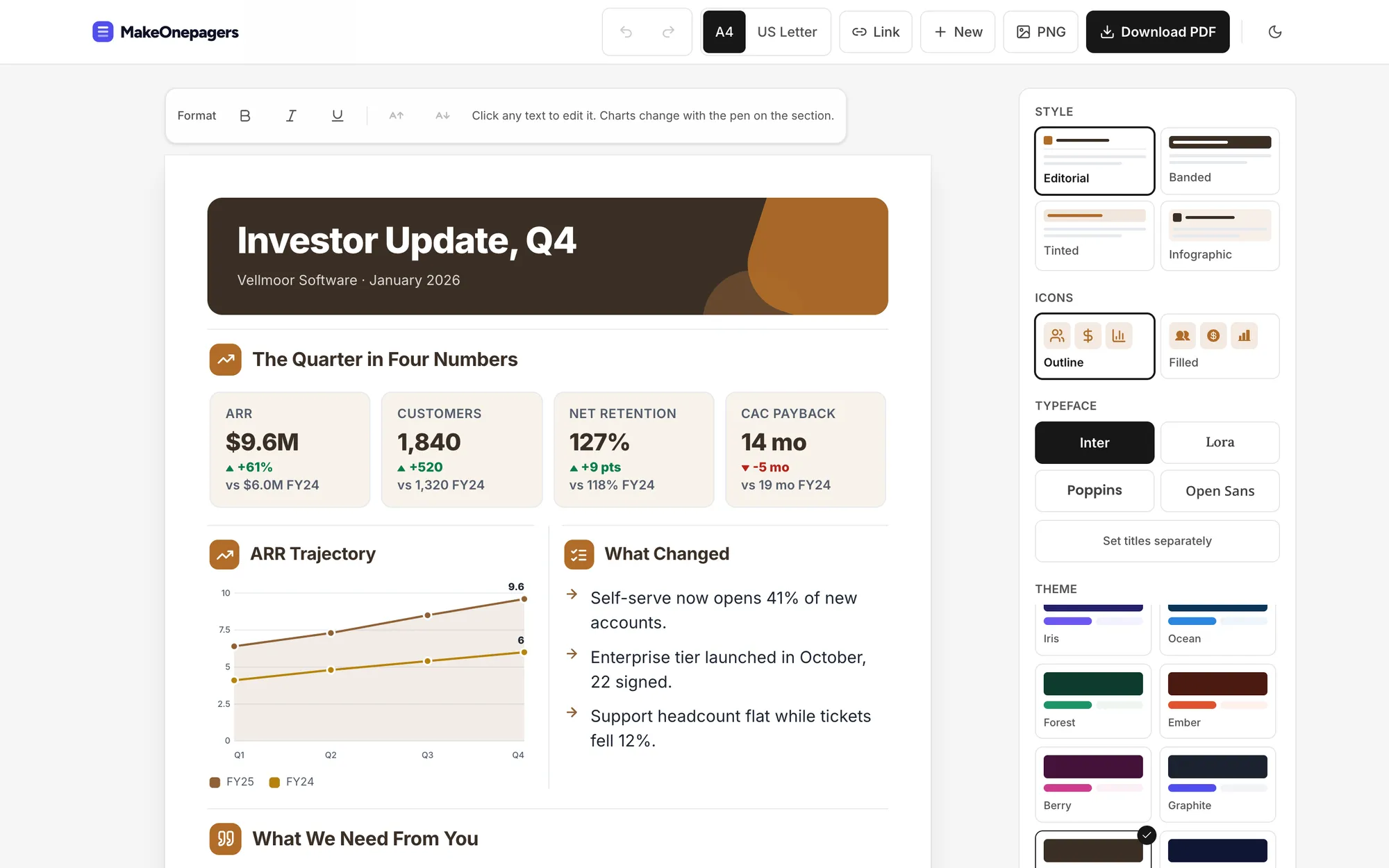
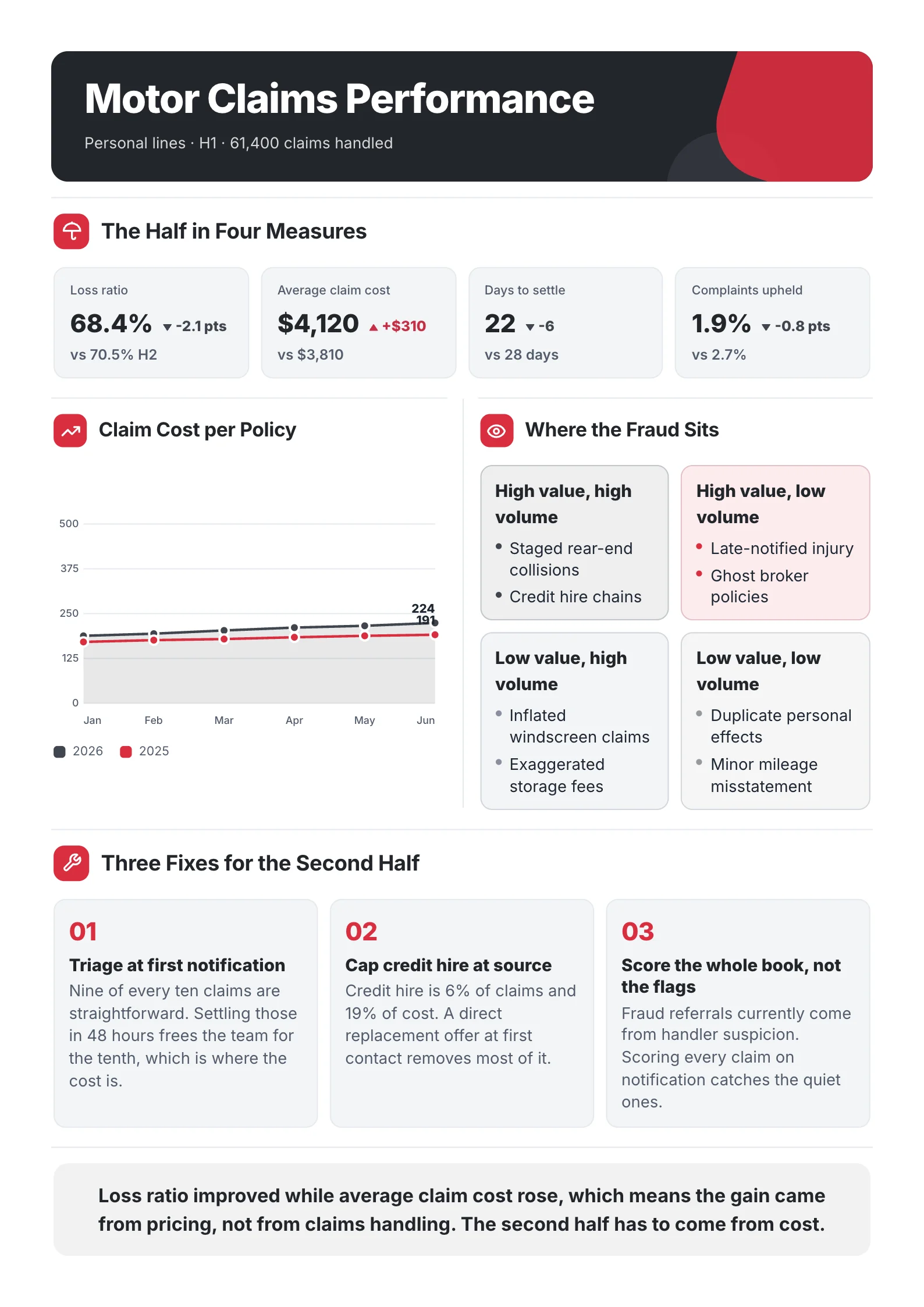
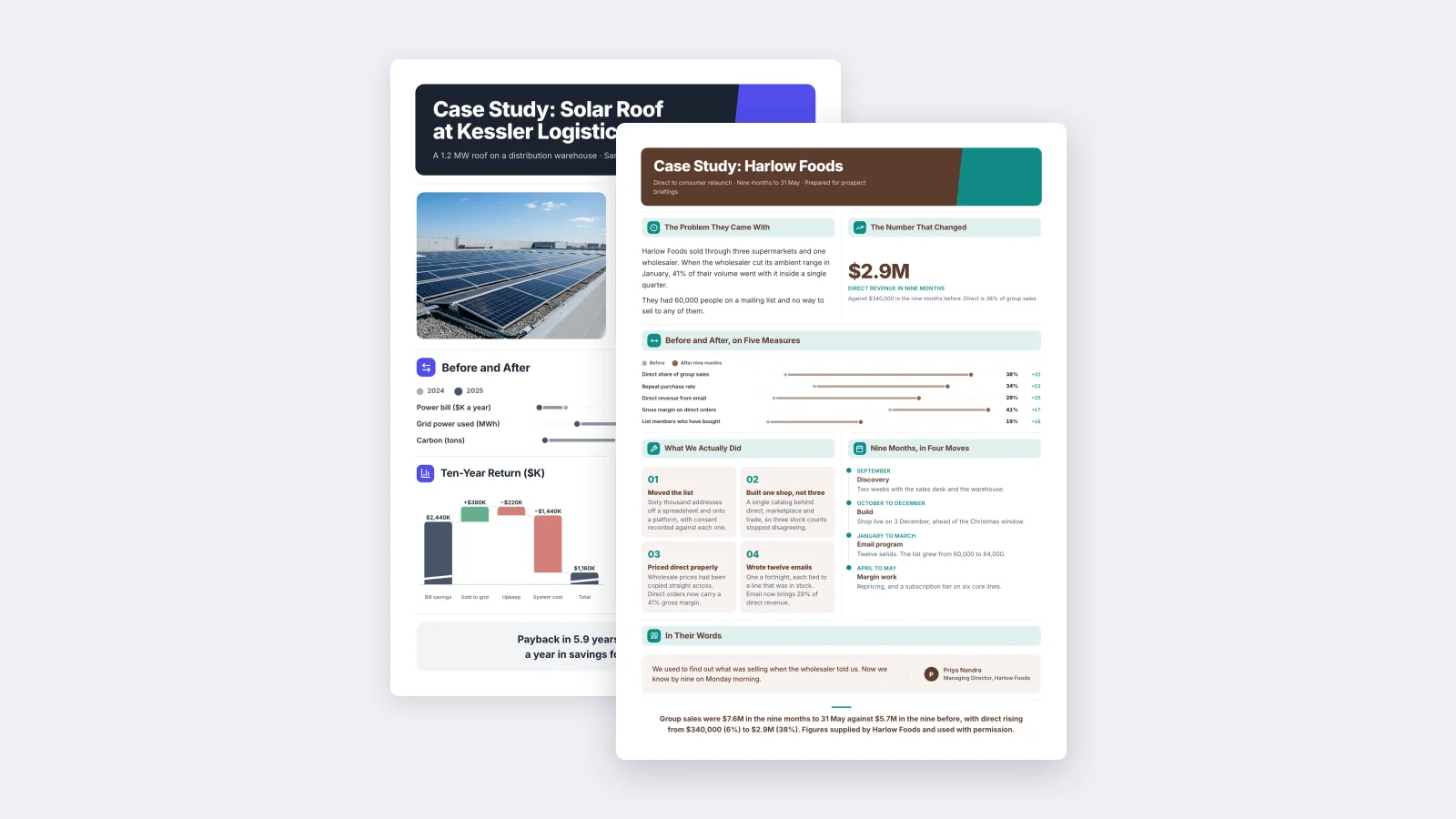
A one page summary template gives you a fixed place for the conclusion, the three or four numbers that prove it, what happened and what you want the reader to do next, all on a single sheet. You use it when the full report is too long for the person who has to decide: a CEO, a board, a client or an investor. Below are the six parts every good summary has, a free template you can copy, and eight examples, each written for a different reader.
One‑Pager examples
Six real One-Pagers made with MakeOnepagers. Open any one to edit it as your own.
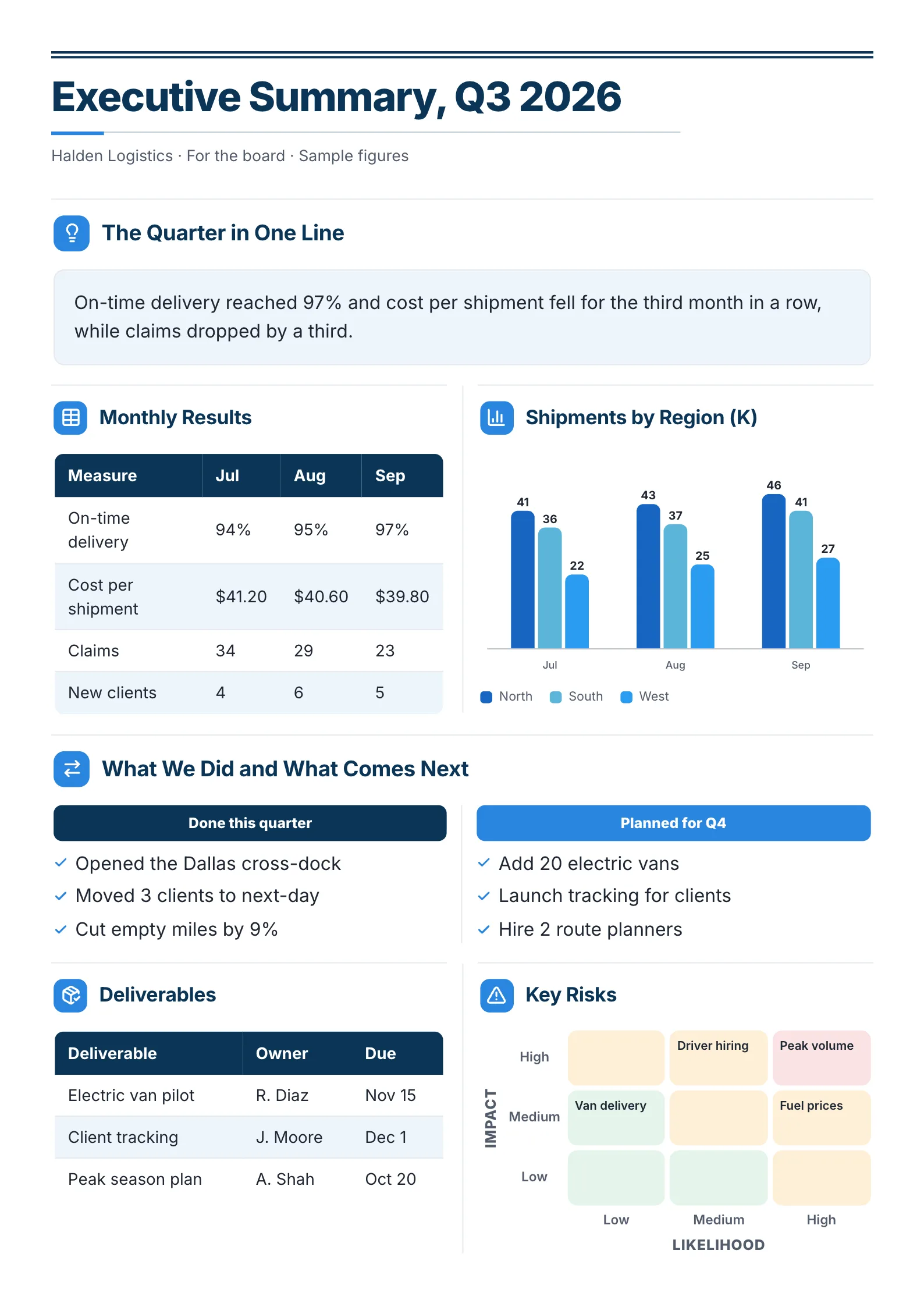 Business Executive SummaryOpen this One-Pager (opens in a new tab)
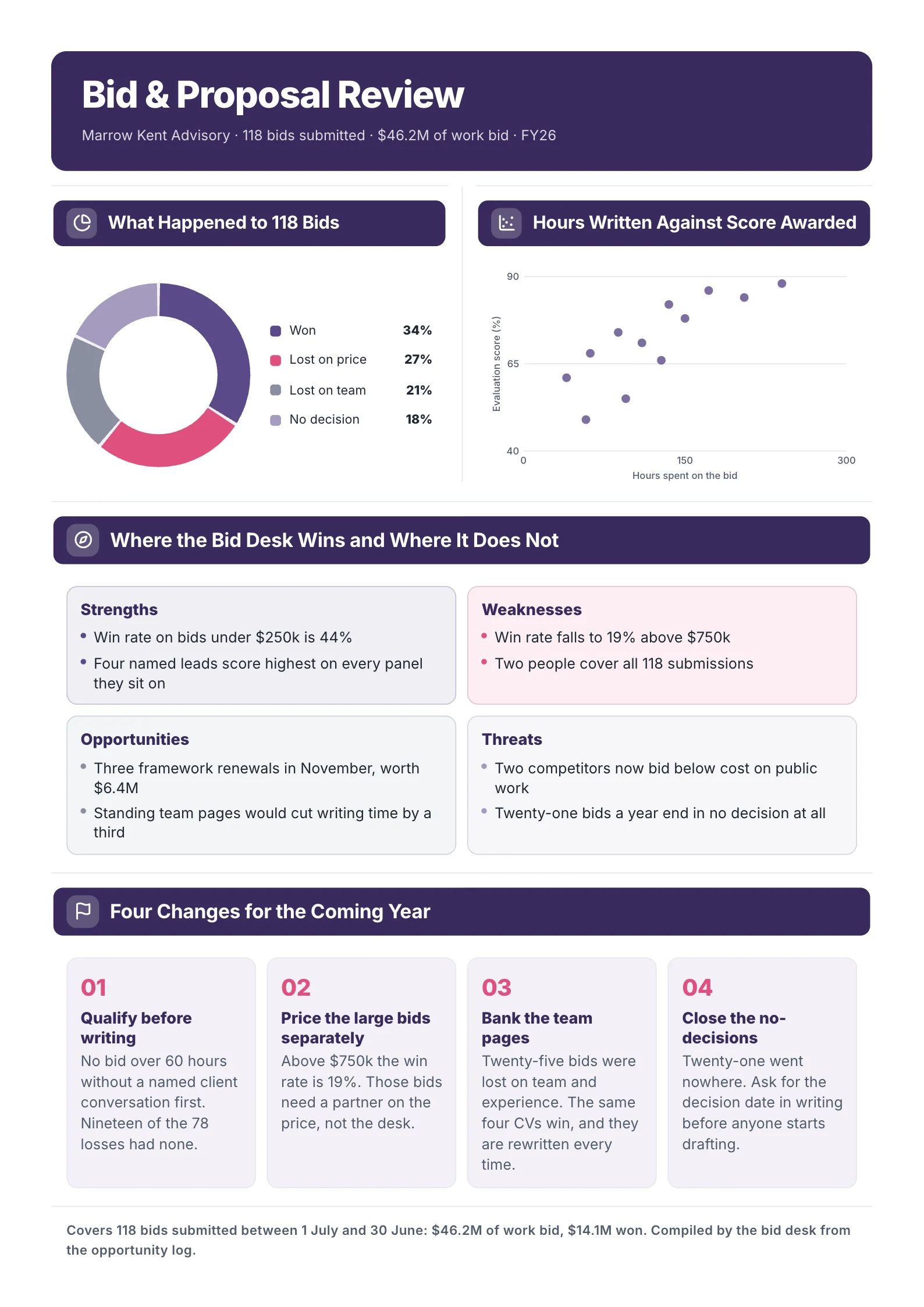
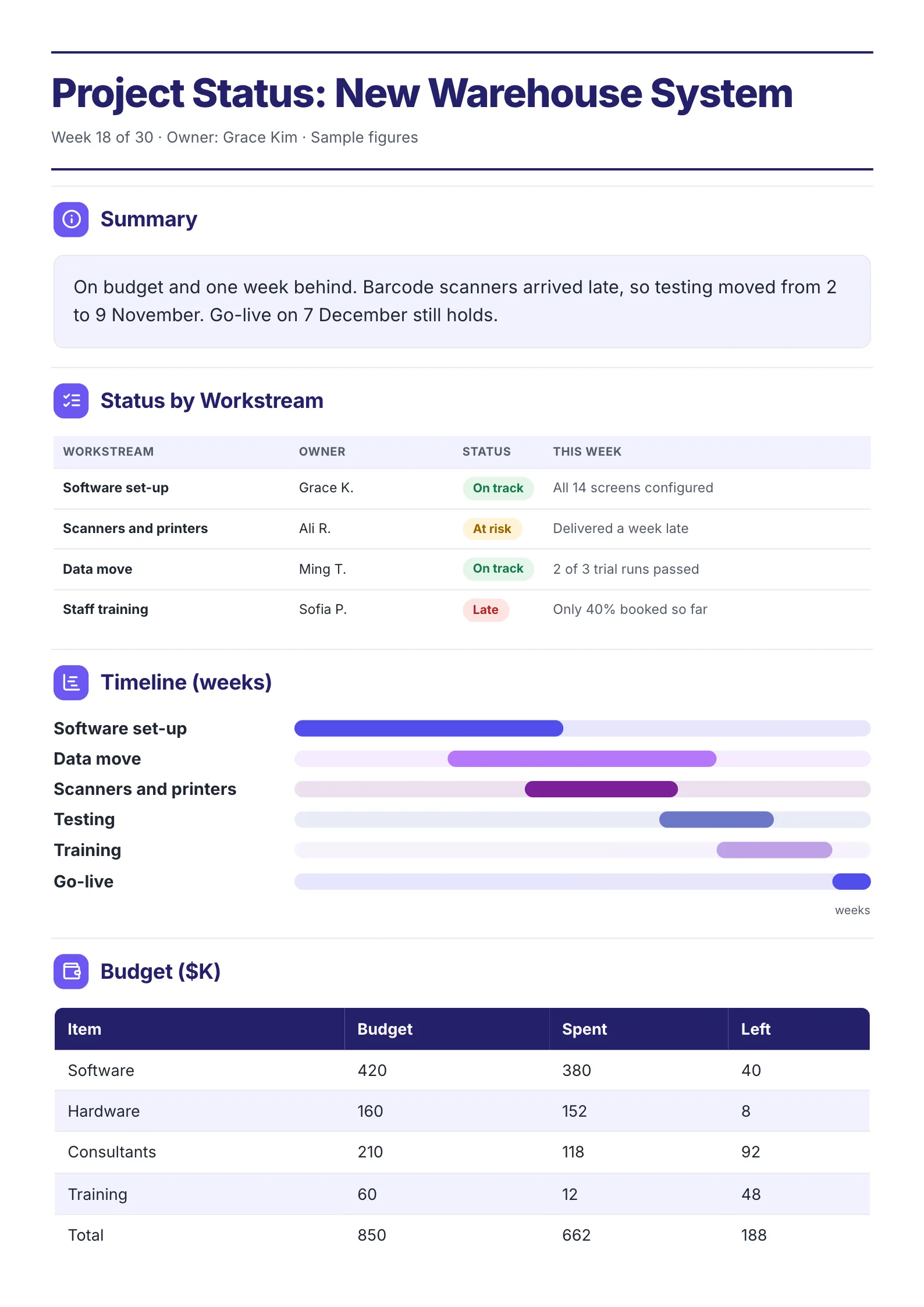 Project Status SummaryOpen this One-Pager (opens in a new tab)
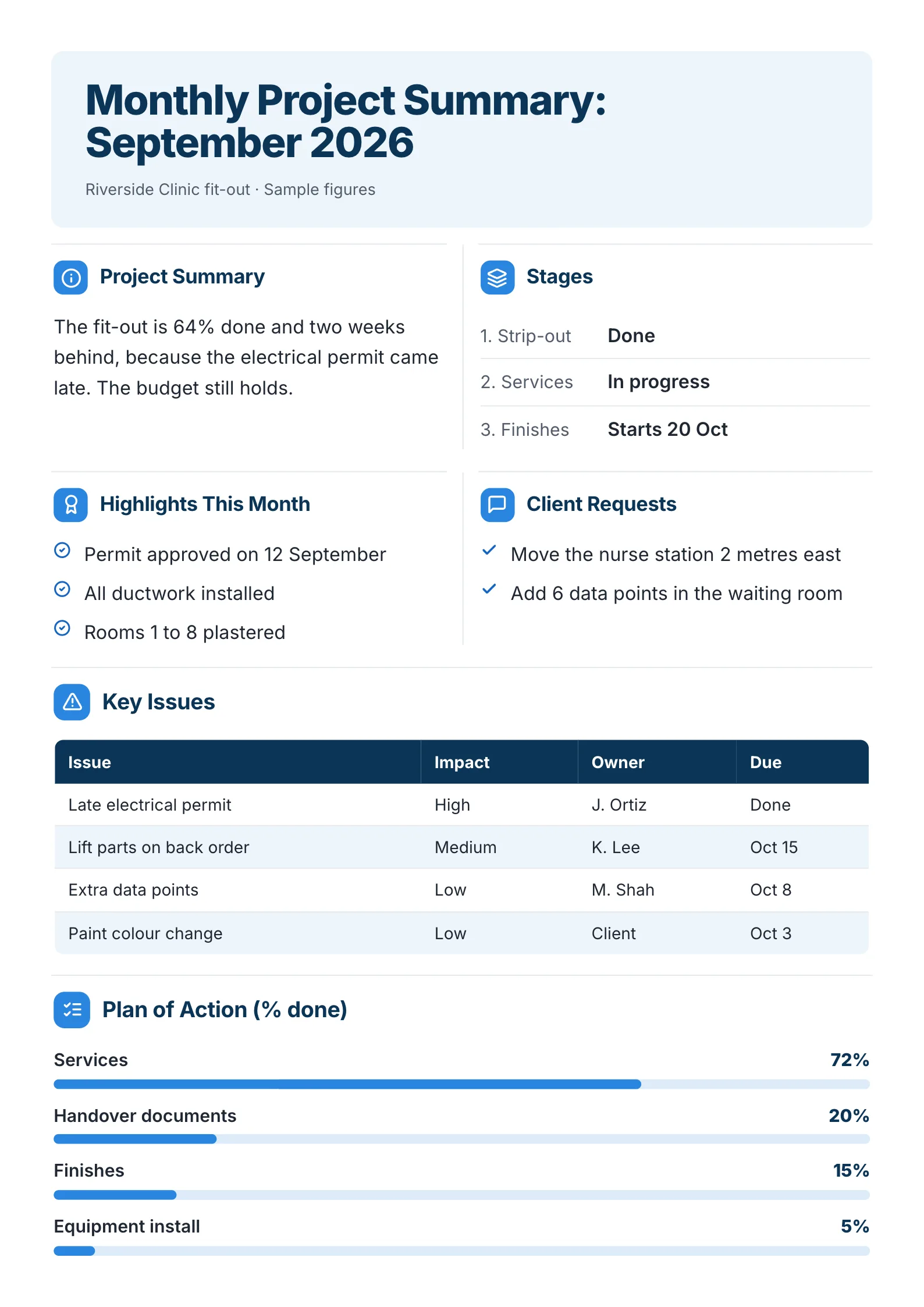 Monthly Project SummaryOpen this One-Pager (opens in a new tab)
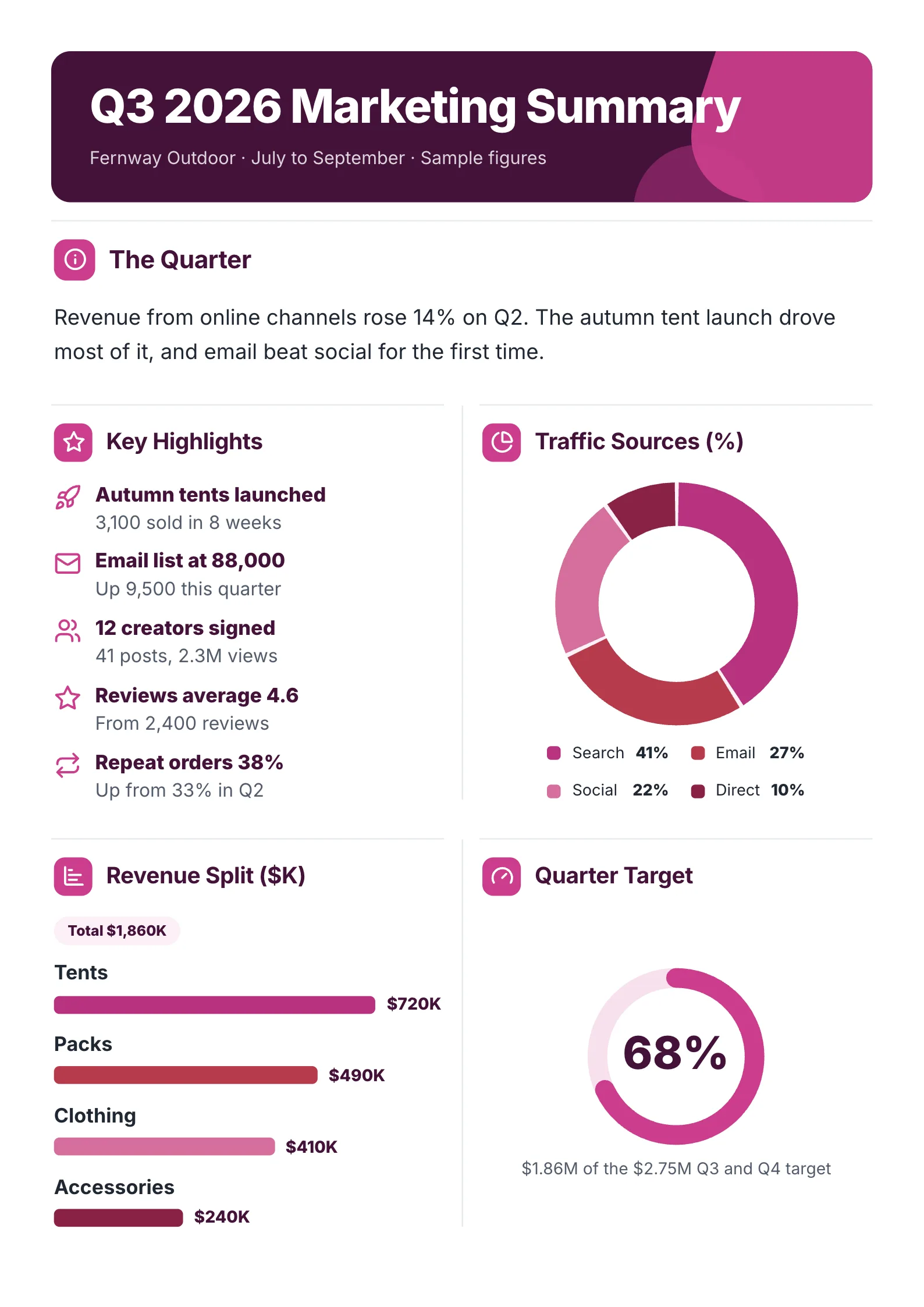 Quarterly Marketing SummaryOpen this One-Pager (opens in a new tab)
 Annual Report SummaryOpen this One-Pager (opens in a new tab)
 Business Summary for InvestorsOpen this One-Pager (opens in a new tab)
Every example was made with MakeOnepagers. The companies and figures are samples, and each one opens as a template you can edit for free.
What is a one page summary?
A one page summary is the short version of something longer: a quarter, a project, a year, a business plan or an event. It is written for a reader who will not open the long version, so it has to stand on its own.
The difference between a summary and a shortened report is order. A report tells the story from the start. A summary starts with the end: what happened, whether it is good or bad, and what you need. Everything under that line is there to back it up.
The 6 parts of a one page summary
- The answer in one line. "On budget and one week behind. Go-live on 7 December still holds." A reader who stops here still knows where things stand.
- Three or four numbers. The figures the reader is judged on, each with the number it is compared against: last quarter, the plan, the target.
- What happened. What went well and what to watch, two or three lines each. Splitting them side by side stops good news from hiding bad news.
- A chart or a table, only if it saves words. A month-by-month trend or a budget against spend says in one glance what a paragraph says in five lines.
- Risks or open issues, each with an owner and a date.
- The ask or the next step. A decision, an approval, a date. If nothing is needed, say so.
If you only have room for three, keep the one-line answer, the numbers and the ask.
A free one page summary template
Copy this into your own document, or open one of the examples below and edit it.
| Part | What to write, with an example |
|---|---|
| Title | What and when. Executive Summary: Q3 Performance |
| Who it is for | The reader and the date. Prepared for the CEO, 6 October |
| The answer | One sentence with a number. Enterprise deals carried the quarter: $9.4M against $8.2M in Q2 |
| Numbers | 3 or 4 figures with their comparison. Margin 31%, up 2 points |
| What happened | Went well, and to watch. Churn at a 2-year low. Hiring 6 weeks behind |
| Chart or table | Only if it replaces a paragraph |
| Risks | Each with an owner and a date |
| The ask | What you need, by when. Fund 4 more sales hires for Q4 |
8 one page summary examples
1. Executive summary of a quarter, for the CEO
 Edit this template
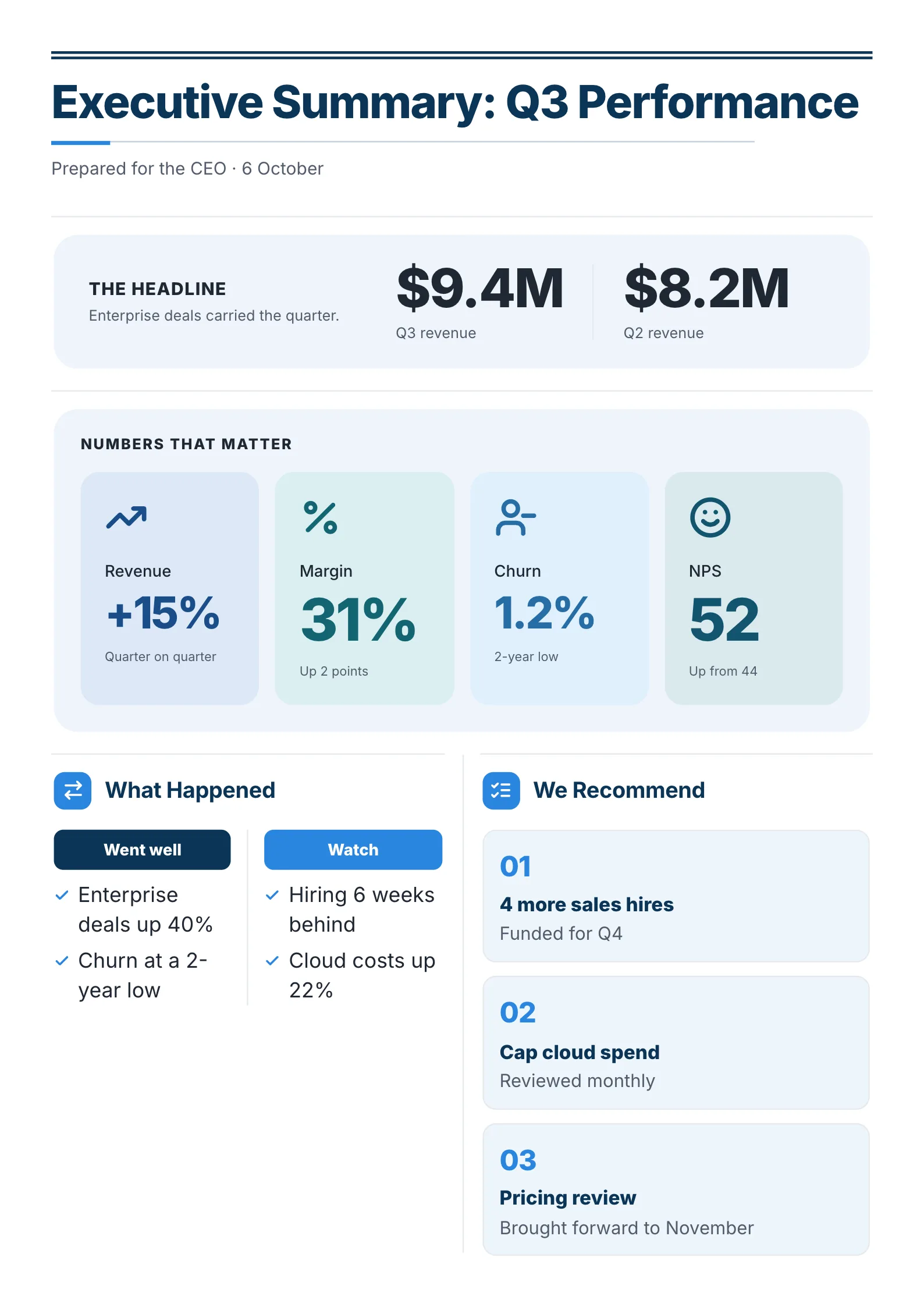
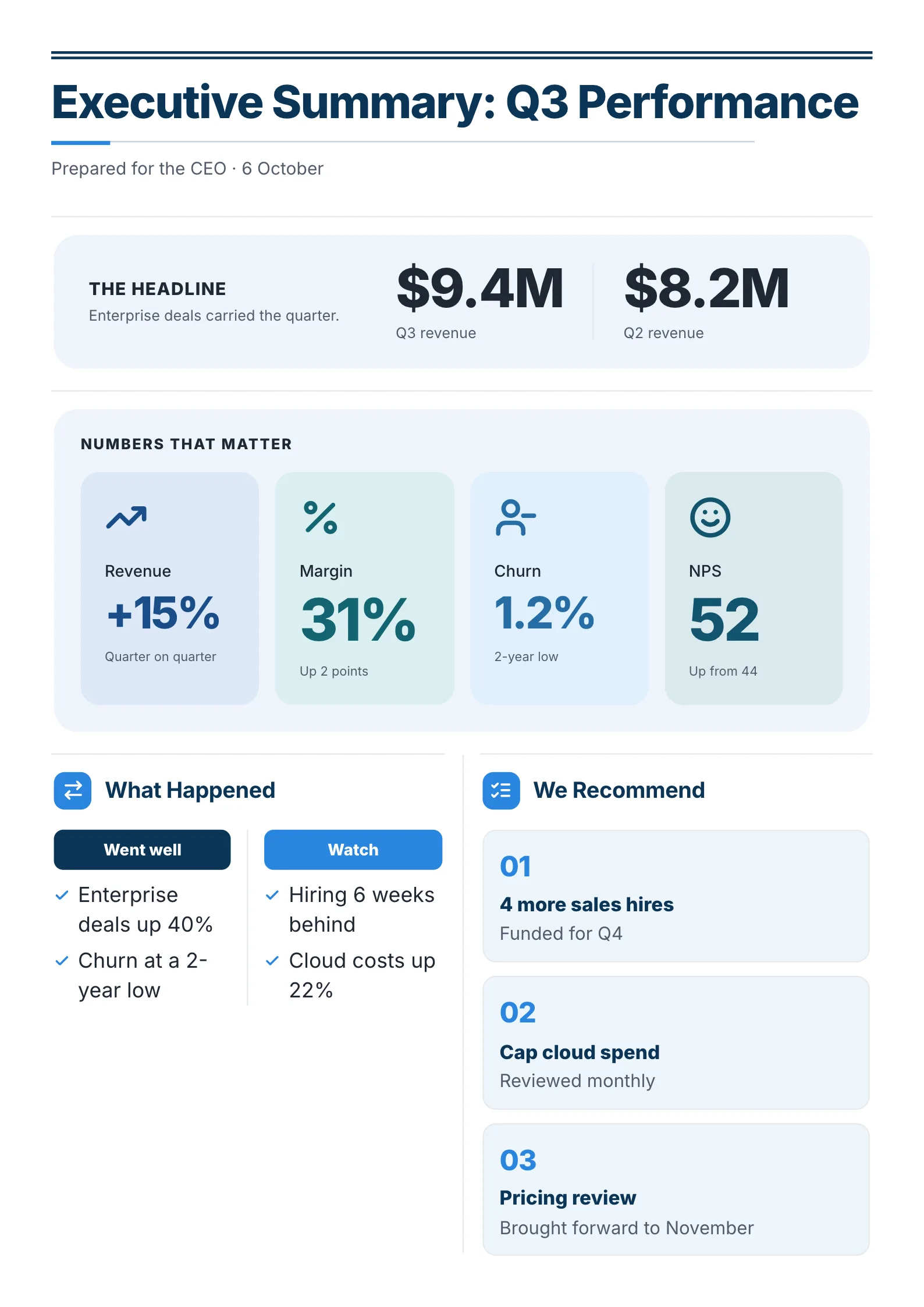
A quarter summed up for a CEO in two sections: what happened and what we recommend.
What to copy:
- This quarter beside last quarter, in the biggest type: $9.4M against $8.2M. One comparison tells the reader whether to worry.
- "Went well" and "Watch" as two columns. Good news cannot bury the hiring delay when it sits right next to it.
- Numbered recommendations, each with a status. "4 more sales hires, funded for Q4" is a decision the reader can say yes to.
Open it: executive summary template.
 Edit this template
2. Business executive summary, for the board
 Edit this template
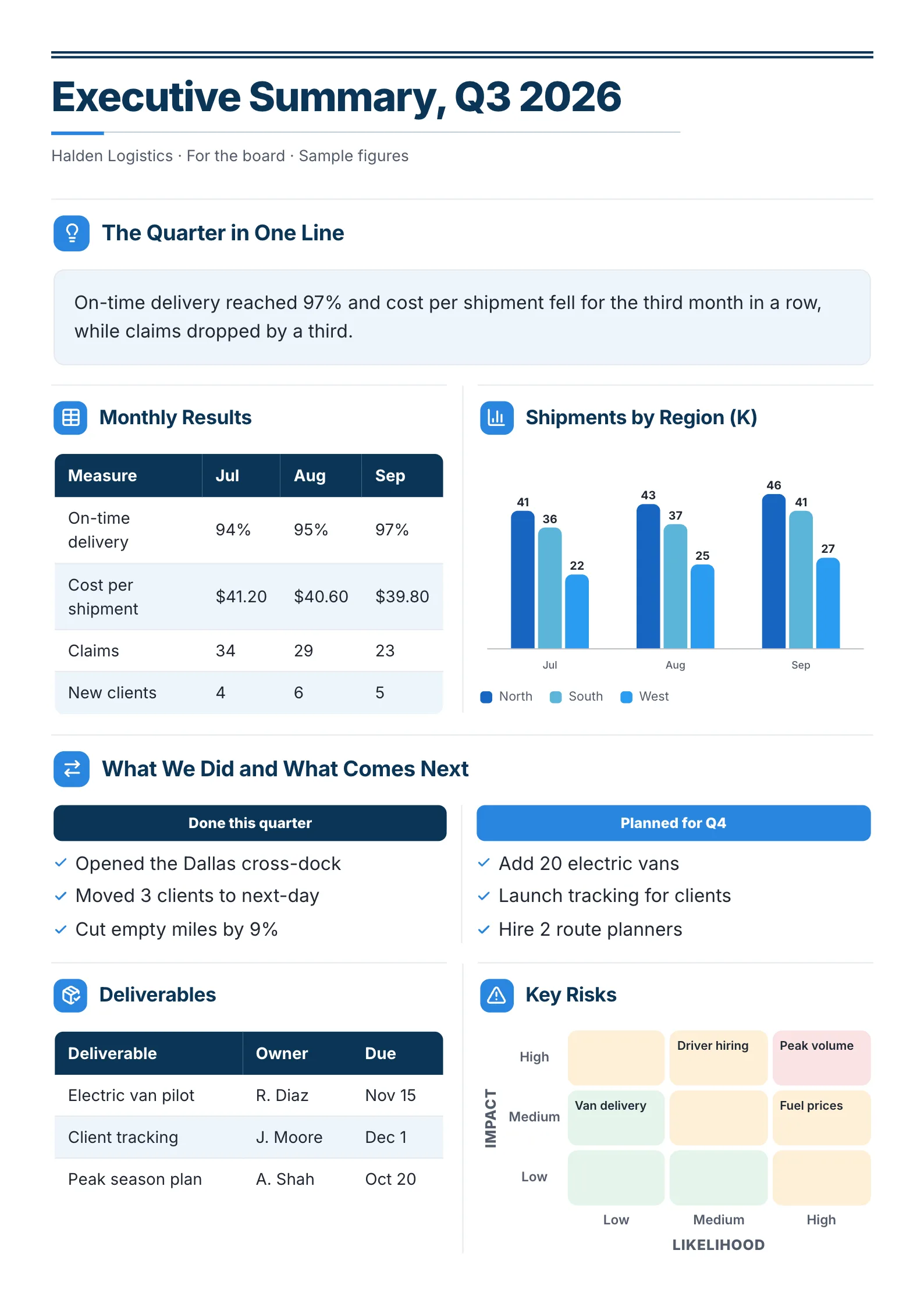
A logistics company's quarter for its board, with the monthly results and the risks on the same sheet.
What to copy:
- The quarter in one line, in a box at the top: "On-time delivery reached 97% and cost per shipment fell for the third month in a row."
- A small table of four measures by month. A board can see the trend without a chart.
- A risk grid of likelihood against impact. It shows which risks matter at a glance, without a paragraph for each.
Open it: business executive summary template.
3. Project status summary
 Edit this template
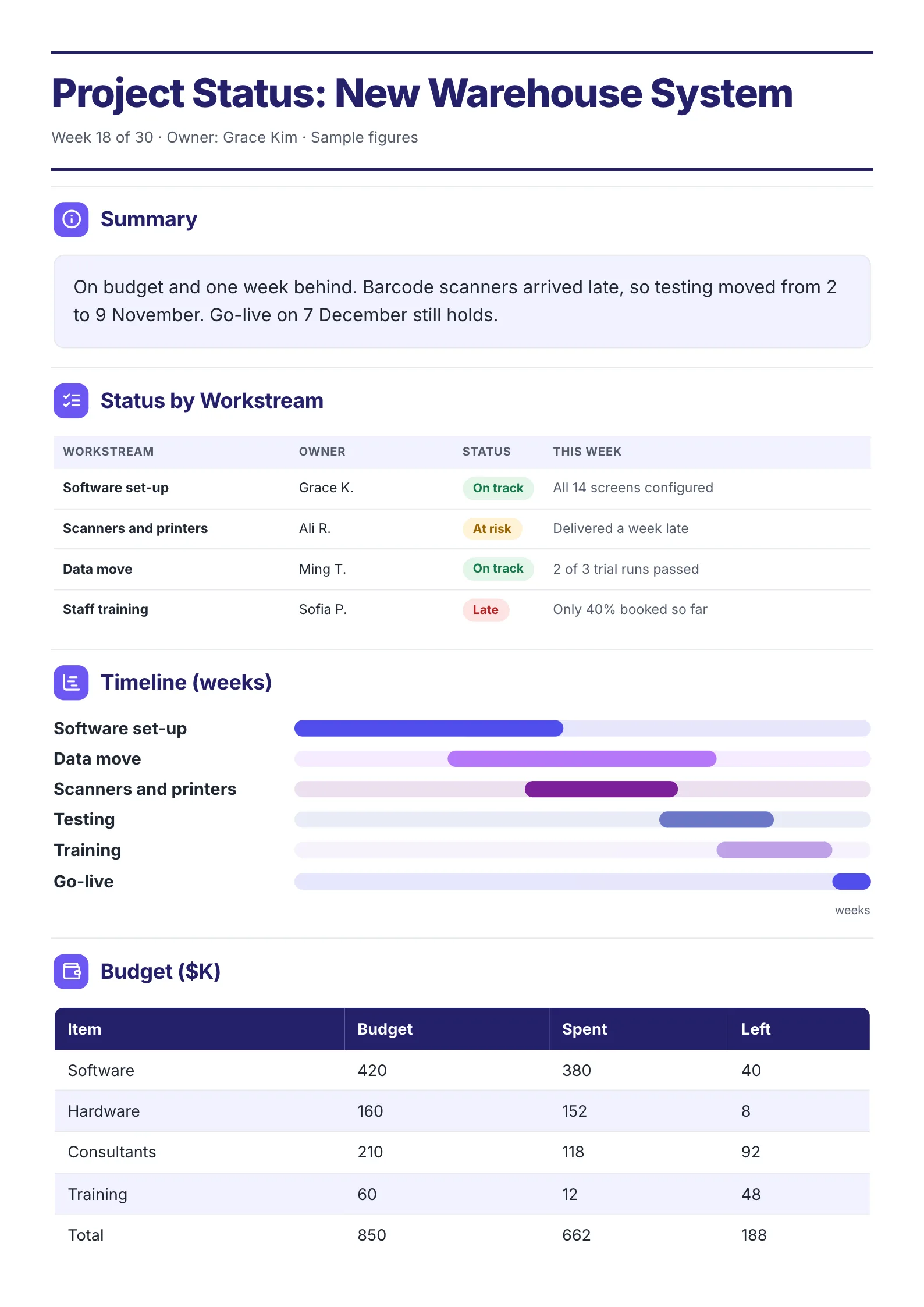
A project's status at week 18 of 30: where each workstream stands, the timeline and the money.
What to copy:
- The cause of the delay in the summary line. "Barcode scanners arrived late, so testing moved from 2 to 9 November." The reader does not have to ask why.
- One word of status per workstream: on track, at risk, late. Each with an owner and a line on what happened this week.
- Budget, spent and left in one table. Left is the column a sponsor actually reads.
Open it: project status summary template.
4. Monthly project summary, for a client
 Edit this template
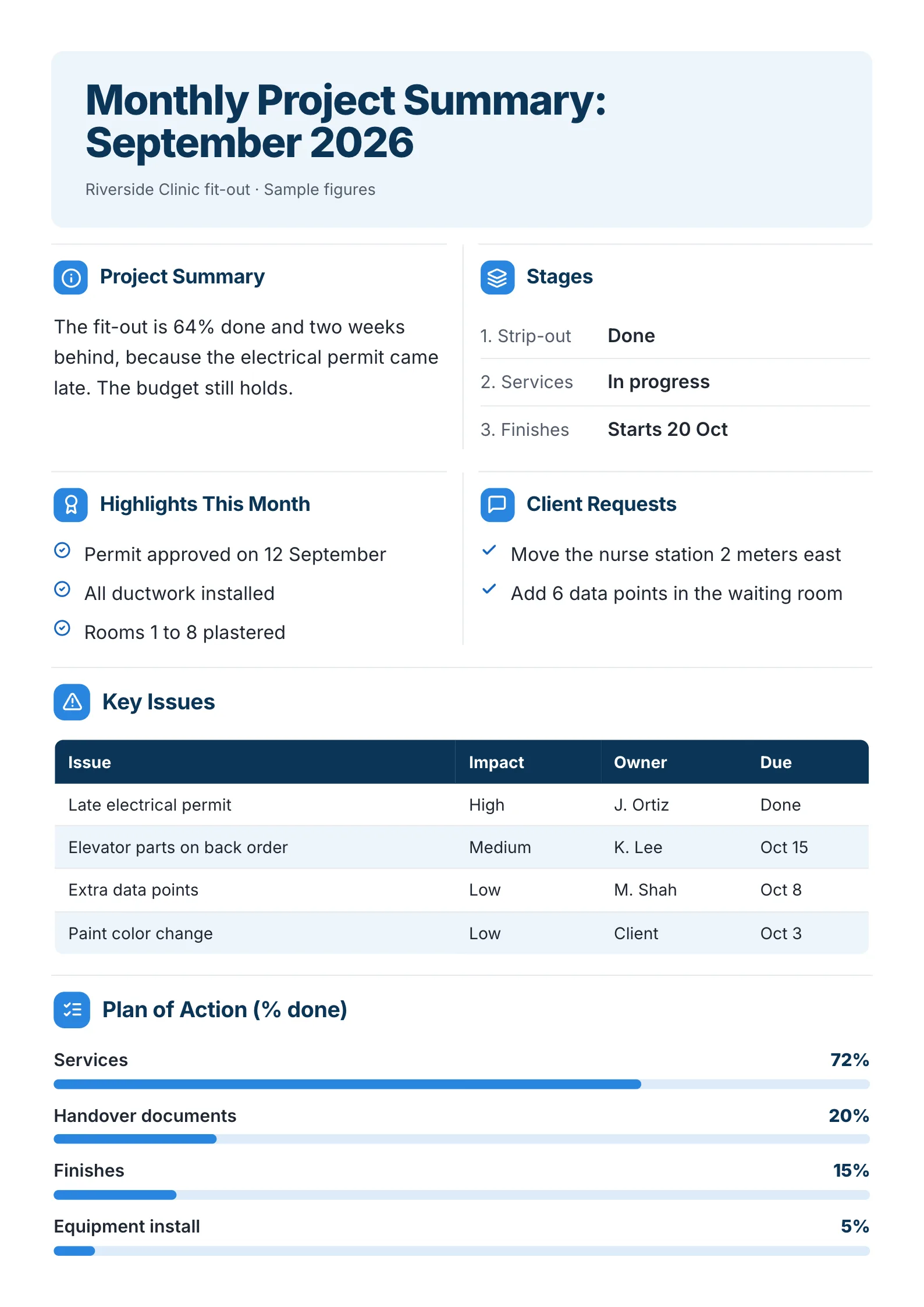
A building project's month, written for the client who is paying for it.
What to copy:
- A section for client requests. Showing that "move the nurse station 2 meters east" was heard and done builds more trust than any status color.
- Issues with impact, owner and due date, so nothing on the list is anyone's guess.
- Progress bars with the percentage written beside them, so the One-Pager still reads when it is printed in black and white.
Open it: monthly project summary template.
5. Quarterly marketing summary
 Edit this template
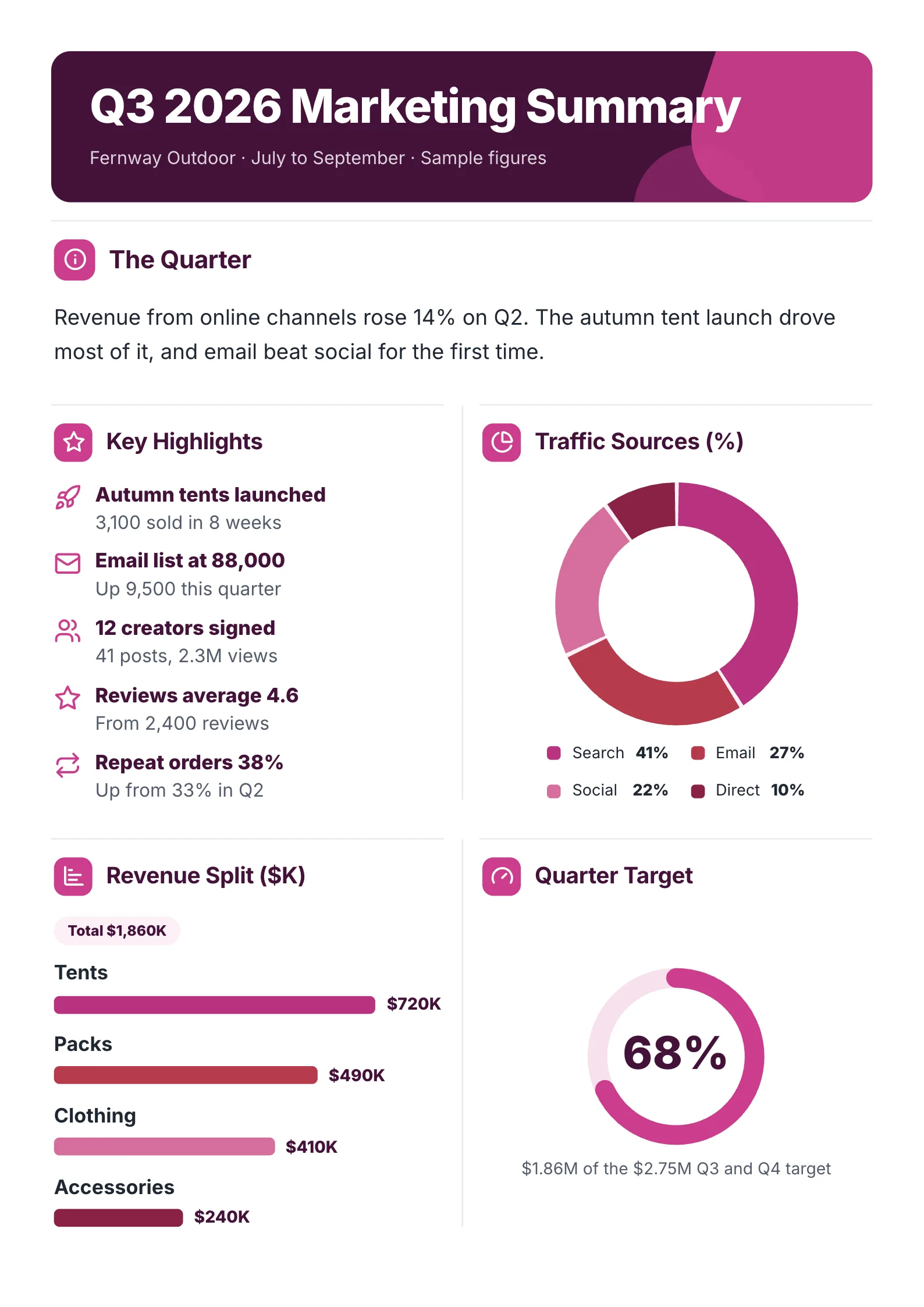
A marketing quarter on one sheet: what drove sales, where visitors came from and how far along the target is.
What to copy:
- A finding, not a list of activities. "Email beat social for the first time" is the line a manager repeats in the next meeting.
- Each highlight as a number with its context: "3,100 sold in 8 weeks", "up from 33% in Q2".
- Progress against the target as one ring, with the dollar figures written underneath.
Open it: quarterly marketing summary template.
6. Annual report summary
 Edit this template
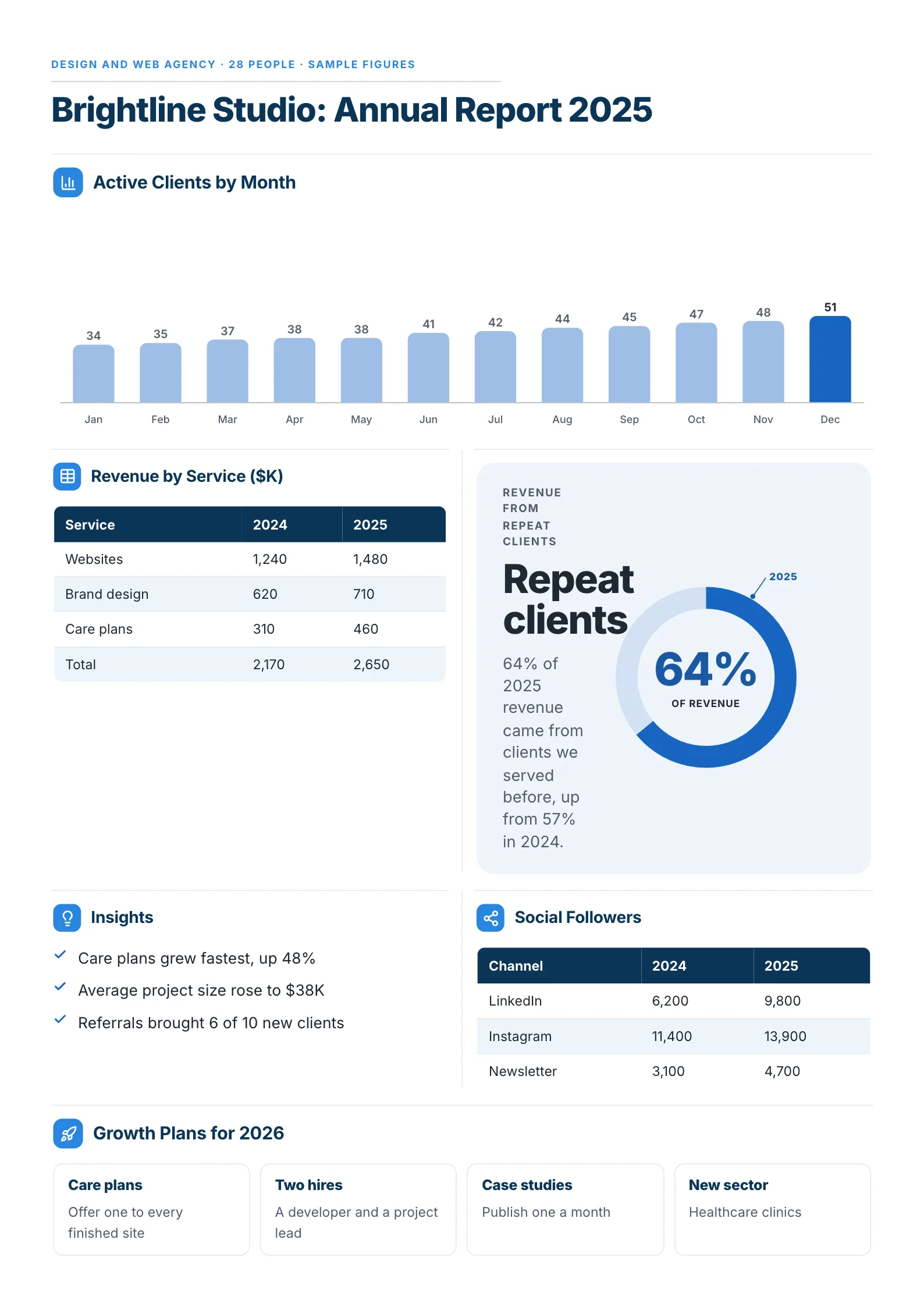
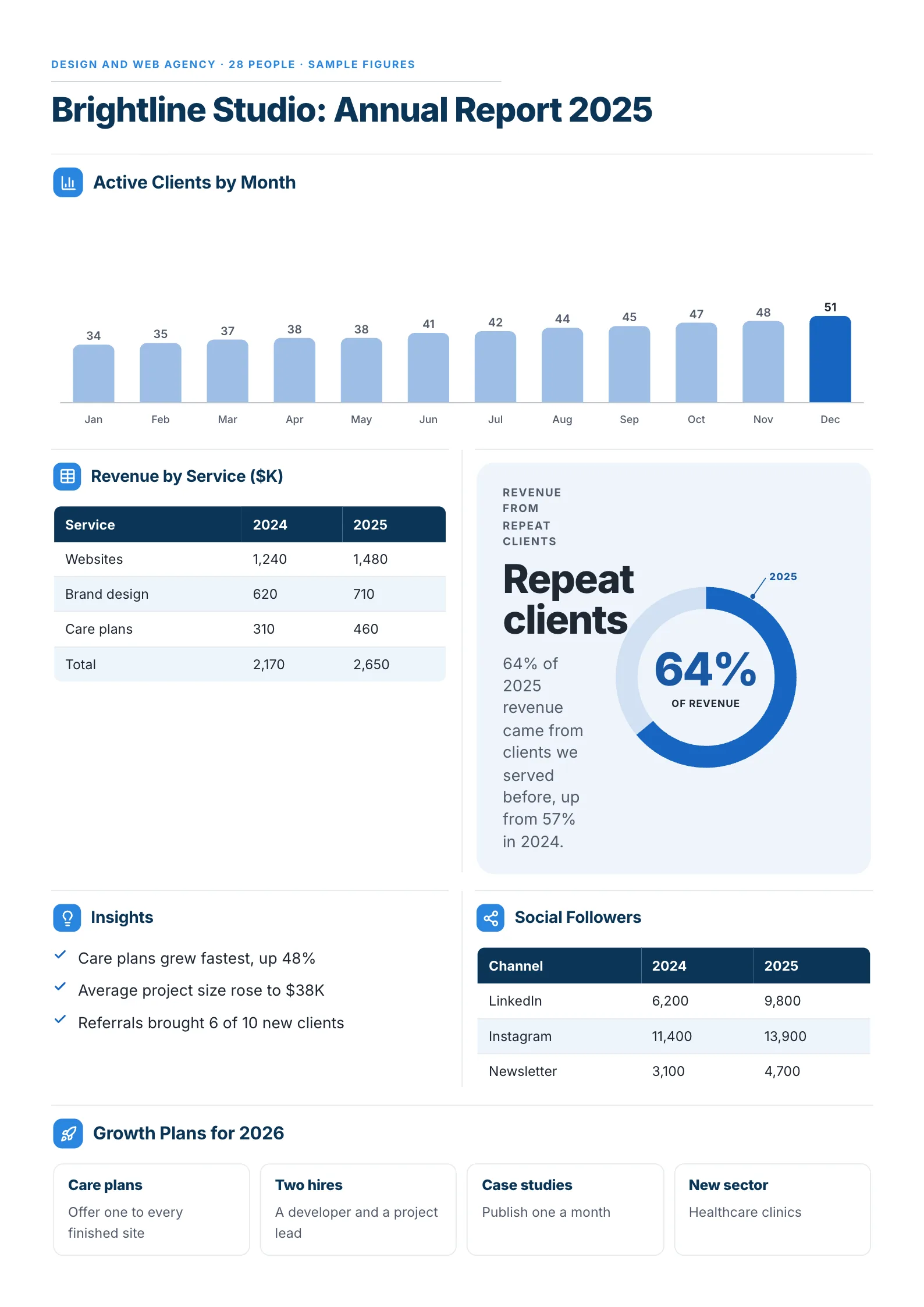
A small agency's whole year, from clients by month to the plans for next year.
What to copy:
- Twelve months in one bar chart, with the last month in a darker color so the eye lands on where the year ended.
- This year beside last year in every table, so each number answers "is that good?"
- Next year's plans as four short boxes. A year summary that ends with a plan gets read as a plan.
Open it: annual report summary template.
7. Business summary for investors
 Edit this template
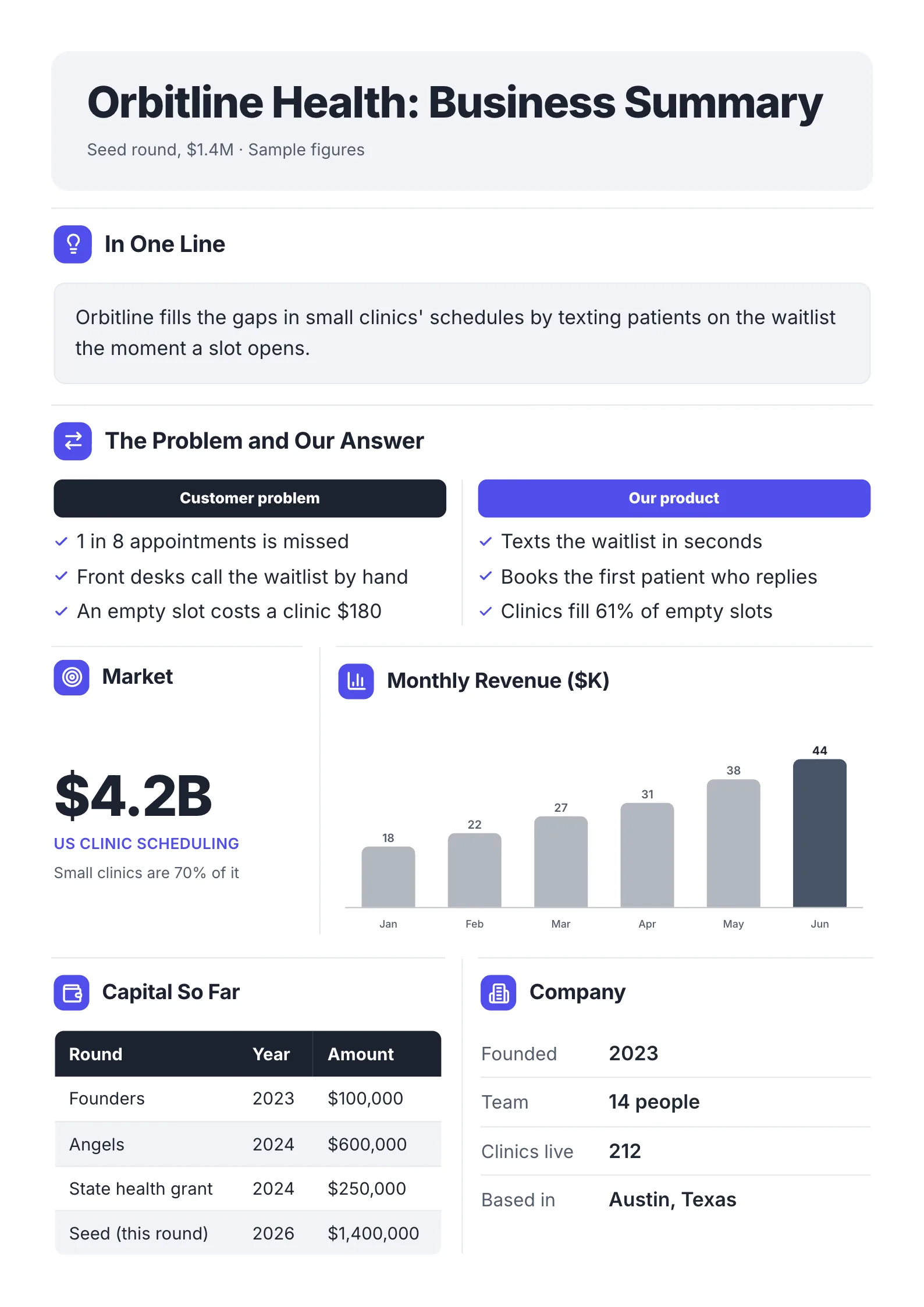
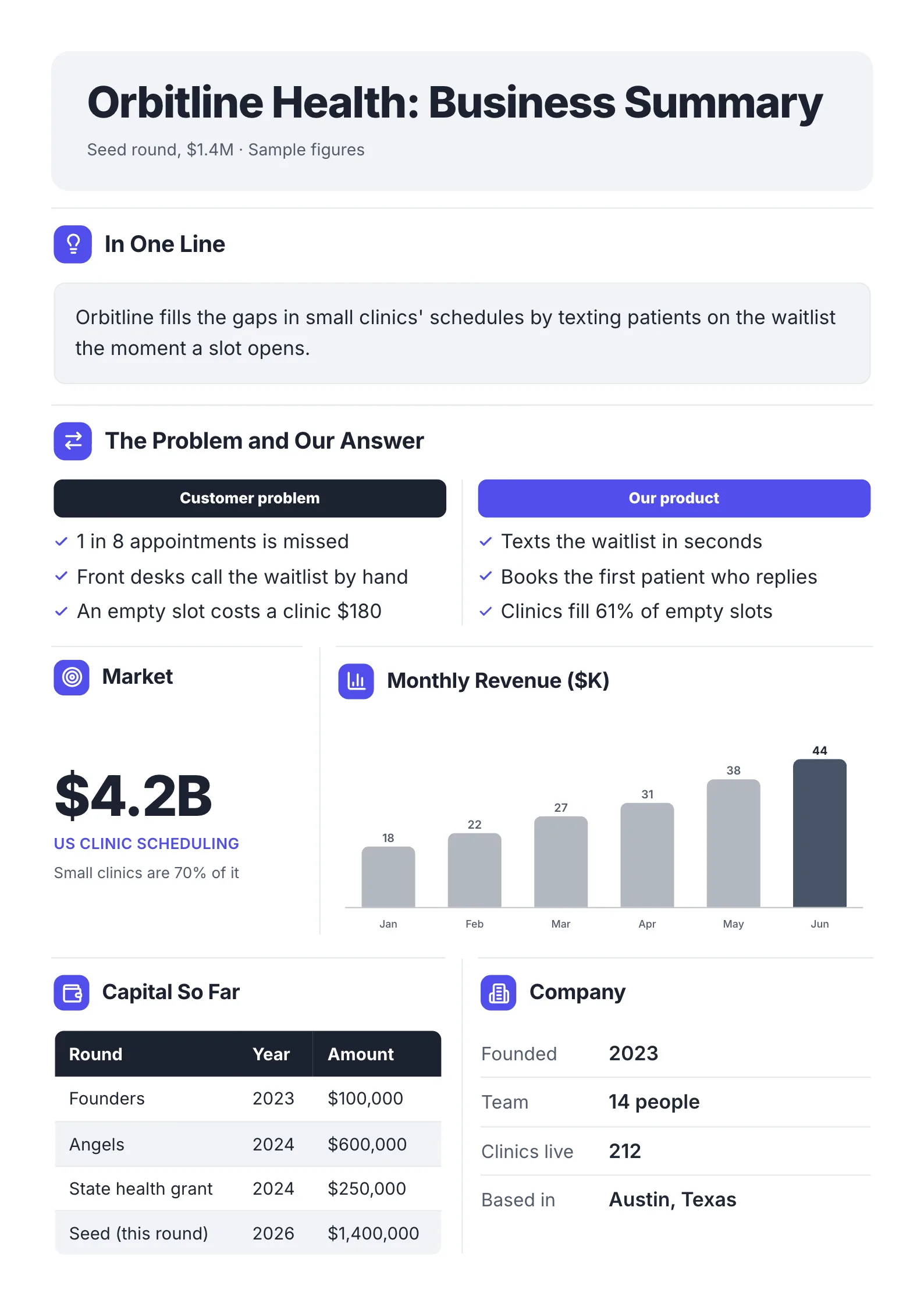
A startup summed up for investors before they open the deck.
What to copy:
- What the company does in one sentence, at the top, in plain words.
- The problem and the answer as matching lists: "1 in 8 appointments is missed" beside "clinics fill 61% of empty slots".
- Six months of revenue as bars. Growth is the question every investor is asking, so answer it with a picture.
Open it: business summary for investors template.
8. Webinar recap
 Edit this template
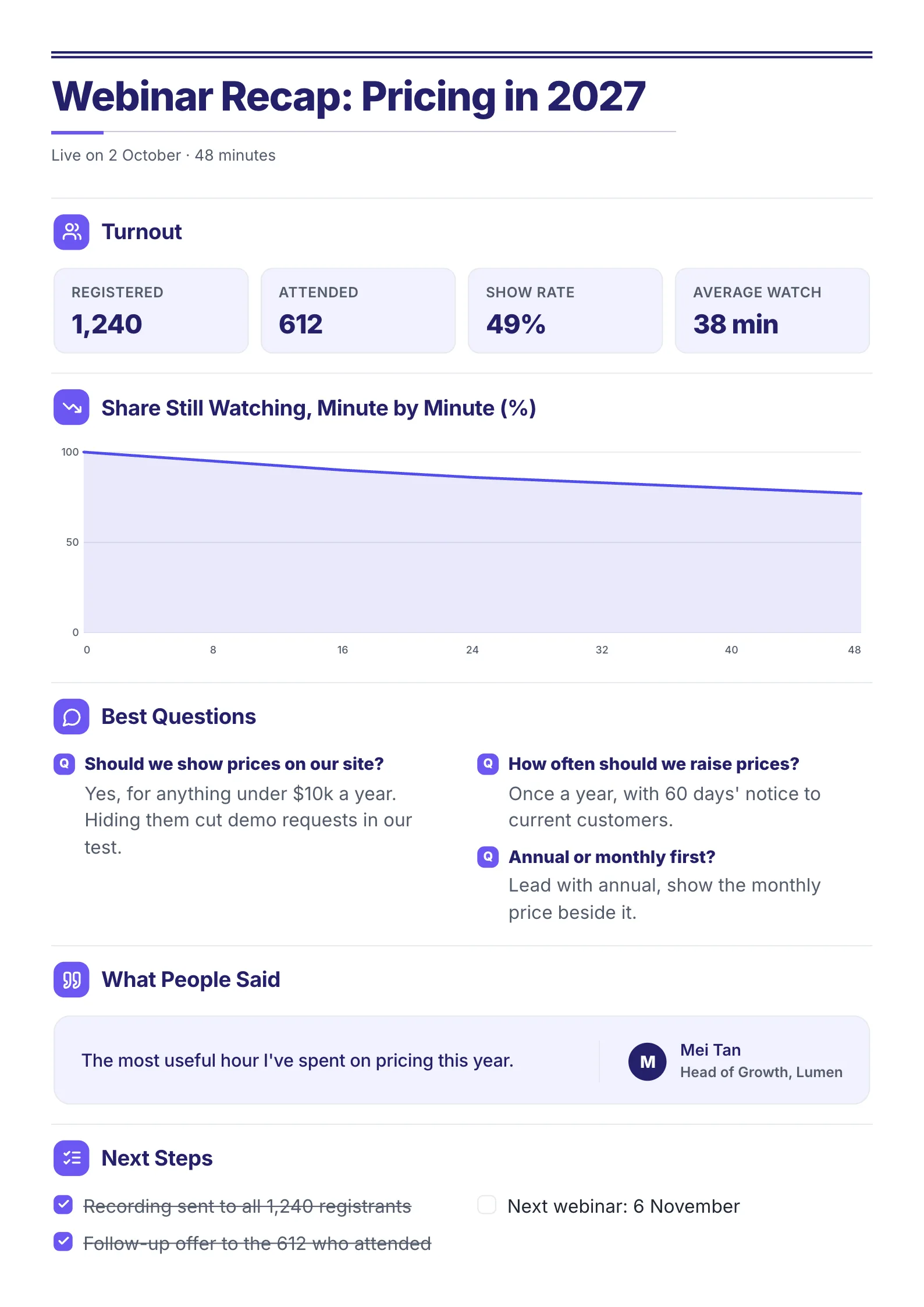
An event summed up for the team and the people who missed it.
What to copy:
- Four turnout numbers in a row: registered, attended, show rate, average watch.
- The best questions with their answers. That is the part people who missed it actually want.
- Next steps as a checklist, with the finished ones ticked.
Open it: webinar recap template.
 Edit this template
Where else to get a one page summary template
We make MakeOnepagers, so its templates are shown above. Here is how the other places people find templates compare, read on their own websites on 1 and 8 October 2026.
| Source | Best for | Cost to start |
|---|---|---|
| MakeOnepagers | A designed summary you can edit online, or one written for you from your long report | Templates free to edit; 7-day free trial with 3 One-Pagers |
| SlideTeam | Summary slides for PowerPoint | Paid plans from $39.99 a month (8 Oct) |
| HubSpot | A plain Word, Google Docs or PDF file | Free after a sign-up form |
| Canva | The widest choice of general designs | Free plan; Pro $144 a year (1 Oct) |
| Visme | Designed layouts with charts | Free Basic plan |
Choose by where the summary will be read. Slides suit a meeting room. A Word file suits a team that edits everything in Word. A designed One-Pager suits anything sent by email or printed, because it reads in two minutes on a phone or on paper.
How to write a one page summary in 5 steps
- Write the one-line answer first, before anything else. If you cannot, you are not ready to summarise.
- Pick the three or four numbers your reader is measured on, and the number each is compared with.
- List what went well and what to watch, two or three lines each.
- Add one chart or table only if it replaces words.
- End with the ask. A decision, a date or "no action needed".
Already have the long report? The free AI One-Pager generator reads a PDF, Word or PowerPoint file of up to 10 pages and gives it back as one designed One-Pager, with the numbers pulled from your file.
One page summary mistakes
- Starting with background. The reader decides in the first two lines. Put the answer there.
- Numbers with nothing to compare them to. "$9.4M" means little. "$9.4M, up from $8.2M" means a good quarter.
- Every number you have. Four is plenty. The rest belong in the full report.
- No ask. A summary without a next step gets read and filed.
Make your one page summary
Open any of the eight examples above and change the words and numbers, or drop the long report you already have into the free AI One-Pager generator and get it back as a One-Pager your reader will finish.
Frequently asked questions
How do you write a one page summary?
Start with one sentence that gives the conclusion, add the three or four numbers that prove it, list what went well and what to watch, and finish with what you need from the reader. Leave the background and method for the full report.
What should a one page summary include?
A title, who it is for, the answer in one line, a few key numbers with comparisons, what happened, the risks and the next step or ask.
Is there a one page summary template for Word or PowerPoint?
HubSpot offers a free Word and Google Docs file after a sign-up form, and SlideTeam sells PowerPoint slides. One-Pagers made on MakeOnepagers are edited online and download as a PDF you can print, email or drop into a deck.
What is the difference between a one page summary and an executive summary?
An executive summary is one kind of one page summary: the version written for leaders, usually at the front of a longer report. A one page summary can also be written for a client, a team, investors or the people who missed an event.
How long should a one page summary take to read?
About two minutes. If it takes longer, cut the background first and the extra numbers second.