Sprint Review vs Sprint Retrospective: 4 Hours, 3 Hours, Two Different Jobs
Sprint review vs sprint retrospective, read from the 2020 Scrum Guide and a US Air Force agile playbook: who attends, what each covers and how long.


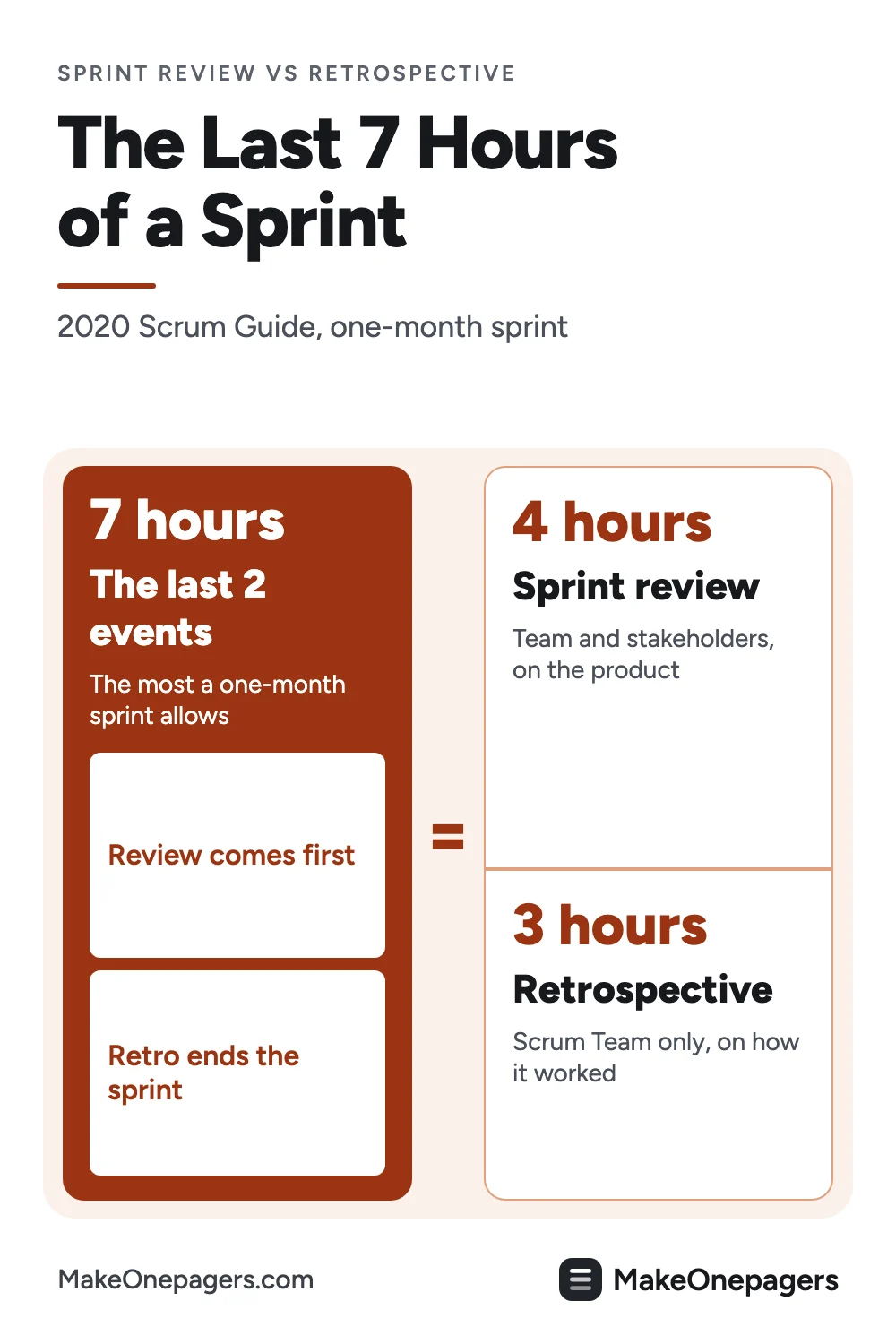
In the sprint review vs sprint retrospective question, the short answer is about who's in the room and what they look at. At the review, your Scrum Team and its stakeholders inspect the product and decide what to build next. At the retrospective, the Scrum Team looks at how it worked and picks changes to try. The 2020 Scrum Guide gives the review up to 4 hours and the retrospective up to 3, for a one-month sprint, and puts them back to back at the very end. Start from a free one pager template.
One‑Pager examples
Real One-Pagers made with MakeOnepagers. Open any one to edit it as your own.
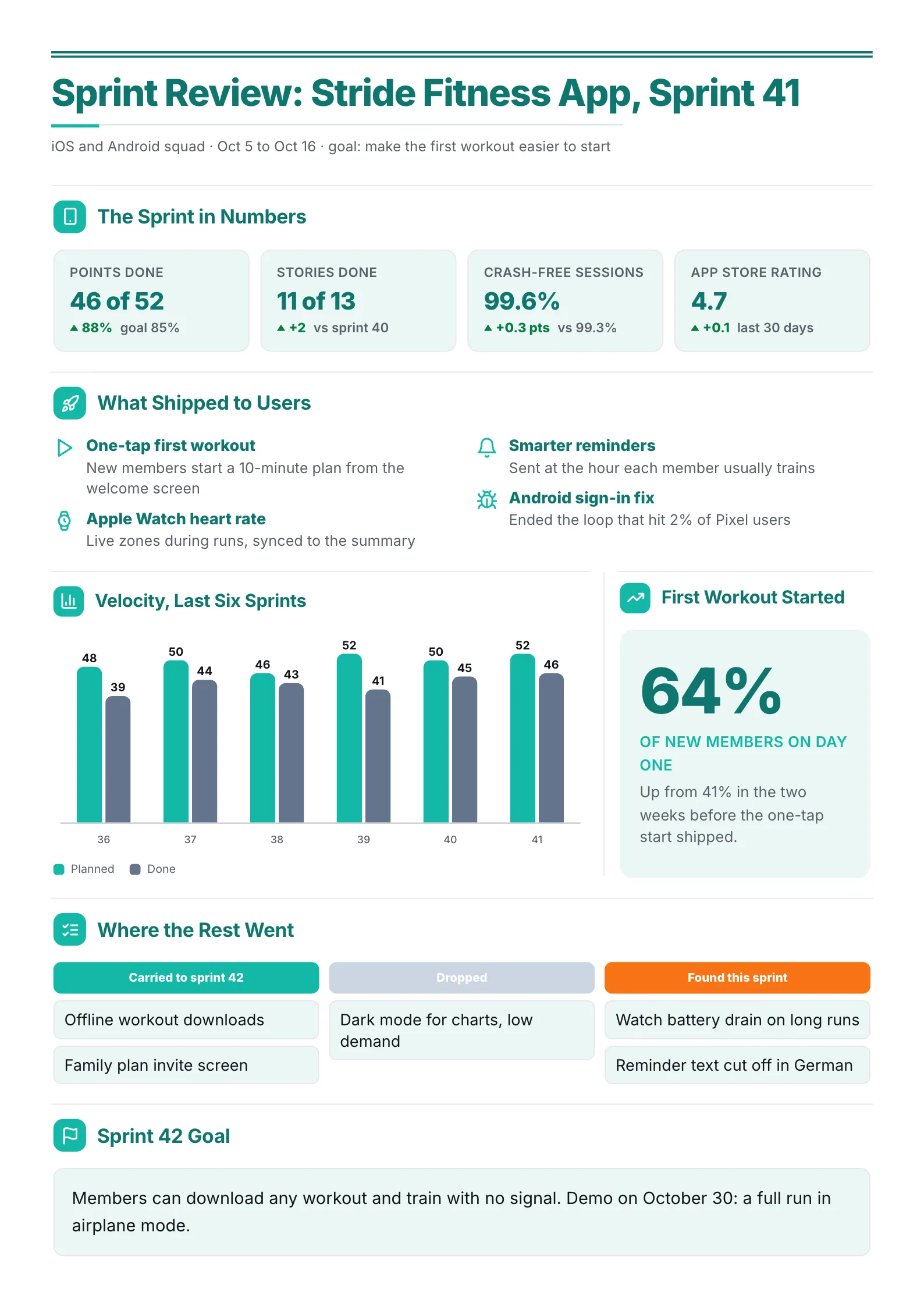 Mobile App Sprint ReviewEdit for free(opens in a new tab)
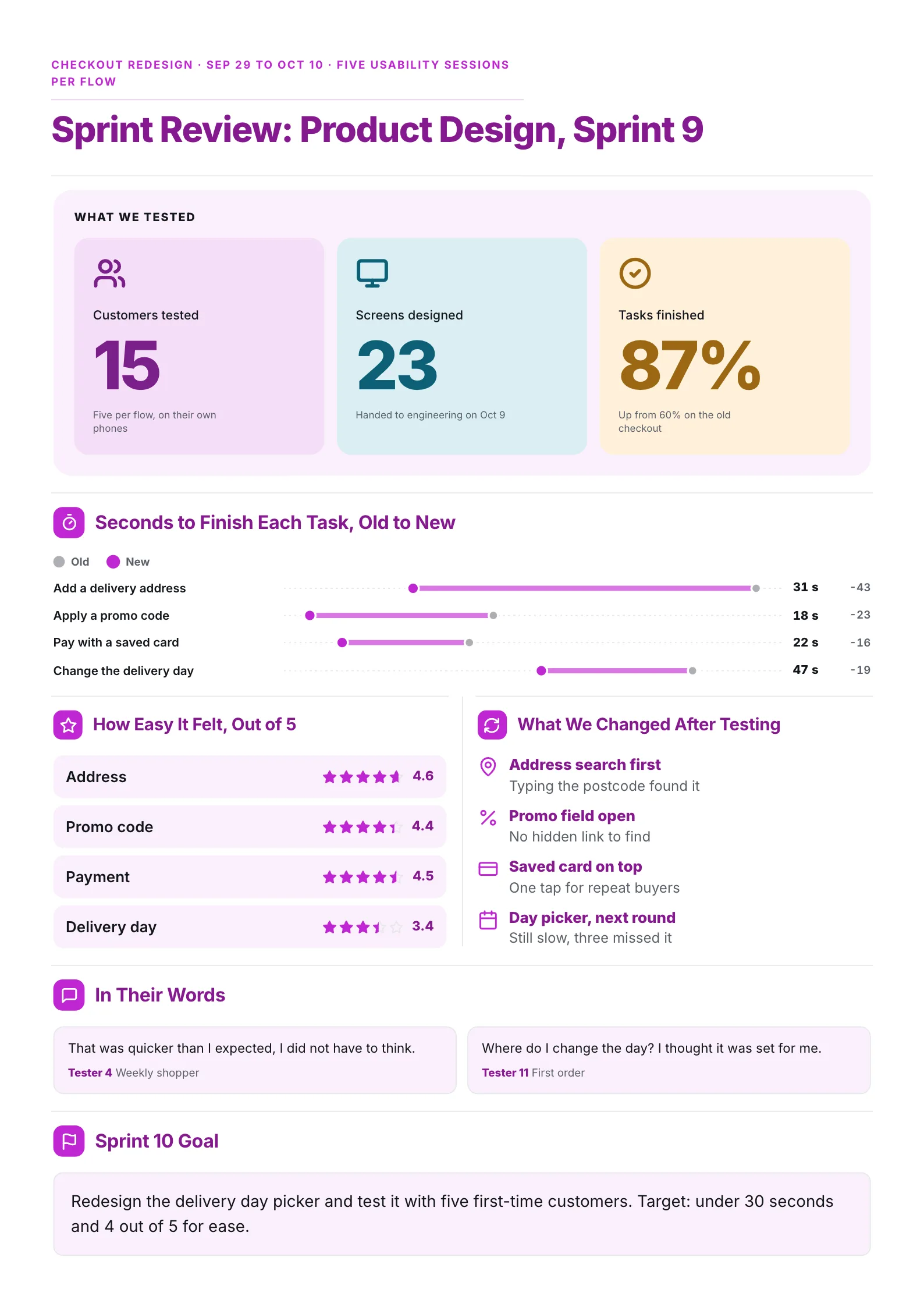 Design Sprint ReviewEdit for free(opens in a new tab)
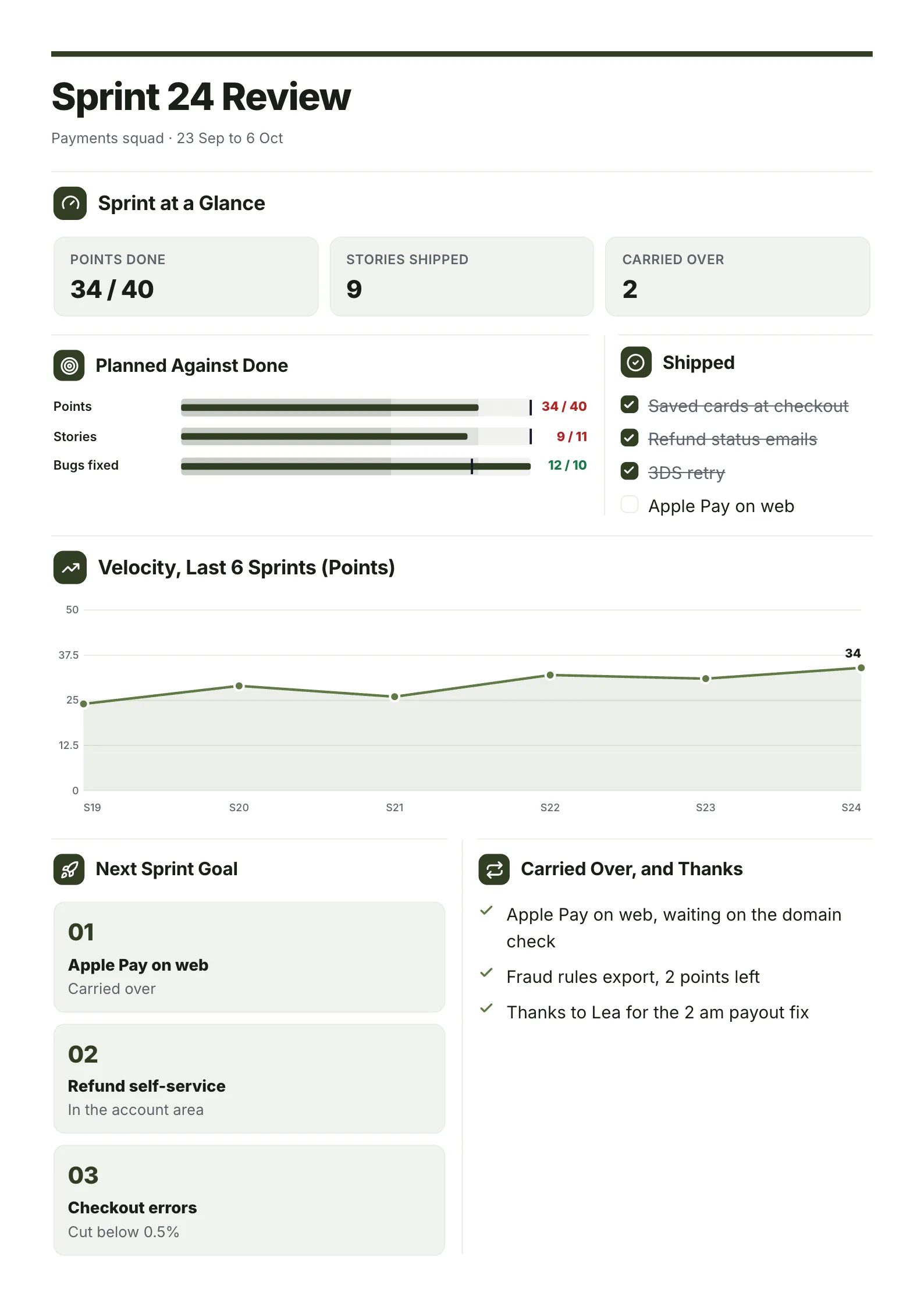 Sprint ReviewEdit for free(opens in a new tab)
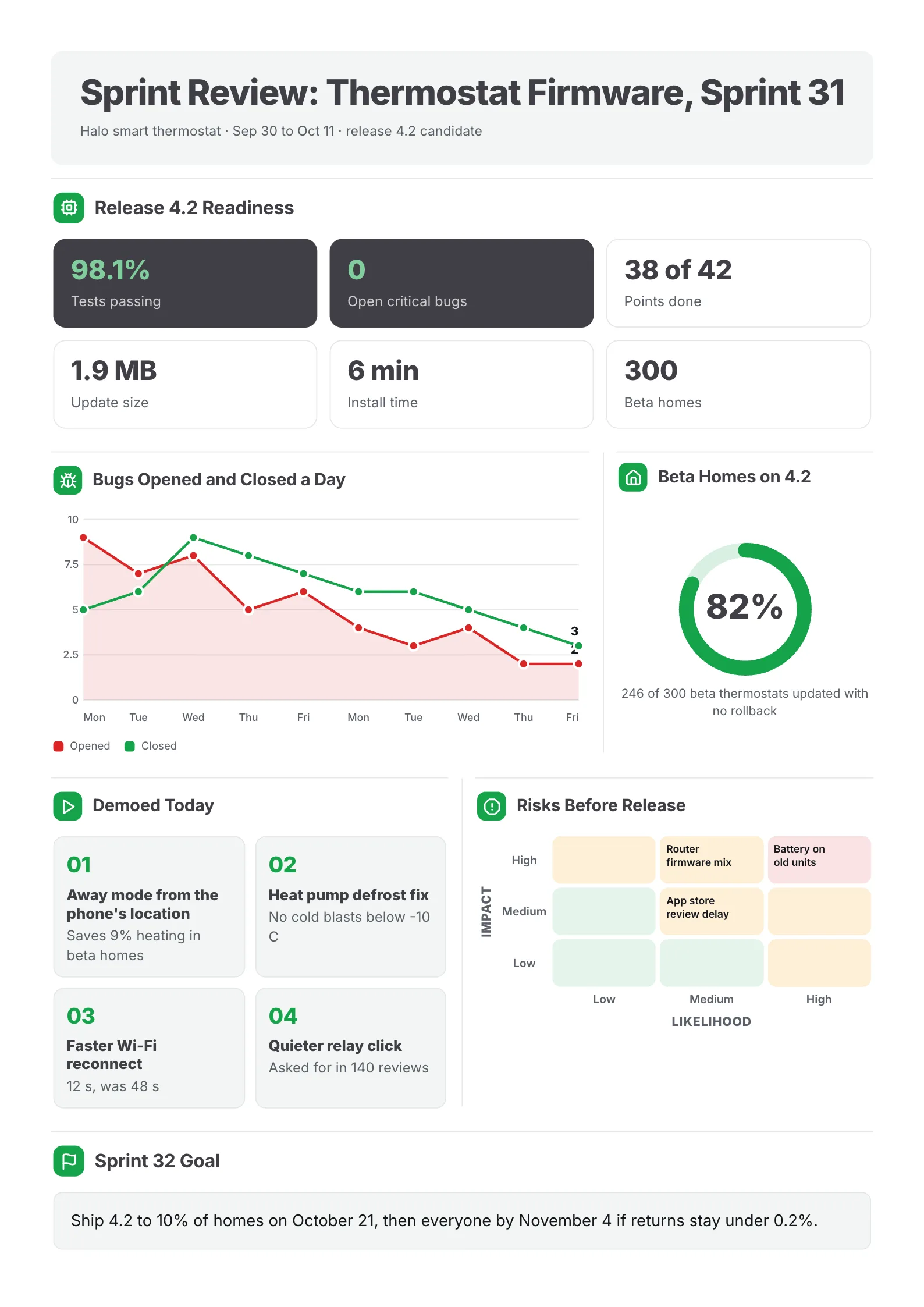 Hardware Sprint ReviewEdit for free(opens in a new tab)
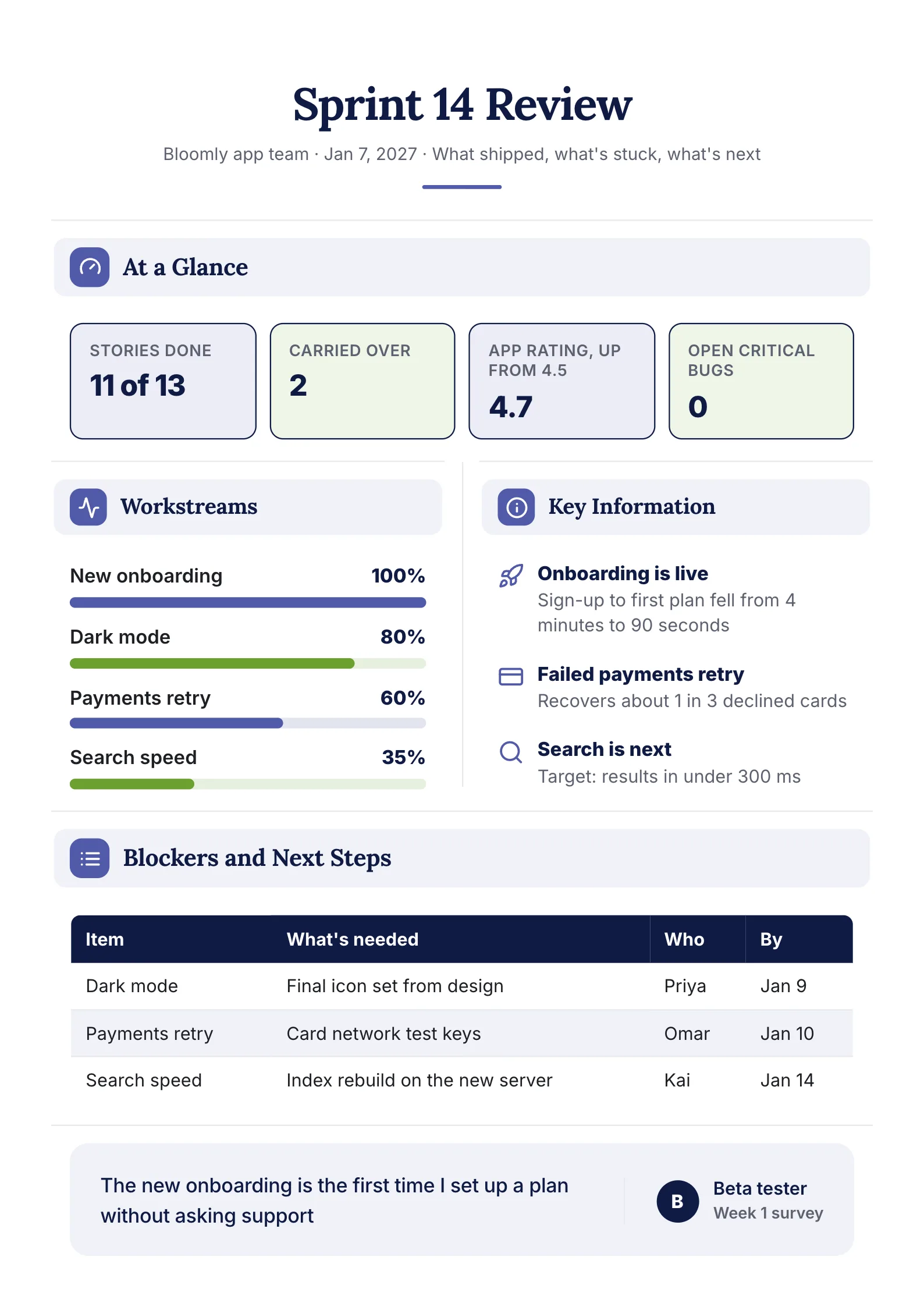 Sprint Review with WorkstreamsEdit for free(opens in a new tab)
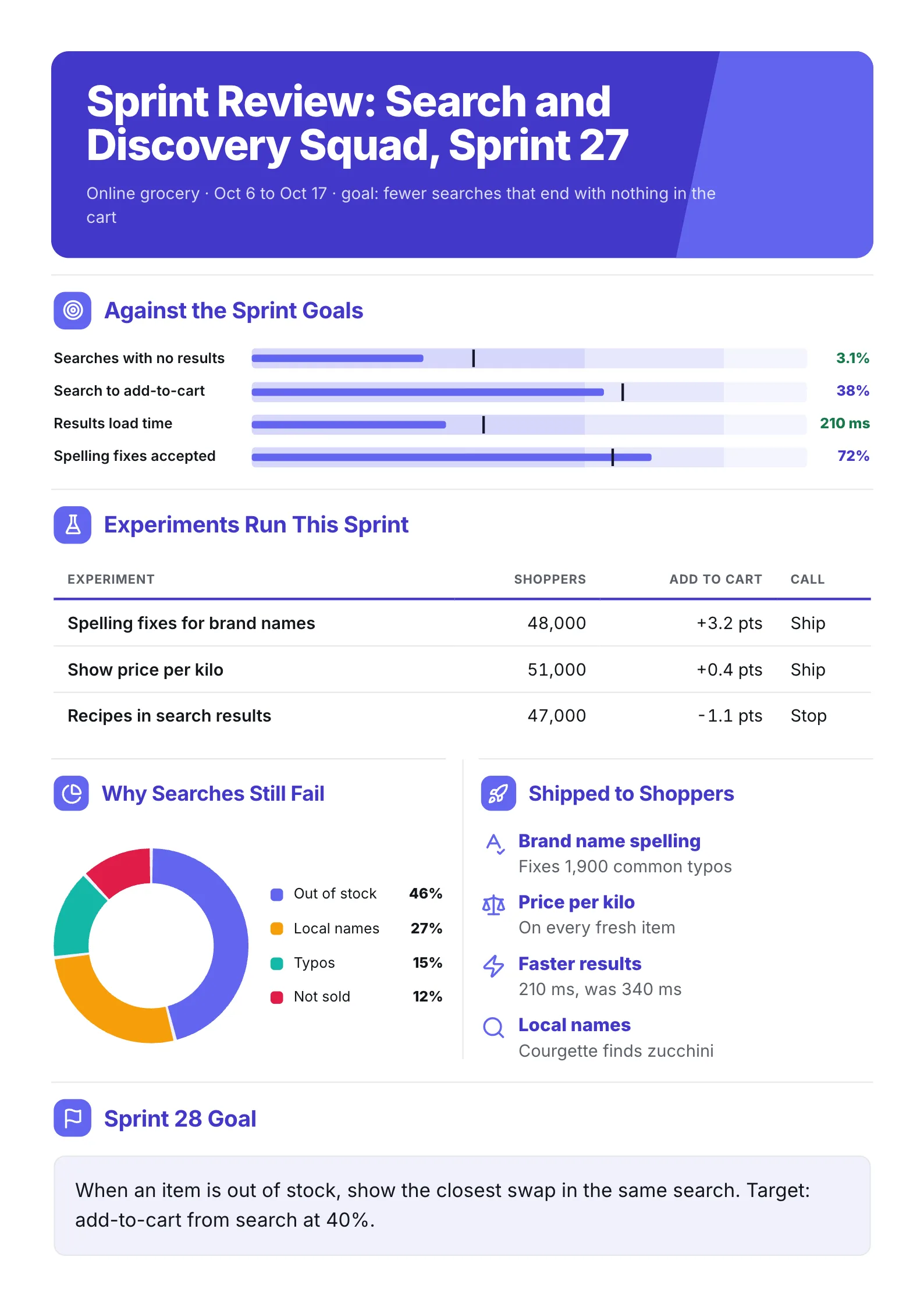 Product Squad Sprint ReviewEdit for free(opens in a new tab)
We read both sections of the guide line by line. The review section runs 133 words and the retrospective 142. Then we set them beside a working playbook from the US Air Force, which turns each event into a table of roles and steps.
The two events, side by side
Everything in this table comes from the 2020 Scrum Guide, the 14-page text by Ken Schwaber and Jeff Sutherland.
| Sprint review | Sprint retrospective | |
|---|---|---|
| Purpose, in the guide's words | "to inspect the outcome of the Sprint and determine future adaptations" | "to plan ways to increase quality and effectiveness" |
| Who takes part | "the Scrum Team and stakeholders" | "The Scrum Team" |
| What gets inspected | "what was accomplished in the Sprint and what has changed in their environment" | "individuals, interactions, processes, tools, and their Definition of Done" |
| What can change | "The Product Backlog may also be adjusted" | Improvements "may even be added to the Sprint Backlog for the next Sprint" |
| When | "the second to last event of the Sprint" | It "concludes the Sprint" |
| Longest allowed, one-month sprint | Four hours | Three hours |
Read across the rows. Your review faces outward. It looks at the product, what changed around it and the Product Goal, and it can change the Product Backlog. Your retrospective faces inward. It looks at your team's own habits and its Definition of Done, and its changes land in the very next sprint.
Five lines worth reading twice
The guide is short, so a few phrases carry a lot of weight.
- "The Sprint Review is a working session and the Scrum Team should avoid limiting it to a presentation." A demo with no talk afterward misses the point of the event. Leave time for stakeholders to react.
- "what has changed in their environment." Your review covers news from outside the team too, like a competitor's launch or a new rule.
- Work that isn't done stays out. If an item falls short of your Definition of Done, the guide says it "cannot be released or even presented at the Sprint Review." Leave it off your demo list.
- "Assumptions that led them astray are identified and their origins explored." Use your retrospective to dig into why something went wrong.
- "The most impactful improvements are addressed as soon as possible." Give every change an owner before you leave the room.
What the guide never says
Many rival posts add rules that aren't in the 2020 text. Check these before you set up your calendar.
- No hours per week. Geekbot's guide caps a review at one hour for one-week sprints and says to "add 45 minutes for every week" of sprint for a retro. The 2020 guide gives only the one-month maximums and adds, for both events, "For shorter Sprints, the event is usually shorter." Pick a length that fits your team and stay under the cap.
- No product manager. One top-ranking post says "the product manager runs the sprint review." The guide never uses the words "product manager." It gives the Product Owner, Developers and Scrum Master separate jobs. One of the Scrum Master's jobs is "Ensuring that all Scrum events take place and are positive, productive, and kept within the timebox."
- No named facilitator. The guide doesn't say who leads either event. Agree on it as a team and write it down.
How an Air Force playbook runs both
The BES Playbook is written for the Air Force Life Cycle Management Center's Business and Enterprise Systems directorate. Its Scrum appendix gives each event a table of roles and activities. Use it to compare your own setup.
| Sprint review | Sprint retrospective | |
|---|---|---|
| Scrum Master | "Prepare for and facilitate the meeting." | Same, plus a "Brief status of action items from previous meeting" and "Track action items from meeting." |
| Product Owner | "Confirm user story acceptance as done." | "Provide the perspective of the government customer on the process and how it can be improved," and may have a "limited role" if a government representative |
| Development Team | "Present accomplished work to the PO and external Stakeholders." | "Contribute positive and negative feedback, identify opportunities for improvement." |
| Activities listed | 7 | 5 |
The review's 7 activities start with "Present Sprint goals and achievements." The second asks for numbers: velocity, sprint burn down, defects logged and resolved, and user stories committed versus completed. The last is "Determine next steps for committed user stories which were not completed and/or accepted."
The retro's 5 start with last time's action items, then "Discuss what went well during the sprint," then "what did not go well and should not continue." They end with "Assign owners to new action items."
Two habits from this playbook are worth taking. First, open every retro with the last retro's list. You'll see whether your changes stuck. Second, the methodology page says story points for stories not marked Done "are not counted when measuring sprint completion velocity." Count your velocity the same way, so the number you show at the review stays honest.
Where each item belongs
When something comes up at the end of your sprint, ask who needs to act on it, then send it to the right meeting. This sorting table is ours, built from the guide's wording above.
| It came up... | Take it to | Where it lands |
|---|---|---|
| A stakeholder wants a feature changed | The review | The Product Backlog |
| A competitor shipped something similar | The review | The Product Backlog, maybe the Product Goal |
| A story didn't meet the Definition of Done | Neither as a demo | Back to the Product Backlog |
| Test devices were booked late twice | The retrospective | An action item with an owner |
| The team's Definition of Done is too loose | The retrospective | A new Definition of Done |
| A tool kept failing during the sprint | The retrospective | The next Sprint Backlog, if it's urgent |
Five sprint reviews, and what each hands on
A review that also holds retro notes
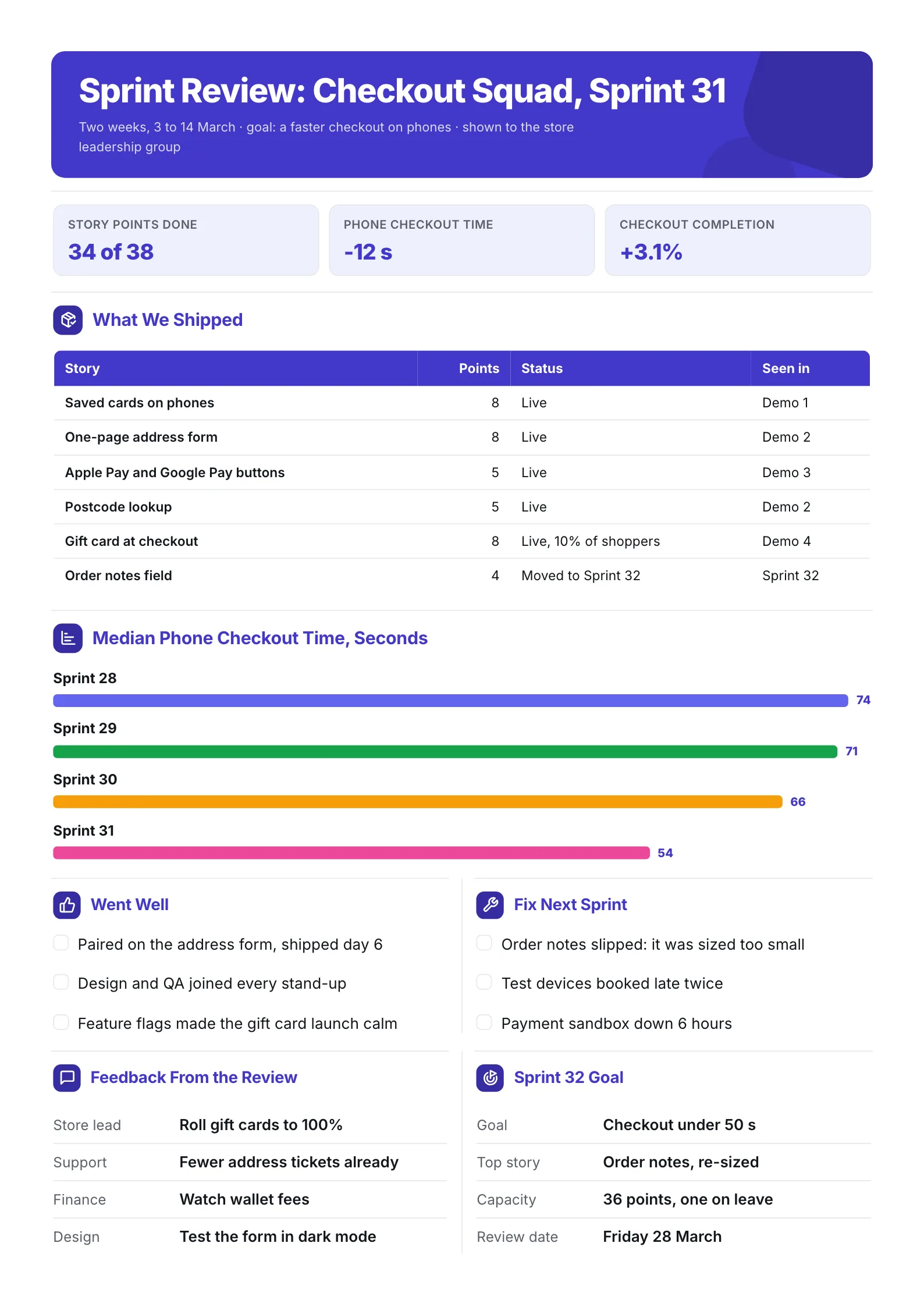 Edit this template
This checkout squad sprint review carries both kinds of notes. "Feedback From the Review" is review material, such as the store lead's "Roll gift cards to 100%." "Went Well" and "Fix Next Sprint" are retro material, like "Test devices booked late twice." If your review goes to leadership, keep the feedback box and move the other two to your retro notes.
A data team that turns feedback into the next goal
 Edit this template
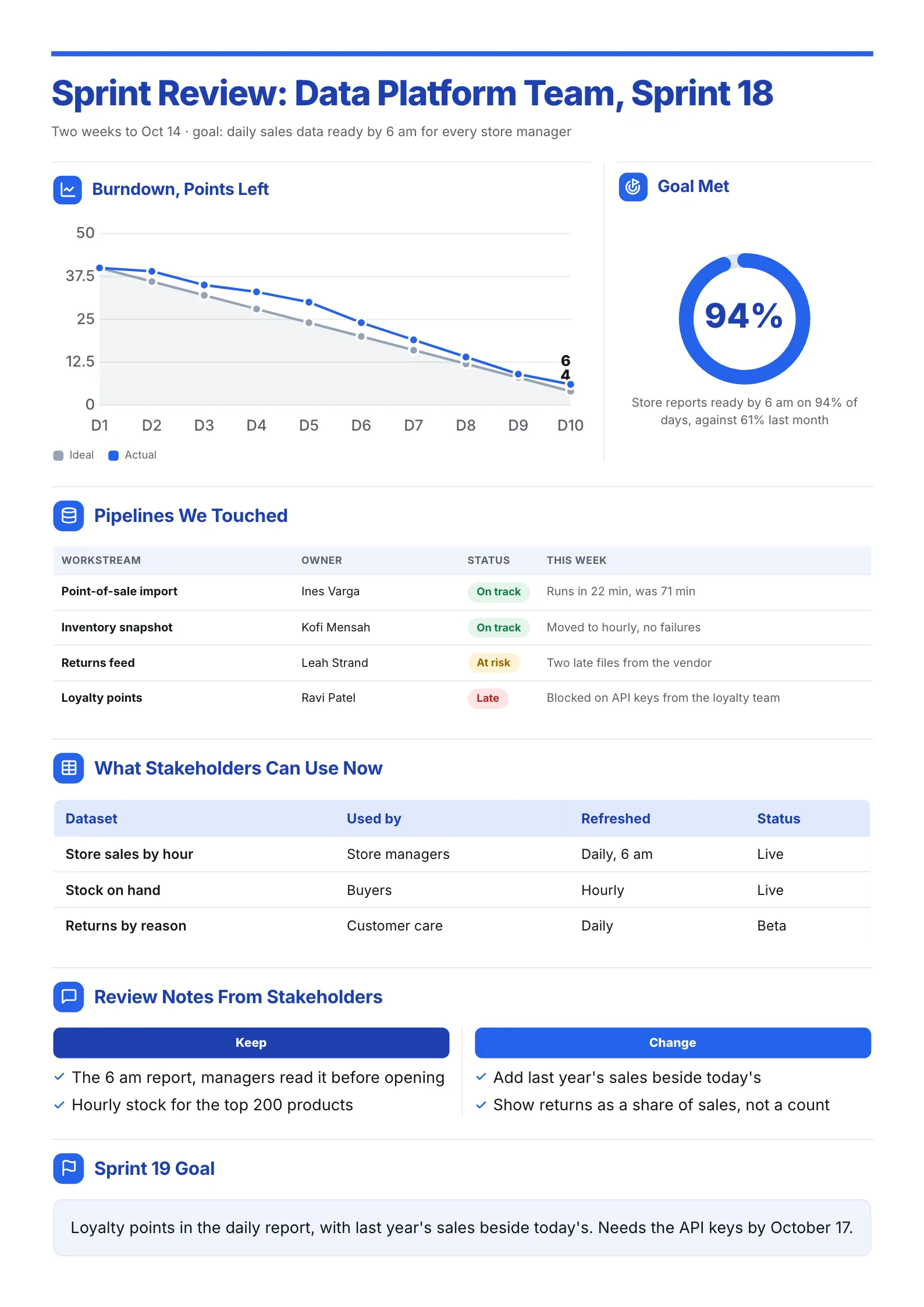
This is what review output looks like when it works. In this data team sprint review, stakeholders asked to "Add last year's sales beside today's." The Sprint 19 goal picks it up word for word: loyalty points in the daily report, "with last year's sales beside today's."
A marketing team that stops what doesn't sell
 Edit this template
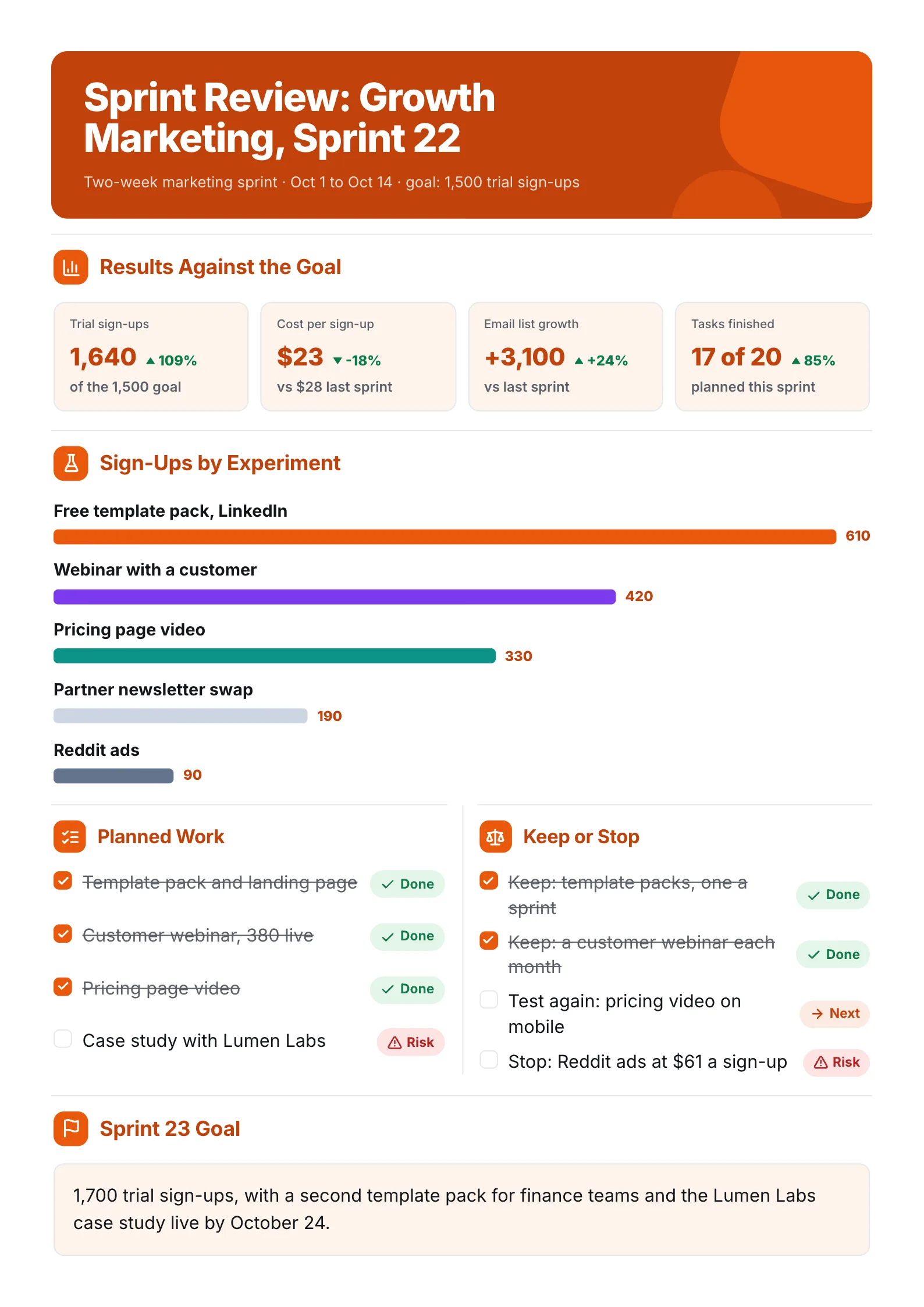
A keep or stop list can sound like a retro, but this one is about the product of the sprint, so it belongs in the review. This marketing sprint review shows 1,640 trial sign-ups against a 1,500 goal and ends with "Stop: Reddit ads at $61 a sign-up." Put a decision like that in front of your stakeholders.
A game studio that brings players to the review
 Edit this template
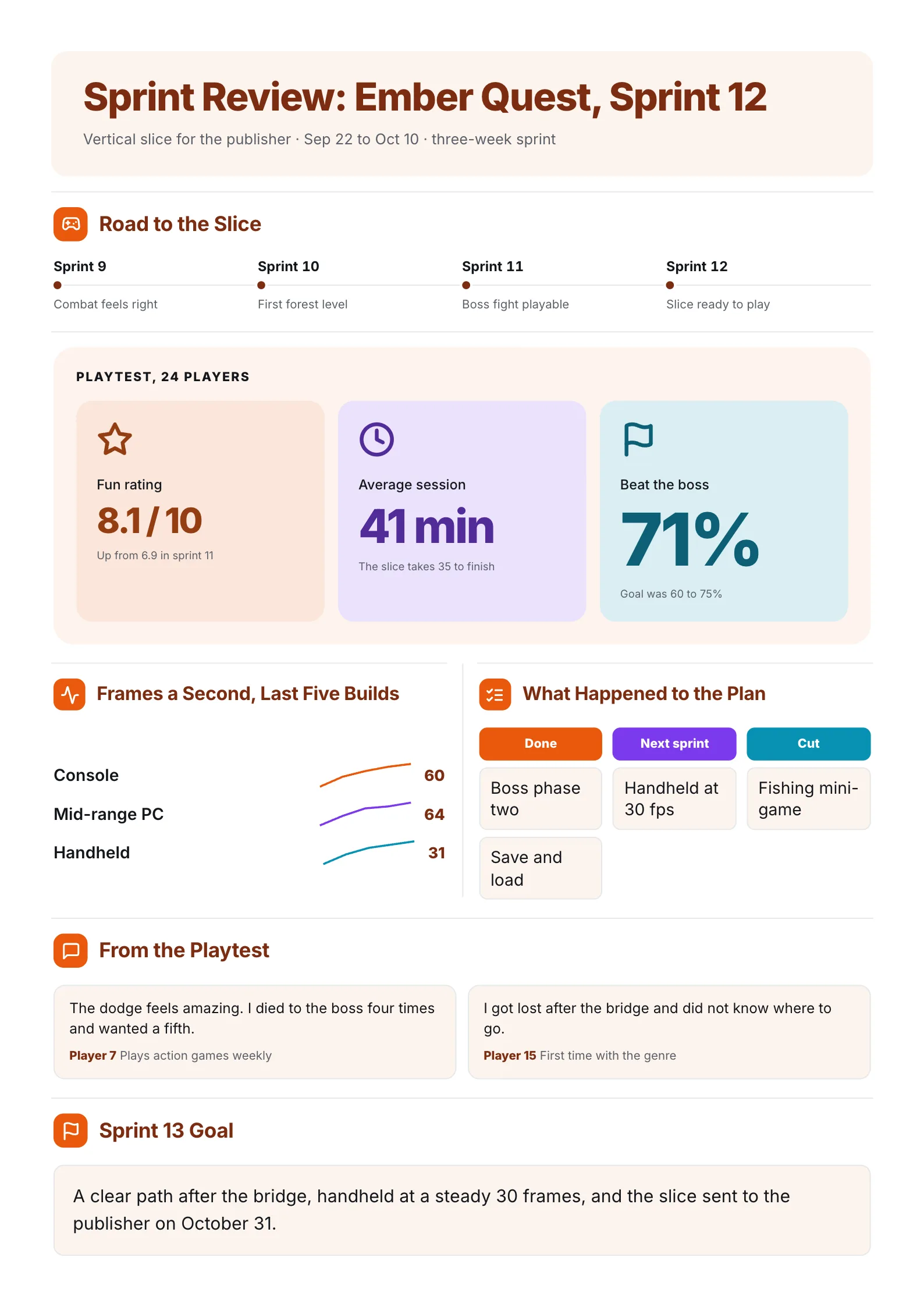
The guide asks what "has changed in their environment." For a game, that's what players feel. This game development sprint review quotes Player 15: "I got lost after the bridge and did not know where to go." The Sprint 13 goal opens with "A clear path after the bridge."
Four teams asking for one decision
 Edit this template
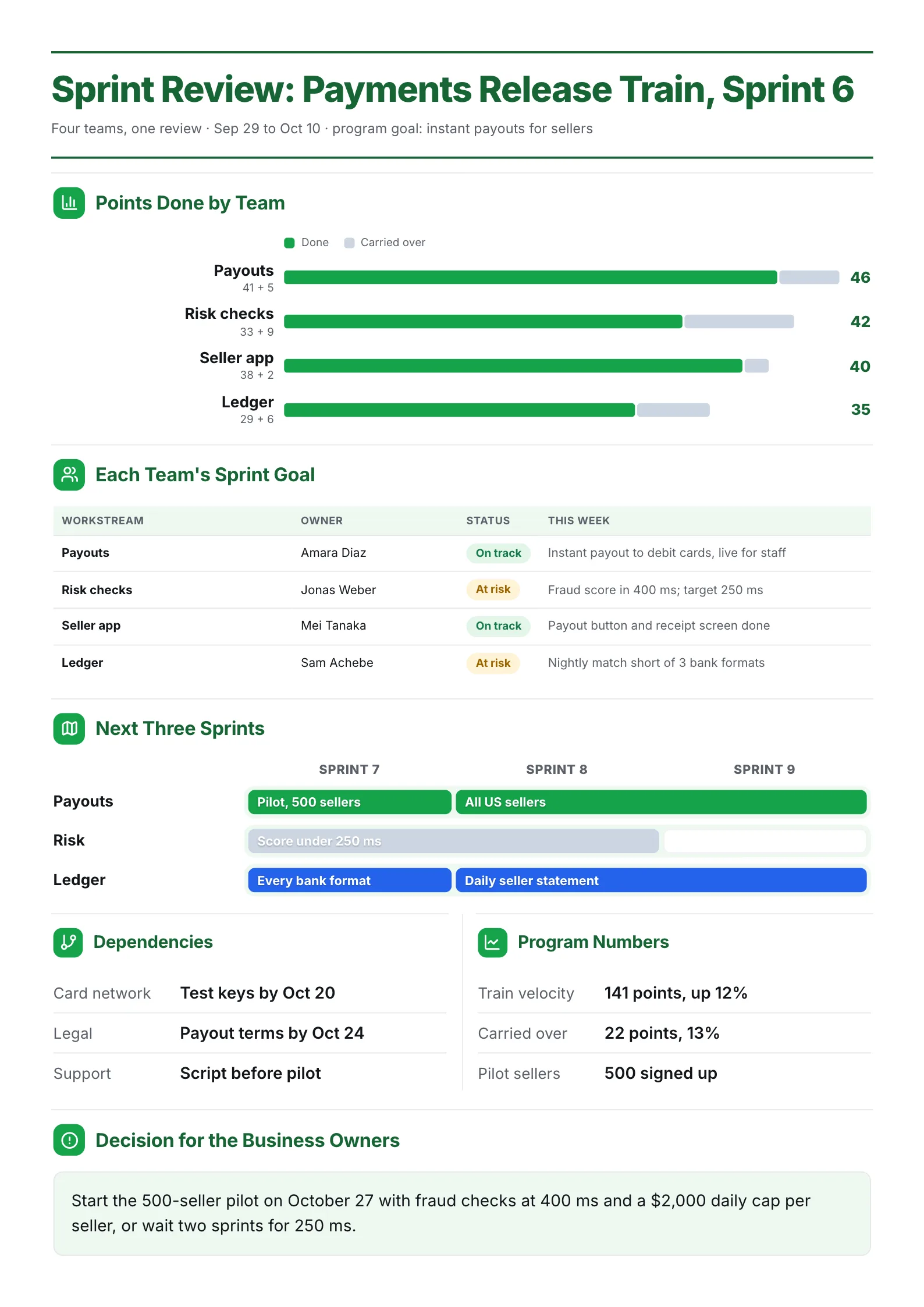
When several teams share a review, the stakeholders' choice can be the main event. This multi-team sprint review closes with a "Decision for the Business Owners": start a 500-seller pilot on October 27 with fraud checks at 400 ms, or wait two sprints for 250 ms. Hold a separate retro for each team afterward.
Make your sprint review
Start from a MakeOnepagers sprint review that looks like your team's work, then type in this sprint's numbers. Short on time? Drop your sprint notes, or a PDF of your board, into the free AI One-Pager generator, and it lays out the review for you to check and send. For what to ask stakeholders, see our sprint review questions, and for the steps from goal to decision, see our guide to writing a sprint review.
Frequently asked questions
Which comes first, the sprint review or the retrospective?
The review. The 2020 Scrum Guide calls the review "the second to last event of the Sprint" and says the retrospective "concludes the Sprint." Your team can bring what it learned at the review into the retro.
Can stakeholders come to the sprint retrospective?
The guide names only the Scrum Team for the retrospective. The Air Force playbook gives its Product Owner a voice for "the government customer" and notes a government representative "may have limited role during this event." Keep outside guests for the review.
How long should each one be for a two-week sprint?
The guide sets only the one-month caps, four hours and three hours, and says shorter sprints usually need less. Agree on a length as a team, write it in your calendar, and keep under the cap.
Who runs the sprint review?
No single person is named in the guide. The Scrum Master is accountable for events taking place within the timebox. In the Air Force playbook, the Scrum Master prepares and facilitates both meetings, and the Product Owner alone accepts stories as done.
Where do retrospective action items go?
The guide says the biggest improvements may go on the Sprint Backlog for the next sprint. The Air Force playbook gives each one an owner and checks them at the start of the next retrospective.




