Project Timeline Examples, Shortest to Longest, With What Real Schedules Did Next
Five project timeline examples from an 8-week launch to a 24-month study, each paired with a real published schedule and what happened to its dates.

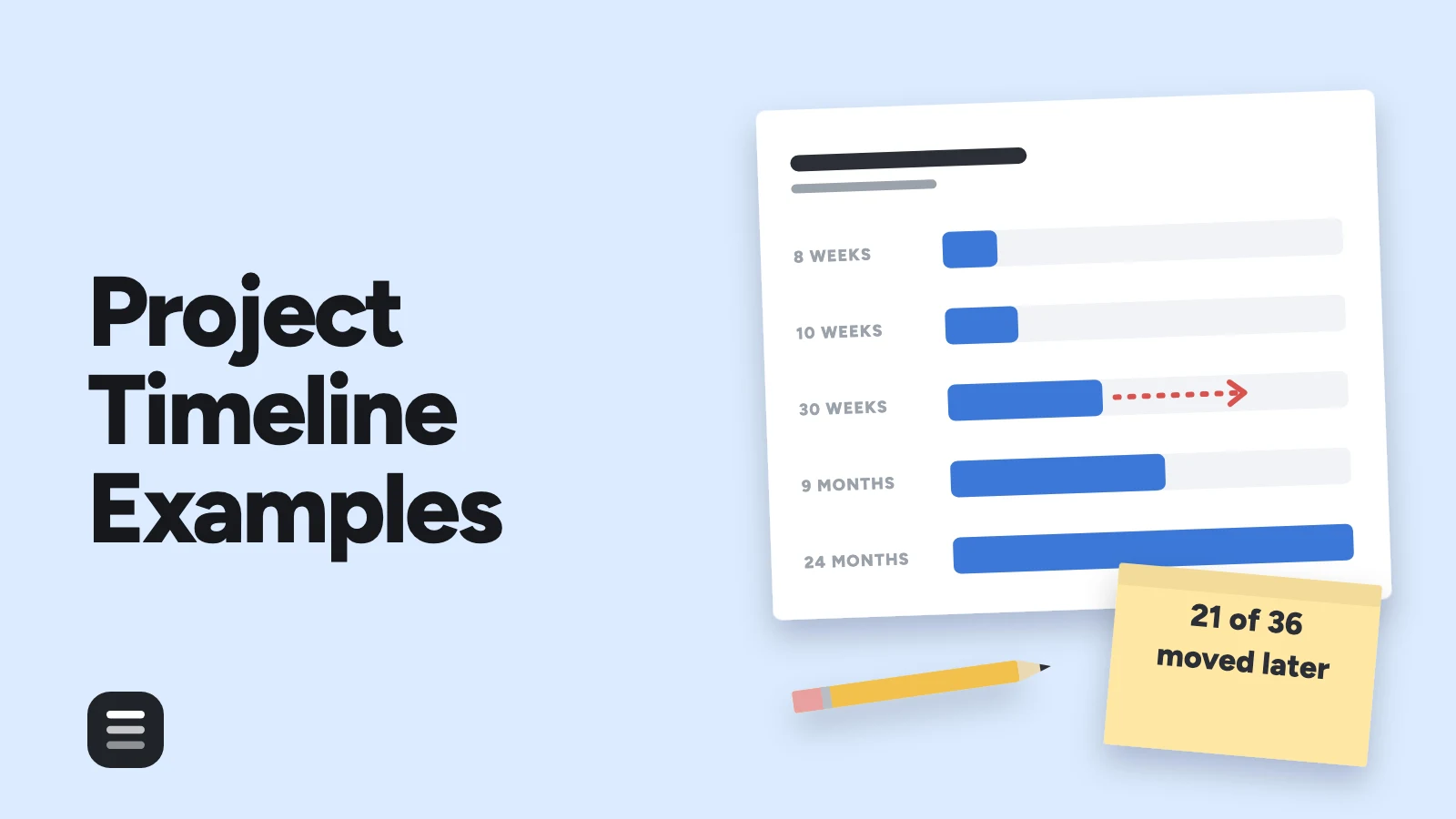
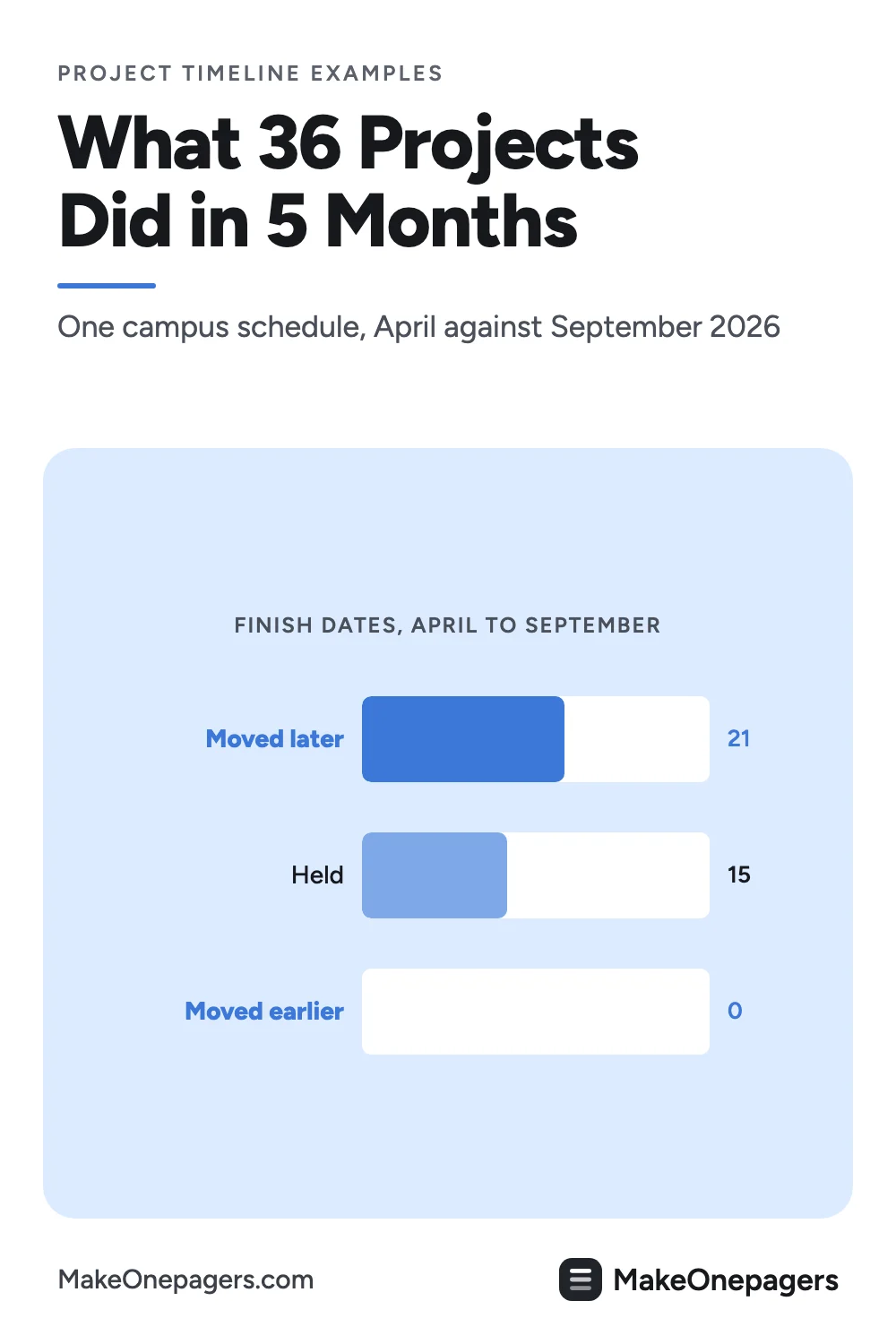
Of 36 campus building projects listed in both the April and September 2026 editions of one university's schedule, 21 pushed their finish date later. Fifteen held. Not one finished earlier than planned. So when you build a timeline, the dates you draw on day one are your best guess, and you'll be updating them. Start from a free one pager template.
One‑Pager examples
Real One-Pagers made with MakeOnepagers. Open any one to edit it as your own.
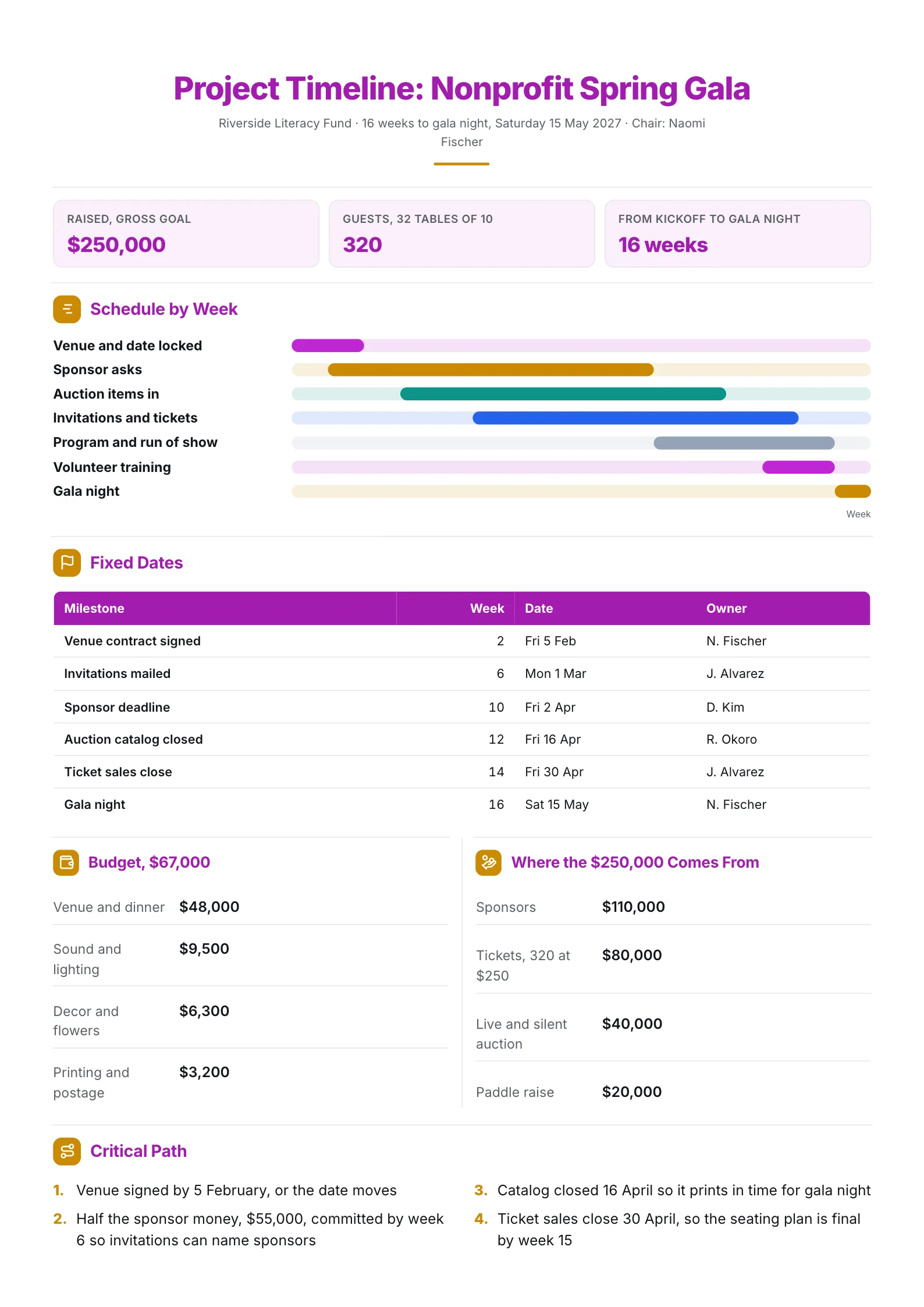 Project Timeline: Nonprofit Spring GalaEdit for free(opens in a new tab)
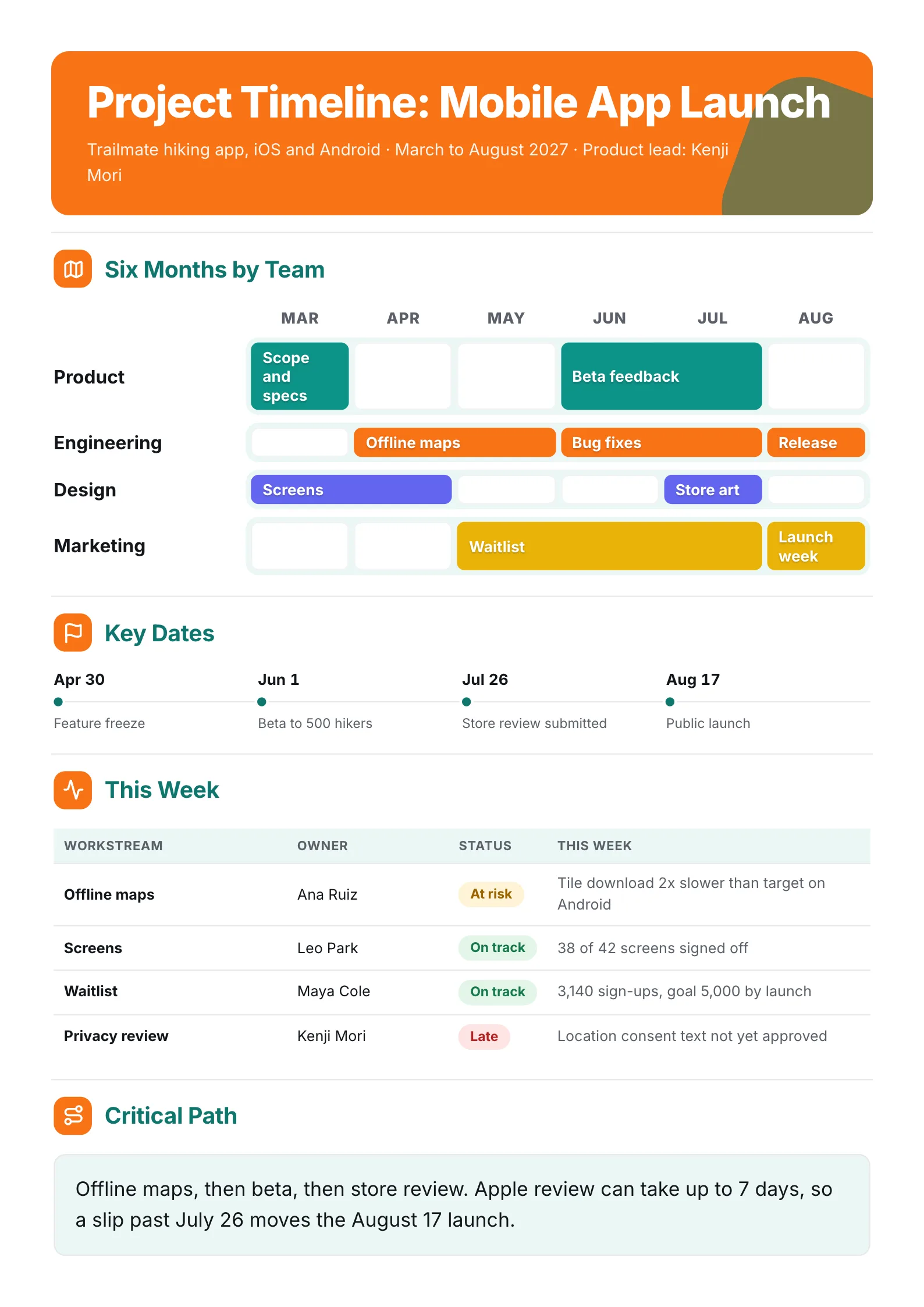 Project Timeline: Mobile App LaunchEdit for free(opens in a new tab)
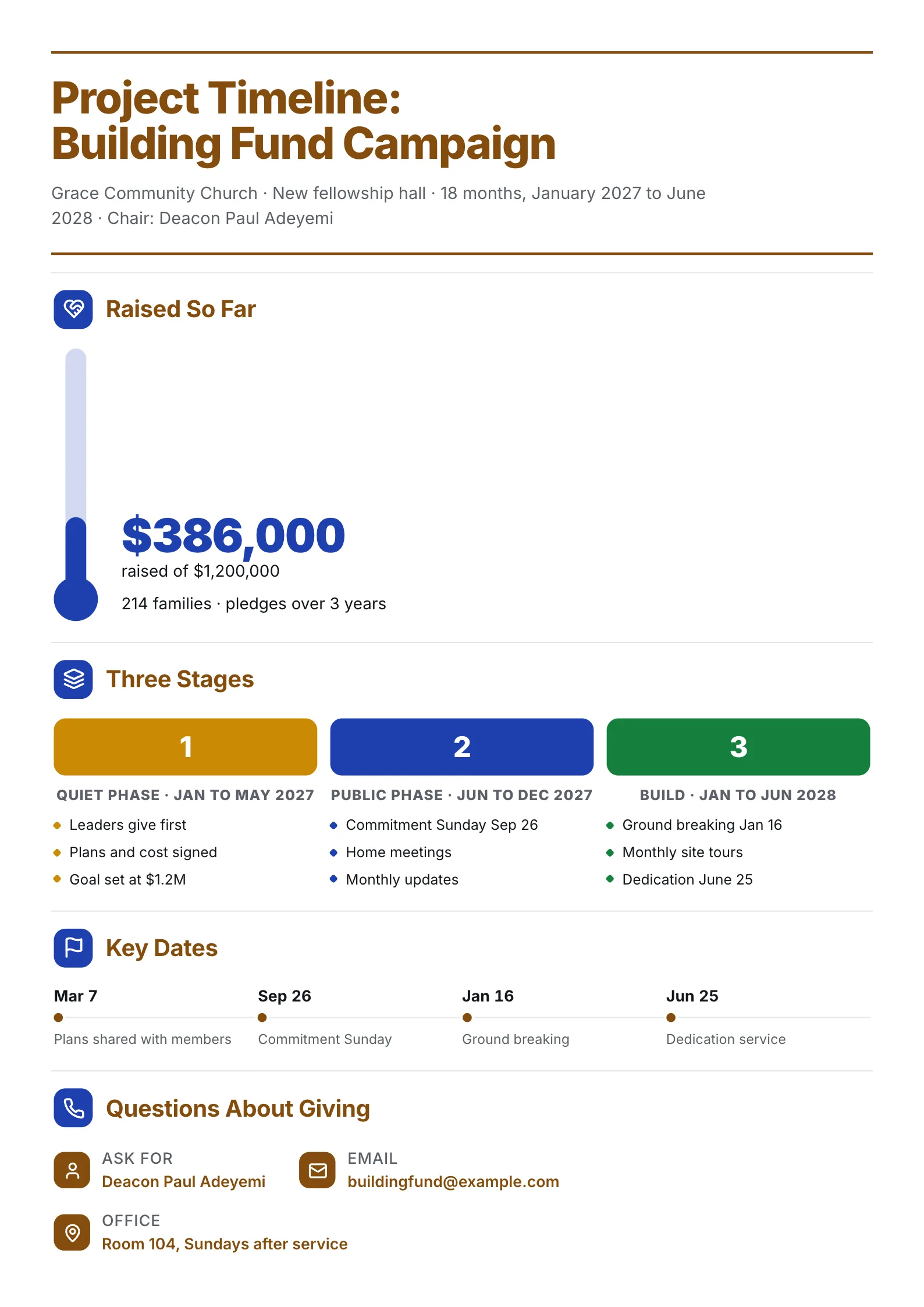 Project Timeline: Church Building Fund CampaignEdit for free(opens in a new tab)
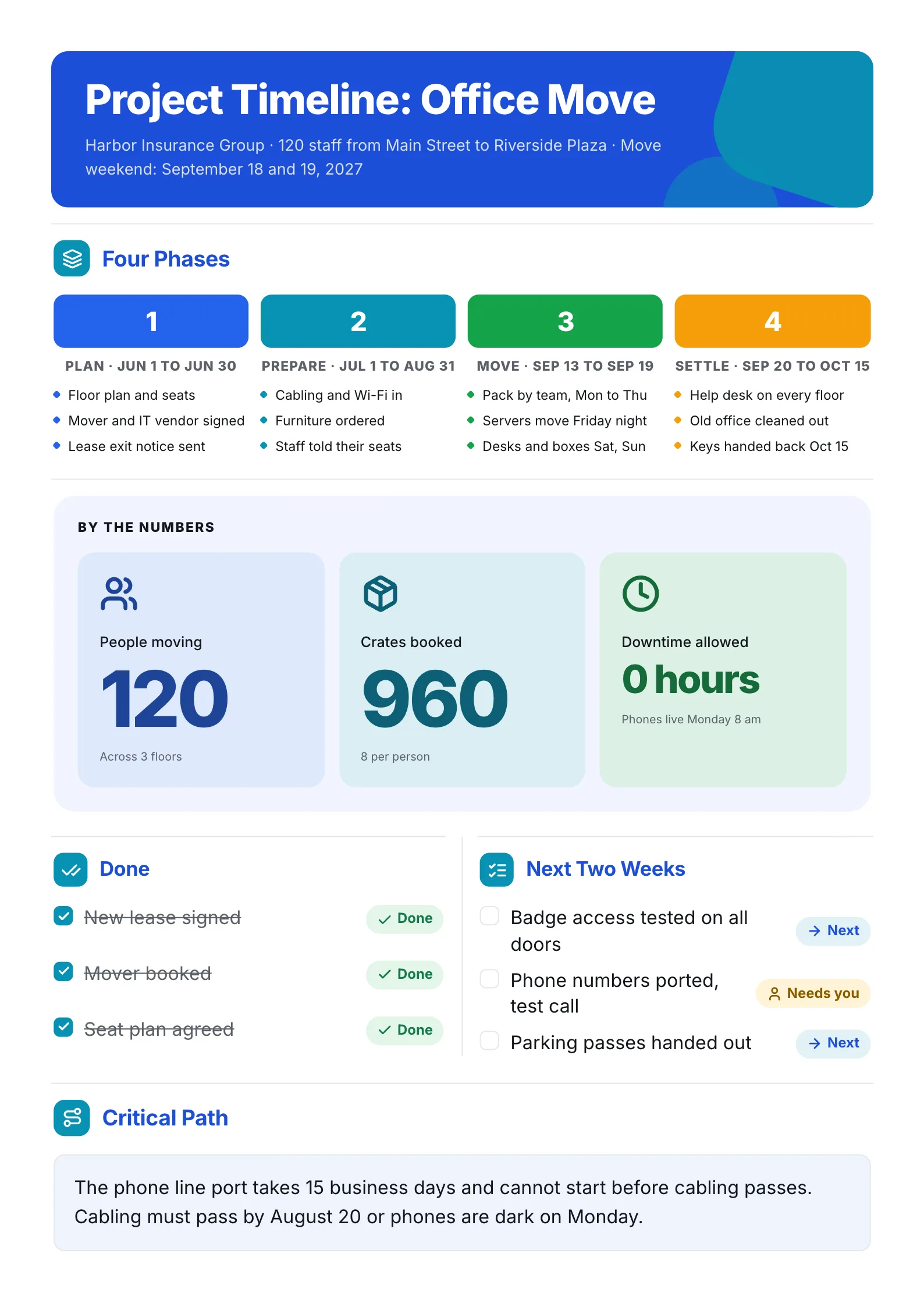 Project Timeline: Office MoveEdit for free(opens in a new tab)
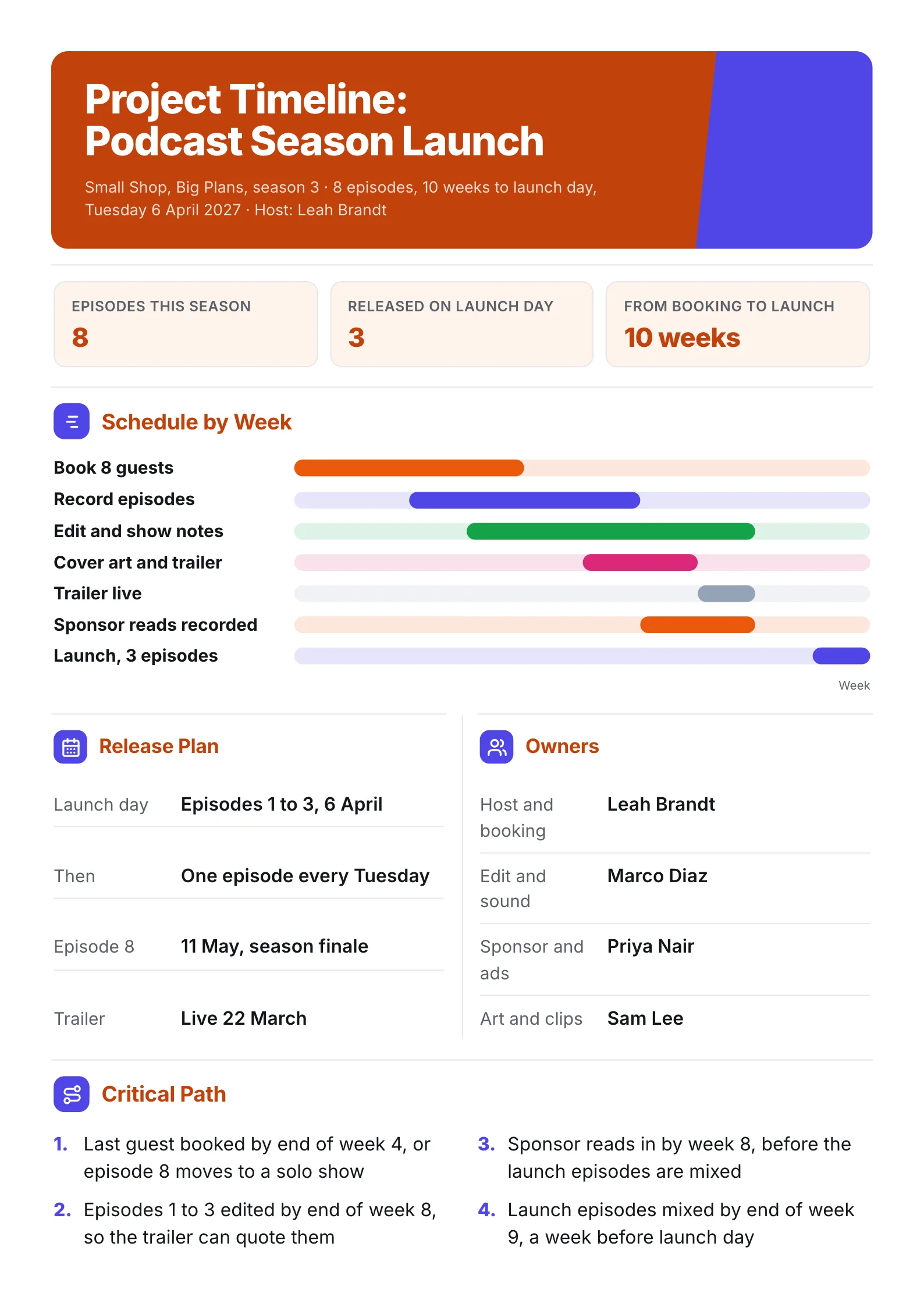 Project Timeline: Podcast Season LaunchEdit for free(opens in a new tab)
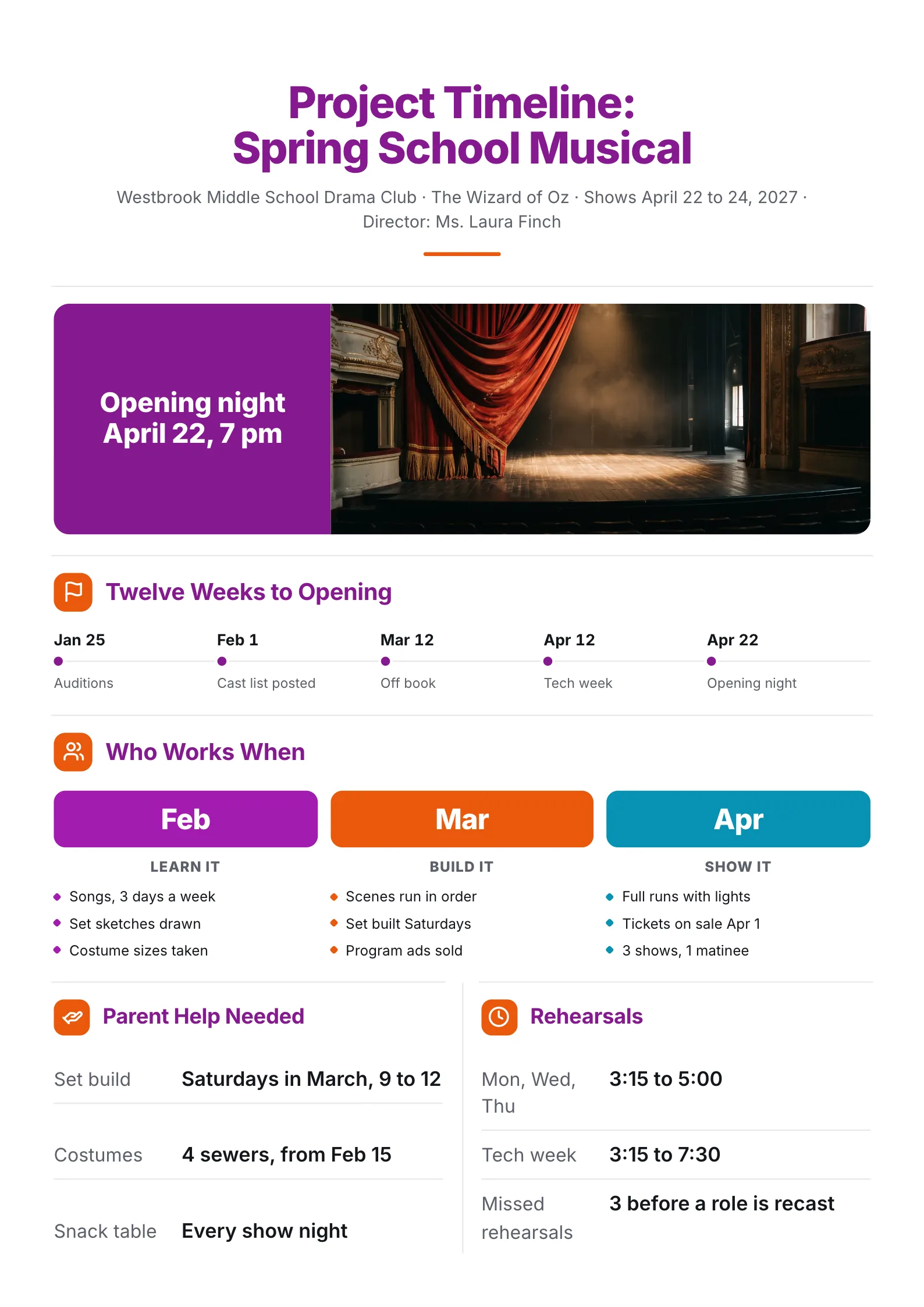 Project Timeline: Spring School MusicalEdit for free(opens in a new tab)
This list of project timeline examples climbs a ladder, from an 8-week launch to a 24-month research study. Each rung pairs one of our one-page timelines with a real published schedule of about the same length. The real one shows the risk that matters most at that length, and what happened to its dates.
For the real schedules, we read three editions of the UC Riverside Capital Projects Schedule, from April, May and September 2026. We also read two schedules from the Washington State Department of Transportation. One covers a single paving season. The other covers a freeway that will take years.
You can use this list in two ways. When you already know how long your project will run, jump to that rung and open its layout in MakeOnepagers. When you're still guessing, read the real schedules first, because they show you how far a date can travel once the work actually starts. Our guide on how to write a project timeline covers the build step by step. This post is about what the finished page looks like, and what its dates do next.
Rung 1: a project measured in weeks
 Edit this template
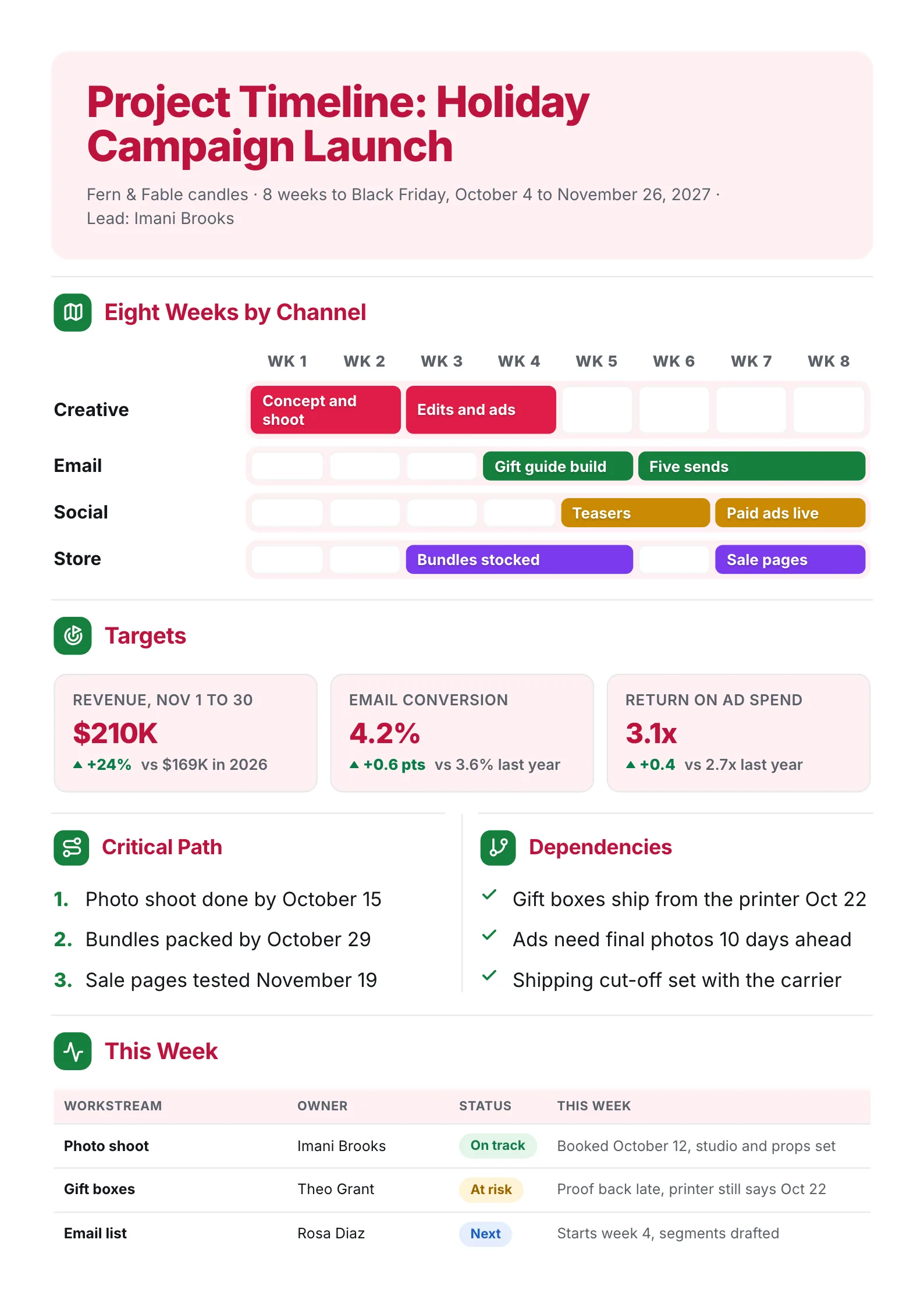
Fern & Fable gives itself 8 weeks to Black Friday and splits the work into four channel rows.
When your project only runs a few weeks, it lives or dies on one or two dates. This candle shop's campaign runs from October 4 to November 26, 2027. Its critical path has three lines, and the first is the photo shoot, done by October 15. Ads need final photos 10 days ahead, so a late shoot pushes everything behind it.
You'll also notice a small "This Week" box at the bottom. Each line has an owner and a colored status. The gift boxes sit at amber because the proof came back late. Your team will read this box every Monday, long after the bars stop changing.
What a real schedule shows. WSDOT planned a paving job on Interstate 90 in Grant County to run from July 21 to October 31, 2025, then pick up again in spring 2026. The first season comes to about 15 weeks.
Two details from that schedule are worth stealing. First, the working days change partway through. Crews work Monday through Thursday until Labor Day, then Monday through Friday until October 31. Second, the paving was "scheduled so it doesn't interfere" with a bridge deck project nearby. Your short project probably shares people, space or equipment with another one too, so write that clash down on your timeline before it surprises you.
Rung 2: a project of two to three months
 Edit this template
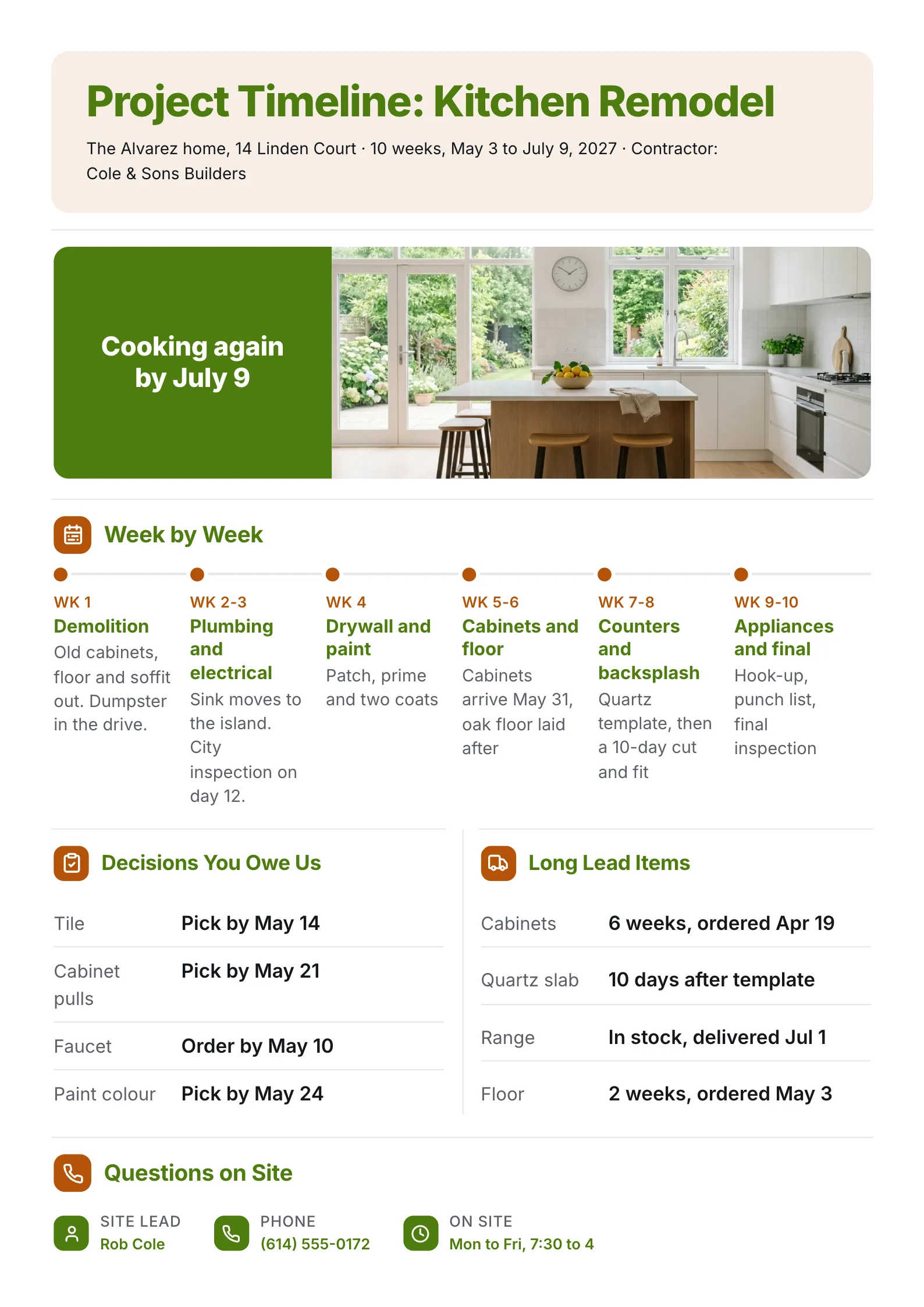
This remodel promises cooking again by July 9, and lists four choices the homeowner must make in May to keep it.
Ten weeks is long enough for you, the client, to become the delay without meaning to. This kitchen timeline handles it with a box called "Decisions You Owe Us." The faucet must be ordered by May 10, the tile picked by May 14, the pulls by May 21 and the paint color by May 24.
Right beside it sits a list of long lead items. Cabinets take 6 weeks and were ordered April 19. The quartz slab takes 10 days after the template. Put a box like this on any job where parts take weeks to arrive, so your client sees why an early choice matters.
What a real schedule shows. UC Riverside's schedule lists a repair job called Balcony Bill Repairs. It began in September 2024. The April 2026 edition had it finishing in March 2026, the May edition said May, and the September edition said August. The finish moved twice in five months.
Nothing on the schedule says why, so anyone reading it has to guess or call the office. One line of reason beside each moved date on your page saves that call.
Rung 3: a project of about half a year
 Edit this template
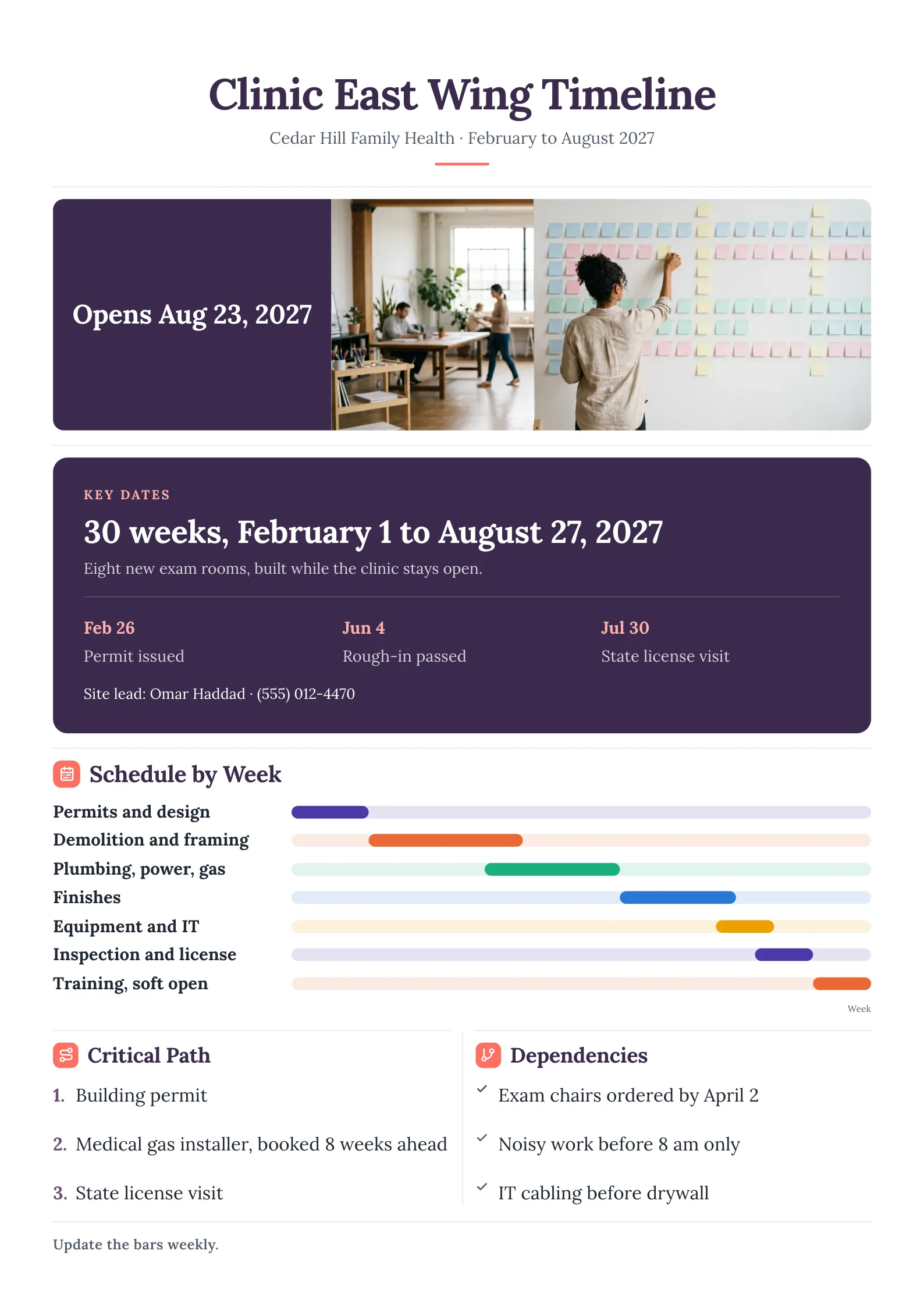
Cedar Hill keeps its clinic open for all 30 weeks of building, and the dependencies list even sets the hours for noisy work.
At six months, you need a few fixed dates that your team, your vendors and your boss can all plan around. This clinic timeline puts three of them at the top. The permit is issued February 26. Rough-in passes June 4. The state license visit lands July 30. The wing opens August 23, 2027.
The dependencies list is where you see real-world thinking. Exam chairs must be ordered by April 2. IT cabling goes in before drywall. Noisy work happens before 8 am only, because patients are next door. The footer gives you one instruction: "Update the bars weekly." A timeline you update every Friday shows a slip while you can still fix it.
What a real schedule shows. The HUB Roof Replacement at UC Riverside started in December 2023. In April 2026 it was set to finish in July 2026. One month later, in the May edition, that became December 2026. In September it was still in bidding.
The schedule gives no reason, though the job sat in bidding from May to September, a phase that deserves its own bar and its own date on your timeline.
Rung 4: a project of most of a year
 Edit this template
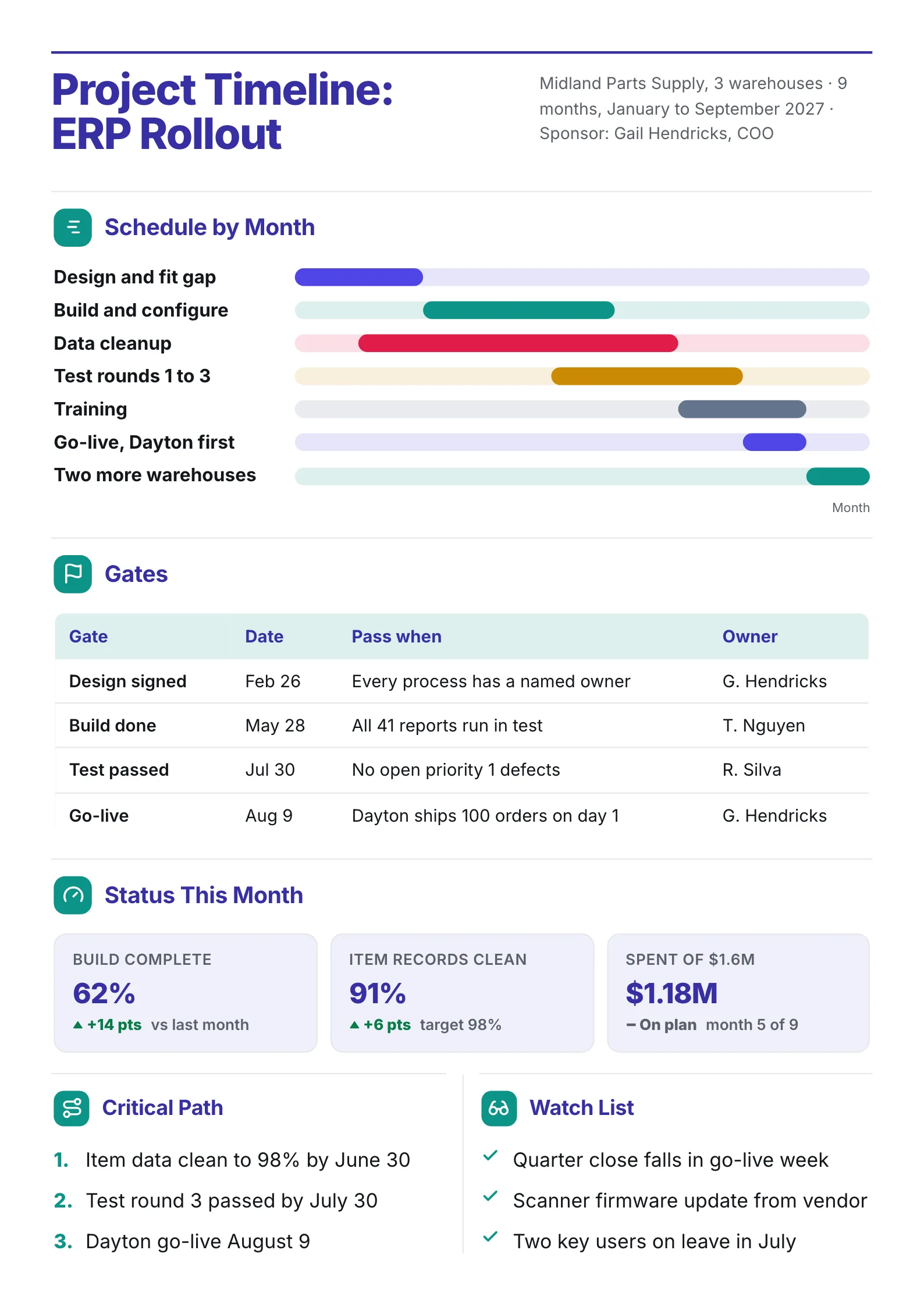
Midland Parts Supply sets four gates over 9 months, and each one says exactly what has to be true to pass.
This software rollout runs from January to September 2027. The smartest part is the gates table. Each gate has a date, an owner and a test. "Build done" on May 28 means all 41 reports run in test. "Go-live" on August 9 means the Dayton warehouse ships 100 orders on day one.
A status box shows where things stand in month 5 of 9. The build is 62% complete. Item records are 91% clean against a 98% target. Spending sits at $1.18M of $1.6M, and the box says it's on plan. Your sponsor can read the whole project in that box without opening a single spreadsheet. Below it, a watch list names three things that could hurt the dates, like a quarter close that falls in go-live week. You'll want your own version of that list on any project longer than a few months.
What a real schedule shows. UC Riverside's Spieth MEP project, a building systems upgrade, started in February 2022. In April 2026 it was due in December 2026. By September the date read December 2027, a full year later.
The campus Undergraduate Teaching & Learning Facility shows a gentler slip. It started in February 2019. Its finish date moved from July 2026 to October 2026, and by September it had reached close-out. A three-month slip on a project that began seven years earlier is small, and it landed right at the end.
Rung 5: a project of two years or more
 Edit this template
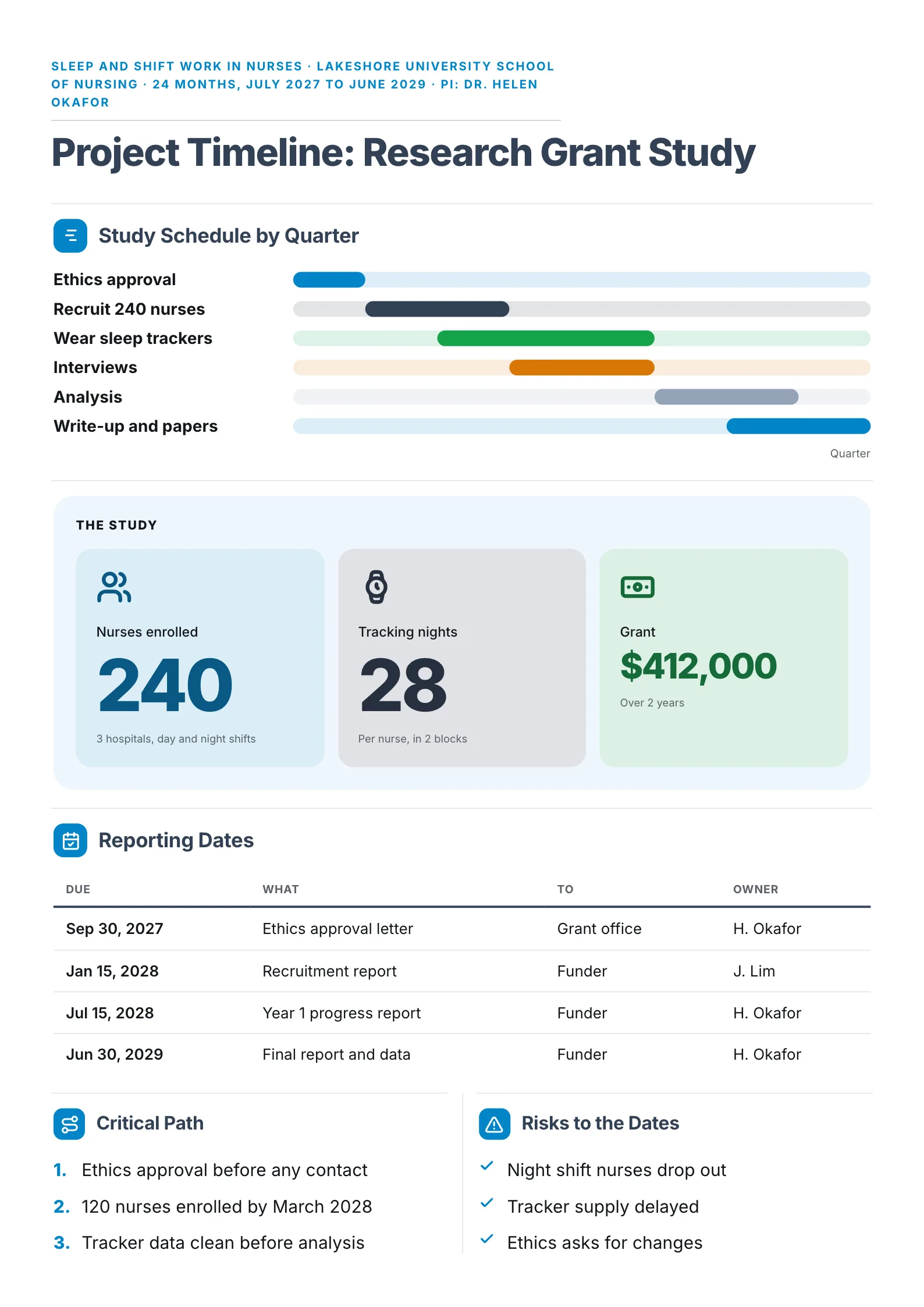
Lakeshore's 24-month nursing study is plotted in quarters, with four reporting dates, three of them to the funder.
At two years, nobody on your team can hold the whole plan in their head, and that includes you. This grant timeline switches to quarters. It names the study's big numbers, 240 nurses at 3 hospitals and a $412,000 grant. Then it lists four reporting dates, from the ethics letter on September 30, 2027 to the final report on June 30, 2029.
There's also a box called "Risks to the Dates." Night shift nurses might drop out. Tracker supply might run late. Ethics might ask for changes. Naming those risks on day one makes your later updates much easier to explain, because your funder has already seen them coming.
What a real schedule shows. WSDOT's page for the US 395 North Spokane Corridor connection to I-90 gives a timeline of "Summer 2027 - Early 2030s." The project is not started, with $305 million in funding. In January 2024 the state chose to split the work into three projects. The first is expected to go out to bid in 2027, with building in late 2027 and 2028.
Read further down the same page and you'll find a different date. It says work will continue until the corridor is complete "in 2029." A page that gets edited for years can keep an old date. When your timeline gets a new end date, search the whole document for the old one.
How exact each date should be
The public schedules we read get less exact as the work gets longer, and you can copy that pattern on your own page.
| Schedule | Length | How the dates are written |
|---|---|---|
| South Dakota DOT, S.D. Highway 79 bridge | about 7 months | Starts Monday, March 17, 2025. Done Oct. 31, 2025. |
| Connecticut DOT, Route 200 bridge over I-395 | about 13 months | Starts Thursday, October 8, 2026. Done Friday, November 19, 2027. |
| Minnesota DOT, Blatnik Bridge | about 6 years | Phased construction "fall of 2026-32" |
| WSDOT, US 395 connection to I-90 | years | "Summer 2027 - Early 2030s" |
Source: SDDOT release, CTDOT advisory, MnDOT Blatnik Bridge FAQ and the WSDOT page above, read October 30, 2026.
The two shorter bridge jobs give you the start and the finish down to the day. Even so, Connecticut's advisory switches to a season for the one piece it hasn't planned in detail. The demolition is "tentative to start in spring through fall 2027," and the state promises another release closer to the date. Minnesota's FAQ uses years and seasons throughout and adds a plain warning, "This timeline could change once a contractor is hired this summer."
Give an exact day to work that's booked, with your people and money behind it. For work that isn't, write the month or season plus the latest date you'd accept, and name the thing that will firm it up, like a contractor hired or a grant awarded. The kitchen timeline above does the first part well, with a dated deadline for every choice the homeowner owes.
What 36 projects did between April and September
Now zoom out from single projects. We matched every UC Riverside project that showed a finish date in both the April and September 2026 editions. There were 36.
| Between April and September 2026 | Projects |
|---|---|
| Finish date moved later | 21 |
| Finish date held | 15 |
| Finish date moved earlier | 0 |
Source: our count of the UC Riverside Capital Projects Schedule, April and September 2026 editions, read October 30, 2026.
More than half slipped in five months, and none got faster, which is worth knowing before you promise your own finish date. The 21 slips ran from 1 month to 12. Eleven of them moved four months or less, and ten moved five months or more. Only two went past six months, Spieth MEP by a full year and a door job called SOM Ed2 Additional Doors by seven. Projects that left the list between editions aren't in this count, so it shows only the work still underway in September.
UC Riverside isn't unusual here. The same University of California report our how-to opens on, the annual report on major capital projects for 2016-17, found that 53% of the 93 major capital projects finished that year ran more than 90 days behind their original approved schedule. The two years before were worse, at 66% and 58%. The report also lists the usual reasons, and you can borrow them for your own "why" line. Scope changed, funding came late, the design had to be redone and re-bid to stay on budget, a contractor fell short, or crews hit hidden conditions and bad weather. It names slow work to define the scope at the start, and changes to it later, as the leading causes.
So when your timeline runs longer than a few months, plan for at least one date to move. You don't need fancy software for that. Between them, the five one-page timelines in this post use four tools on a single sheet:
- They name a critical path, so you know which slip matters.
- They list dependencies with dates, like chairs ordered by April 2.
- They give each phase an owner, so someone notices when it drifts.
- They keep a short status or risk box you can update in minutes.
Our project timeline template post sets out the critical path, the dependencies and an owner for each phase in tables you can copy.
Print the edition date on your timeline
UC Riverside's schedule taught us one more thing, almost by accident. We could only count those 21 slips because each edition was saved and dated, so April's promise sat right next to September's. If your timeline gets overwritten each time, it can't show anyone what moved.
So put a line at the top of yours that reads "Updated" with today's date. Each time a date moves, change it, save the old copy and add one line saying why. Editions do for your whole page what a "First date" column does for one row. Six months from now, you and your sponsor will see the whole history in a few files. When someone asks why the finish moved, your answer is already written down, with a date beside it.
Save today's version of your page as edition one, before anything on it moves. In five months, 21 of UC Riverside's 36 finish dates moved, and the only reason anyone can show it is that April's file was kept.




