Content Calendar vs Editorial Calendar: 6 Real Ones Compared
Content calendar vs editorial calendar, compared on 6 published calendars: one plans themes by month or issue, the other plans each post with its date.

An editorial calendar plans what you'll talk about, one theme per month or per issue. A content calendar plans each post: the day it goes out, the channel, the caption, the link and the picture. We read 6 calendars that real organizations publish, 3 of each kind. None of the 3 editorial calendars has a column for a post's date, channel, caption or link. All 3 content calendars have all four. That's the clearest line between them, and you can see it in the columns before you read a word. Start from a free one pager template.
One‑Pager examples
Real One-Pagers made with MakeOnepagers. Open any one to edit it as your own.
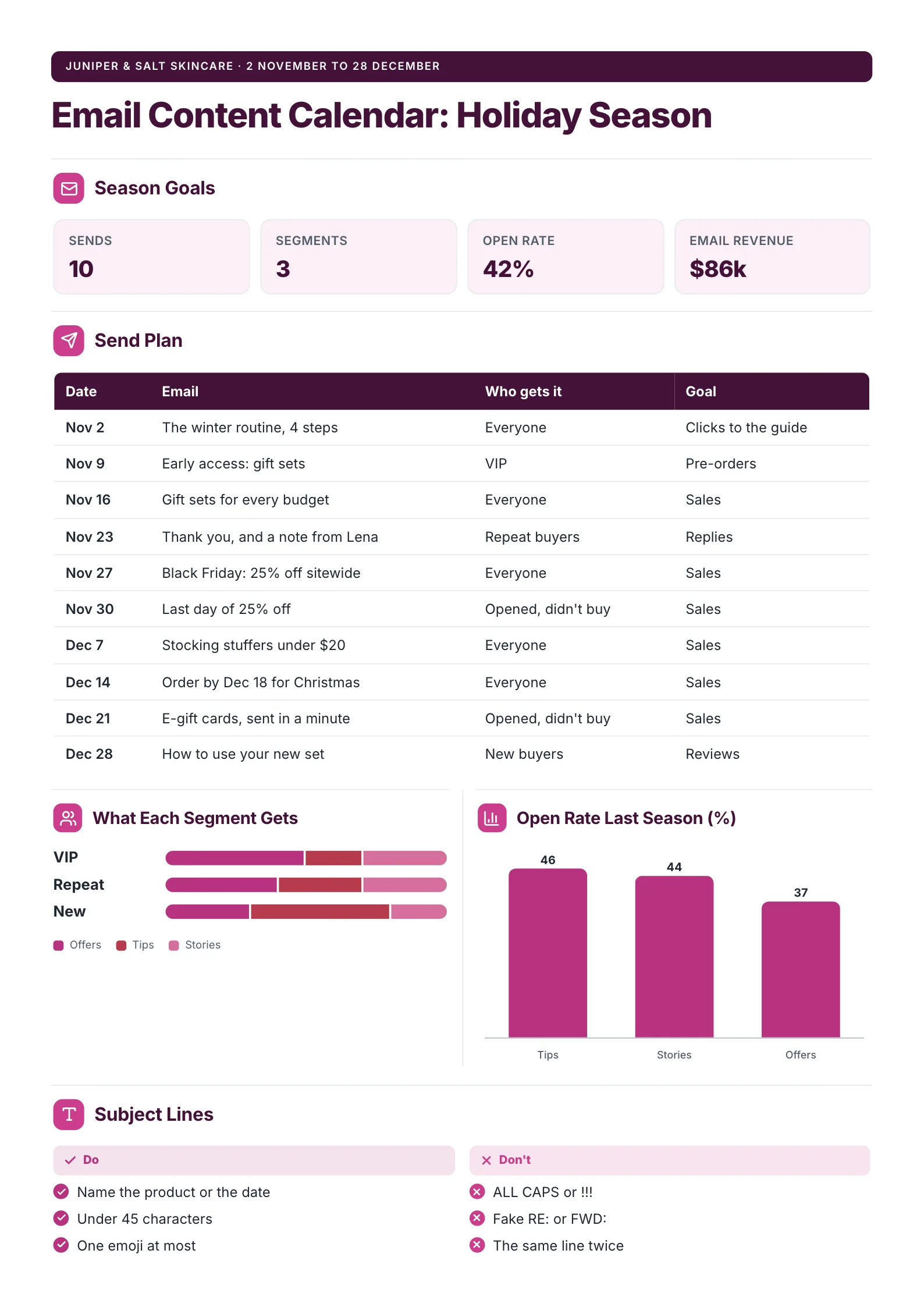 Email Content CalendarEdit for free(opens in a new tab)
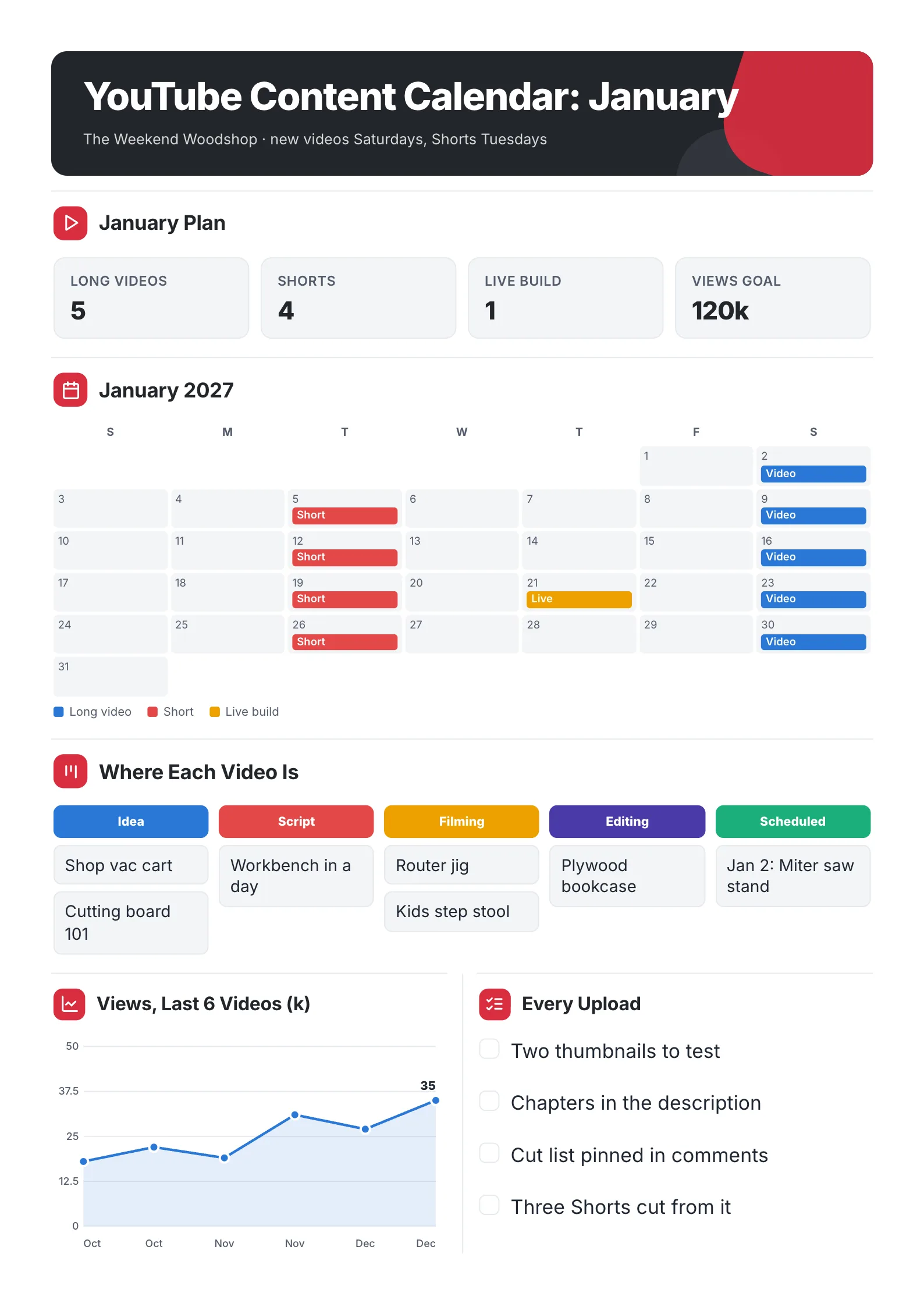 YouTube Content CalendarEdit for free(opens in a new tab)
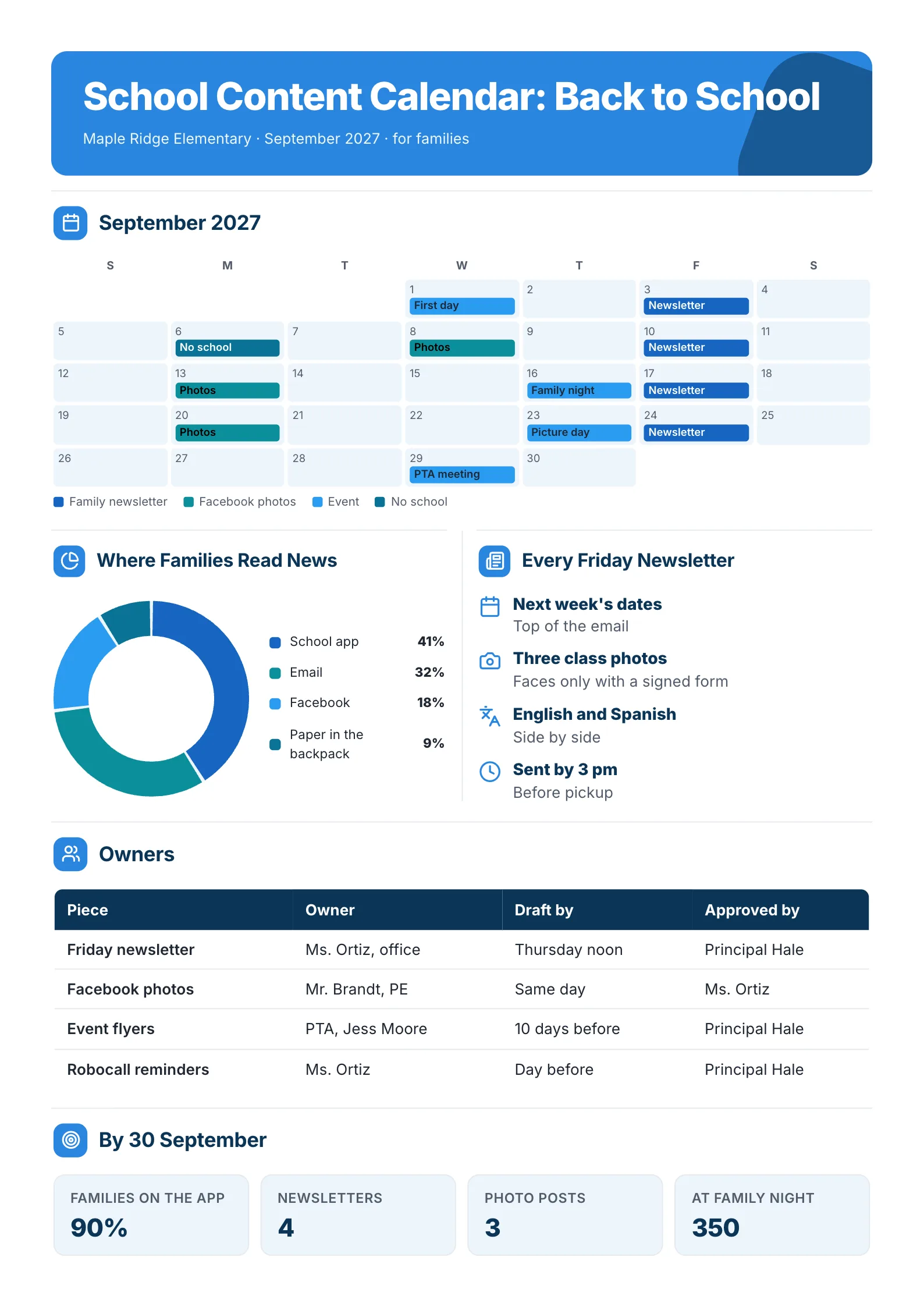 School Content CalendarEdit for free(opens in a new tab)
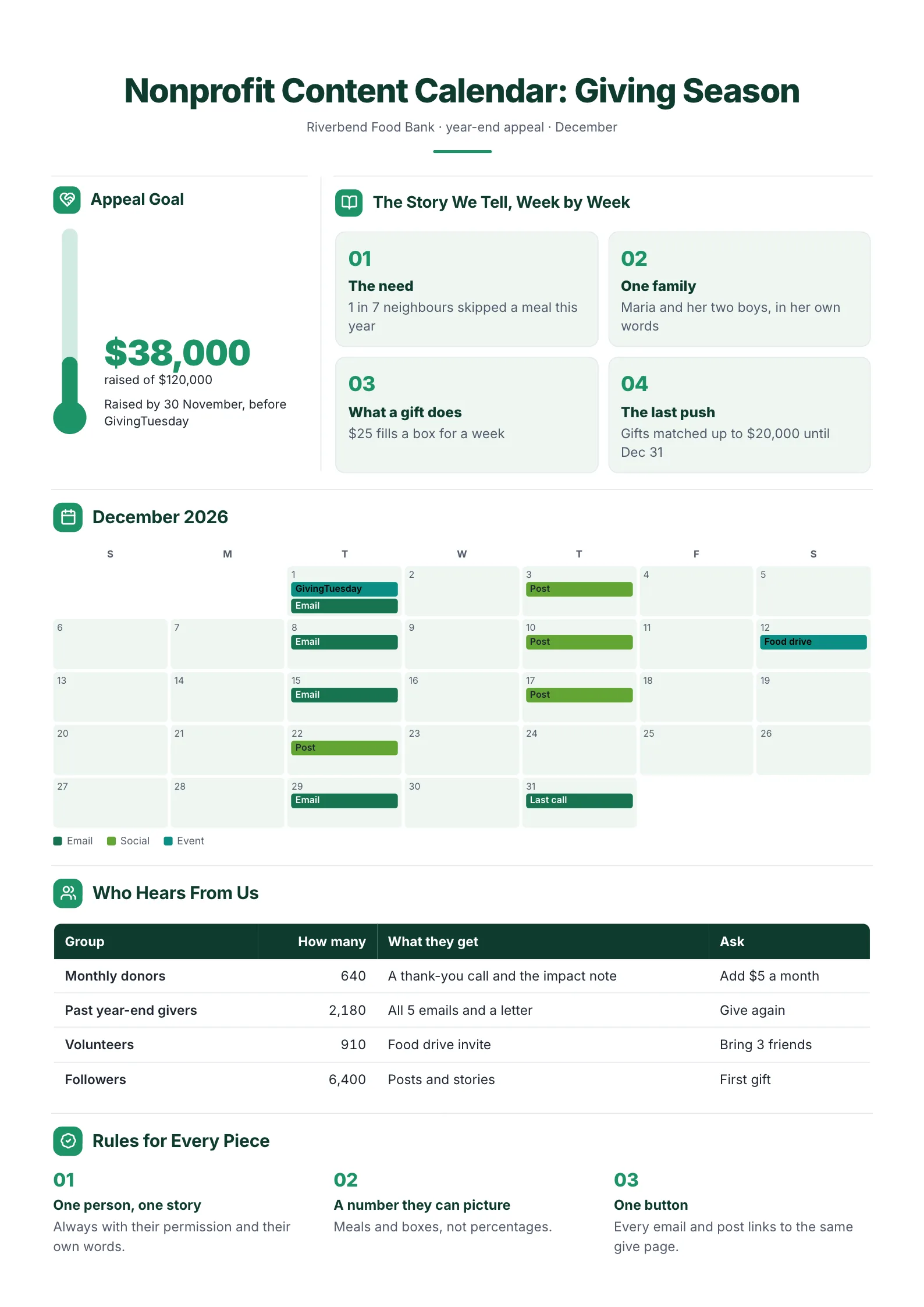 Nonprofit Content CalendarEdit for free(opens in a new tab)
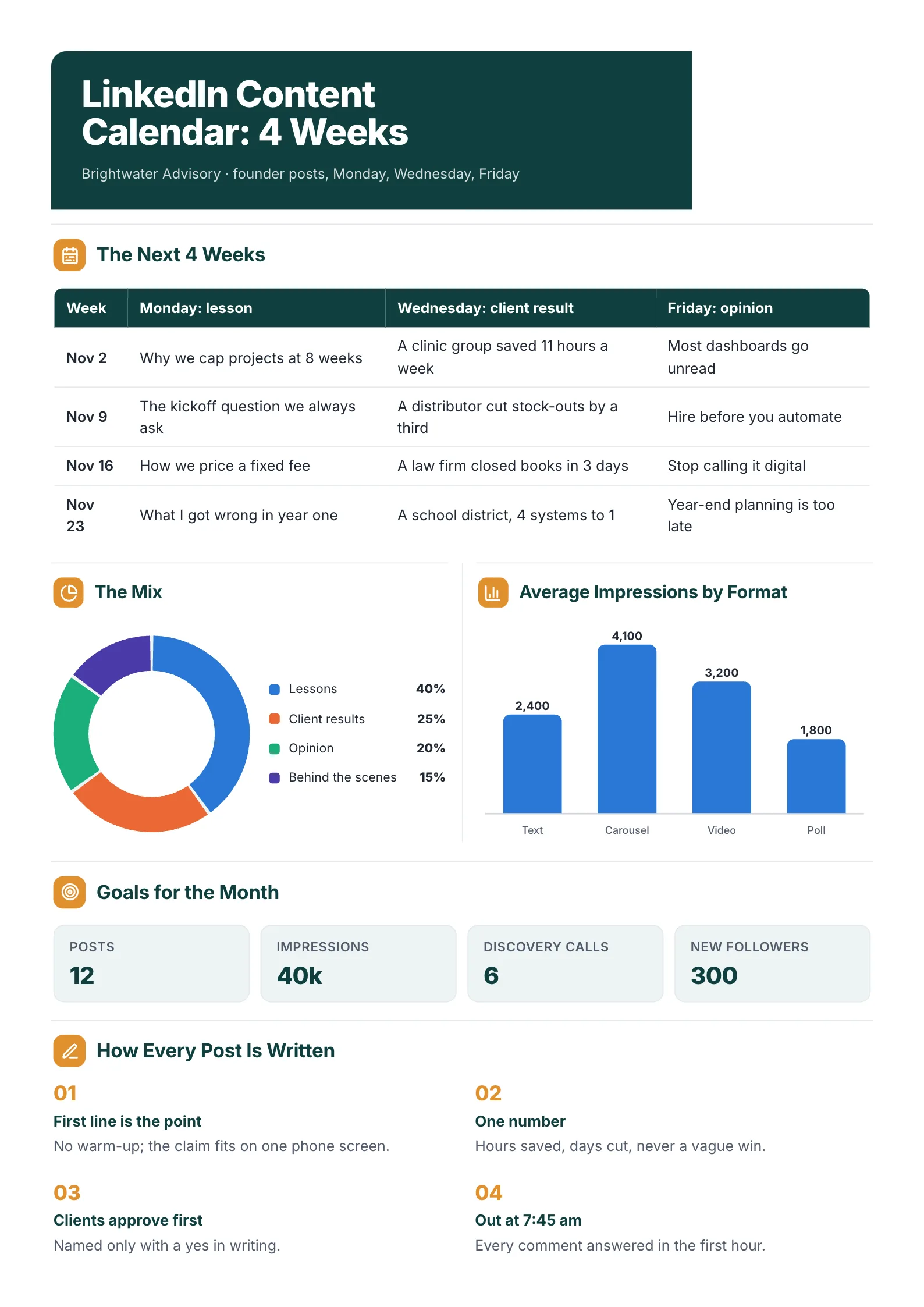 LinkedIn Content CalendarEdit for free(opens in a new tab)
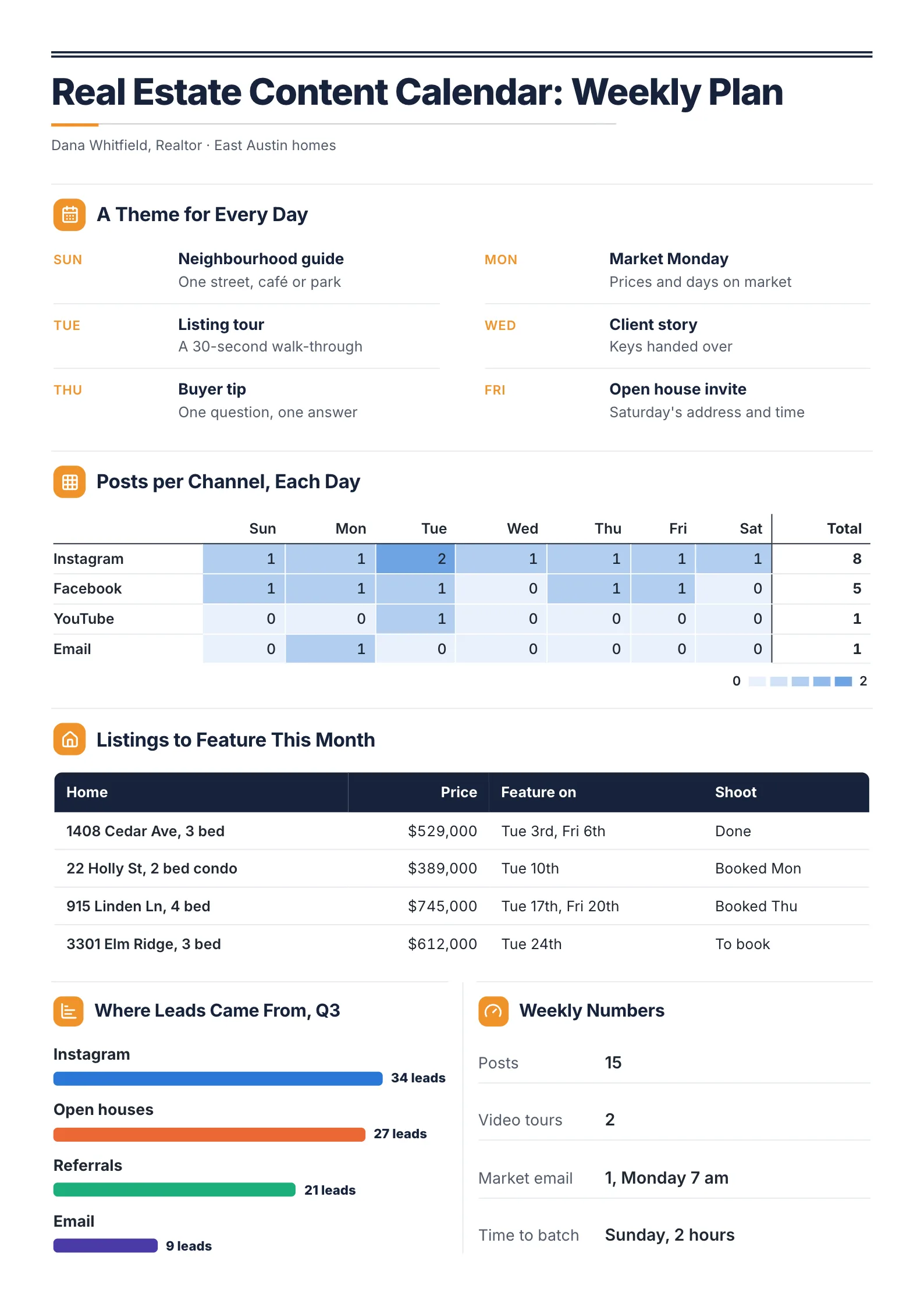 Real Estate Content CalendarEdit for free(opens in a new tab)
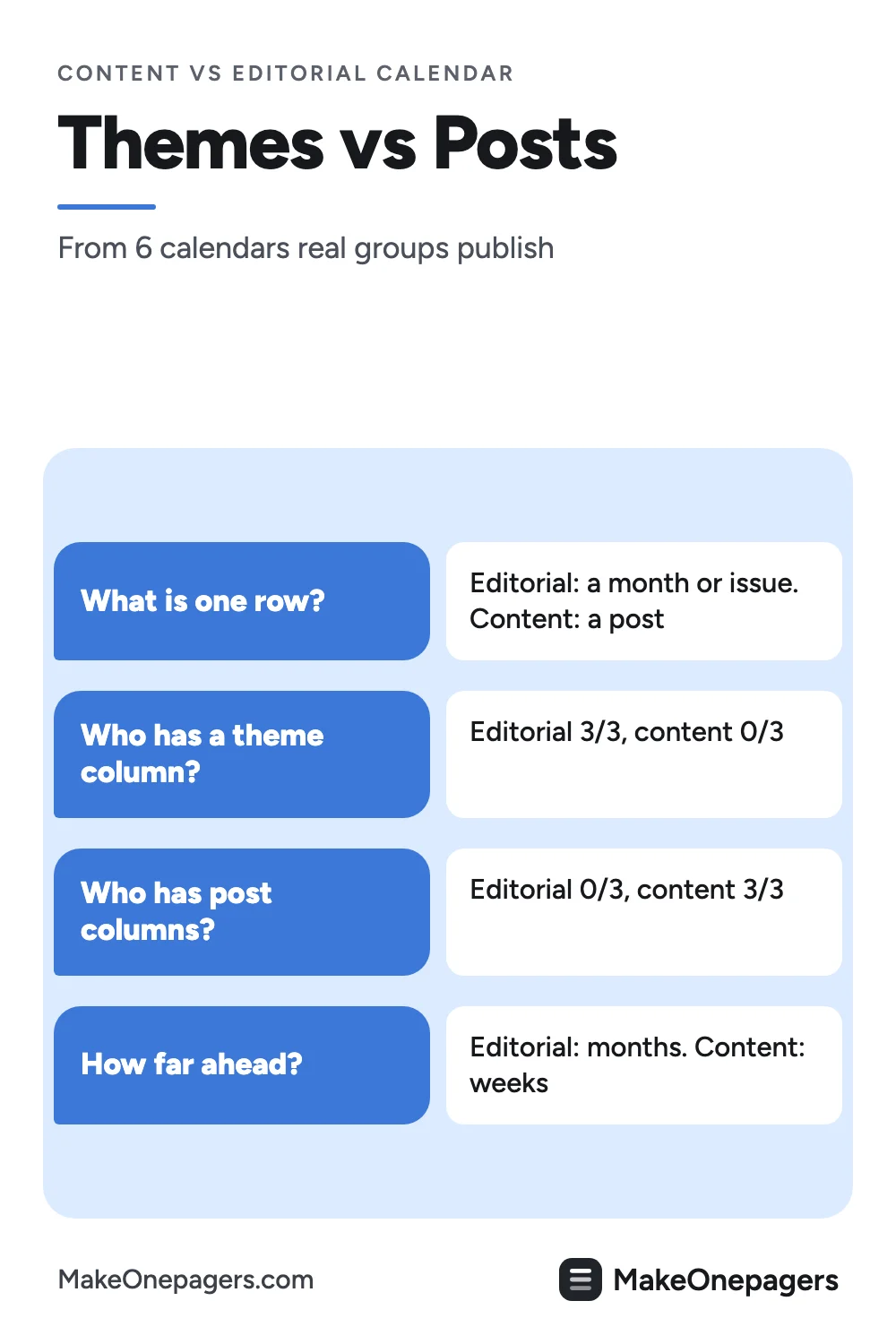
| Editorial calendar | Content calendar | |
|---|---|---|
| One row is | A month or an issue | One post |
| Main columns | Theme, focus, deadlines | Date, channel, caption, link, image |
| Looks ahead | A season or a year | A week to a month |
| Mostly read by | Editors, writers, partners, advertisers | The person who posts |
| Changes | A few times a year | Every week |
Where these 6 calendars come from
We read each one at the source on November 5, 2026.
Editorial calendars
- University of Wisconsin-Madison, Office of Strategic Communication: one theme a month for the whole campus.
- Parks & Recreation magazine, from the National Recreation and Park Association (NRPA): 12 issues for 2026.
- Campus Dining Today, from the National Association of College & University Food Services (NACUFS): 4 issues with their deadlines.
Content calendars
- CDC's Healthy Youth toolkit: a blank "Social Media Calendar" with 12 numbered post rows.
- Model Systems Knowledge Translation Center (MSKTC), a federally funded rehabilitation research center: a one-month sheet for social posts.
- Council for Exceptional Children (CEC): a handout with its "Content Calendar Basics" and a sample spreadsheet.
Column by column
Here's what each kind tracks, counted across the 6 calendars.
| Column | Editorial calendars (of 3) | Content calendars (of 3) |
|---|---|---|
| A theme or focus | 3 | 0 |
| Production deadlines | 2 | 0 |
| Post date and time | 0 | 3 |
| Channel or platform | 0 | 3 |
| Caption or post text | 0 | 3 |
| Link | 0 | 3 |
| Image or media | 0 | 2 |
| Status | 0 | 1 |
In our count, the two kinds share none of these columns. That's why you can't swap one for the other. An editorial calendar can't tell your social person what to post on Tuesday. A content calendar can't tell a writer what the March issue is about.
What an editorial calendar holds
Wisconsin's calendar has 5 columns, running from Month and Theme to Notable campus activities. November 2026 is "How UW Shapes the World." Its notable activities include "National First-generation College Student Day (Nov. 8)" and "Veterans Day (Nov. 11) #UWVeterans." The page says why it bothers. "By sharing similar content at the same time, we'll enhance the impact of our individual stories while contributing to a collective narrative." It names dates and hashtags, but it never says which account posts what, or when.
Parks & Recreation has 8 columns, from Issue and Editorial Focus to Space Close and Art Deadline. The July issue is "Park and Recreation Month." Half of its 8 columns serve advertisers, from sponsorships and underwriting to when ad space and art are due.
Campus Dining Today gives each of its 4 issues a theme, a mailing date and up to 4 deadlines. Spring 2026 is "Building Resilient Partnerships," and it mails March 2, 2026. Writers send article abstracts by November 10, 2025, and finished articles by December 15, 2025.
What a content calendar holds
CDC's sheet has just 5 columns: No., Platform, "Post text and URL or link," "Date to post" and "Image/photo to use with post." There's no theme or owner column. Use it when you only need to know what goes up and when.
MSKTC's sheet has 6 columns: Day/time, Goal/call to action, Message/caption, Media, Link and Channel. Its example shows how exact a row should be: "Monday, December 2 at 11 a.m." It's the only one of the three with a goal for each post.
CEC's list has 7, from Date and Time to Links and Status. Its sample has three weekly posts in August 2024, like an Instagram image for "Join our Book club!" marked Scheduled. It's the only one that tracks status, from planned to published.
How far ahead each one looks
Editorial calendars run months ahead, because print and partners need time. Content calendars run on a much shorter clock.
- Campus Dining Today wants article abstracts 16 weeks before its spring and summer issues mail. For winter, it's 14 weeks.
- Parks & Recreation closes ad space in the month before each issue for 11 of its 12 issues. The September conference issue closes earlier, on July 28.
- Wisconsin sets its themes a year at a time and keeps past ones in an archive.
- MSKTC fits one month on a sheet, with a line for the month and year at the top.
So plan your themes a season or more ahead. Fill the post rows a few weeks out, when you know what's new. Then check your themes again each quarter.
Labels that point the wrong way
Don't trust the label. Look at the columns instead. MSKTC's file is titled "Social Media Editorial Calendar," yet its download page calls it a "Social Media Development Content Calendar." Its columns, a day and time, a caption and a channel for each post, make it a content calendar.
It works the other way too. CEC's content calendar handout tells you to plan "Monthly Themes: Focus on specific topics or campaigns each month." That's editorial calendar work, done inside a content plan. Small teams often keep both on one sheet, and that's fine as long as you know which part is which.
Pick the right calendar for your team
Pick the one that fits who will read it and how far ahead you plan. Then try it for one month before you add more columns.
- You post on social or send emails every week: start with a content calendar. Give every row a date, a channel, a caption and a link.
- You publish an issue, a newsletter or a blog series: keep an editorial calendar with one theme per issue or month, plus the deadlines.
- Several teams post for one brand: share one editorial calendar so everyone tells the same story each month, as Wisconsin does. Then each team keeps its own content calendar.
- You take ads or sponsors: your editorial calendar is a sales tool too. Add space and art deadlines, as Parks & Recreation does.
From one monthly theme to a week of posts
Use these five steps to move from the editorial row to the content rows.
- Copy the theme to the top of the month. Write it where your content calendar starts, so every post can tie back to it.
- Add the fixed dates under it. Take them from the editorial calendar, like Wisconsin's Veterans Day on Nov. 11.
- Give each date a post row. Fill in the date and time, the channel, the caption, the link and the picture.
- Mark a status on every row. Use CEC's four steps: planned, drafted, scheduled and published.
- Check the theme once a week. If a post doesn't fit the month's theme, move it to the month it does fit.
5 One-Pager calendars, from editorial to daily
Each sample below is made up, and each sits at a different point between the two kinds.
An editorial calendar for a blog quarter
 Edit this template
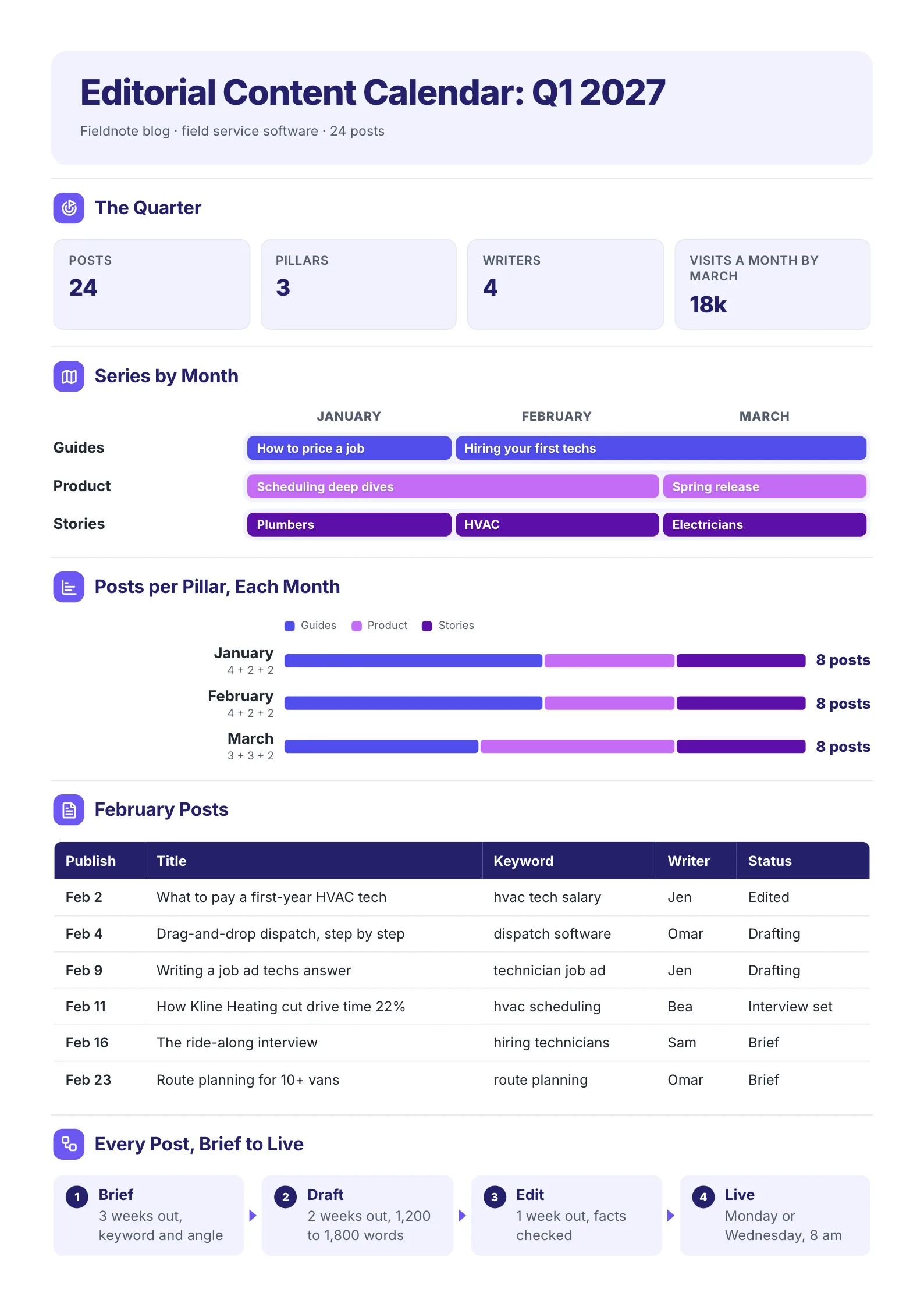
This editorial content calendar does both jobs on one sheet. The top plans 3 pillars by month for a quarter of 24 posts. The bottom lists February's posts with a publish date, title, keyword, writer and status. Its timeline starts each post "3 weeks out, keyword and angle" and goes live on "Monday or Wednesday, 8 am."
A podcast season planned by episode
 Edit this template
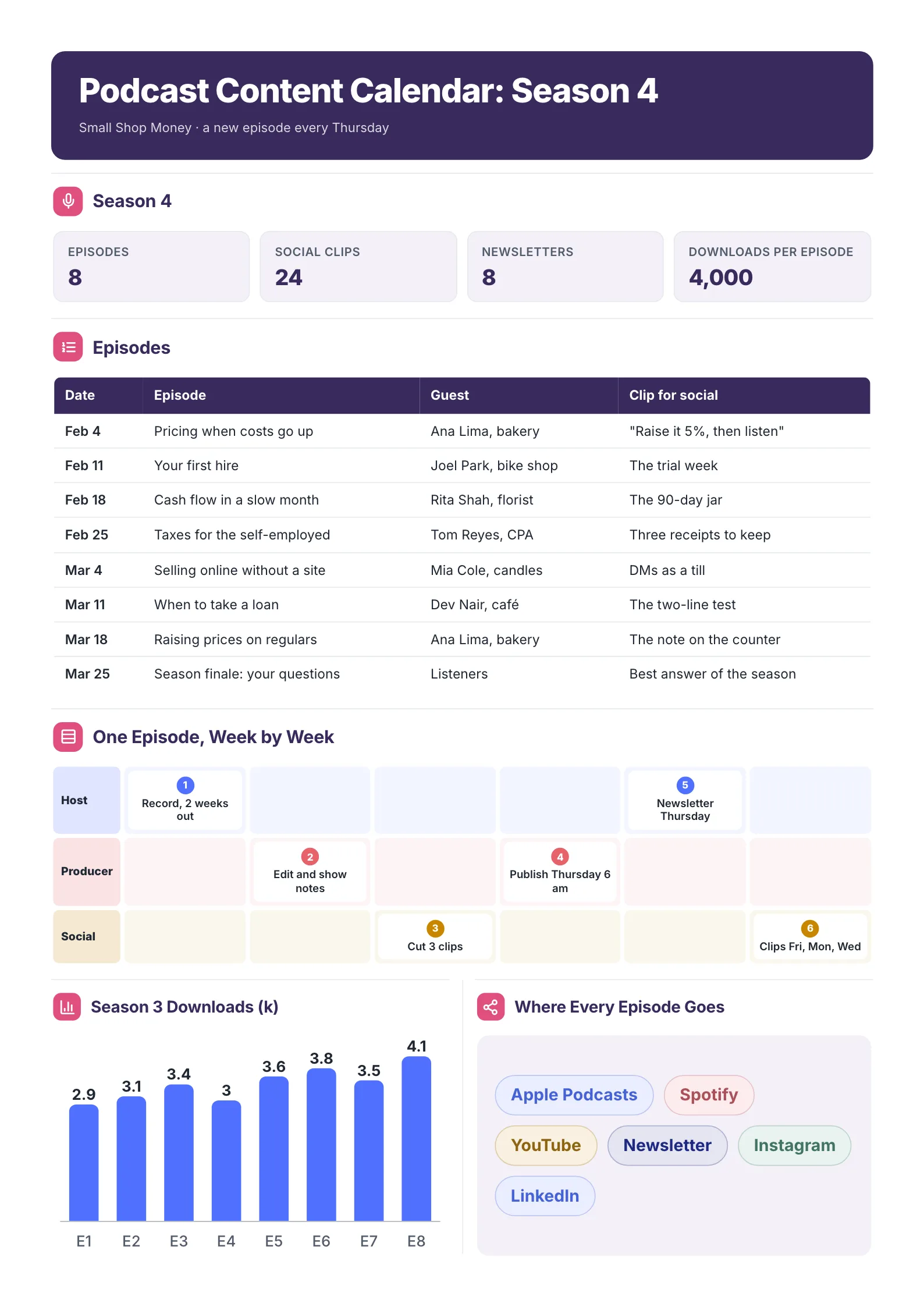
A season works like an issue plan. This podcast content calendar lists 8 episodes, each with a date, topic, guest and clip, like "Raise it 5%, then listen." Then it turns each episode into posts. You record 2 weeks out and publish on Thursday, and the clips go out over the next week.
A café's November, split by channel and owner
 Edit this template
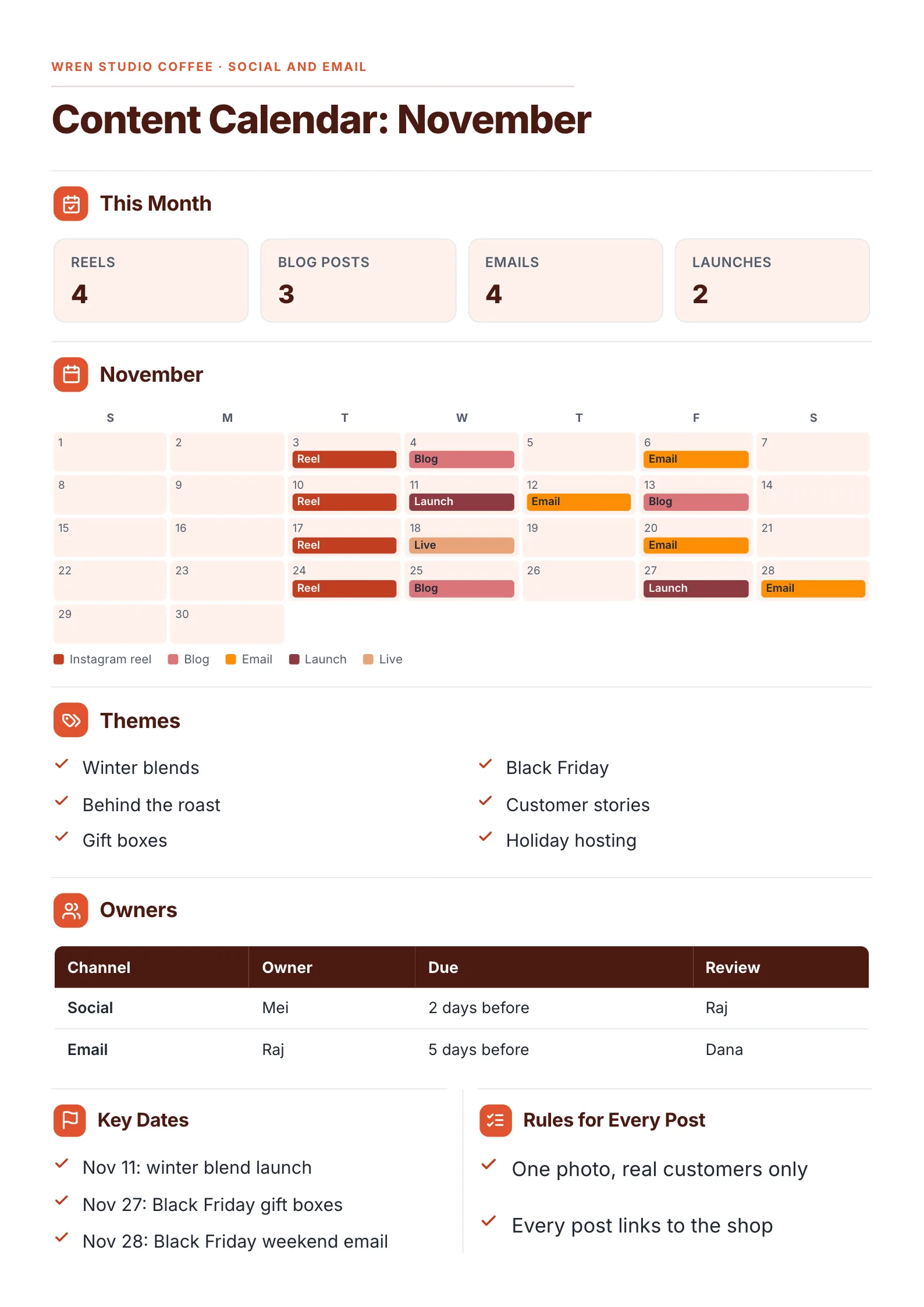
This content calendar is the daily kind. It puts 4 reels, 3 blog posts, 4 emails and 2 launches on a month grid. It also names who owns each channel: Mei for social, due 2 days before, and Raj for email, due 5 days before. The key dates, like the November 11 winter blend launch, anchor the month.
A restaurant's posts with their rules
 Edit this template
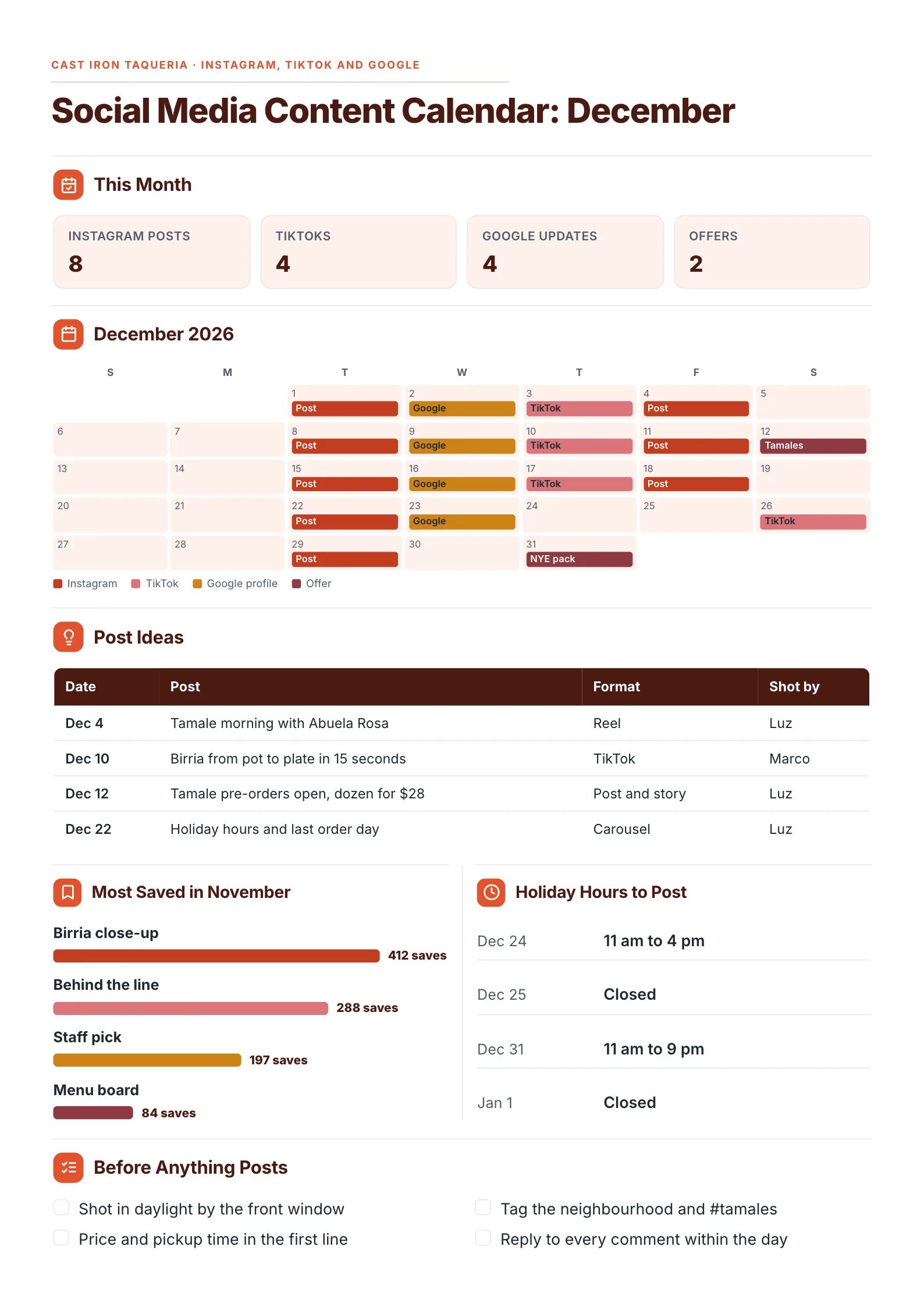
This restaurant social media content calendar plans 8 Instagram posts, 4 TikToks and 4 Google updates for December. Its post ideas table names the format and who shoots each one, like "Tamale pre-orders open, dozen for $28" on December 12. Its rules belong to every row: "Price and pickup time in the first line."
A launch plan with six weeks of content
 Edit this template
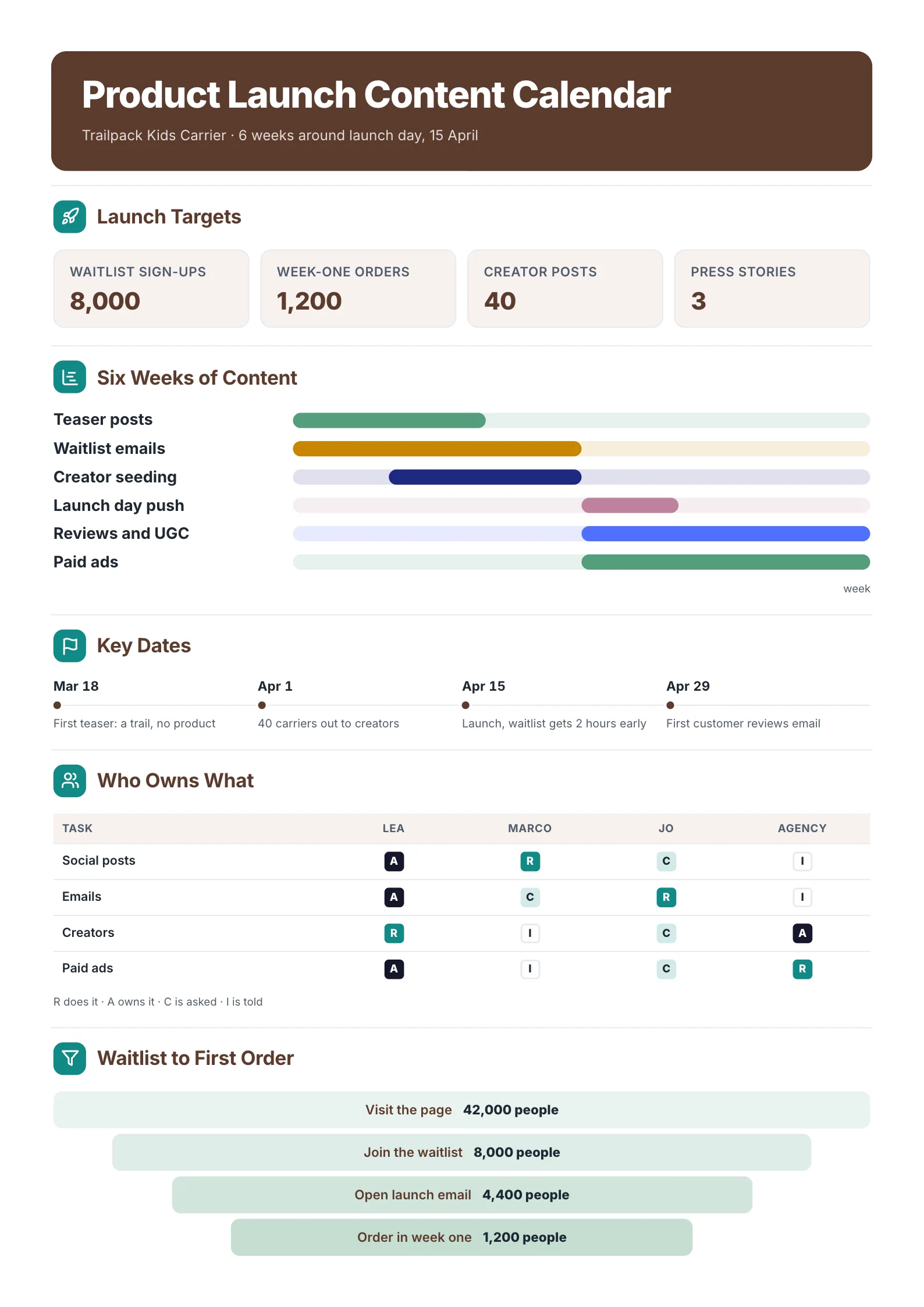
This product launch content calendar sits in the middle. It sets targets, like 8,000 waitlist sign-ups and 1,200 week-one orders. Then it maps six weeks of teasers, emails, creator posts and ads around one launch day, April 15. Its first teaser goes up March 18, and 40 carriers reach creators on April 1.
Start your calendar this week
Open the MakeOnepagers calendar that matches your plan. Put your theme for the month at the top, then your post rows below it. Want a first draft fast? List your themes and dates in the free AI One-Pager generator, then fix any row that looks off. For the post rows, see how to write a content calendar. For finished samples by channel, browse these content calendar examples.
Frequently asked questions
Can one calendar be both an editorial and a content calendar?
Yes, if you keep the two parts apart. Put the monthly theme and deadlines at the top, and the post rows with dates, channels and captions below. CEC's handout mixes both, monthly themes and a post-by-post sheet.
Which comes first, the editorial or the content calendar?
The editorial calendar. Set your themes and fixed dates first, since magazines like Campus Dining Today lock them months ahead. Then fill the content rows a few weeks out.
What columns should a social media content calendar have?
All three content calendars we read have a date, a channel, the post text and a link. Two add an image or media column. CEC also adds hashtags, content type and status.
Does an editorial calendar list every post?
No. The three we read list one row per month or issue. Wisconsin's names a theme, examples and campus dates, but no single post.
How far ahead should an editorial calendar be planned?
At least a season. Campus Dining Today asks for article ideas 14 to 16 weeks before an issue mails. Wisconsin plans its themes a full year at a time.




