BlogGuide
Budget Summary Template: Free, With 4 Examples
A free one-page budget summary template, the 6 parts every summary needs, and 4 examples: an annual budget, a quarter's variance, a household and a family plan.

By MakeOnepagers Team
Updated · 6 min read
A budget summary template turns a spreadsheet of hundreds of rows into one page a board, a manager or a family can read in two minutes: the total, where the money goes, how it compares with last year or the plan, and what to do about the gaps. The spreadsheet stays where the work is done. The summary is what gets read and approved. Below are the six parts every budget summary needs, a free template you can copy, and four examples.
One‑Pager examples
Real One-Pagers made with MakeOnepagers. Open any one to edit it as your own.
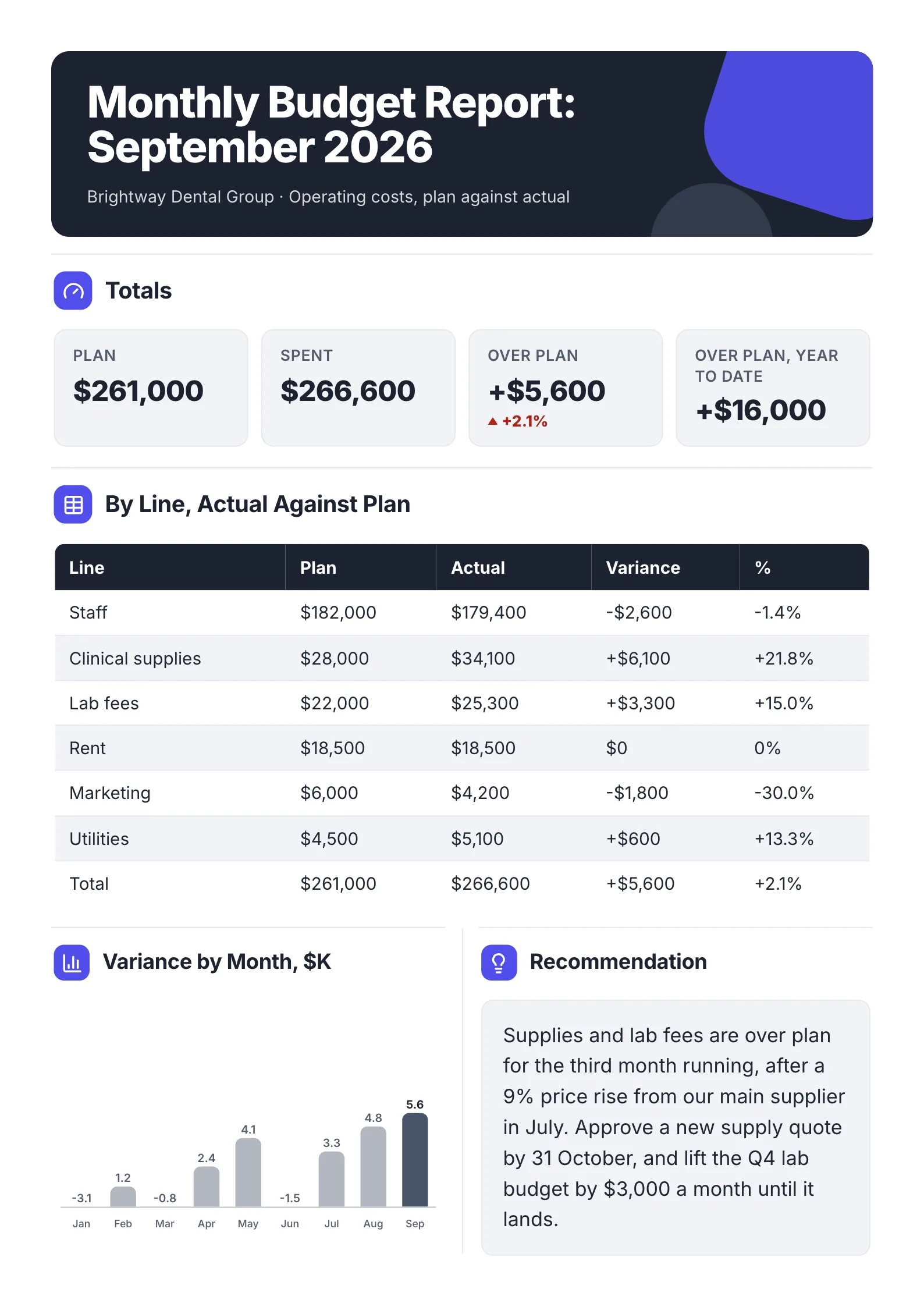 Monthly Budget ReportEdit for free(opens in a new tab)
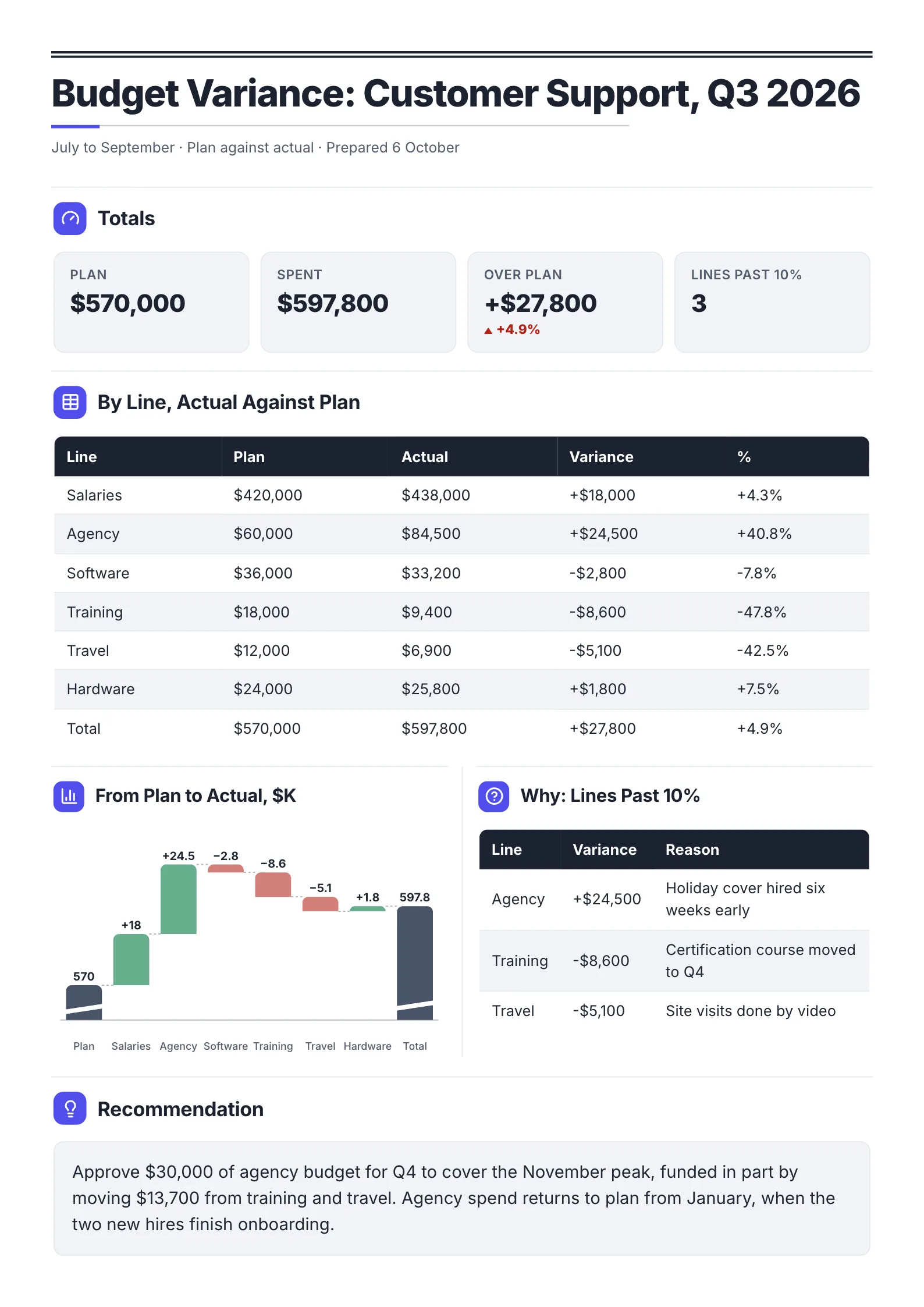 Department Budget Variance ReportEdit for free(opens in a new tab)
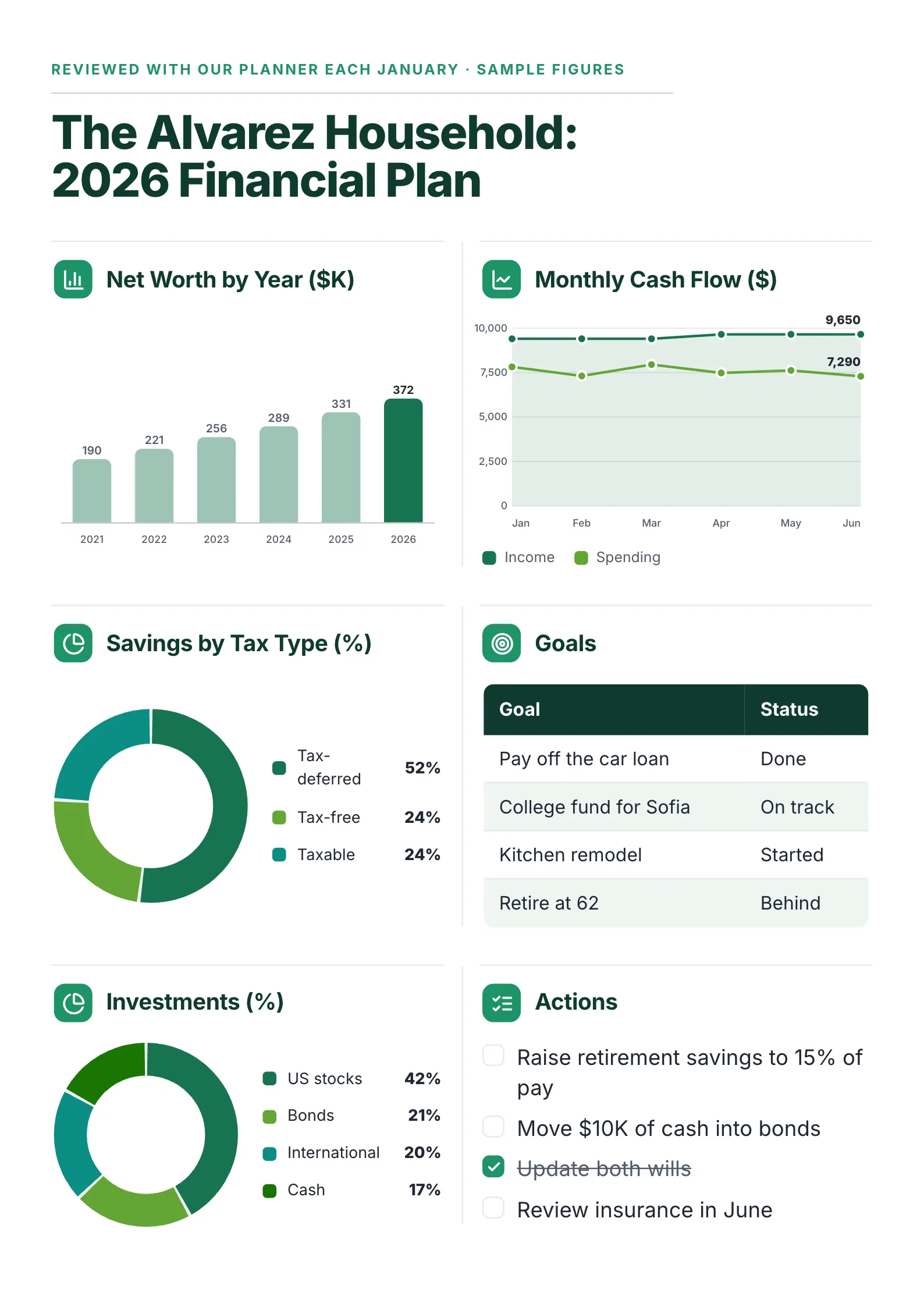 Financial Planning One-PagerEdit for free(opens in a new tab)
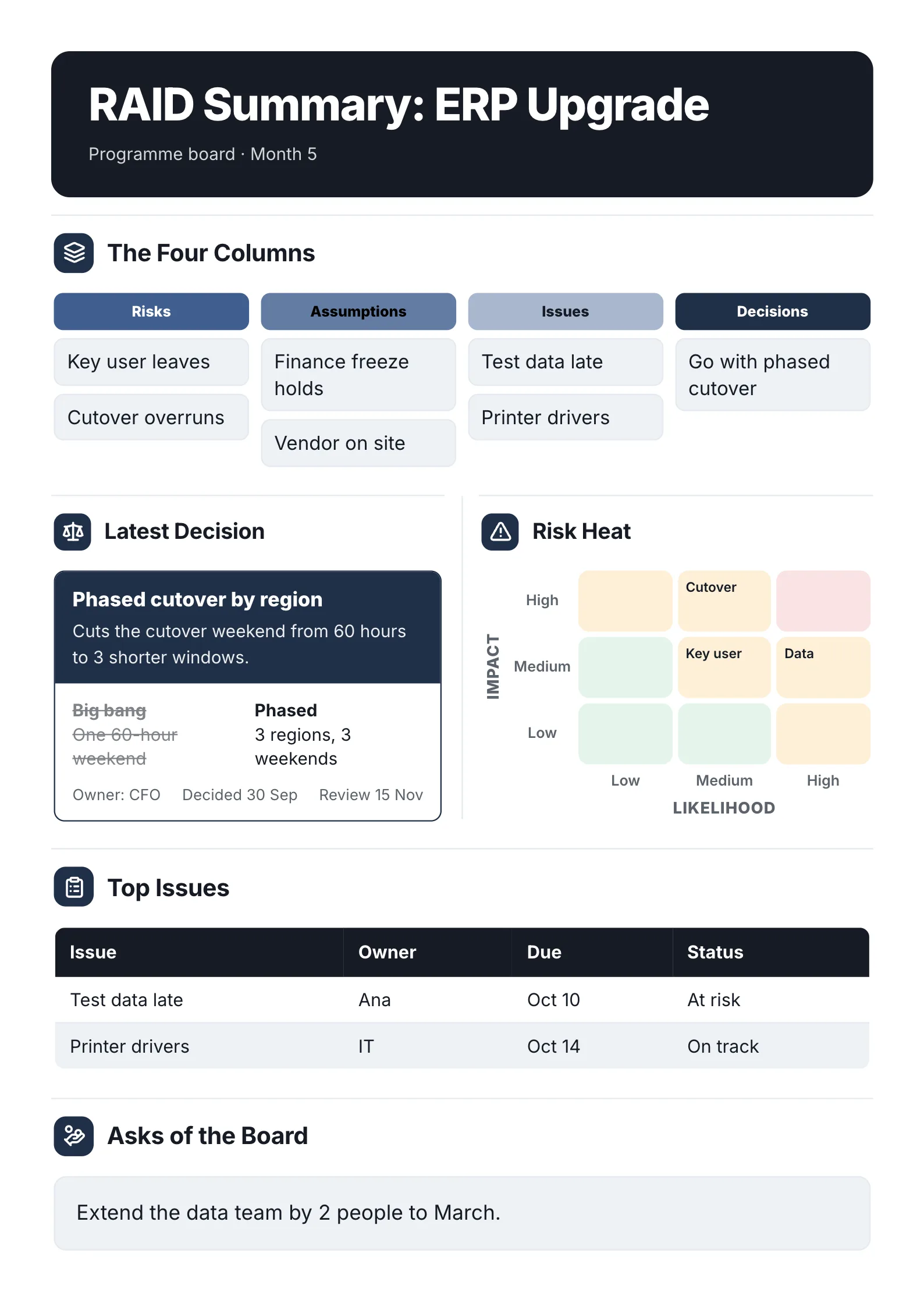 RAID Log SummaryEdit for free(opens in a new tab)
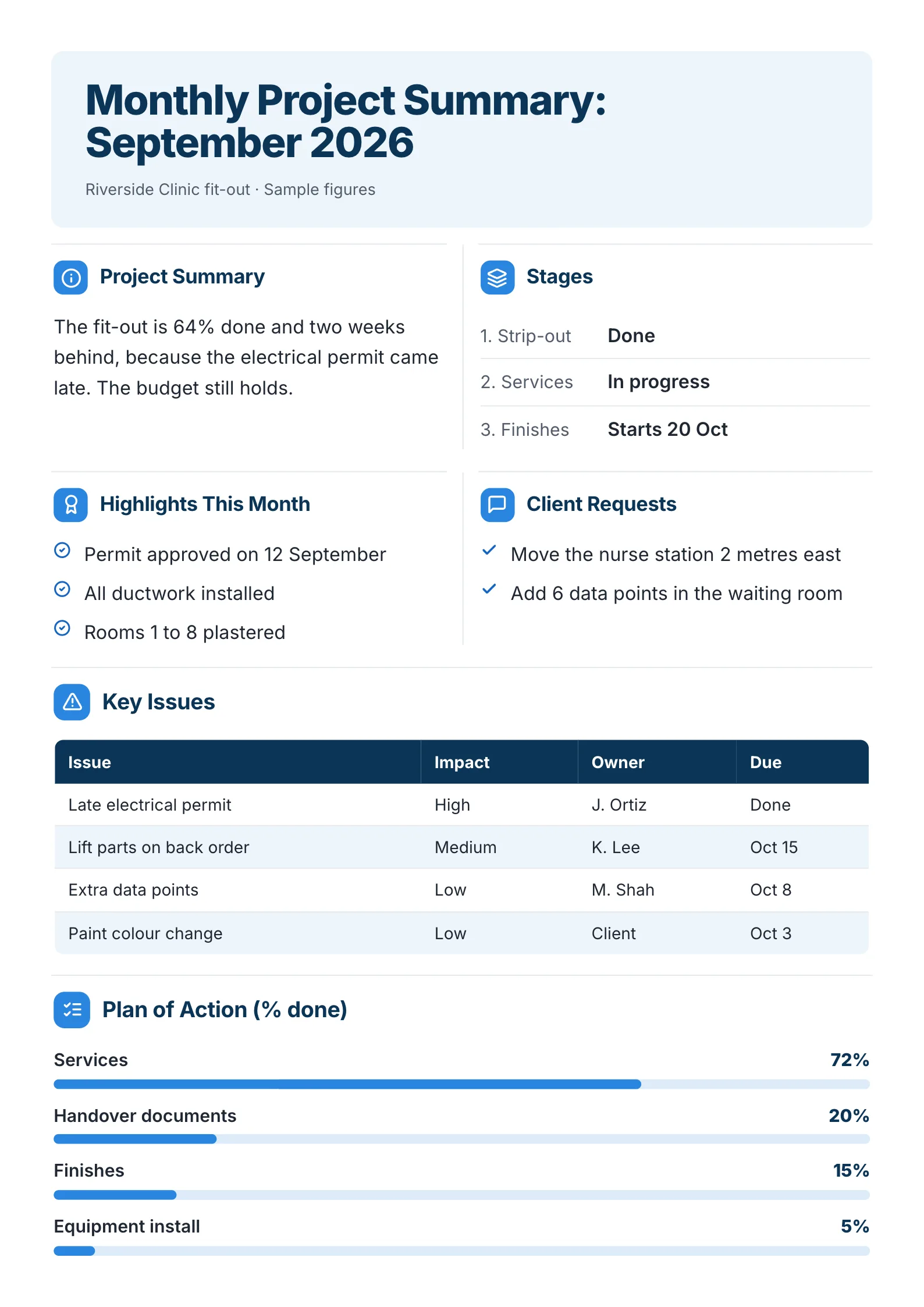 Monthly Project SummaryEdit for free(opens in a new tab)
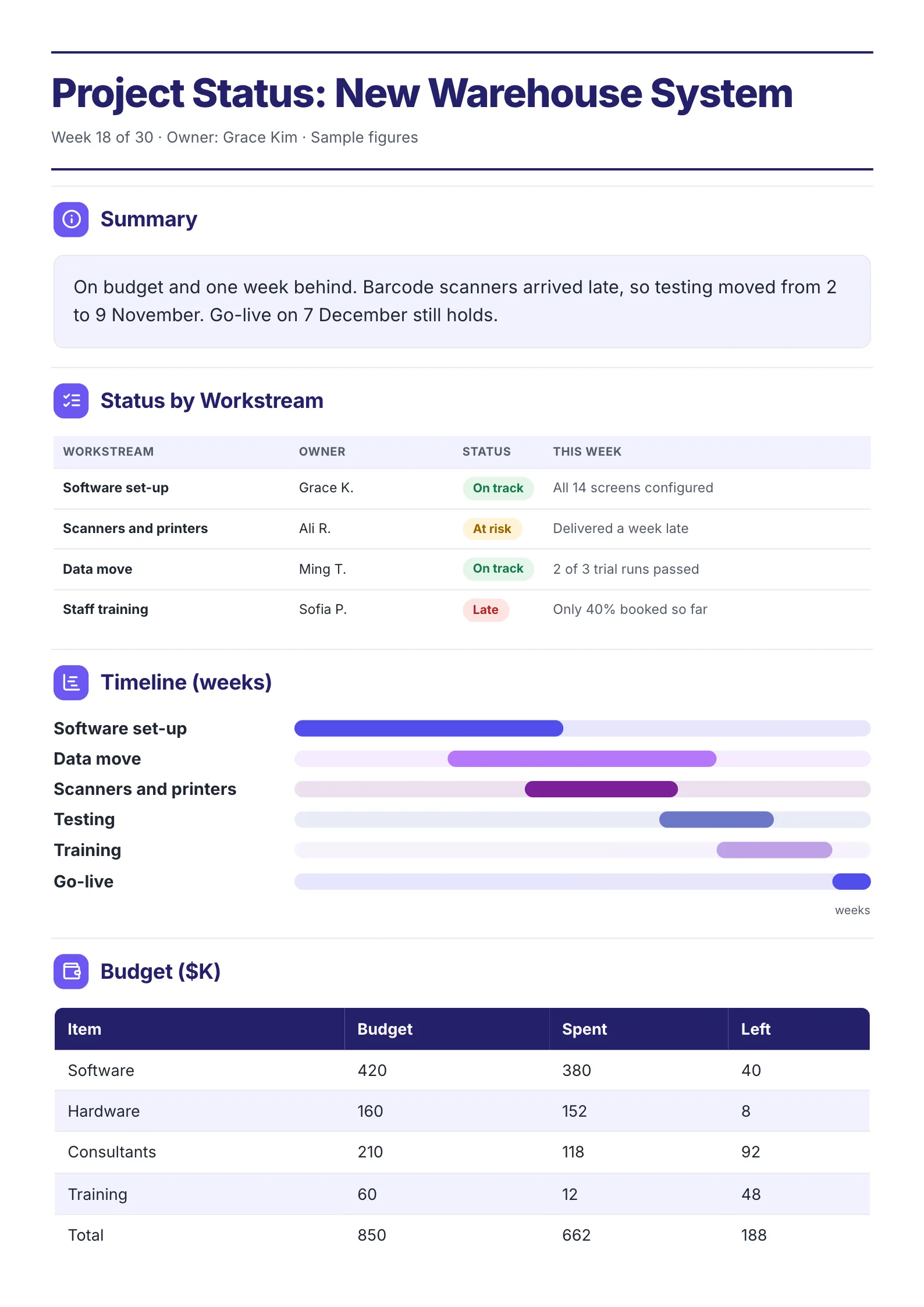 Project Status SummaryEdit for free(opens in a new tab)
Every example was made with MakeOnepagers. Each one opens as a template you can edit for free: every word, chart and color.
What is a budget summary?
A budget summary is the short version of a budget. It shows the total, the biggest areas of spending, how they changed and why. It is written for people who approve or live with the budget but will never open the spreadsheet: a board, a council, investors, staff, or the other half of a household.
There are two common kinds:
- A budget summary before the year: what we plan to spend and on what.
- A budget report during the year: what we actually spent against the plan, and why it differs. This is often called a budget variance report.
The 6 parts of a budget summary
- The total in one sentence, with the change. "The district plans to spend $84.0M in 2026, up 3.2% on 2025."
- The reason for the change. "Most of the rise pays for 22 new teaching posts."
- Where the money goes, by area, as shares of the total.
- This year against last year, or actual against plan, area by area, with the difference.
- A trend, if it helps: the total over the last four or five years.
- What happens next: a recommendation, a decision needed, or next month's changes.
A free budget summary template
Copy this into a document, or open one of the examples below and edit it.
| Part | What to write, with an example |
|---|---|
| Title | What and when. 2026 Annual Budget Summary |
| Who approved it | Approved by the board |
| Overview | Total, change, reason. $84.0M in 2026, up 3.2%. Most of the rise pays for 22 new teaching posts |
| Types of budget | Operating, capital, reserve, each with its total |
| Where it goes | Shares by area. Teaching 62%, support staff 14%, buildings 11% |
| By area | Last year, this year, change. Teaching 43.2, 44.3, +1.1 |
| Trend | Total by year, 4 or 5 years |
| Next step | A recommendation or a decision |
4 budget summary examples
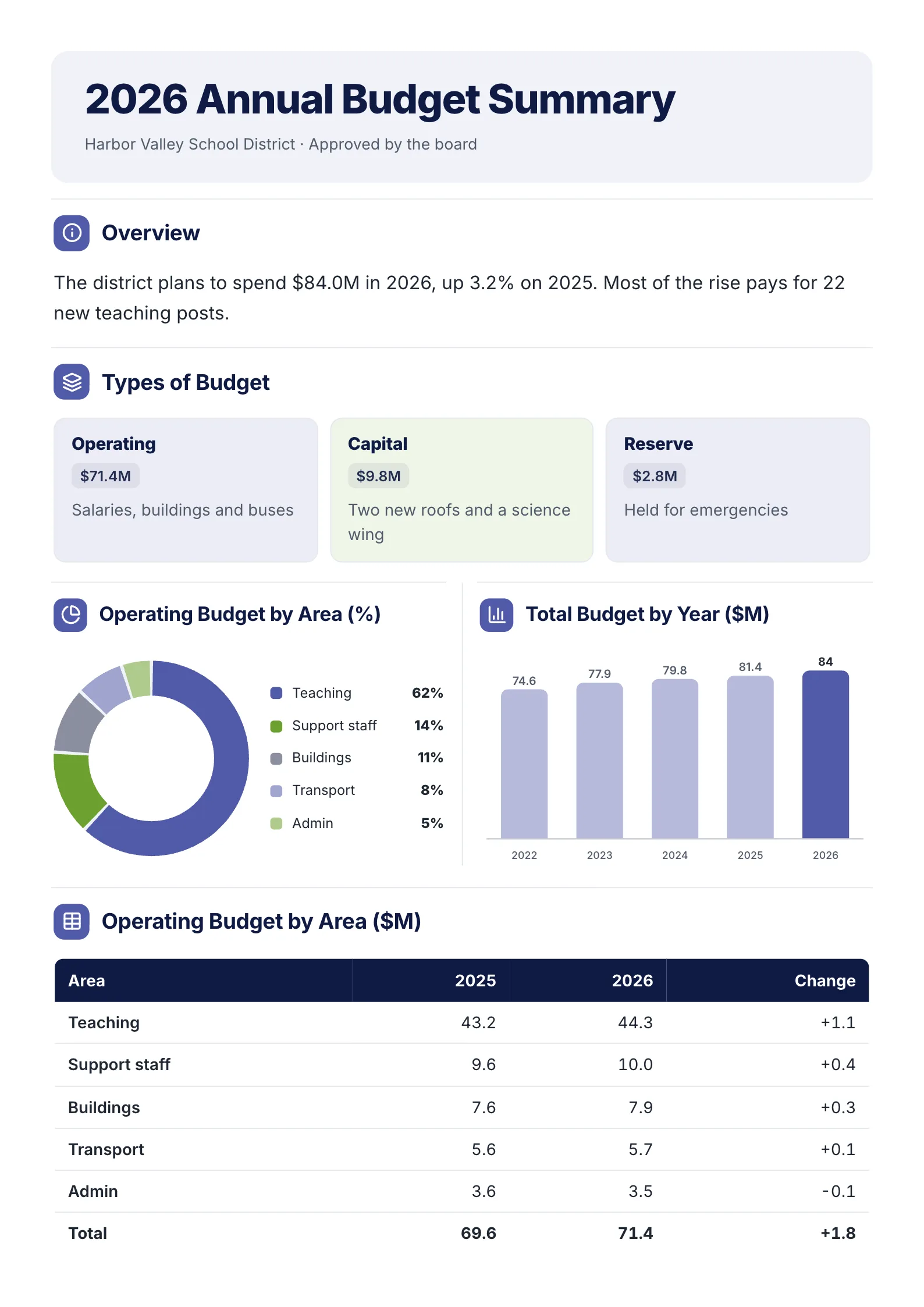
1. Annual budget summary for a board
 Edit this template
A public body's annual budget, written so parents and staff can follow it as well as the board.
What to copy:
- The total, the change and the reason in two sentences. "Up 3.2%. Most of the rise pays for 22 new teaching posts." The first question is answered before it is asked.
- Three types of budget, each in its own box: operating, capital and reserve. Readers stop confusing a new roof with salaries.
- A table with last year, this year and the change for every area. The change column is the one people read.
Edit for free: annual budget summary template.
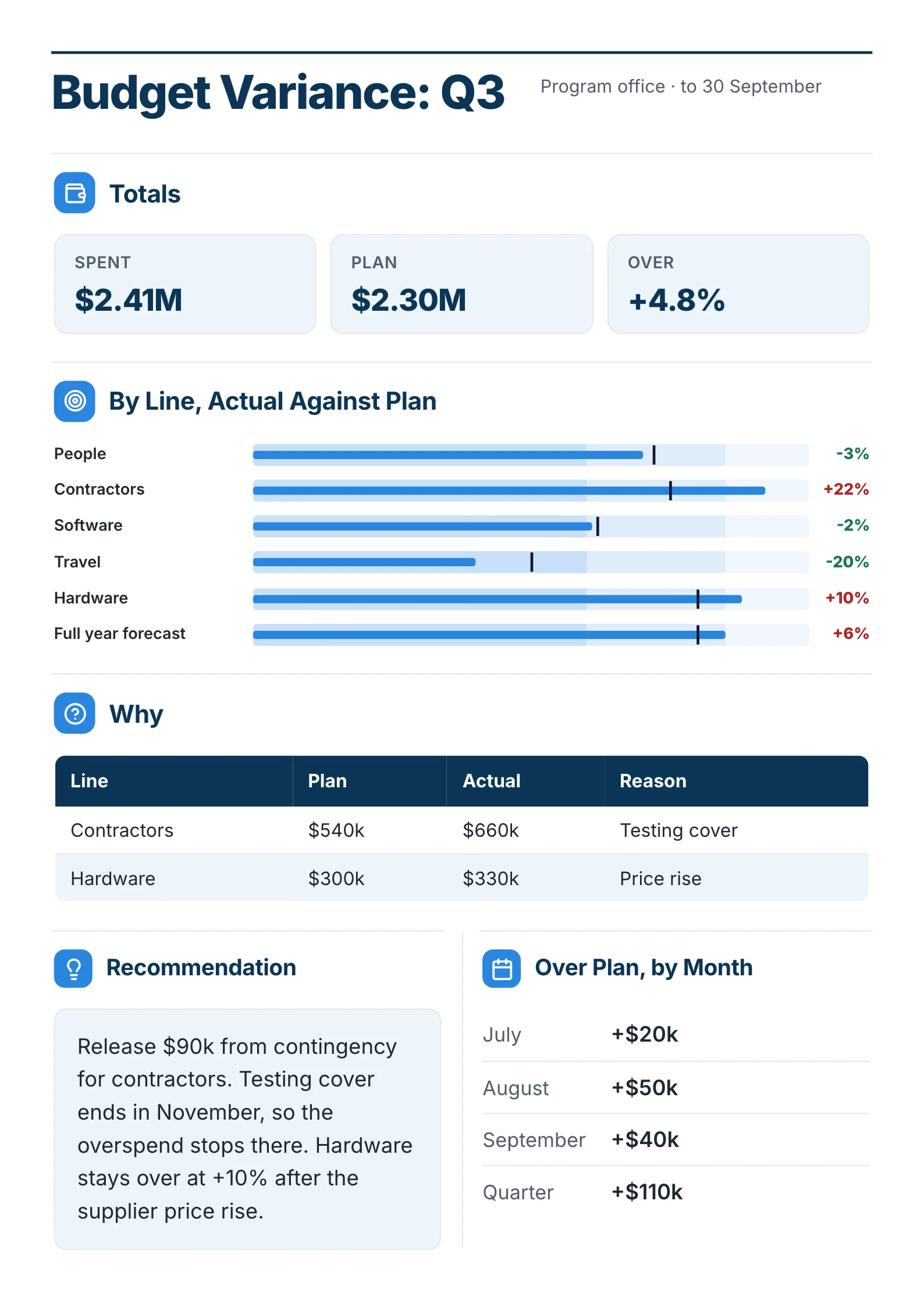
2. Budget variance report for a quarter
 Edit this template
A quarter's spending against plan, with the reasons and what to do about it.
What to copy:
- Spent, plan and over as three numbers at the top. A manager knows in one second whether to worry.
- Each line's actual against plan as a bar with a marker, the percentage in green or red beside it.
- A "Why" table for the lines that are over, then a recommendation: release $90K from contingency, because the extra cost ends in November.
Edit for free: budget variance report template.
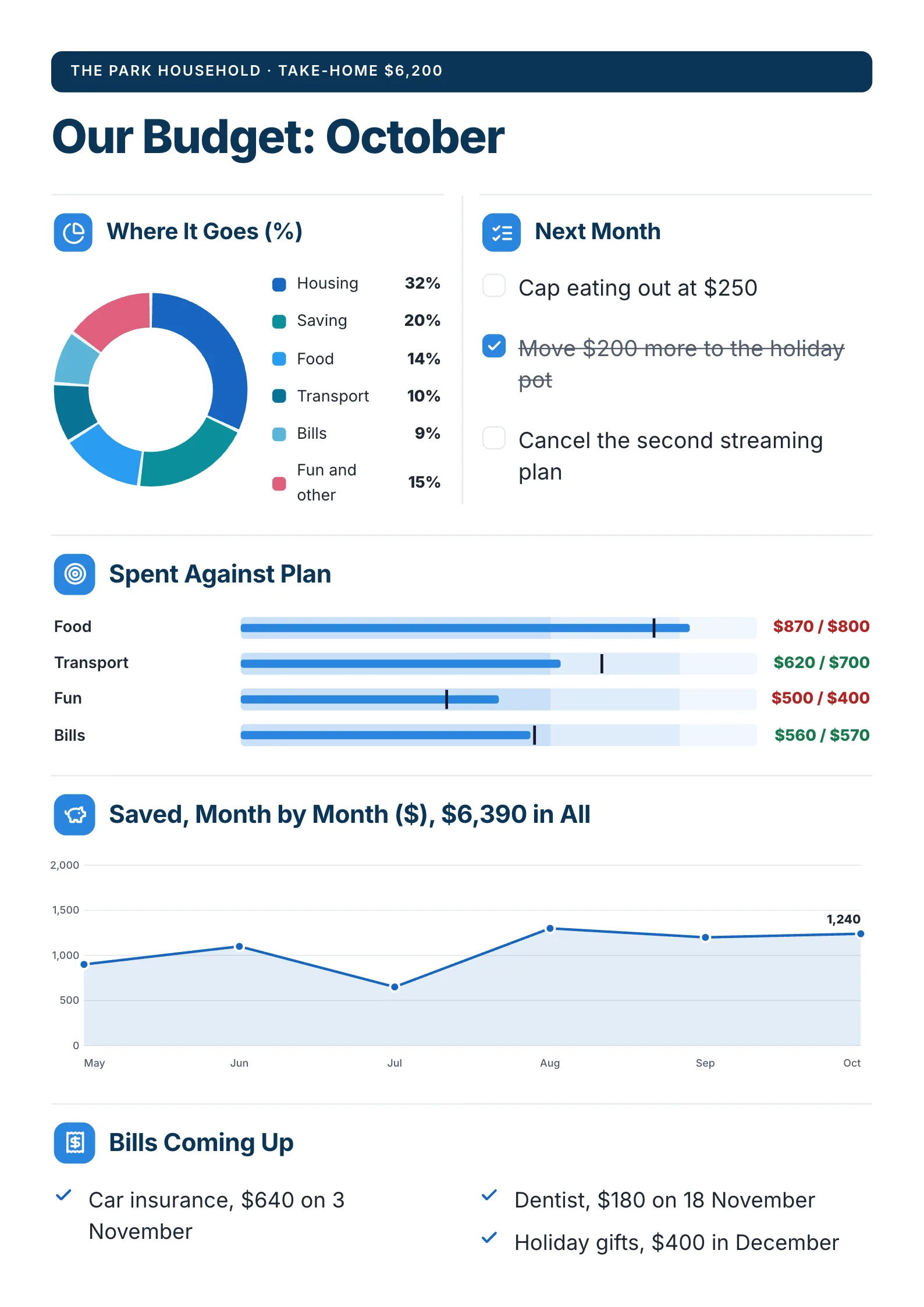
3. Household budget summary for a month
 Edit this template
A family's month on one page, the kind you stick on the fridge.
What to copy:
- Take-home pay at the very top, so every share below it means something.
- Spent against plan, category by category: $870 of $800 on food in red, $620 of $700 on transport in green.
- Bills coming up with their dates, so next month has no surprises.
Edit for free: personal budget template.
For a whole year of household money (net worth, cash flow, savings and goals), the financial planning template puts it on one page too.
Excel or a one-page summary?
Searches for this template often add "excel". Both have a job.
| Spreadsheet | One-page budget summary | |
|---|---|---|
| Who uses it | The person building the budget | The people who approve or follow it |
| Detail | Every line, every month | Totals, shares, changes and reasons |
| Good for | Working out the numbers | Getting a yes, explaining a change |
| Read in | An hour | Two minutes |
Build the budget in a spreadsheet, then summarise it on one page for everyone else. If you already have the spreadsheet or a long budget report as a PDF, the free AI One-Pager generator reads a PDF, Word or PowerPoint file and gives it back as a designed One-Pager, with the figures pulled from your file.
How to write a budget summary in 5 steps
- Write the total and its change in one sentence.
- Write the main reason for the change in one more.
- Group spending into five or six areas and work out each one's share.
- Add last year or the plan beside every number, and the difference.
- Finish with what happens next: approve, release, cut or watch.
Budget summary mistakes
- A total with nothing to compare it to. "$84.0M" invites "is that a lot?" Add "up 3.2% on last year".
- Twenty categories. Group them into five or six. The rest belongs in the spreadsheet.
- Variances without reasons. "Contractors +22%" worries people. "+22% for testing cover that ends in November" does not.
- No decision. If you need approval or a change, say so at the bottom.
Make your budget summary
Open the free annual budget summary template and put in your numbers, or drop your budget file into the free AI One-Pager generator and get a finished summary back.
Frequently asked questions
What should a budget summary include?
The total and how it changed, the reason for the change, where the money goes by area, each area against last year or the plan, and what happens next. Add a trend over several years for an annual budget.
What is the difference between a budget summary and a budget report?
A budget summary usually describes the plan for a period. A budget report, or variance report, compares what was actually spent with that plan and explains the differences.
Is there a budget summary template in Excel?
Most spreadsheet tools include budget templates. Use one to build the numbers, then present them on a one-page summary for the people who approve or follow the budget.
How do I summarise a budget for a board?
Lead with the total and its change, give the main reason, show spending by area with last year beside it, and end with what the board needs to approve. Keep it to one page and attach the full budget for anyone who wants the detail.