Sprint Review Examples Scored Against the Scrum Guide's 5 Checks
Sprint review examples for data, release train, firmware, design and game teams, scored on 5 Scrum Guide checks, plus what 7 public sprint notes leave out.

The 2020 Scrum Guide gives the sprint review five jobs, and only two of the five sprint review examples below do all five. Those are the data team's page and the release train's. The other three each miss one, and we name the missing piece so you can add it before your own meeting. The teams run from four squads on one release to a game studio chasing a publisher date, and each page fits on one sheet you can put on screen. Start from a free one pager template.
One‑Pager examples
Real One-Pagers made with MakeOnepagers. Open any one to edit it as your own.
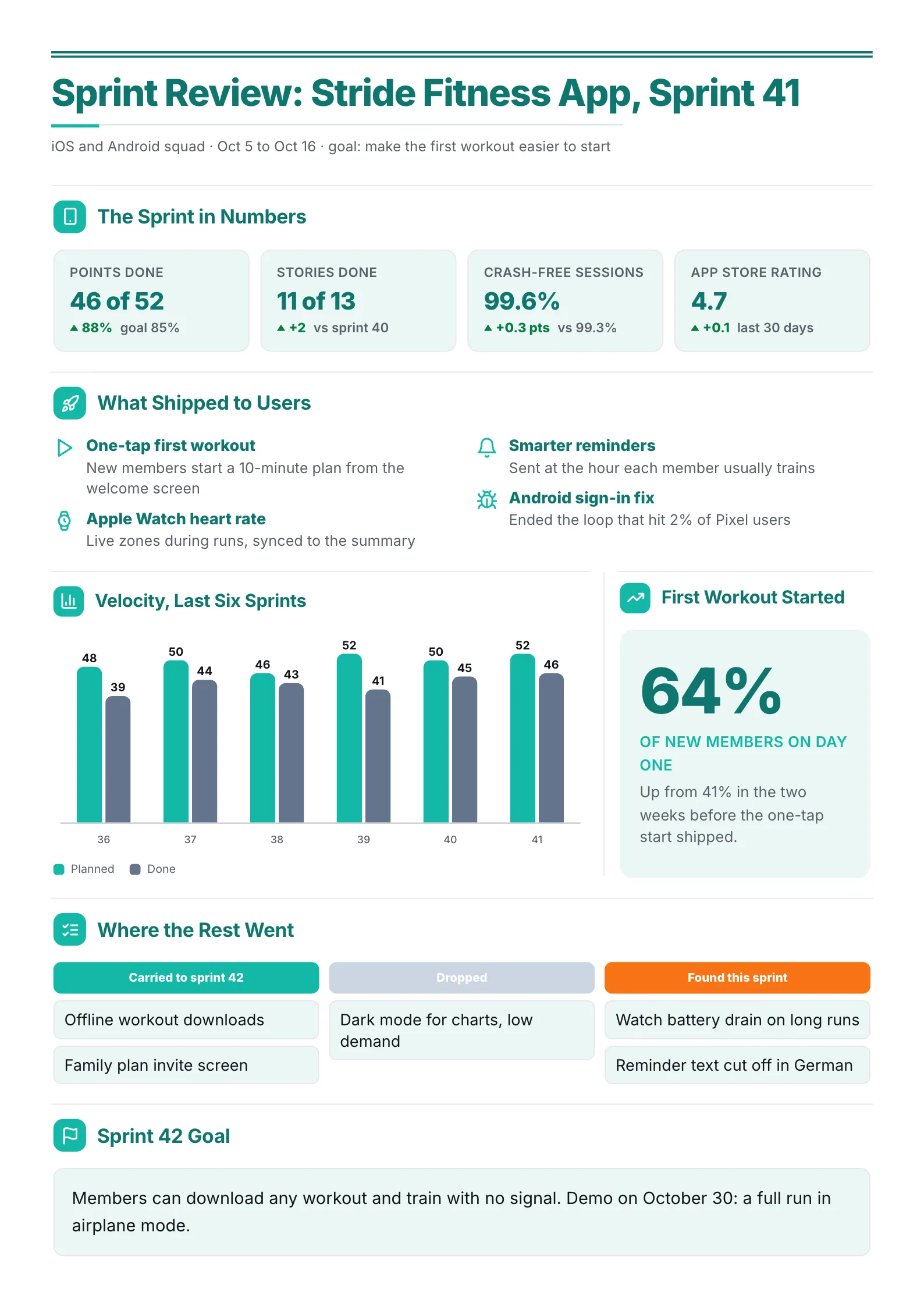 Mobile App Sprint ReviewEdit for free(opens in a new tab)
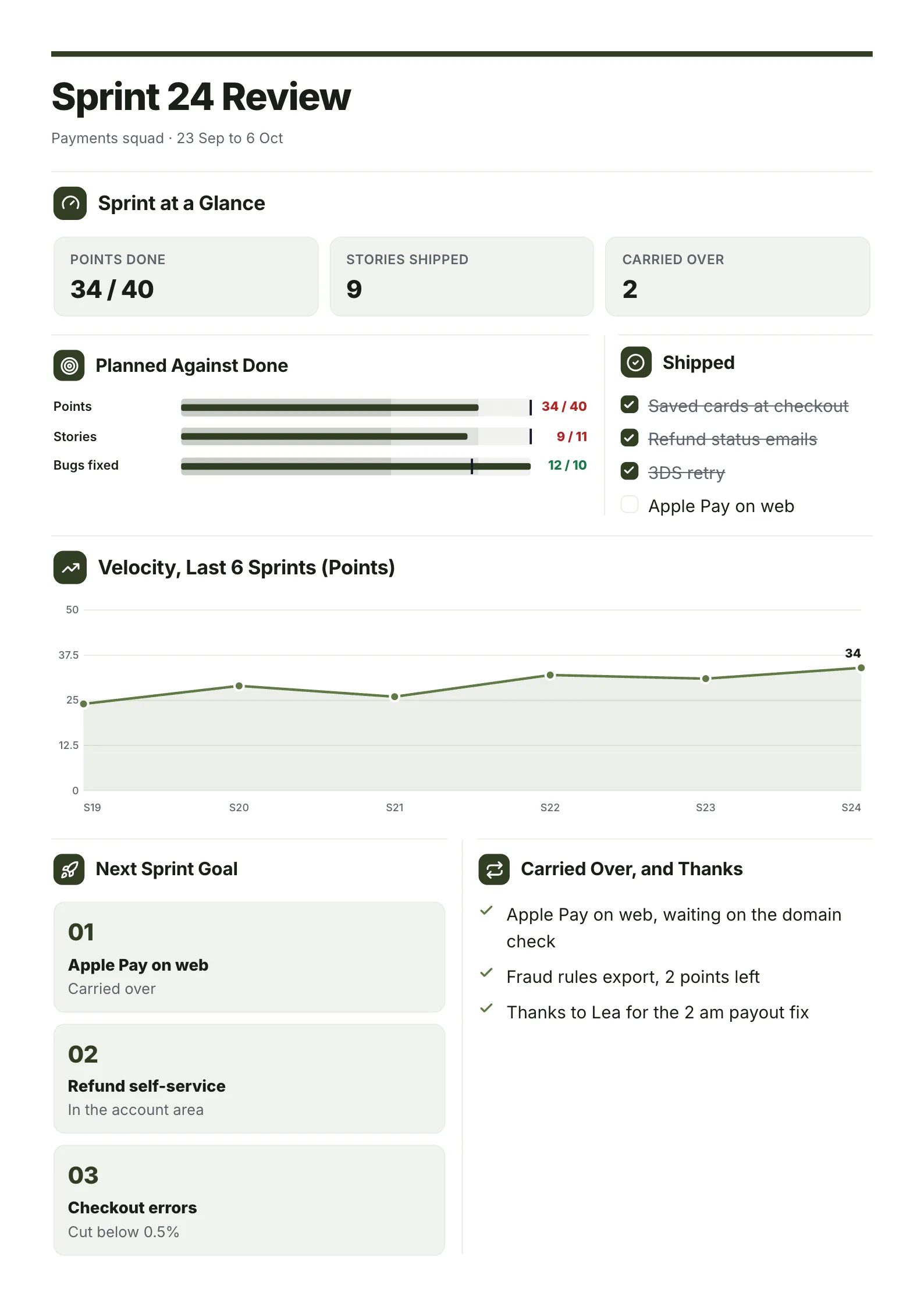 Sprint ReviewEdit for free(opens in a new tab)
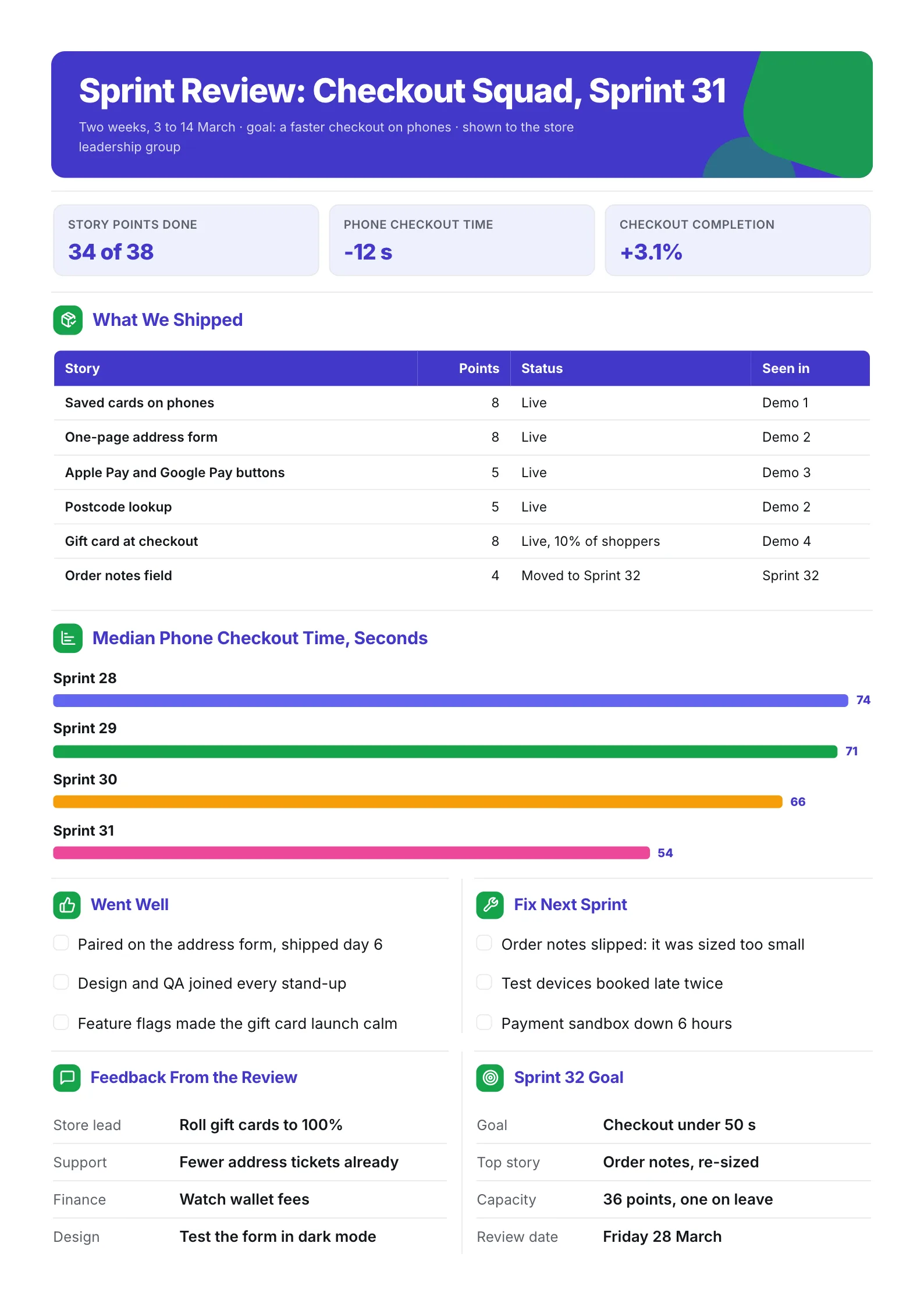 Sprint Review: Checkout SquadEdit for free(opens in a new tab)
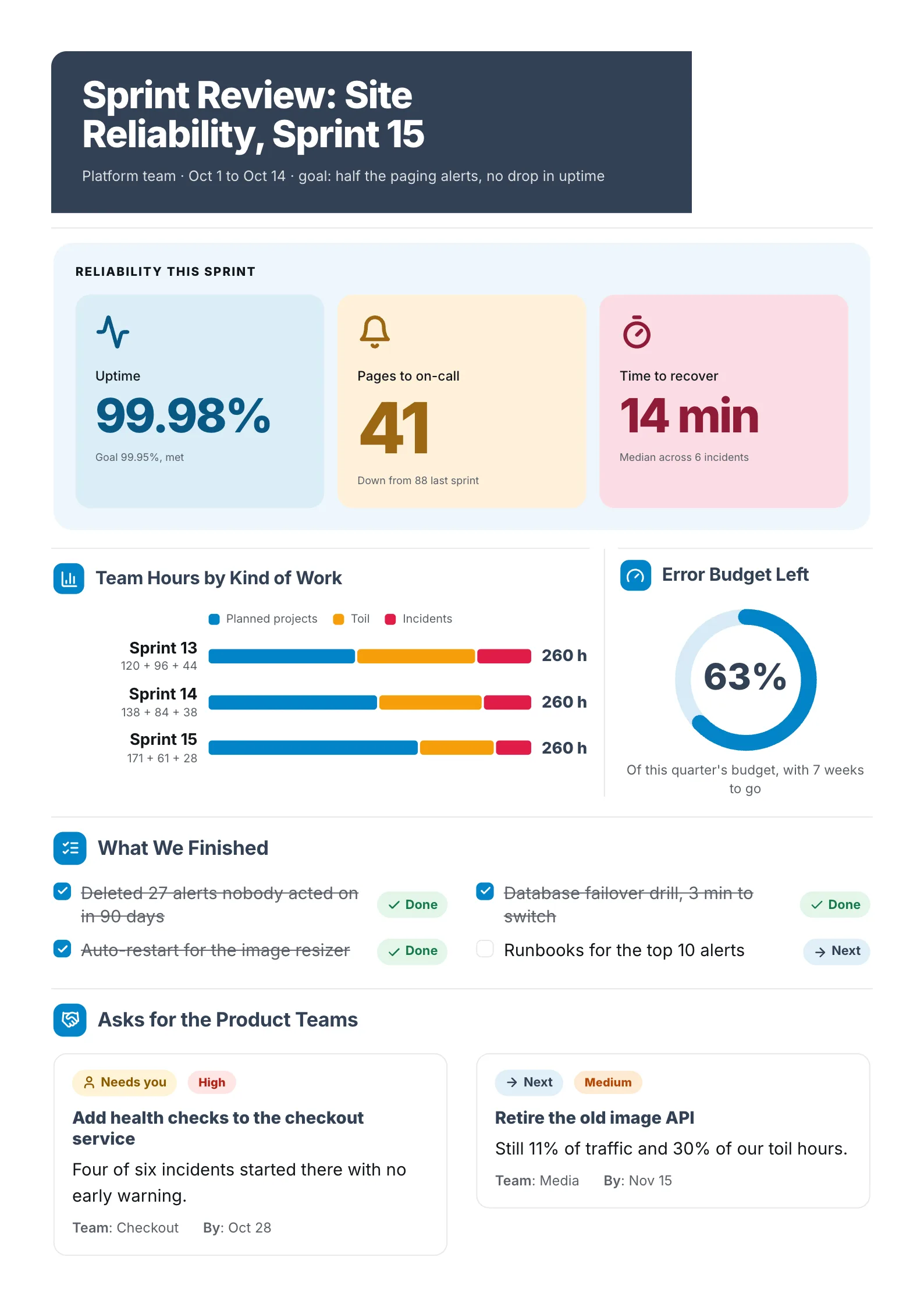 DevOps Sprint ReviewEdit for free(opens in a new tab)
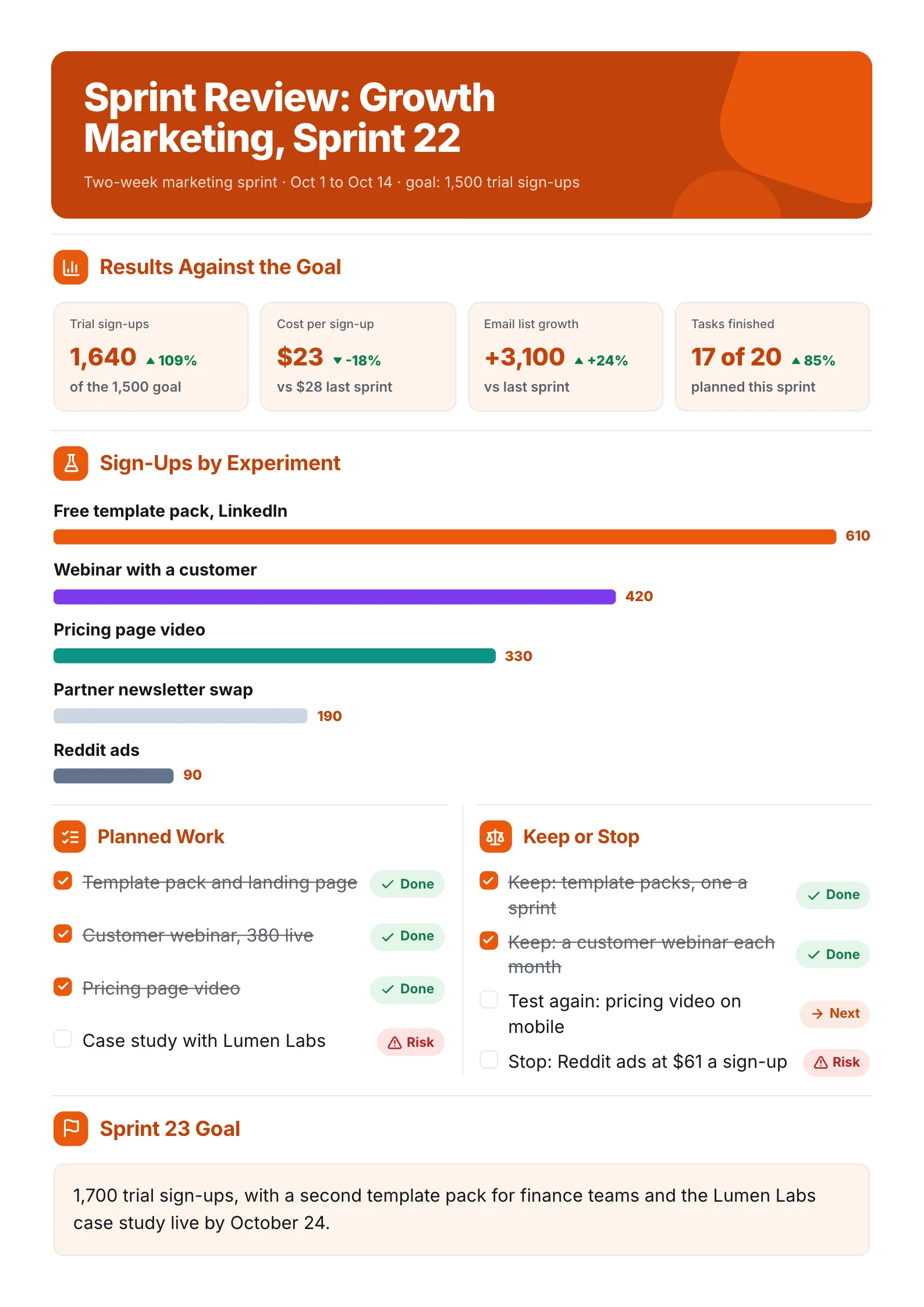 Marketing Sprint ReviewEdit for free(opens in a new tab)
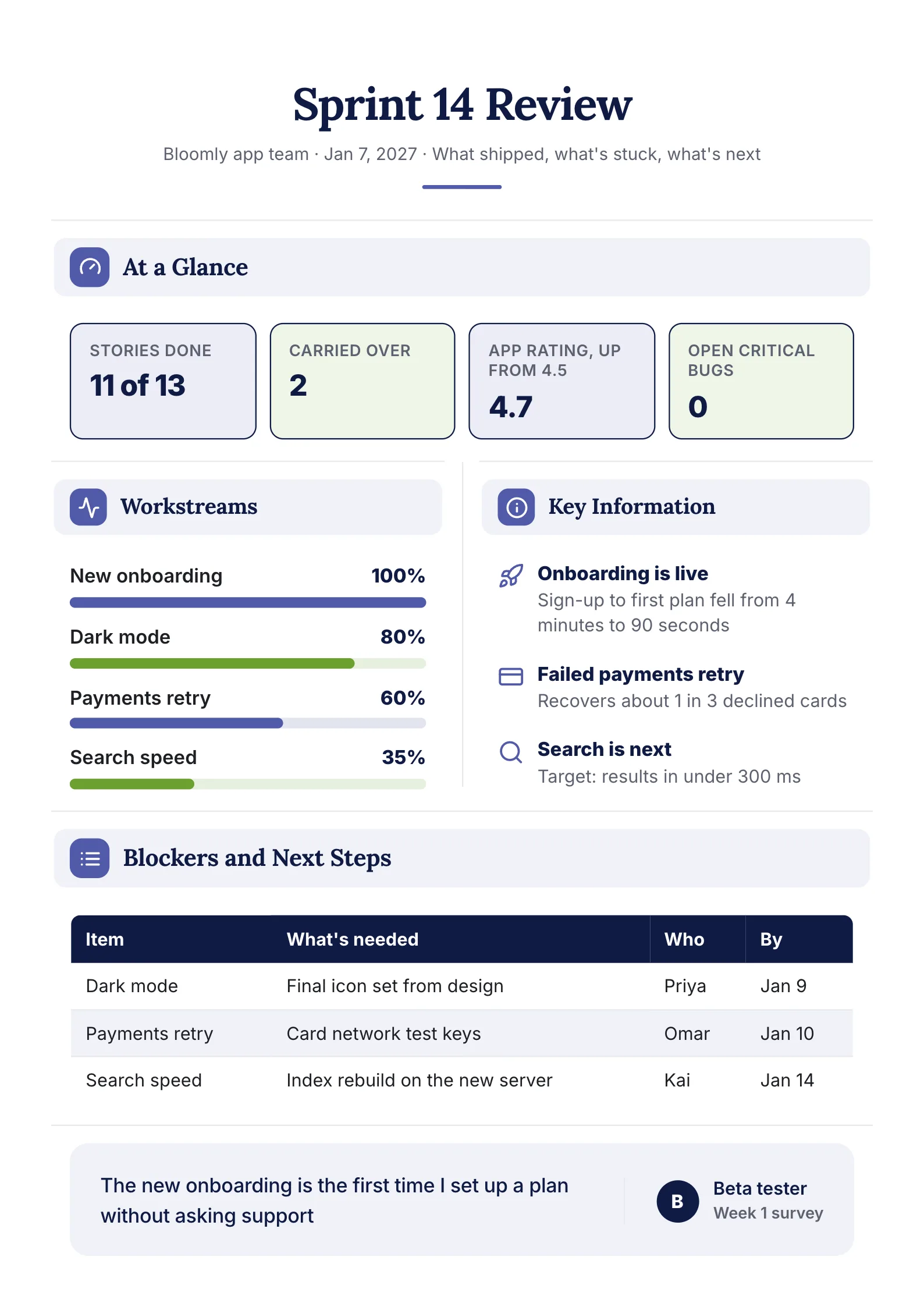 Sprint Review with WorkstreamsEdit for free(opens in a new tab)
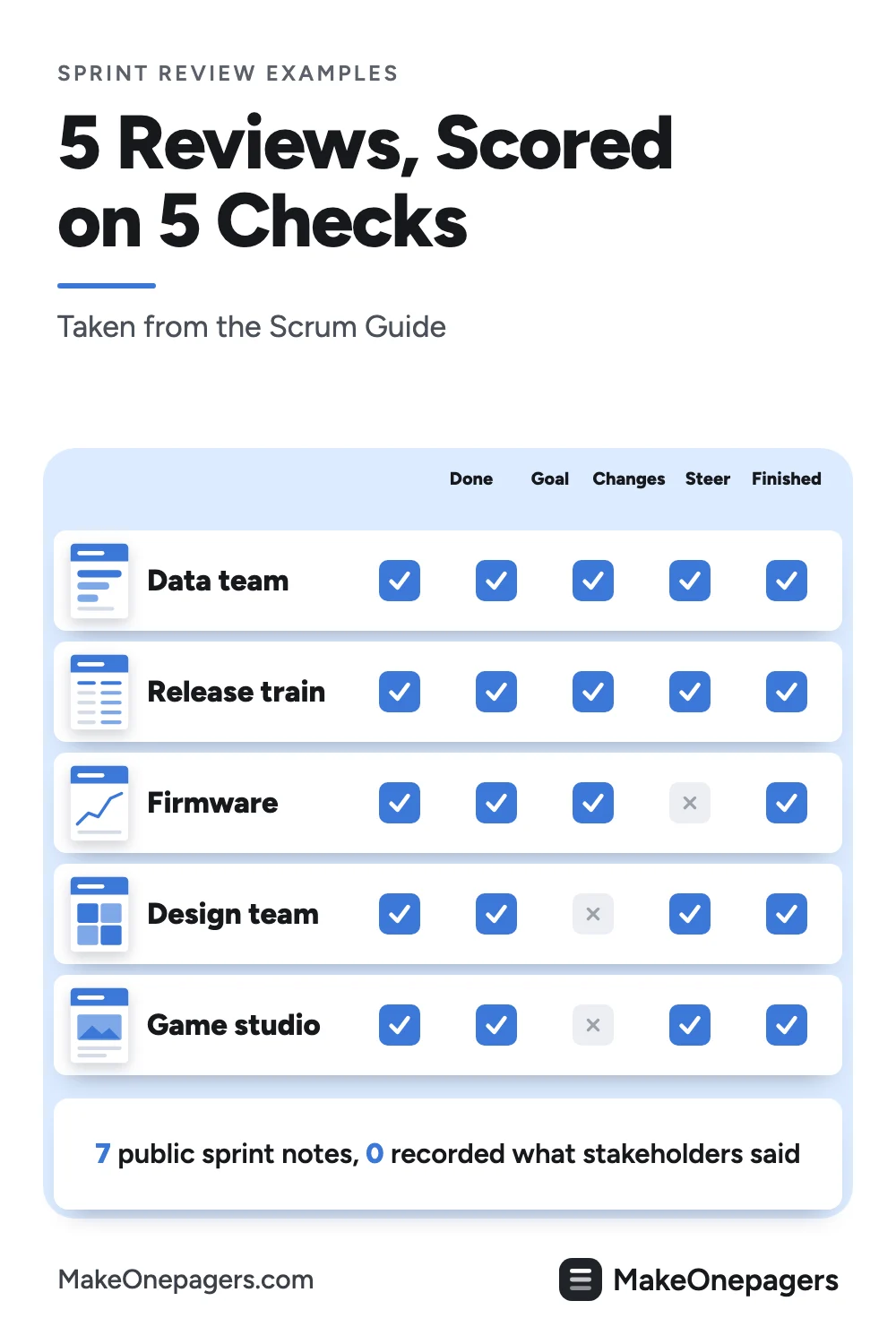
Your review is probably missing it too, because real teams miss the same piece. Seven sprint notes that a UW-Madison API team and the UK Parliament's website teams posted at the end of a sprint all list the work done. None of them writes down what stakeholders said, and that's the part your review exists for.
The Scrum Guide's sprint review rules, as 5 checks
The Scrum Guide gives the sprint review one short section. Its purpose is "to inspect the outcome of the Sprint and determine future adaptations." You show key stakeholders what your team got done, and together you talk about progress toward the Product Goal, the longer aim your sprints add up to.
We turned that section into five checks you can run on your own review page.
- What got done. Your page shows the outcome of the sprint against what you planned.
- Progress to the bigger goal. It says how close you are to the goal behind the sprint.
- What changed around the team. The guide asks attendees to review "what has changed in their environment," like a blocker, a new request or a dependency on another team.
- Room to steer. The guide calls the review "a working session" and says the team "should avoid limiting it to a presentation." So your page needs space for what stakeholders want next.
- Only finished work counts. Work isn't part of the increment unless it meets your Definition of Done. If something is half done, your page should say so.
The guide also sets a timebox of four hours at most for a one-month sprint, and less for shorter ones. A one-page review helps you stay well inside it, because you spend the time talking instead of scrolling.
1. A data team review that records what stakeholders said
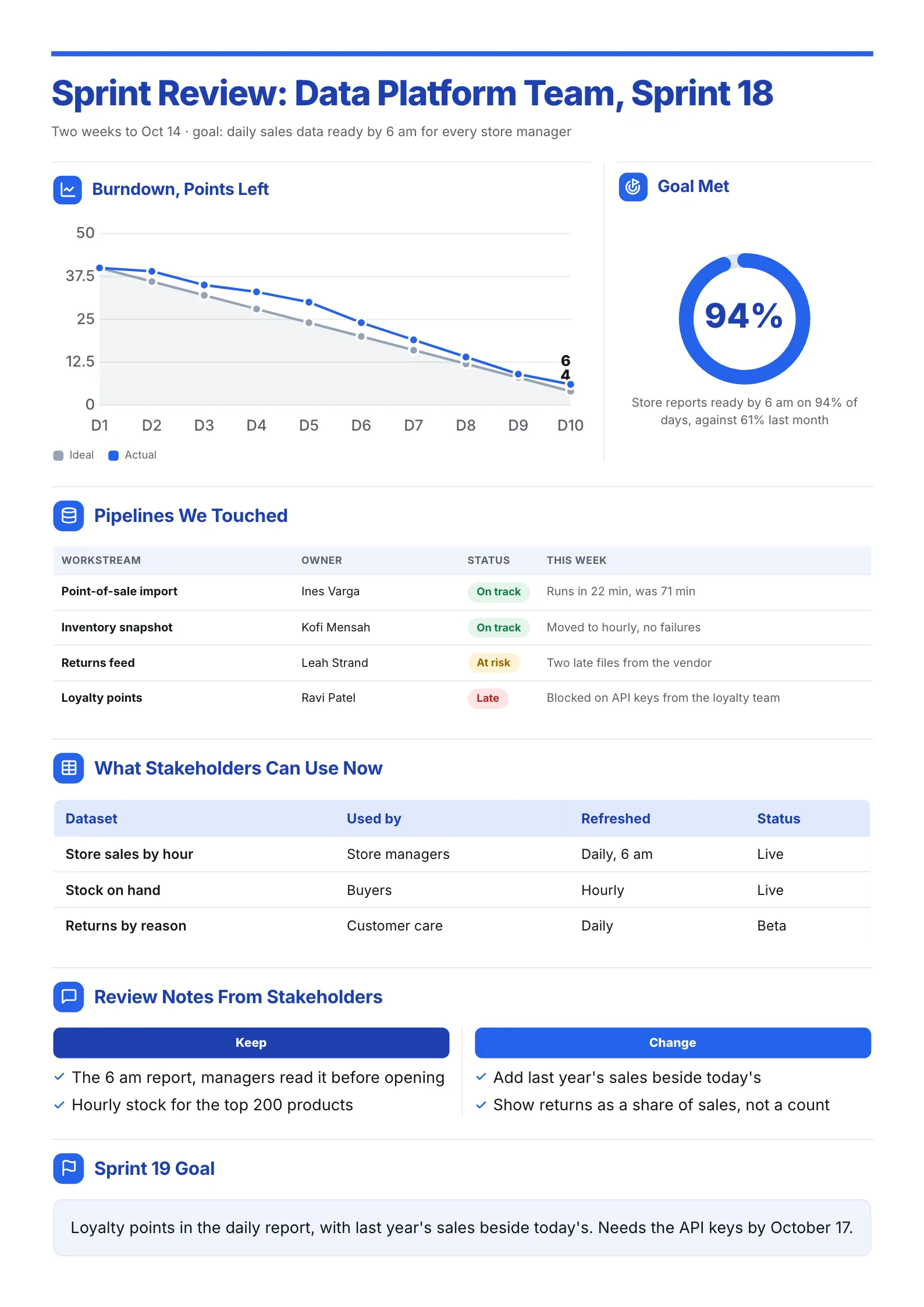
This page meets all five checks, and the box that gets it there is one you can add to your own page today, Review Notes From Stakeholders. It's split into Keep and Change. Store managers want to keep the 6 am report. They asked for last year's sales beside today's, and for returns shown as a share of sales instead of a count. The first of those requests is already written into the Sprint 19 goal, so you can see the room steering the next sprint on paper.
The rest of the page covers your other four checks quickly. The subtitle gives the goal, daily sales data ready by 6 am for every store manager, and a gauge answers it with 94% of days against 61% the month before. A status board shows what changed around the team, with the loyalty points feed blocked on API keys from another team, needed by October 17. And the returns dataset is marked Beta, so nobody mistakes it for done.
The Keep and Change box is the one part of this page that none of the public notes we read has, and it's the quickest part to lift into a review for internal users.
 Edit this template
Made-up company and figures. The Keep and Change box is the part most review pages leave out.
2. A release train review where four teams report at once
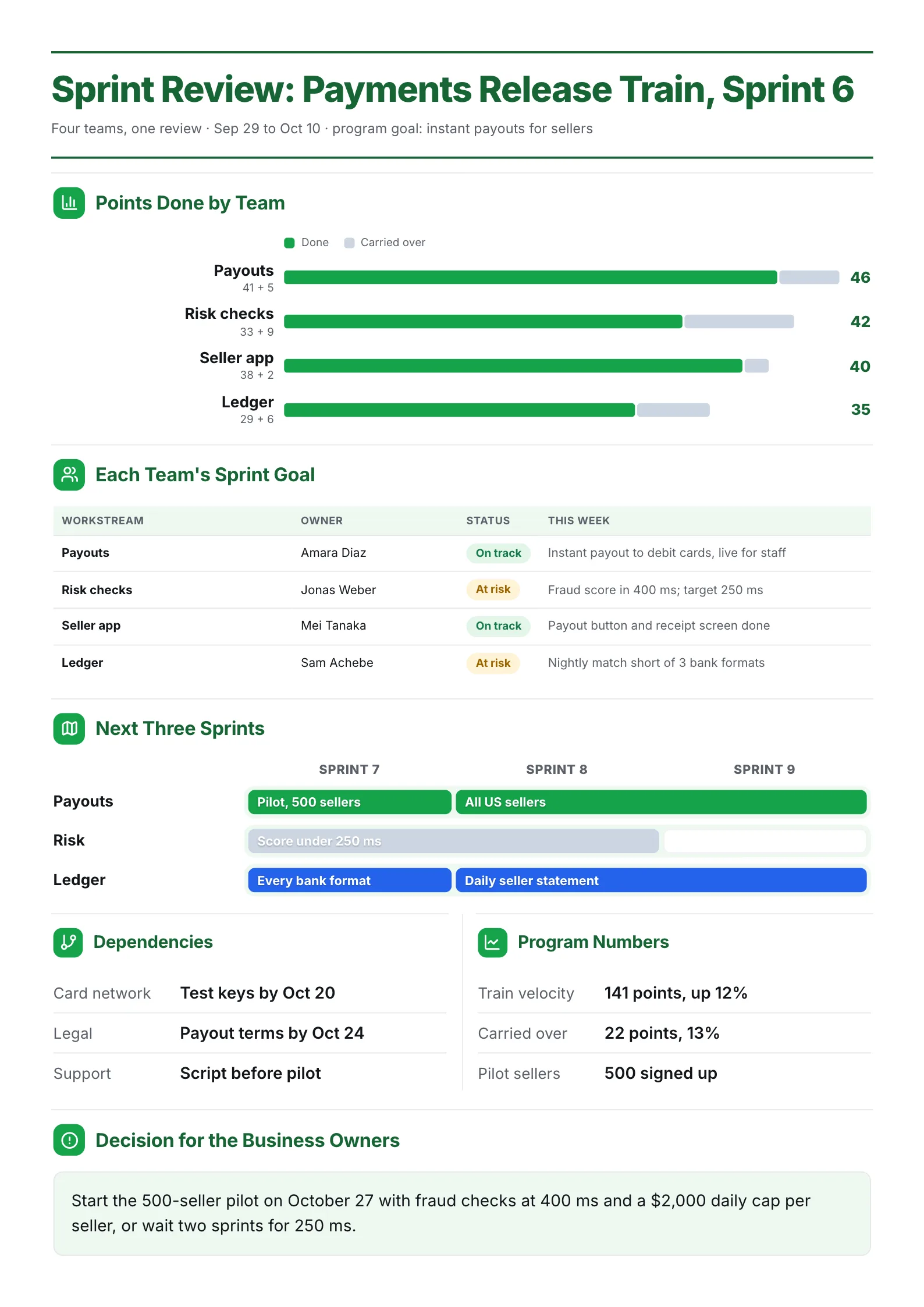
When your teams ship one release together, your stakeholders need one page, and this one covers four teams. A stacked bar shows you points done by team, with Payouts at 41 done and Risk checks at 33. Under it, each team's sprint goal gets a status light. Payouts and the seller app are green. Risk checks is amber, scoring fraud in 400 milliseconds against a target of 250, and so is the ledger, whose nightly match still can't read 3 bank formats.
It meets all five checks in its own way, and you can see each one without turning the page. The subtitle names the program goal, instant payouts for sellers, and a roadmap shows the next three sprints. A Dependencies box covers what changed outside the teams, like test keys from the card network by October 20 and payout terms from legal by October 24. Carried-over work is counted in the open, 22 of the 163 points planned.
The room to steer is a callout at the bottom called Decision for the Business Owners. Start a 500-seller pilot on October 27 with fraud checks at 400 milliseconds and a $2,000 daily cap per seller, or wait two sprints for 250. Put a question like that on your page and your demo turns into a working session, because the people in the room have to answer it.
 Edit this template
Sample program, teams and dates. The decision box at the foot is what the room is there to settle.
3. A firmware review that asks whether the release is ready
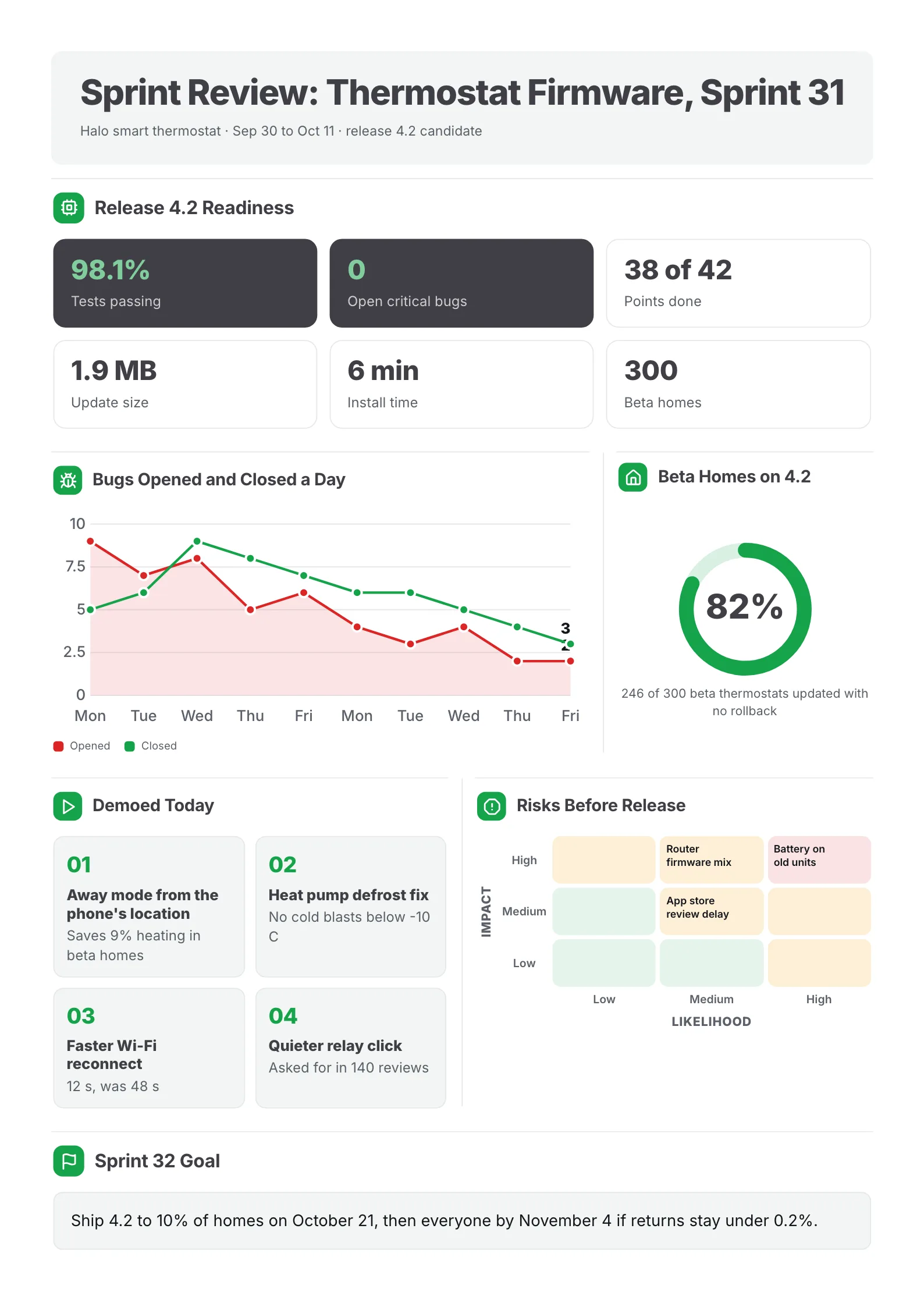
If your team builds hardware, you review against a release, so this page opens with readiness. Tests passing are at 98.1%, open critical bugs are at 0, and 38 of 42 points are done. A gauge shows 246 of 300 beta thermostats already on release 4.2 with no rollback.
It meets four checks. The Sprint 32 goal ties the sprint to the bigger aim, sending 4.2 to 10% of homes on October 21 and to everyone by November 4 if returns stay under 0.2%. A risk grid names what could change around the team, such as a router firmware mix and a delay in app store review. And the Demoed Today list shows only working features, like Wi-Fi reconnect cut to 12 seconds from 48.
The missing check is room to steer. Nothing on the page asks your stakeholders a question or leaves space for their answer, and one line you add at the bottom, such as "Ship on October 21, yes or no?", would close the gap.
 Edit this template
Sample product and figures. The readiness row answers the only question a release review starts with.
4. A design team review where done means tested
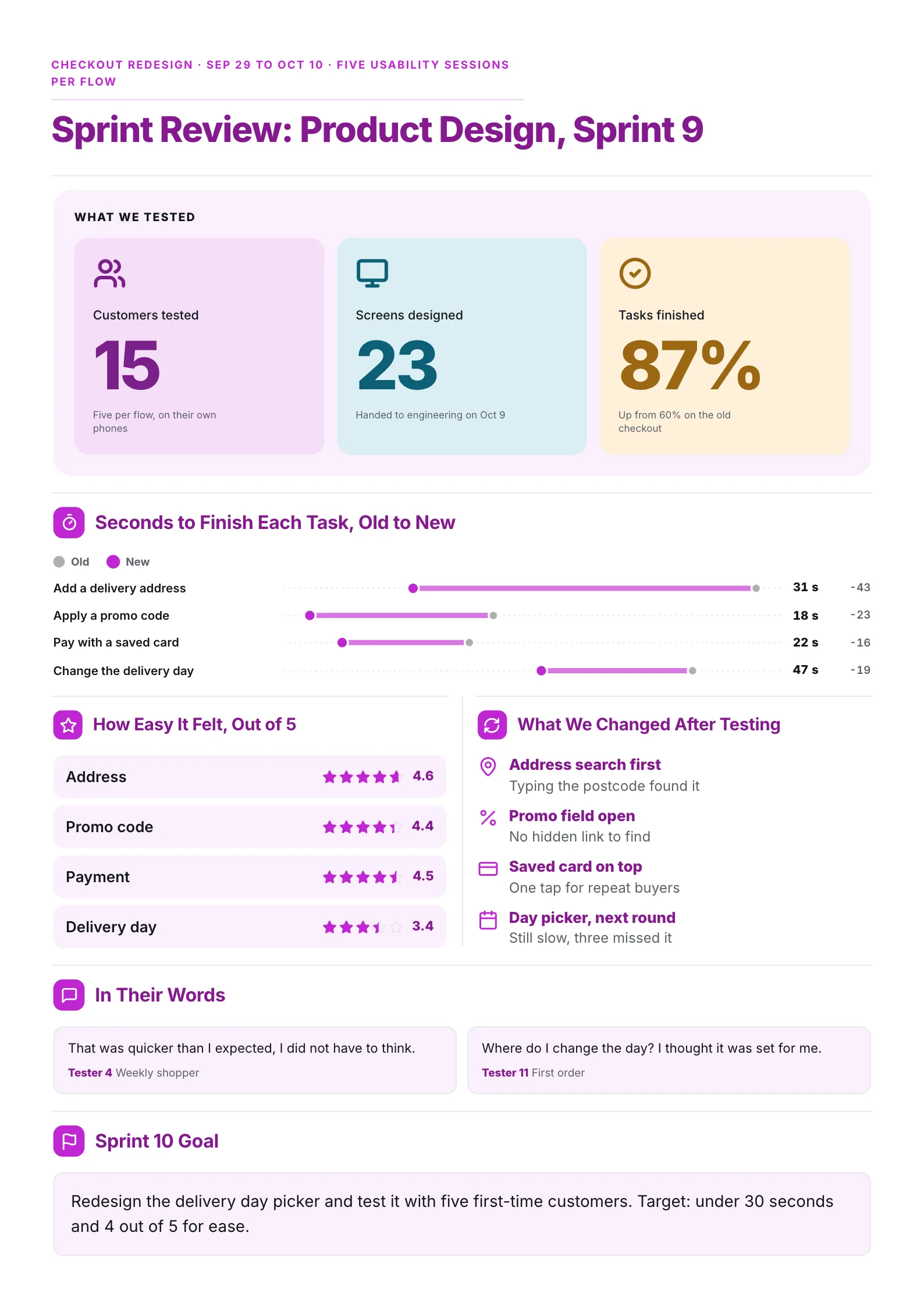
Your design team rarely ships code in a sprint, so this page proves its work with test results, and that's how it meets the Definition of Done check. On this page, a screen counts as done once customers have used it, which gives you a Definition of Done a designer can meet. The team tested a checkout redesign with 20 customers on their own phones and handed 23 screens to engineering on October 9.
It also gives you what got done, the bigger goal and room to steer. Each task shows seconds before and after, and you can spot the weak one at once. Changing the delivery day only improved from 66 to 47 seconds and scored 3.4 out of 5 for ease, while the other tasks scored 4.4 or higher. A tester's question about where to change the day feeds straight into the Sprint 10 goal, a new day picker under 30 seconds.
The check it misses is what changed around the team. A date engineering moved, or a request that arrived mid-sprint, has no line anywhere on the page, so you'd add one near the top.
 Edit this template
Sample figures throughout. Each task shows the old time beside the new one, so the one that barely moved stands out.
5. A game studio review that shows what got cut
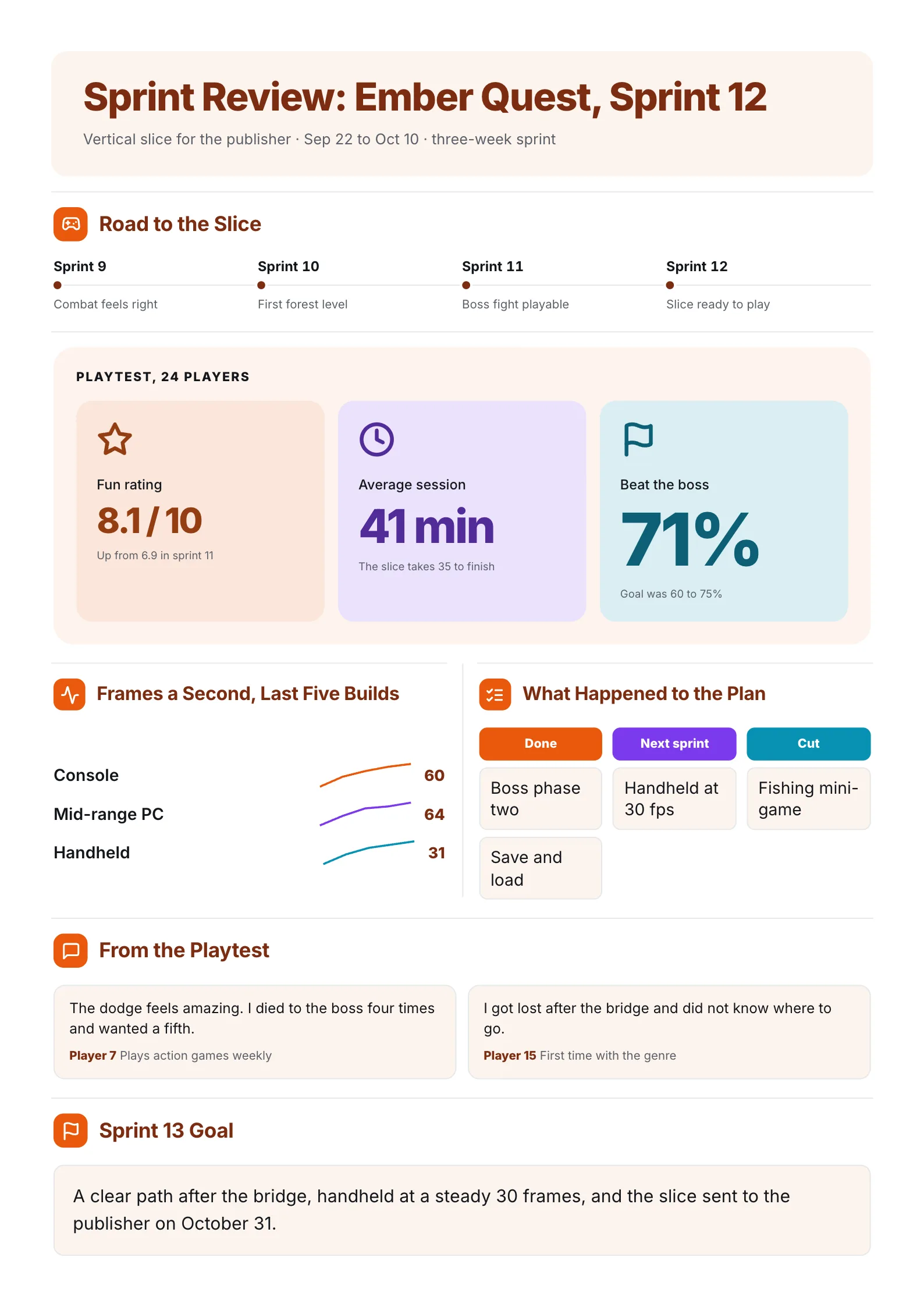
If your team works toward a milestone date, look at this one. The Ember Quest team's Sprint 12 review is building toward a vertical slice for its publisher, a short playable demo. A milestone row shows the road there, from combat that feels right in Sprint 9 to a slice ready to play in Sprint 12.
The playtest numbers you see come from 24 players. The fun rating rose to 8.1 out of 10 from 6.9 the sprint before. The average session ran 41 minutes for a slice that takes 35 to finish, and 71% beat the boss, inside the 60 to 75% the team aimed for. Small lines track frames a second over the last five builds, with the handheld at 31 while the console reached 60.
Then a three-column board shows what happened to the plan. Boss phase two and save and load are done, handheld at 30 frames moved to the next sprint, and the fishing mini-game was cut. When you show a cut on the page, you save yourself an awkward question later.
It meets four checks, and the player quotes count as room to steer because they shape the Sprint 13 goal. That goal also gives you a date to hold the team to, sending the slice to the publisher on October 31. The miss is what changed outside the team. A new ask from the publisher would have nowhere to go, and the space beside the Cut column is the natural home for it.
 Edit this template
Sample studio and data. The Cut column tells the publisher what changed in the plan, before anyone asks.
What public teams post at the end of a sprint
Some teams publish their sprint notes, so you can see what a real sprint leaves behind on paper. We read 7 of them. Four come from the UW-Madison Locations API team, which holds a review every two weeks. Three come from the UK Parliament's beta website teams in 2018, for Sprint 9 and Sprint 10 of the outputs team and Sprint 52 of the members team.
| What the note includes | Notes that do |
|---|---|
| A list of what the team did | 7 of 7 |
| A link to the review recording | 4 of 7 |
| Changes users must act on | 3 of 7 |
| What the team learned | 3 of 7 |
| People joining or leaving the team | 3 of 7 |
| What the team is working toward | 2 of 7 |
| Points or velocity | 0 of 7 |
| What stakeholders said in the review | 0 of 7 |
We read all 7 notes on October 30, 2026, along with the 2020 Scrum Guide.
You can copy two habits from them. The UW-Madison notes close with an API Changes list, just above the recording link, so the people who use the API know what to fix on their side. In Sprint 93 it warns that CSV results now arrive through a link that works for 15 minutes. Every UW note also links the recording of the review.
The Parliament notes are more candid. Sprint 10 admits "We had a difficult sprint" and lists "Almost finished a lot of things" as its last item. That's honest, and it's also exactly the kind of half-done work the Definition of Done check is meant to catch on your review page.
The gap is the same across both teams. Nobody wrote down what stakeholders asked for, so you can't tell whether the review changed anything. If you copy one box from the examples above, make it the data team's Keep and Change notes.
Which example fits your team
| Your team | Start from | Lead with |
|---|---|---|
| A data or analytics team | The data team review | The goal met, as a share of days |
| Several teams on one release | The release train review | Points by team and the decision for business owners |
| A hardware or firmware team | The firmware review | Tests passing, critical bugs and beta rollout |
| A design or research team | The design review | Task times before and after testing |
| A studio or any team with a milestone | The game studio review | The road to the milestone and what got cut |
Every one of these pages gets better with a Keep and Change box filled in during the meeting. Our sprint review template guide walks through the parts one by one, and a weekly status report covers the weeks between reviews.
Run the meeting in the order of the page
Fill in the numbers you know ahead of time, and leave the stakeholder box empty. The review then runs down the page: your sprint goal, met or missed, a demo of finished work only, what changed around the team, the Keep and Change box filled in with the room, and the next goal last. That's the working session the Scrum Guide asks for, with a page to show for it.
Bring last sprint's page to the table too. A Change request still sitting on it two reviews later tells the room the review isn't steering anything yet. Keeping each review as a page in MakeOnepagers gives you that old list to check against, a record none of the 7 public notes we read kept, since not one wrote down what stakeholders said.




