Risk Register Template: Free One-Page Project Risk Register
Free one-page risk register template: the columns it needs, how to score likelihood and impact, and 5 examples from ERP to app release.

A risk register template is a ready table for recording what could go wrong on your project. You write each risk in plain words, with how likely it is and how much it would hurt. Then you name who owns it and what you will do about it. Project managers keep the full register in a spreadsheet. The version your leaders read fits on one sheet, with the top risks, a heat grid and the decisions needed. Below you'll find the columns every risk register needs and how to score risks. You also get a free risk register template you can copy and five worked examples. Start from a free one pager template.
One‑Pager examples
Real One-Pagers made with MakeOnepagers. Open any one to edit it as your own.
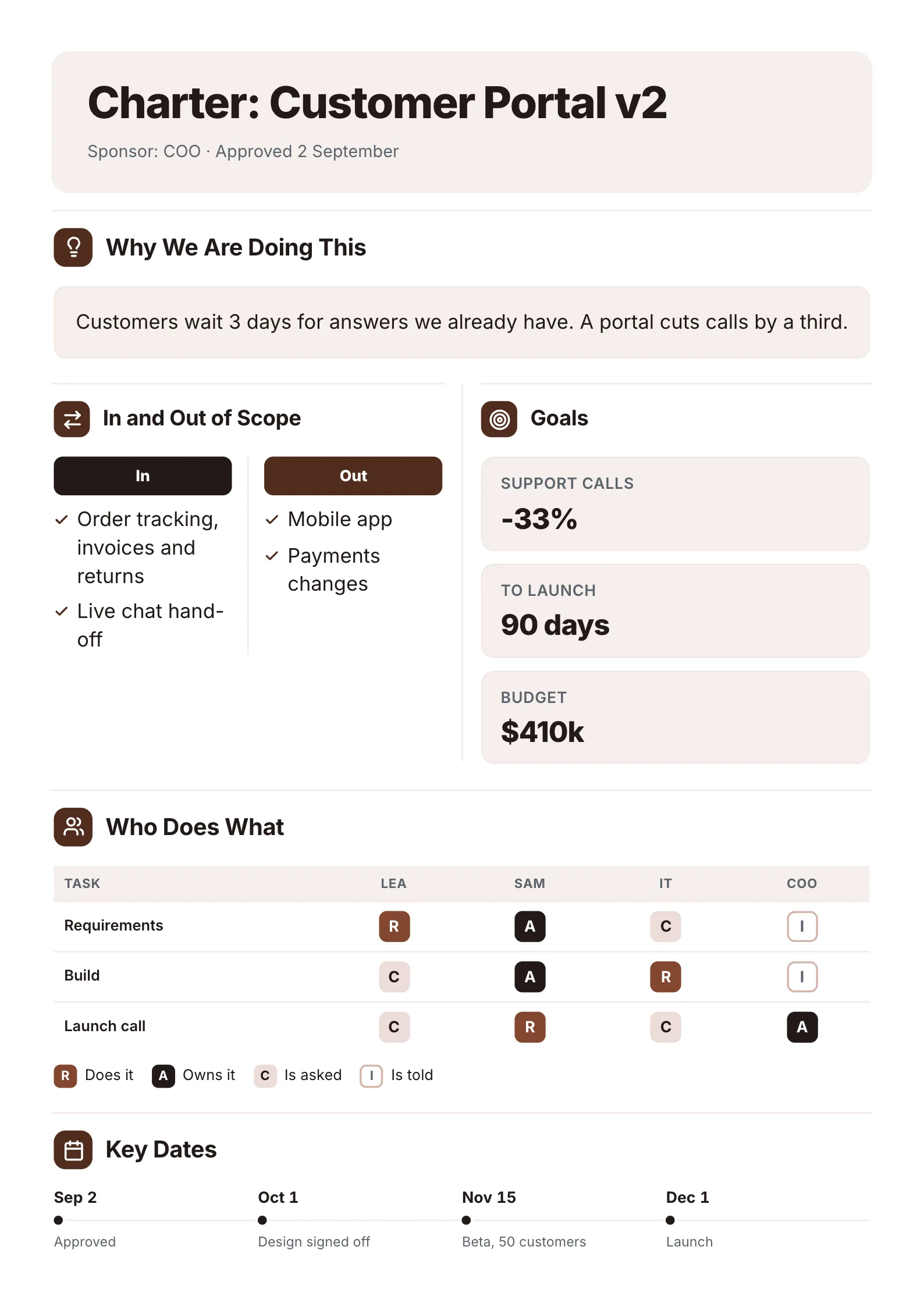 Project CharterEdit for free(opens in a new tab)
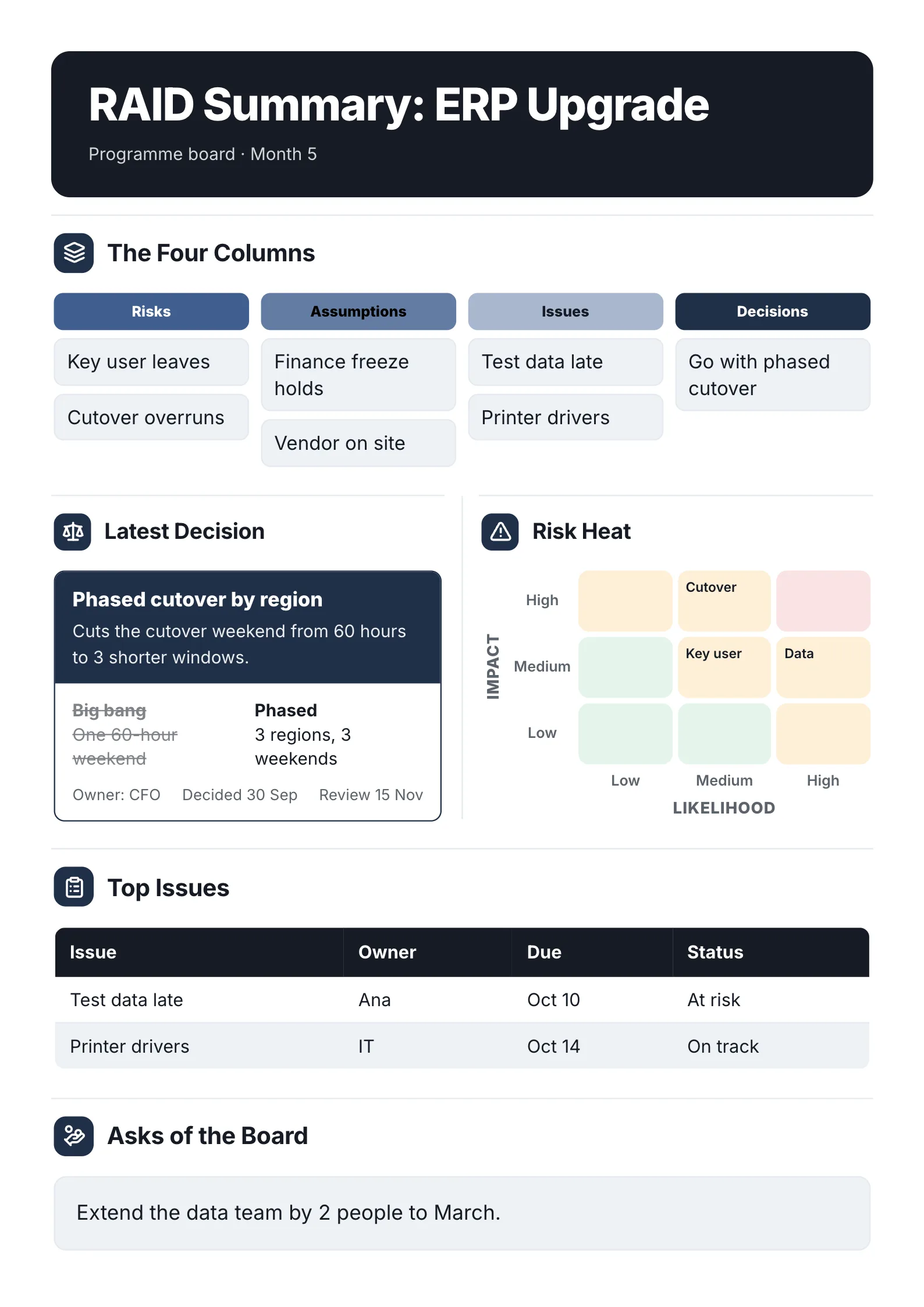 RAID Log SummaryEdit for free(opens in a new tab)
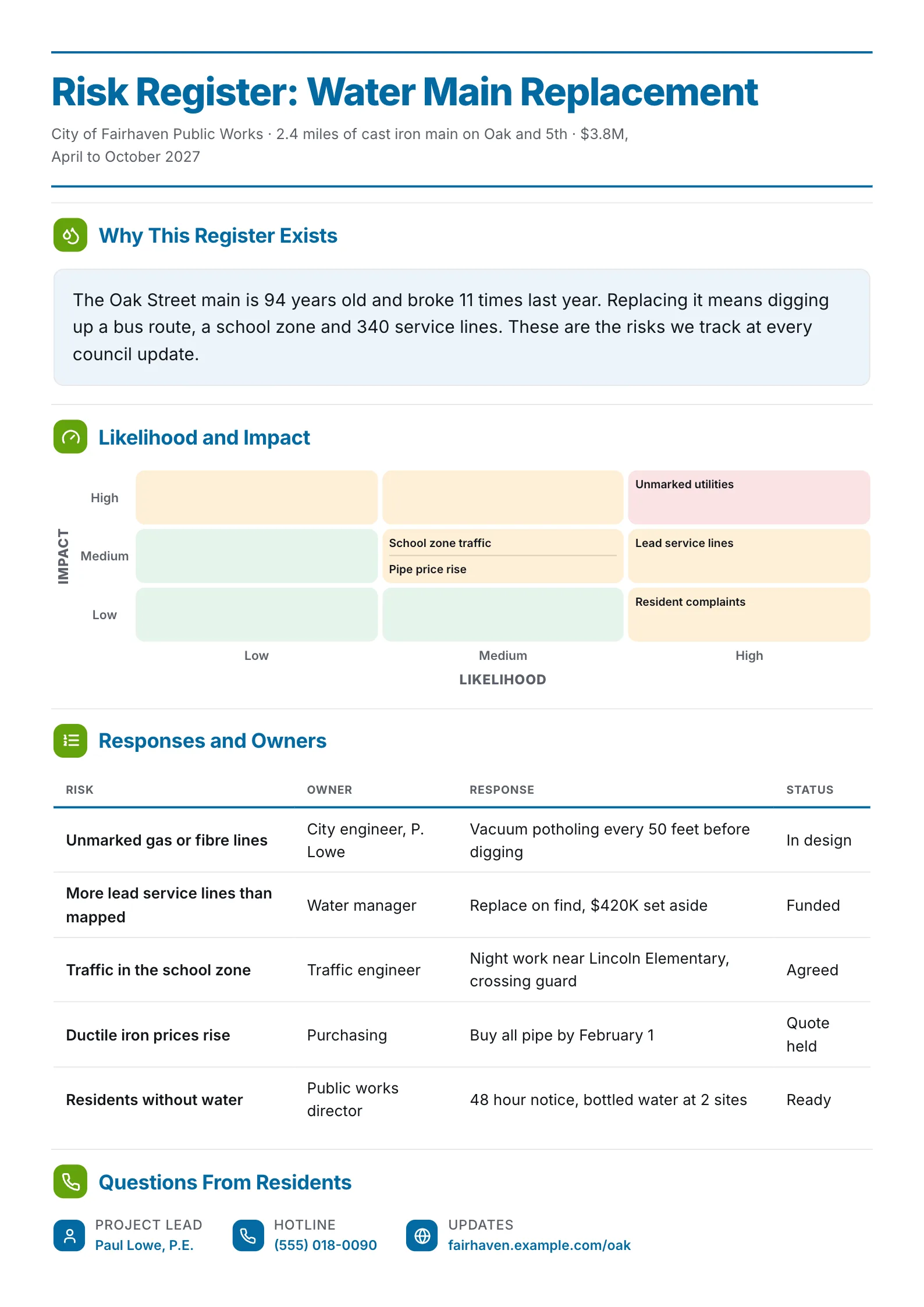 Risk Register: Water Main ReplacementEdit for free(opens in a new tab)
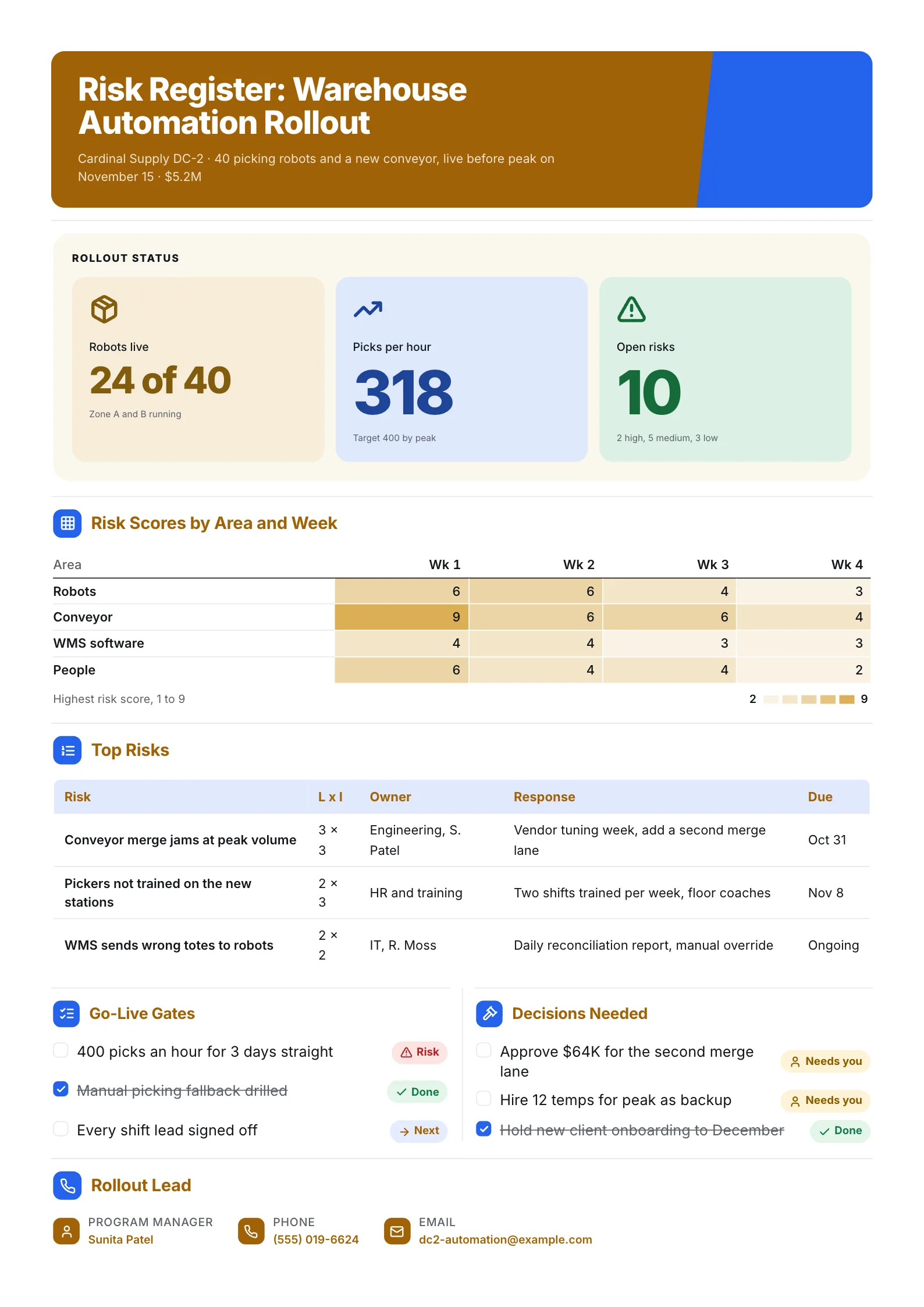 Risk Register: Warehouse AutomationEdit for free(opens in a new tab)
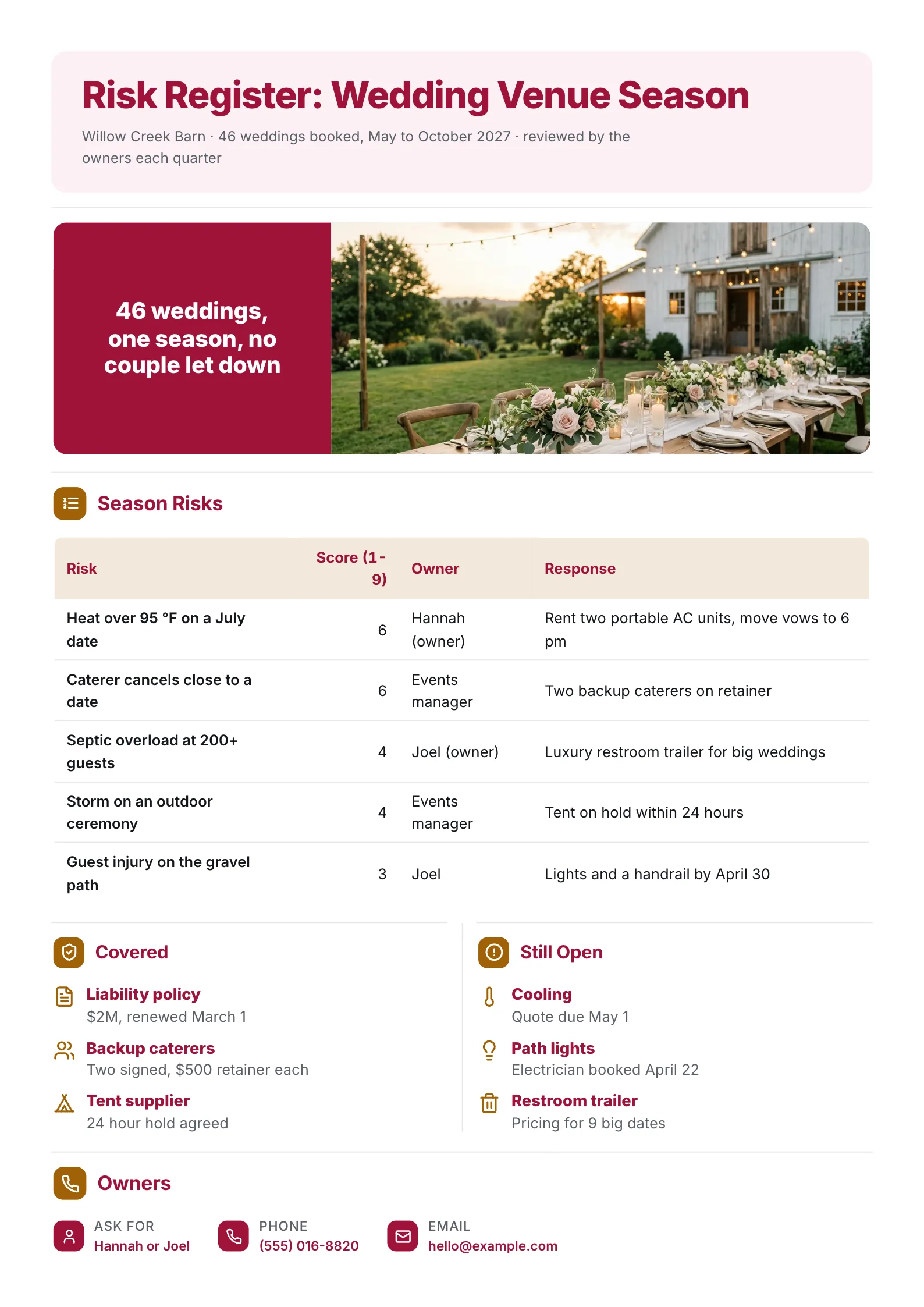 Risk Register: Wedding Venue SeasonEdit for free(opens in a new tab)
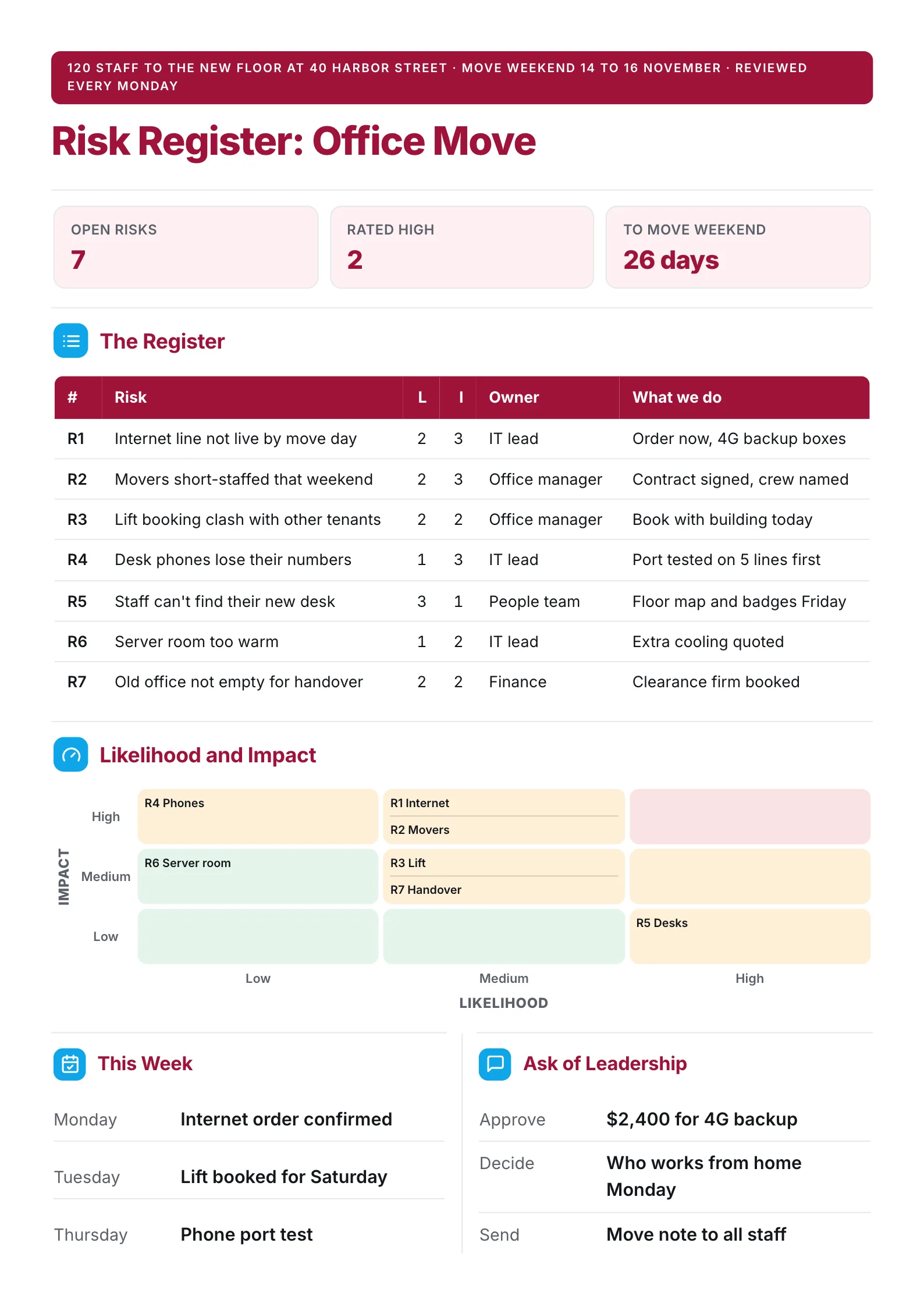 Risk Register: Office MoveEdit for free(opens in a new tab)
Every example was made with MakeOnepagers. Each one opens as a template, and you can edit every risk, score and color for free.
What is a risk register?
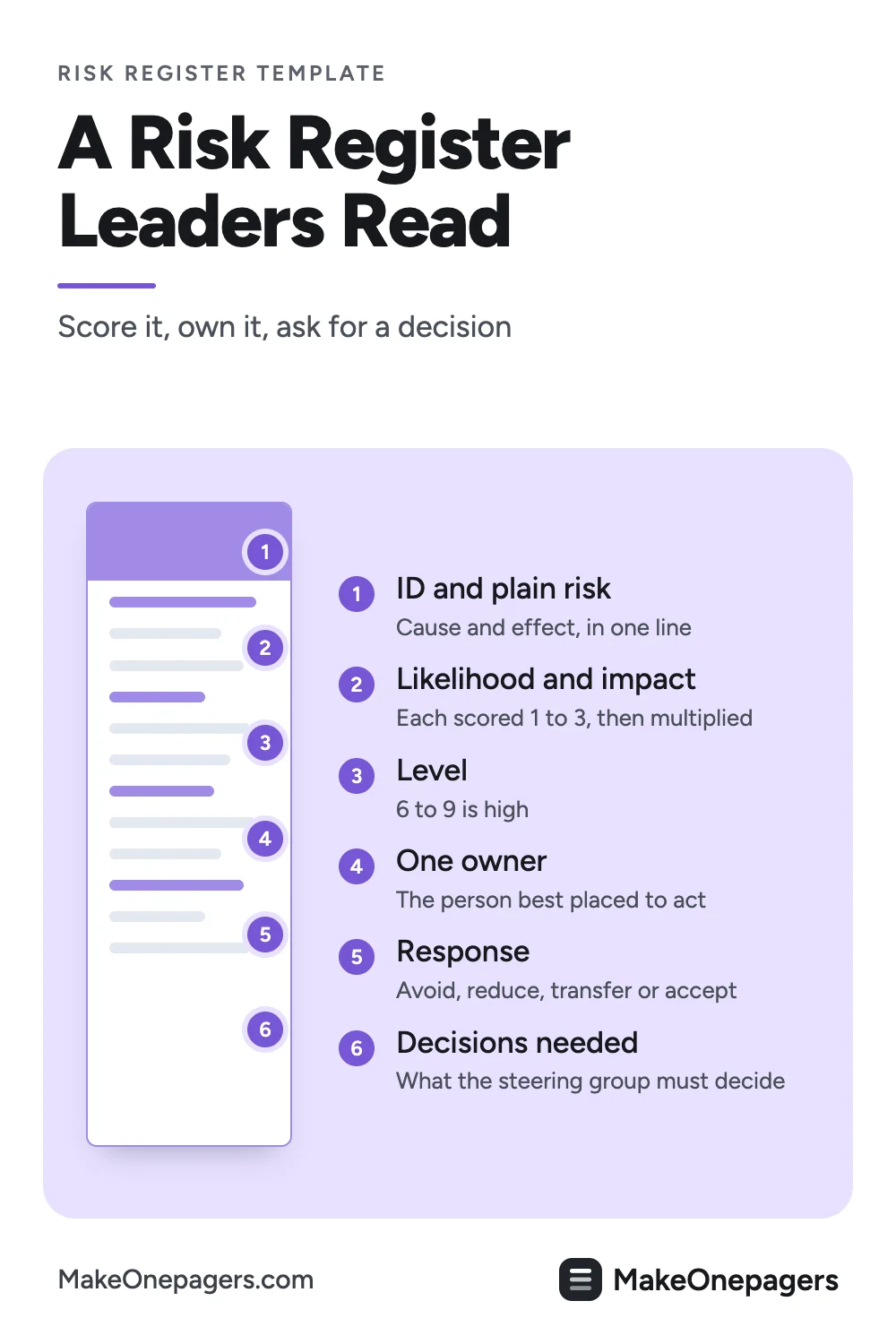
A risk register (also called a risk log) is the central record of your project's risks. Each risk gets a description and two scores, one for likelihood and one for impact. It also gets an overall level, an owner and a planned response. Your team uses it to rank risks, assign them and track them until they close.
Keep it alive. A register written at kickoff and never opened again is a common failure. The useful ones get reviewed every week or two, and you report them to the steering group every month.
A project risk register is different from an issue log. A risk hasn't happened yet. An issue already has. When a risk happens, you move it to the issue log, and the register records that it closed.
What to include in a risk register
| Column | What to write, with an example |
|---|---|
| ID | A short code that never changes. R1 |
| Risk | What might happen, and what it would cause. Item data fails the import, so go-live slips |
| Category | Where it comes from. Data, people, vendor, schedule |
| Likelihood | 1 low, 2 medium, 3 high |
| Impact | 1 low, 2 medium, 3 high |
| Score and level | Likelihood times impact. 3 x 3 = 9, high |
| Owner | One named person. J. Ortega |
| Response | What you will do. Cleanup sprint with 2 temps |
| Trigger | The sign it is about to happen. Import failure rate over 10% |
| Status and review date | Open or closed, and when it was last checked |
Your full register can carry more, like the score before and after the response, a change history and the cost of the response. The one-sheet summary carries only the top risks, each with its ID, risk, level, owner and response.
How to score likelihood and impact
A simple three-point scale works for most projects:
| Score | Likelihood | Impact |
|---|---|---|
| 1 | Unlikely | Small delay or cost, absorbed by the team |
| 2 | Possible | Noticeable slip or overspend, needs the sponsor |
| 3 | Likely | Misses a key date or budget, needs a decision |
Multiply the two and you get a score from 1 to 9. In the first example below, a score of 6 to 9 is high, 3 or 4 is medium and 1 or 2 is low. Write your own definitions at the foot of the register, so a "high" means the same thing to everyone who reads it.
Then plot your risks on a three by three grid, with likelihood across and impact up. Look at the top right corner first.
The 4 risk responses
- Avoid. Change the plan so the risk cannot happen. Move go-live out of quarter close.
- Reduce. Lower the likelihood or the impact. Pair a second analyst with the one person who knows costing.
- Transfer. Move the impact to someone else, often through a contract or insurance. The vendor carries the cost of a late delivery.
- Accept. Decide to live with it, and say so. Low printers risk: test 3 models and carry on.
5 risk register examples
Here are five registers for five kinds of project, from a software migration to an app release. Each one scores every risk and gives it one owner, so you can copy the setup that fits your work.
1. ERP migration risk register
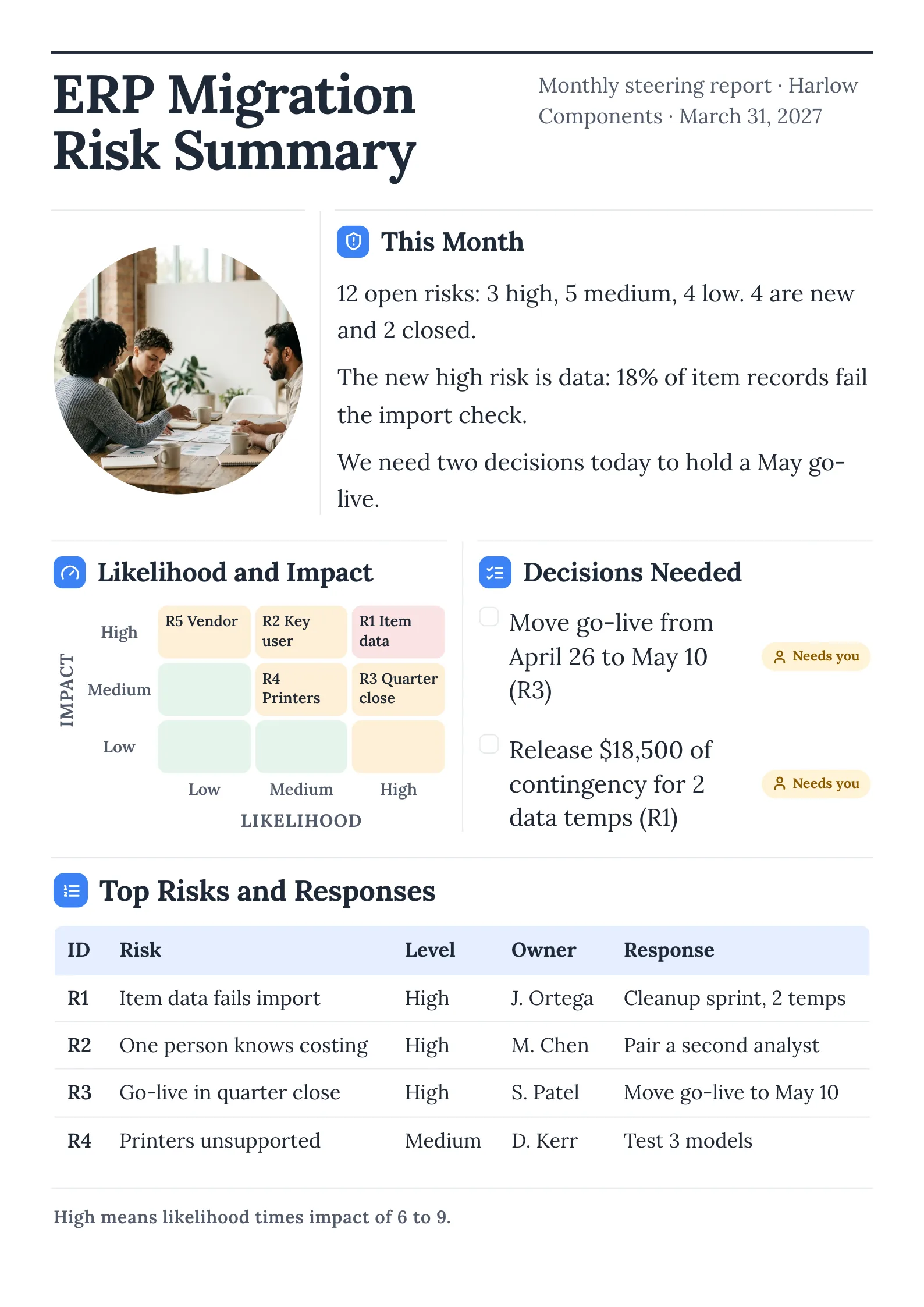 Edit this template
Twelve risks come down to the four that matter. You also see the two decisions that would fix them.
This is a sample monthly steering report for a fictional manufacturer, Harlow Components, that is moving to a new ERP system. The figures are illustrative. Here is how it is built:
- The month in three sentences. 12 open risks: 3 high, 5 medium, 4 low. 4 are new and 2 closed. The new high risk is data: 18% of item records fail the import check. Two decisions are needed today to hold a May go-live.
- A likelihood and impact grid. R1 item data sits in the top right corner, high on both. R2 key user and R5 vendor are high impact. R3 quarter close and R4 printers are medium impact. The grid shows the shape of the risk in a glance.
- Decisions needed, flagged. Move go-live from April 26 to May 10 (R3). Release $18,500 of contingency for 2 data temps (R1). Each is marked "Needs you", so the steering group knows what it is there to decide.
- Top risks with owners and responses. R1 item data fails import: high, J. Ortega, cleanup sprint with 2 temps. R2 one person knows costing: high, M. Chen, pair a second analyst. R3 go-live in quarter close: high, S. Patel, move go-live to May 10. R4 printers unsupported: medium, D. Kerr, test 3 models.
- The scoring rule at the foot. High means likelihood times impact of 6 to 9. Nobody has to guess what the colors mean.
You can edit this risk register template for free.
2. Cybersecurity risk register
 Edit this template
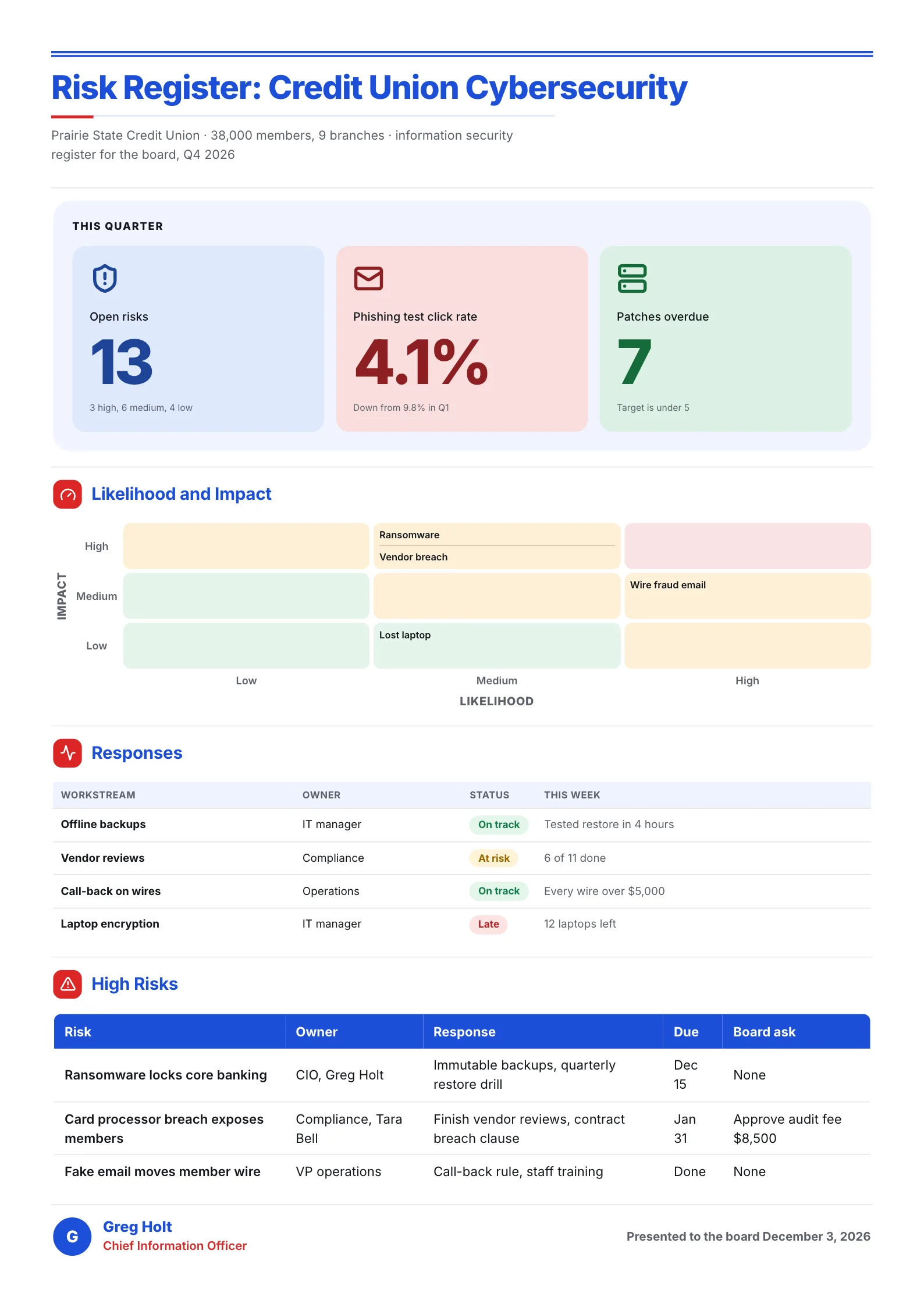
A credit union wrote up its security risks for a board that doesn't read technical reports.
What to copy:
- Proof the responses work. The phishing test click rate fell from 9.8% in Q1 to 4.1%.
- Response status by color. Offline backups green, with a tested restore in 4 hours.
- A board ask column. Each high risk says whether the board needs to act.
You can edit this cybersecurity risk register template for free.
3. Hospital system upgrade risk register
 Edit this template
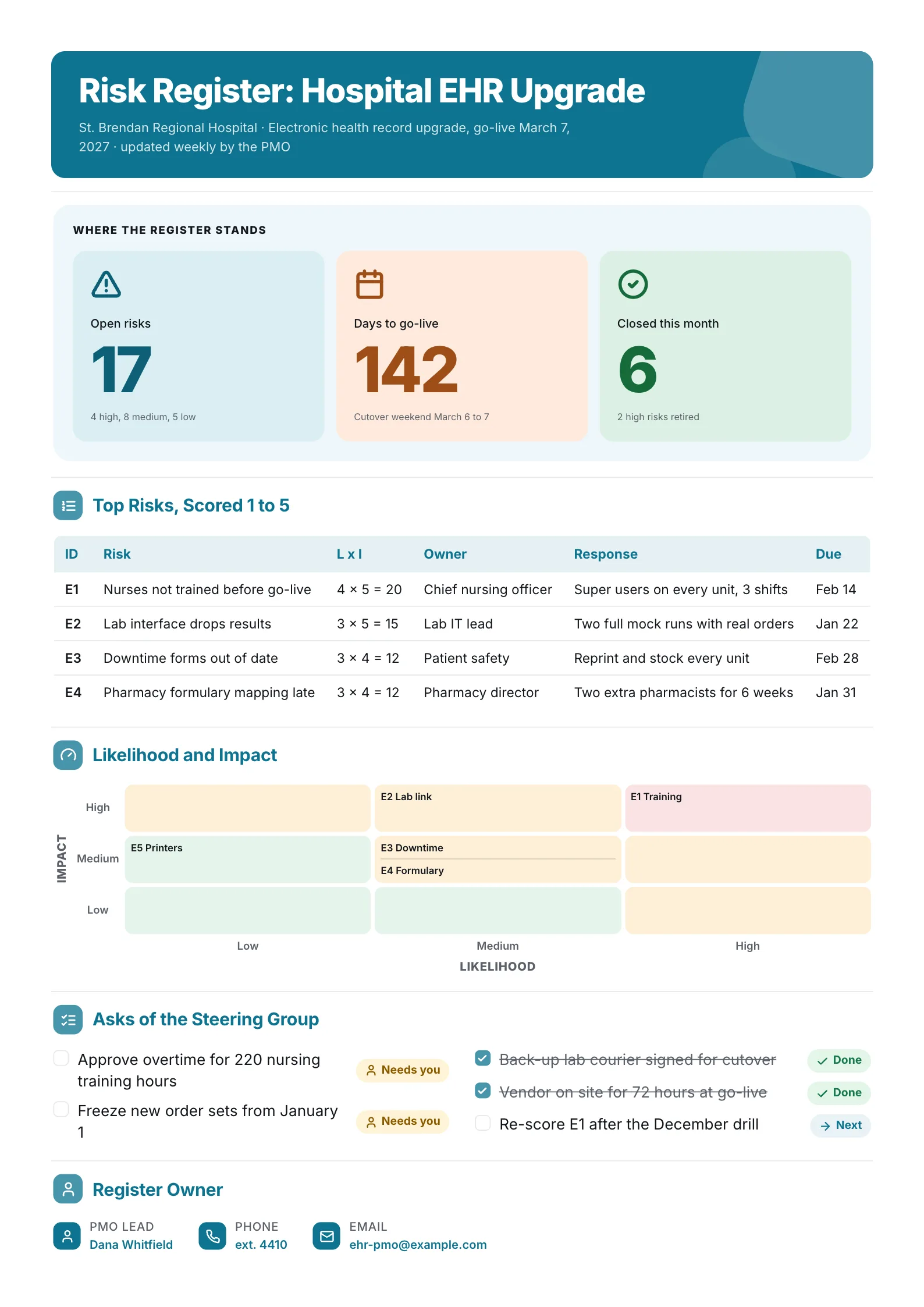
A hospital tracks what could stop its record system going live on March 7.
What to copy:
- The countdown on the sheet. 142 days to go-live, with the cutover weekend named.
- The score written out. Nurses not trained before go-live: 4 x 5 = 20, the top risk.
- Asks with a number. Approve overtime for 220 nursing training hours.
You can edit this hospital EHR upgrade risk register template for free.
4. Construction site risk register
 Edit this template
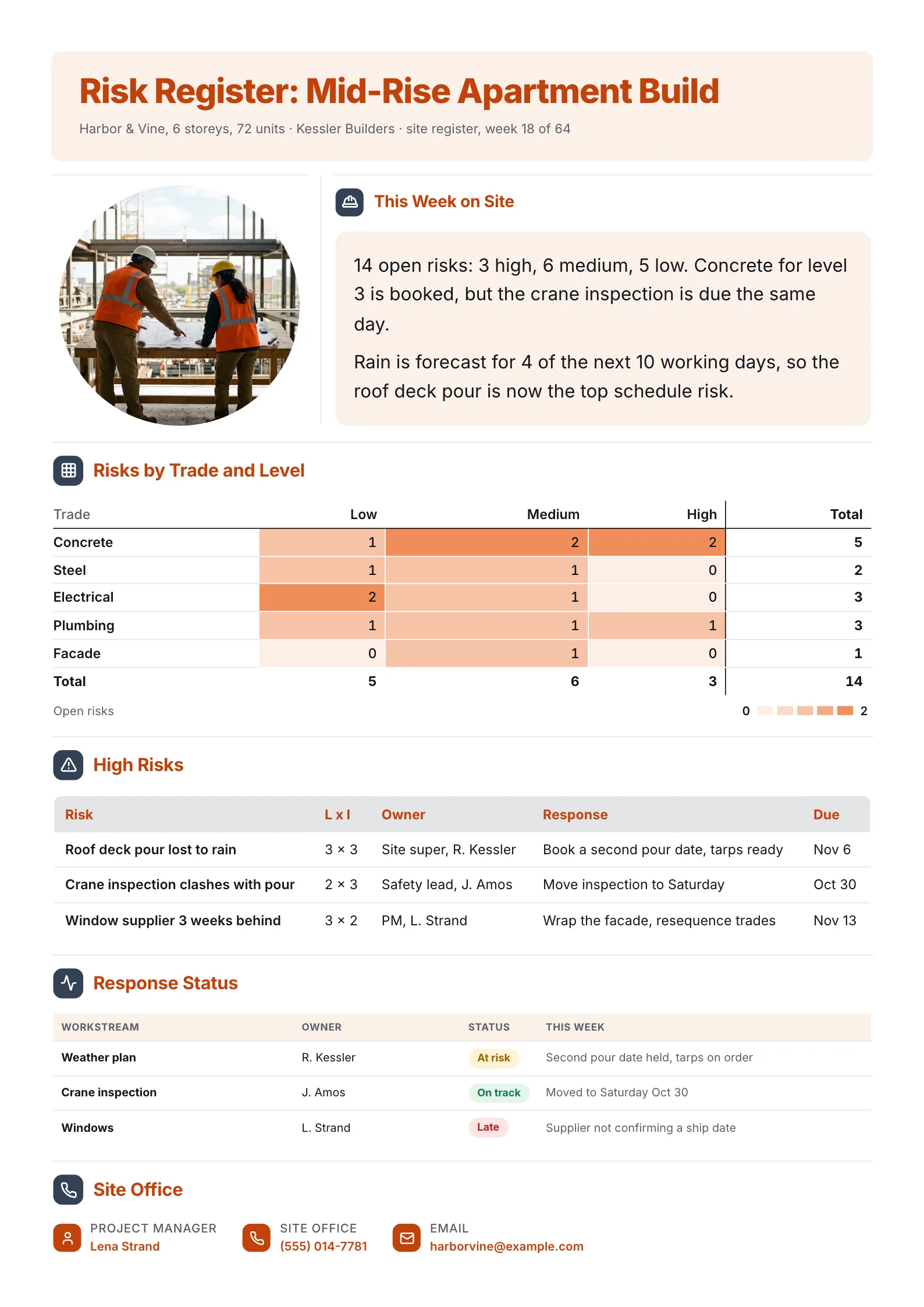
This is a builder's weekly register. Even the weather forecast counts as a risk here.
What to copy:
- This week in two sentences. The level 3 pour is booked for the day the crane inspection is due.
- Risks by trade. A heat map shows concrete holds the most high risks.
- A response you can act on now. Book a second pour date and have tarps ready.
You can edit this construction site risk register template for free.
5. App release risk register
 Edit this template
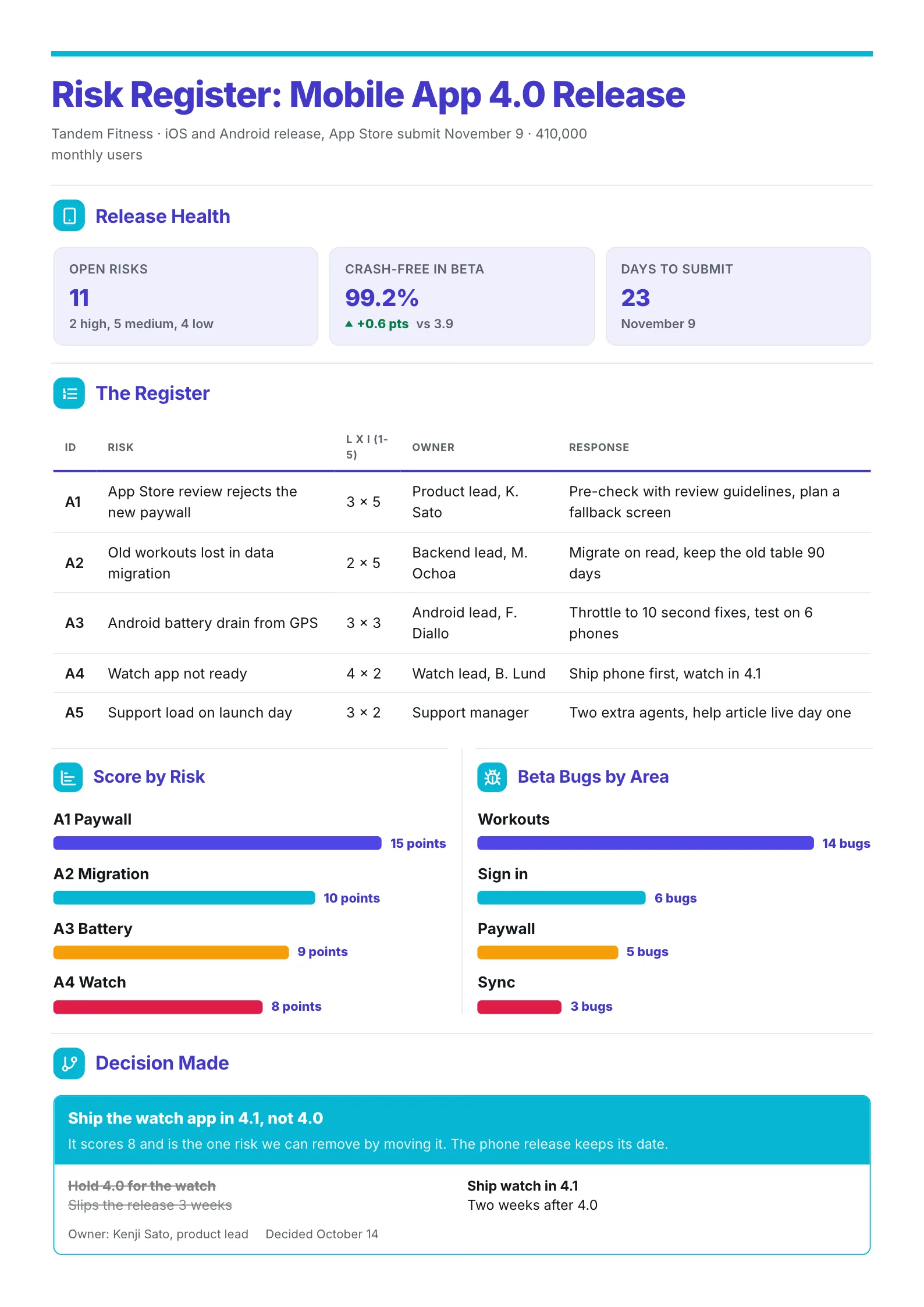
A fitness app scores its release risks and moves the one it can remove.
What to copy:
- Scores as bars. The paywall risk scores 15, almost twice the next one.
- The weak area, measured. Workouts hold 14 of the beta bugs.
- The decision made, with the reason. Ship the watch app in 4.1, so the phone release keeps its date.
You can edit this app release risk register template for free.
How to make a risk register in 6 steps
- Run a short risk workshop. Ask the team, the sponsor and a key user what could stop the project hitting its date, budget or goal. Thirty minutes is enough for a first list.
- Write each risk as cause and effect. "Item data fails the import, so go-live slips" is a risk. "Data" is a topic.
- Score likelihood and impact. Use the three-point scale above and agree the definitions first.
- Give each risk one owner. The person best placed to act, not the project manager by default.
- Pick a response and a trigger. What you will do now, and the sign that tells you the risk is turning into an issue.
- Review it on a fixed rhythm. Every week or two with the team, every month with the steering group, on one sheet.
Do you keep your register in a spreadsheet? Paste the top rows into the free AI One-Pager generator, and you'll get back a designed risk register summary for your steering meeting.
Risk register vs RAID log
A risk register tracks risks only. A RAID log tracks four things together, which are risks, assumptions, issues and dependencies. Small projects often keep one RAID log. Larger ones keep a separate risk register, because risks need scoring and owners and the other three don't always. Either way, your steering group should see the same top risks on one sheet.
Risk register mistakes
- Vague risks. "Resourcing" cannot be owned or fixed. "The only analyst who knows costing leaves in May" can.
- The project manager owns everything. A register with one name in the owner column is a list of worries, not a plan.
- Scores with no definitions. If "high impact" is not defined, each person scores by feel and the grid means nothing.
- Never closing risks. A register that only grows hides the risks that matter under the ones that have passed.
- No decisions asked for. A steering report that lists risks without asking for anything leaves the people who could fix them with nothing to do.
Make your risk register
Open the free risk register template and put in your project's top risks. Or drop your spreadsheet into the free AI One-Pager generator, and you'll get a finished risk register summary back.
Frequently asked questions
What should a risk register include?
Give each risk an ID, a plain description and its scores for likelihood and impact. Add an overall level and one owner. Then write the planned response, a trigger and a status with the date you last reviewed it.
How do you calculate a risk score?
Multiply likelihood by impact. On a 1 to 3 scale for each, your scores run from 1 to 9. A common split is 1 to 2 low, 3 to 4 medium and 6 to 9 high.
Who owns the risk register?
The project manager keeps it up to date. Each risk is owned by the person best placed to act on it.
How often should a risk register be updated?
Update yours every week or two during active work, and before every steering meeting. Add new risks as they appear, and close risks when they pass.
What is the difference between a risk and an issue?
A risk might happen. An issue already has. When a risk becomes real, you move it to the issue log.




