How to Write a Meeting Summary: What 7 Public Ones Leave Out
How to write a meeting summary, from 7 published by councils and boards: none gives a follow-up a due date. Here's the order to write yours in.

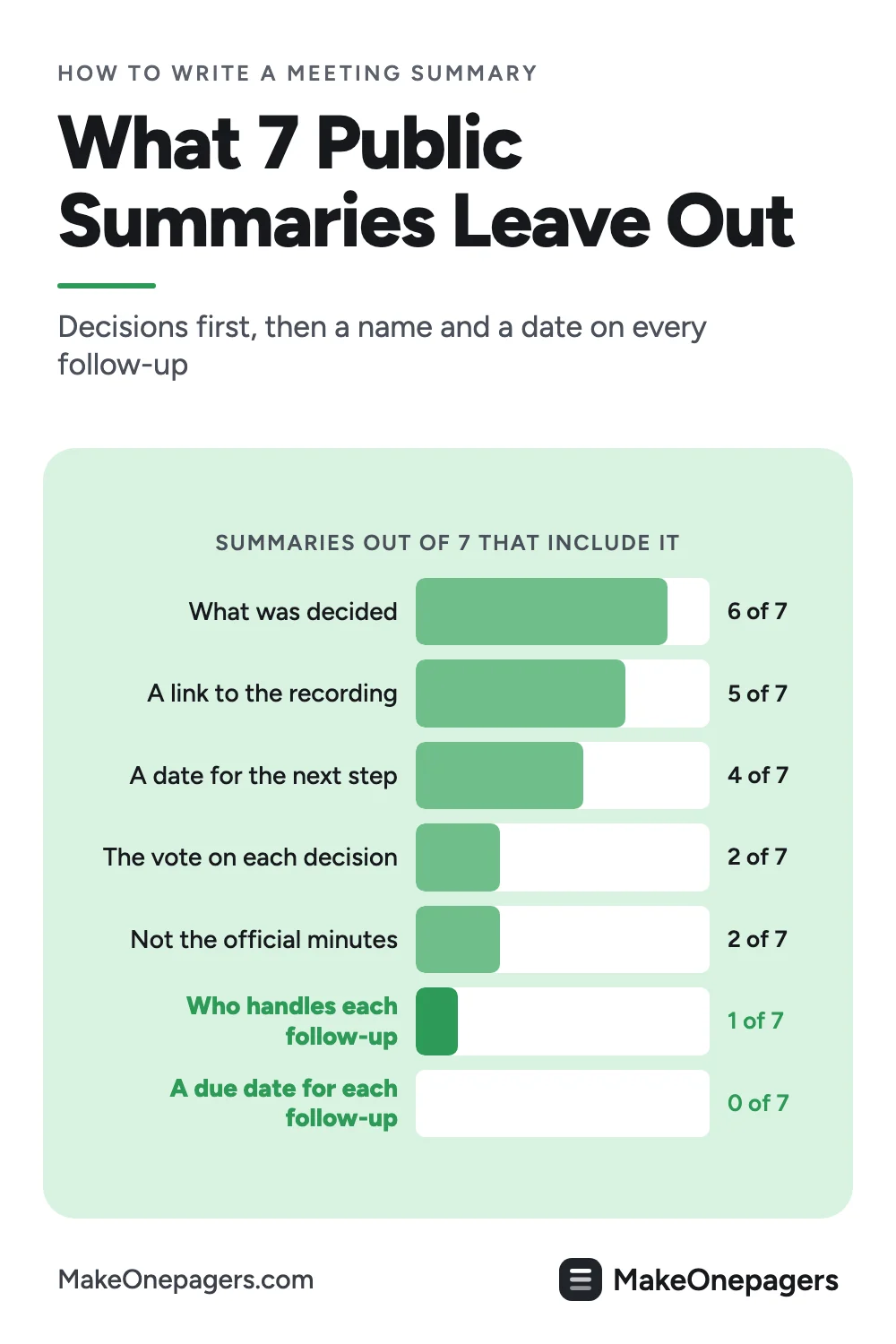
City councils and school boards write meeting summaries for people who weren't in the room, and many post them online. We read 7. Six of them tell you clearly what was decided. Only 1 says who will do the follow-up work, and none of the 7 puts a due date on a single task. Start from a free one pager template.
One‑Pager examples
Real One-Pagers made with MakeOnepagers. Open any one to edit it as your own.
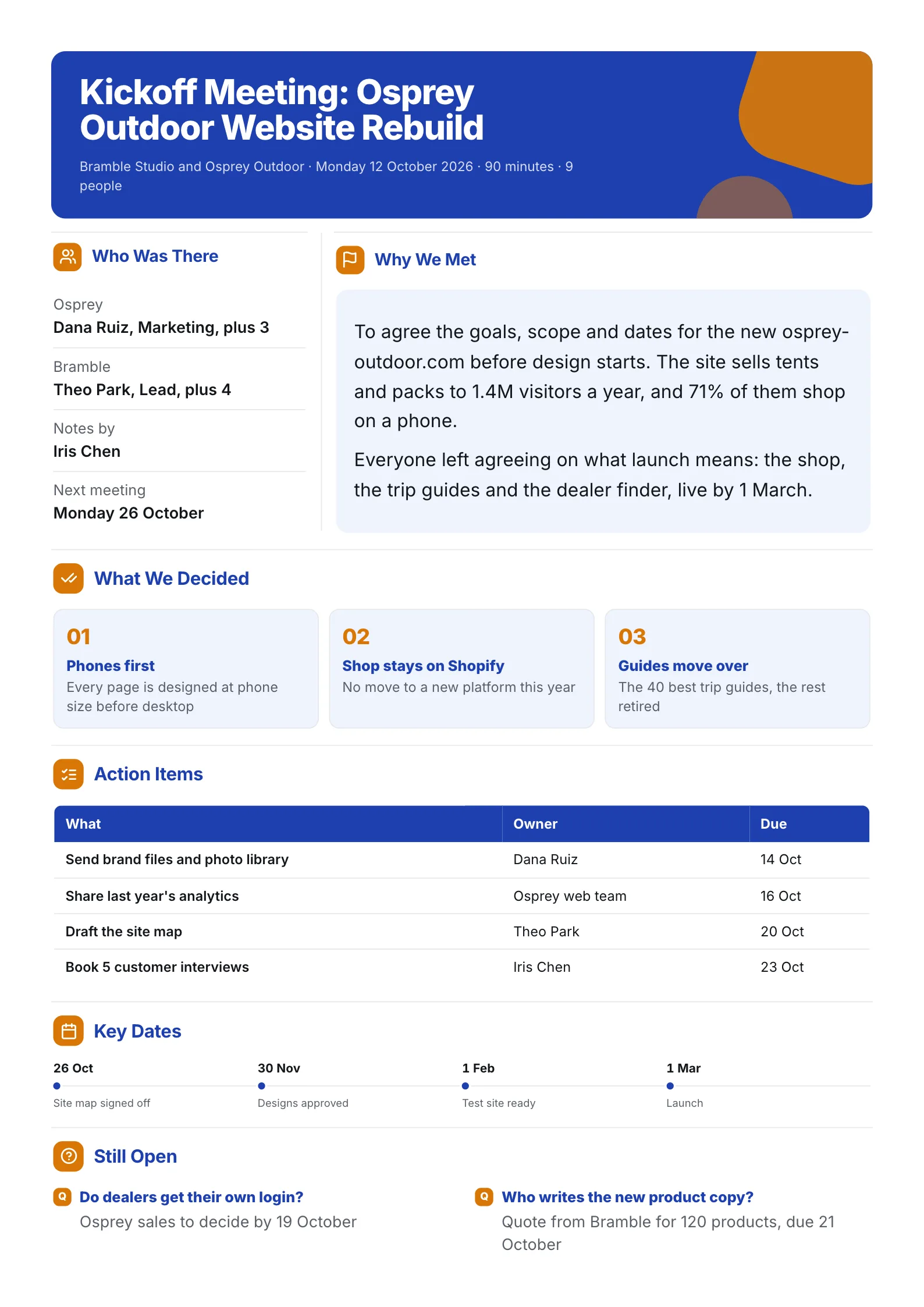 Meeting Summary: Client KickoffEdit for free(opens in a new tab)
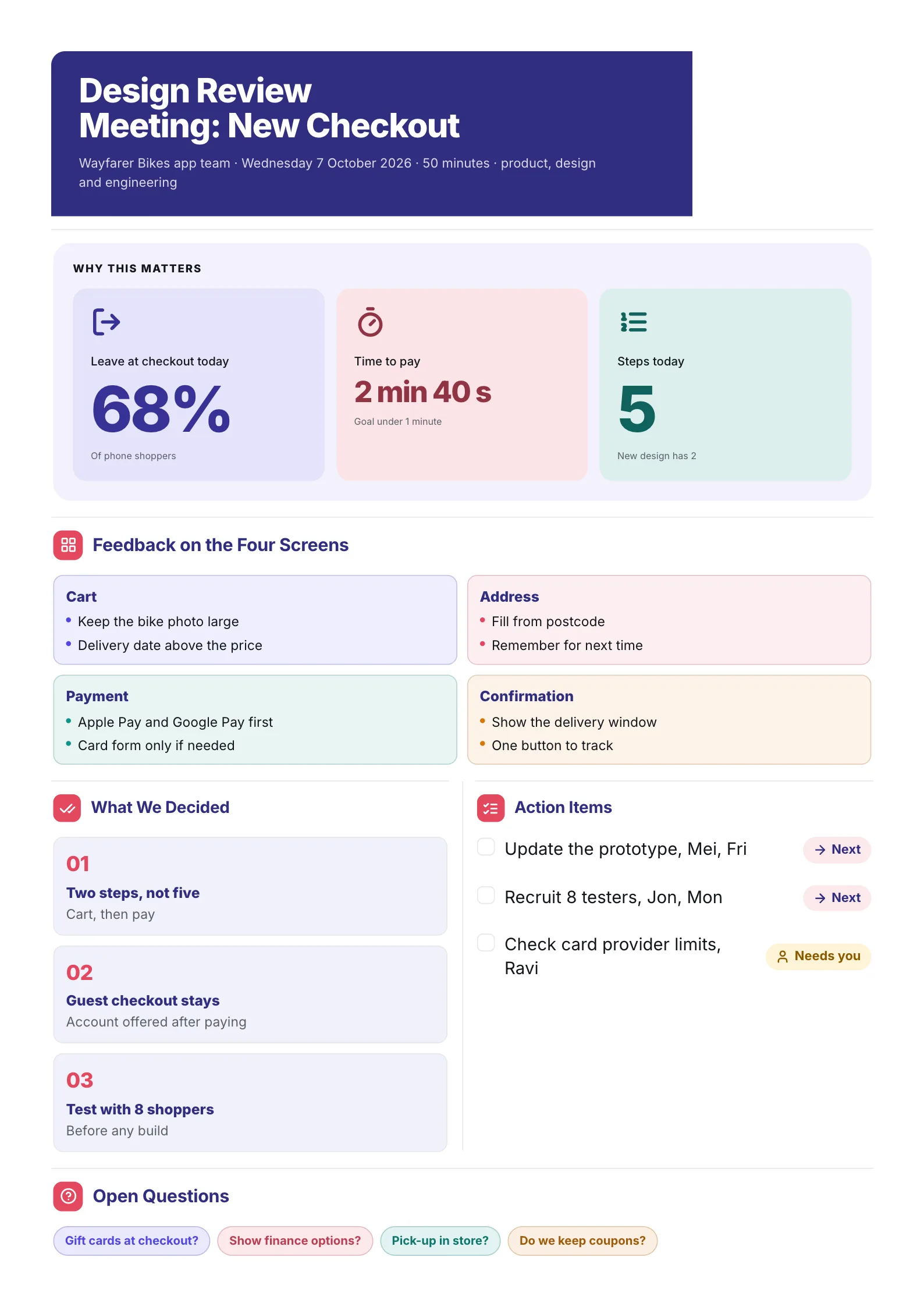 Meeting Summary: Design ReviewEdit for free(opens in a new tab)
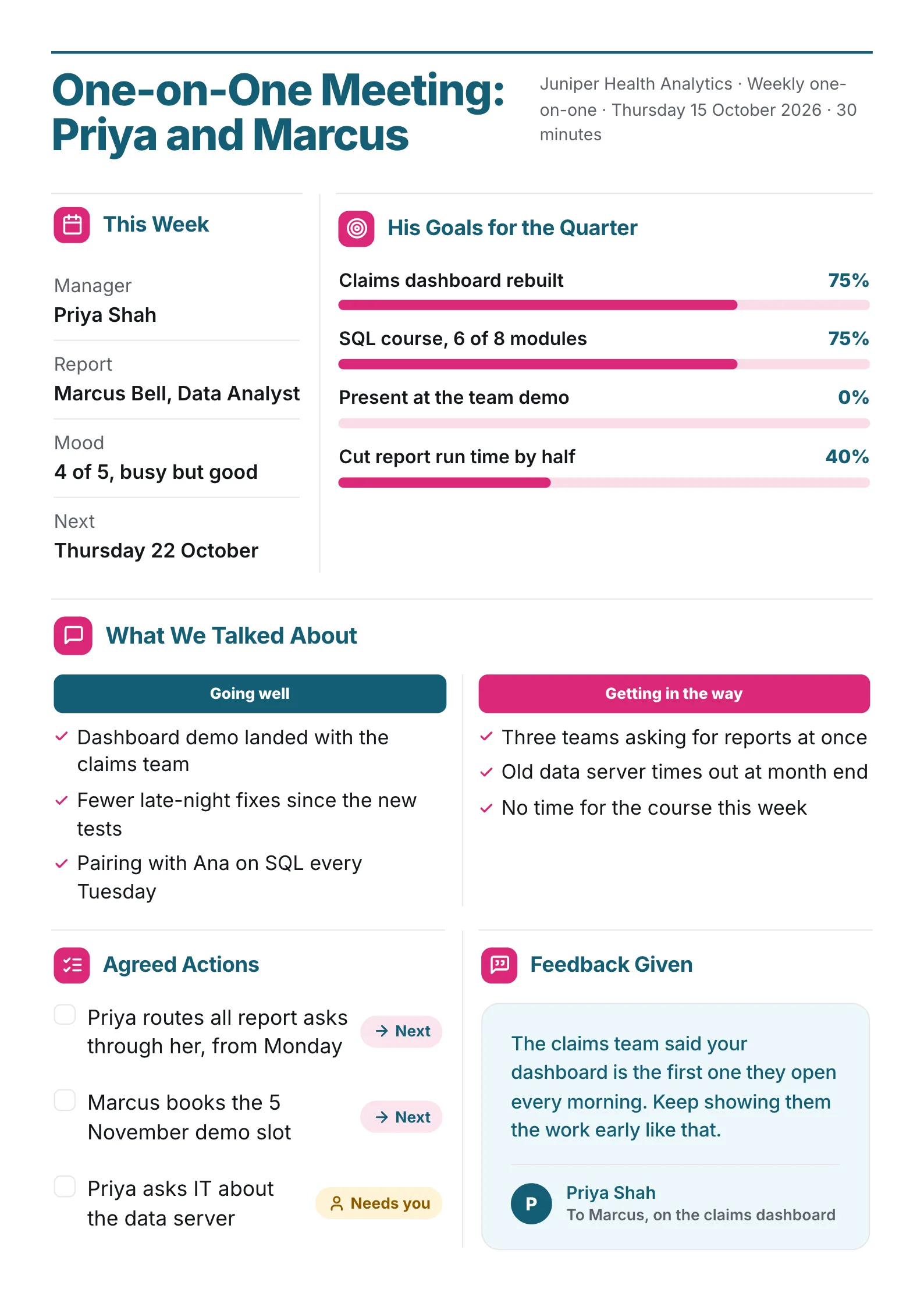 Meeting Summary: One-on-OneEdit for free(opens in a new tab)
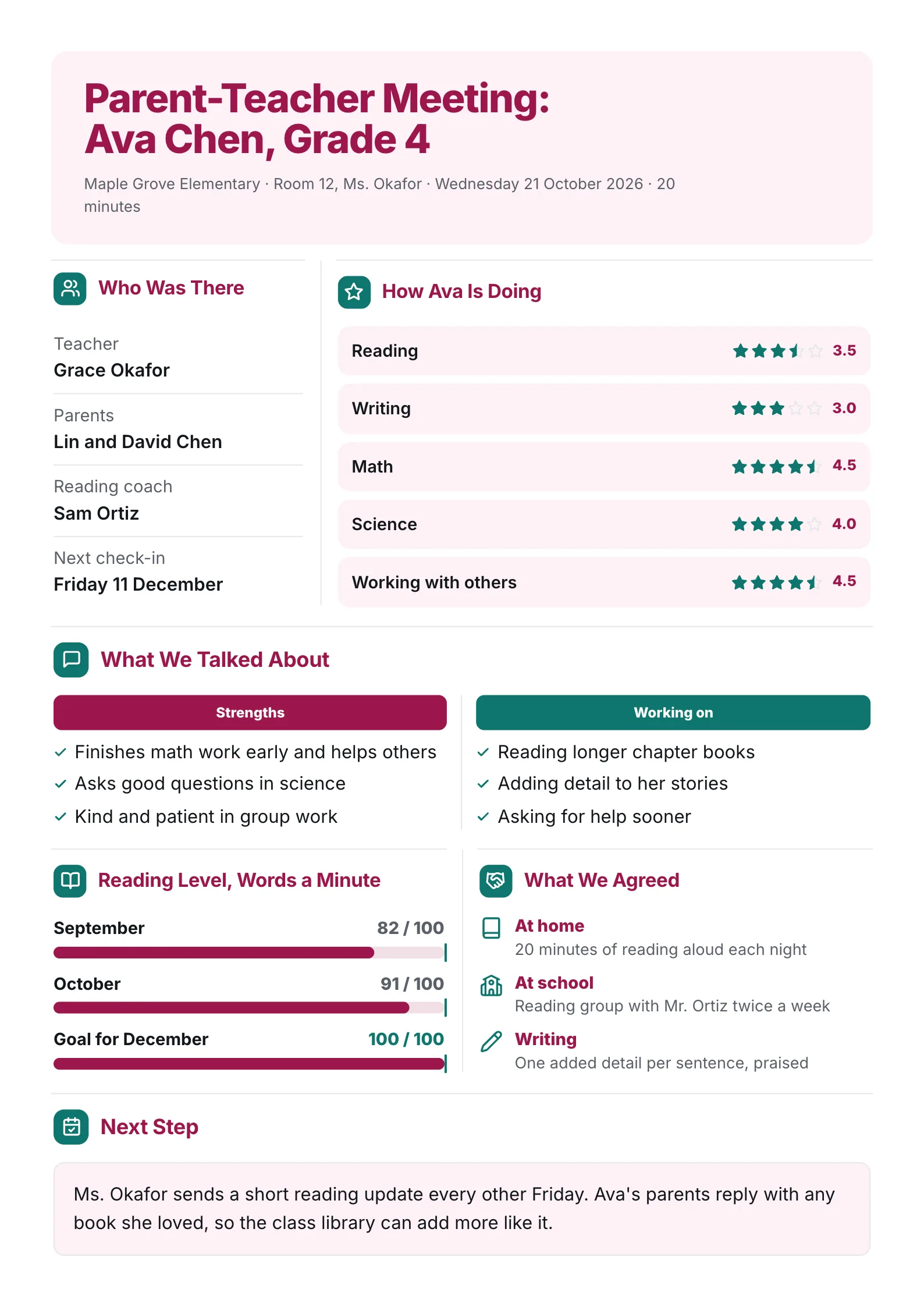 Meeting Summary: Parent-Teacher ConferenceEdit for free(opens in a new tab)
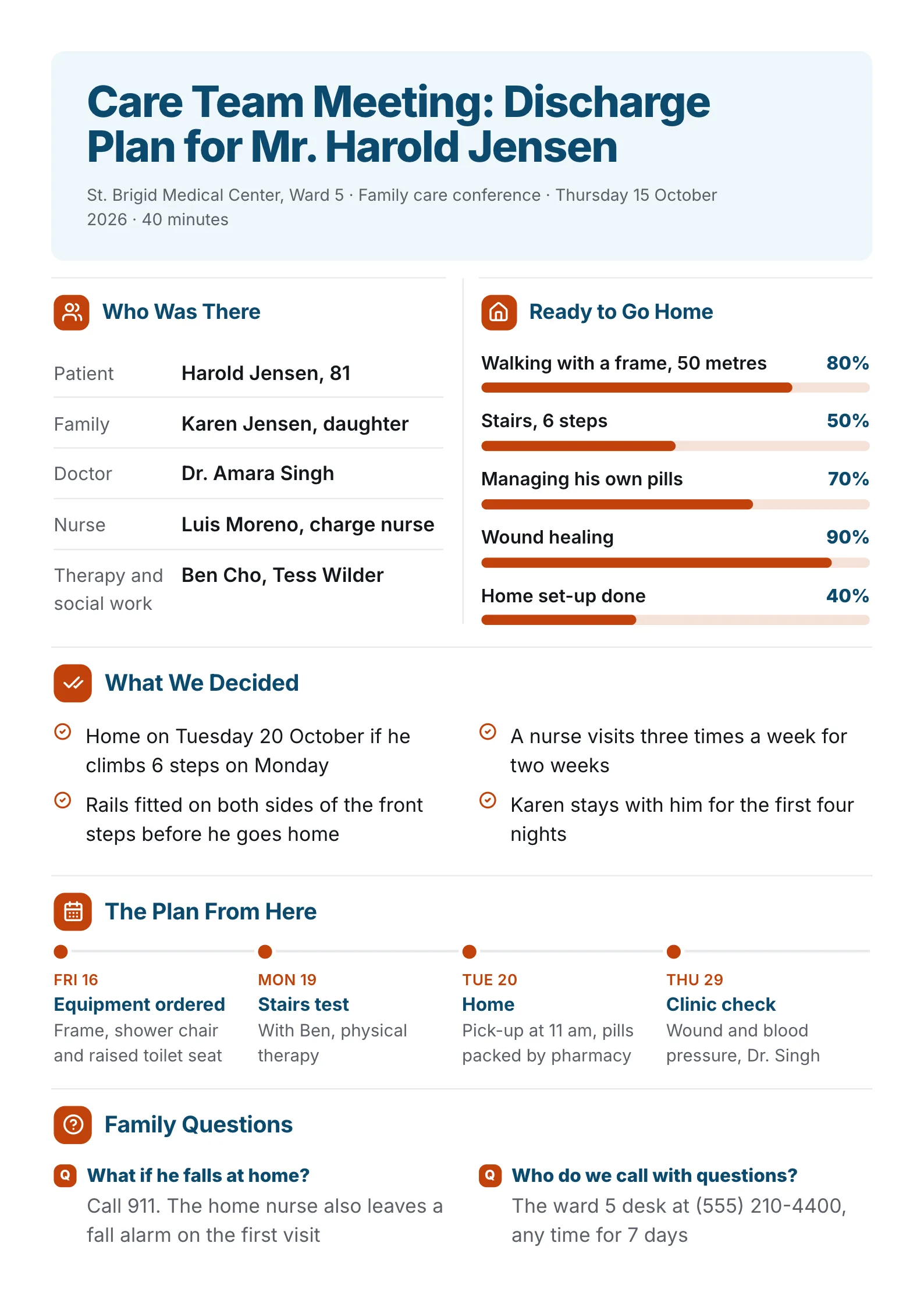 Meeting Summary: Patient Care ConferenceEdit for free(opens in a new tab)
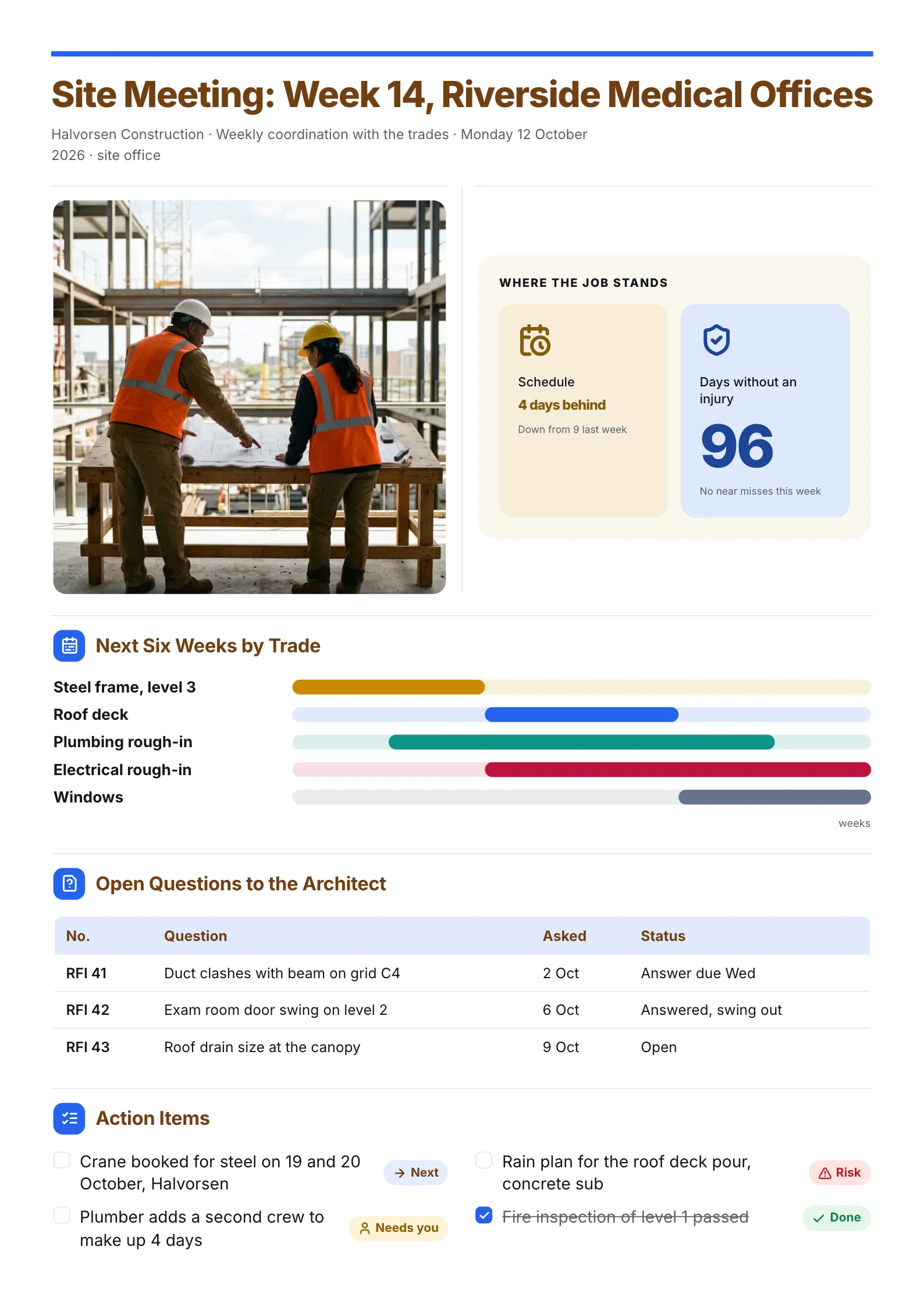 Meeting Summary: Construction SiteEdit for free(opens in a new tab)
That's the gap to close in your own. Here's how to write a meeting summary that someone who missed the meeting can read in a minute and act on. Start with the decisions, because that's what the person who missed the meeting needs first.
What we counted in 7 public meeting summaries
We picked summaries from a city council in Colorado, five school boards in four states and a committee that advises Oregon's governor. They range from about 110 words to a 9-page annotated agenda.
| What the summary includes | Summaries that do |
|---|---|
| What was decided | 6 of 7 |
| A link to the video or recording | 5 of 7 |
| A date for the next step, like a hearing or meeting | 4 of 7 |
| The vote on each decision | 2 of 7 |
| A note that it isn't the official minutes | 2 of 7 |
| Who handles each follow-up | 1 of 7 |
| A due date for each follow-up | 0 of 7 |
Source: our read of 7 published US meeting summaries, October 30, 2026. Every summary is linked at the end.
Public bodies mostly record decisions, because that's what the law asks of them. Your team meeting is different. The follow-ups are usually the reason you met, so they deserve more room than the public summaries give them.
Open with what was decided
Your first lines should say what changed because the meeting happened. Woodland's school board in California does this well. Its summary is six bullets, and each one starts with a verb you can't misread, like "Approved" or "Reviewed and approved." You know what the board did before you finish the first line.
Jordan School District in Utah takes a different route. Its summary lists 14 agenda topics, each with a link to that moment in the meeting video. That's handy if you have time to watch. But the topics don't tell you what happened, so you have to open a separate file to find out.
Start your summary with decisions, written as past-tense statements. "We chose the Tuesday launch date" tells your reader more than "Discussed launch timing."
 Edit this template
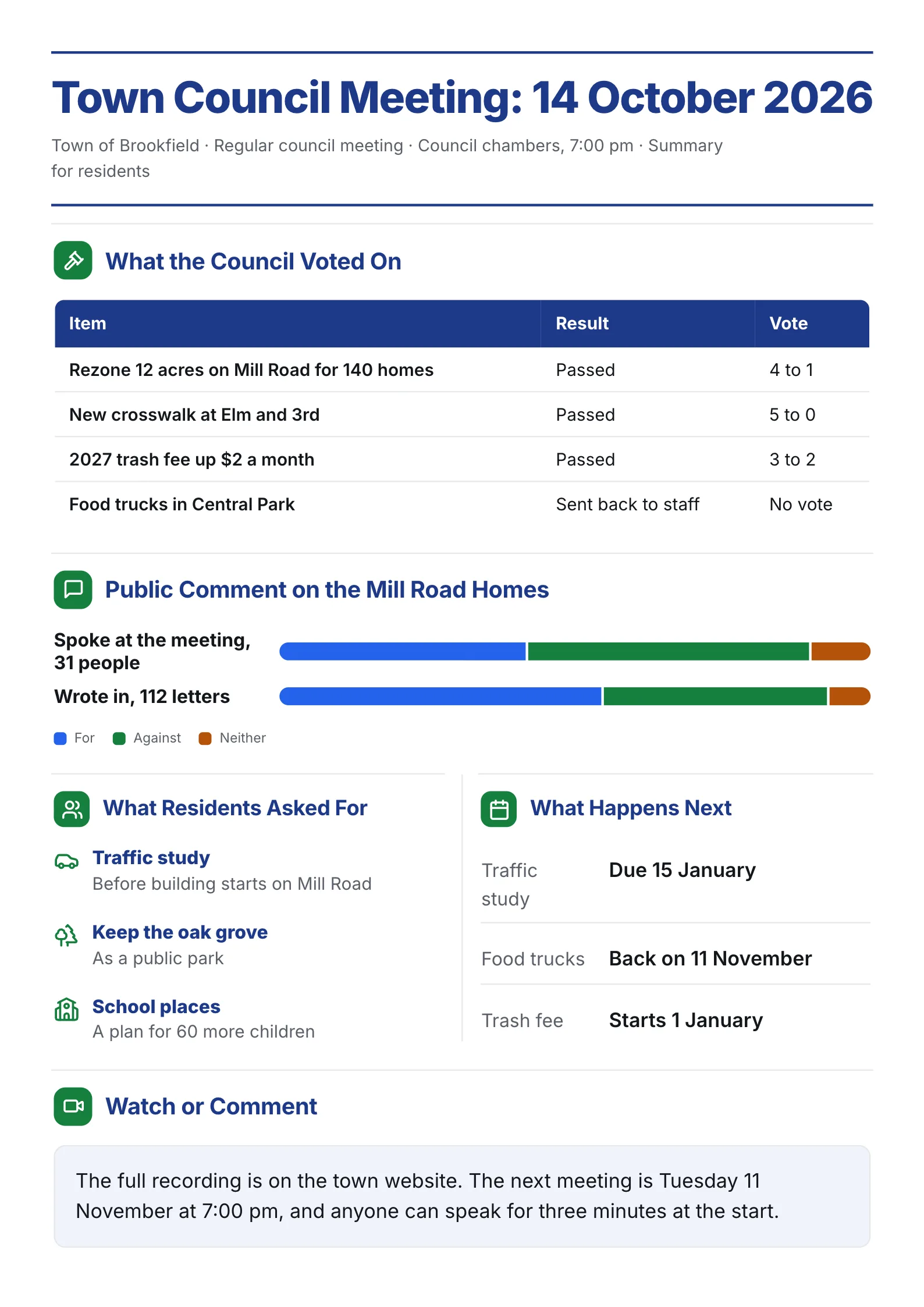
Sample names and figures. What the Council Voted On gives each item its result and vote, like the crosswalk passing 5 to 0.
Write each decision so it makes sense alone
People forward one line of your summary to someone else. Write every decision so it still works for a reader who missed your meeting.
Louisville's city council in Colorado gets close. Each item names the ordinance, says what it does and gives the roll-call vote. You can see that a wildfire code change passed 5 to 2, and which members voted against it.
Pipestone's school board in Minnesota records 22 actions with the same care, including who moved and seconded each one. They're all packed into one long paragraph, though, so you'll have trouble finding a single decision.
The longest example is Jefferson Elementary's 9-page "board actions," which is the full agenda with a status word after each item. Every decision is in there, but you have to read about 2,000 words to collect them.
Put each decision on its own line. Add the one number that matters, like a price, a vote or a date. With no vote, say who made the call.
 Edit this template
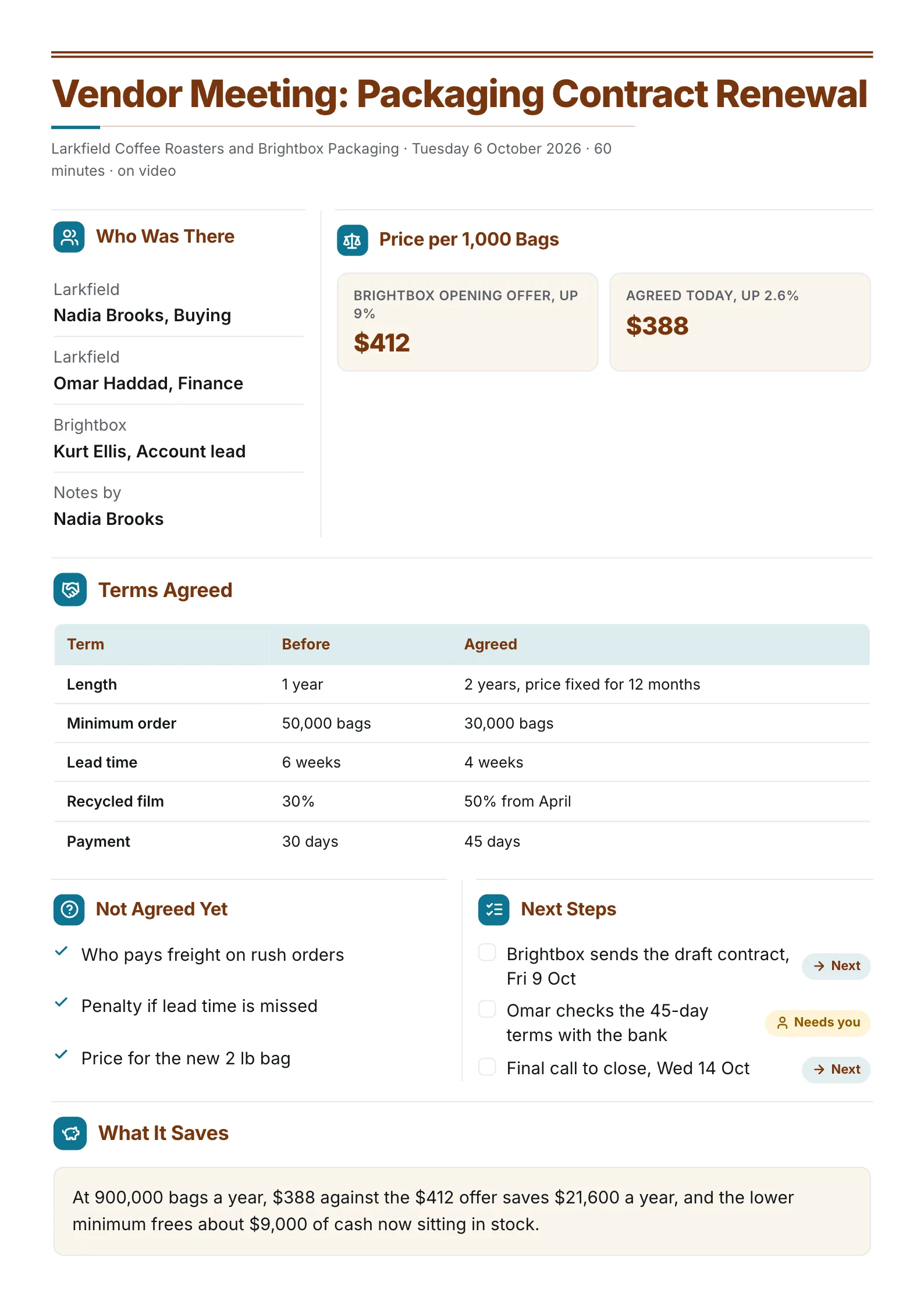
Sample names and figures. Terms Agreed shows each term before and after, so the new lead time of 4 weeks reads on its own.
Give every follow-up a name and a date
This is the part none of the public summaries finish. One comes close. The Oregon committee's notes use a three-column table, with a column for decisions and action items. Its action items name who does each task, like a presenter sending slides to the moderator to share. They just don't say when.
A follow-up without a date tends to drift on your team. Without a name, it drifts faster, because everyone assumes someone else has it.
Write each follow-up as a short line with three parts. Say what will be done, who does it and the date it's due. "Rachel sends the final budget to the CFO by October 26" leaves nothing to guess.
If a task belongs to two people, pick one to own it. Your summary is the place where that gets settled.
 Edit this template
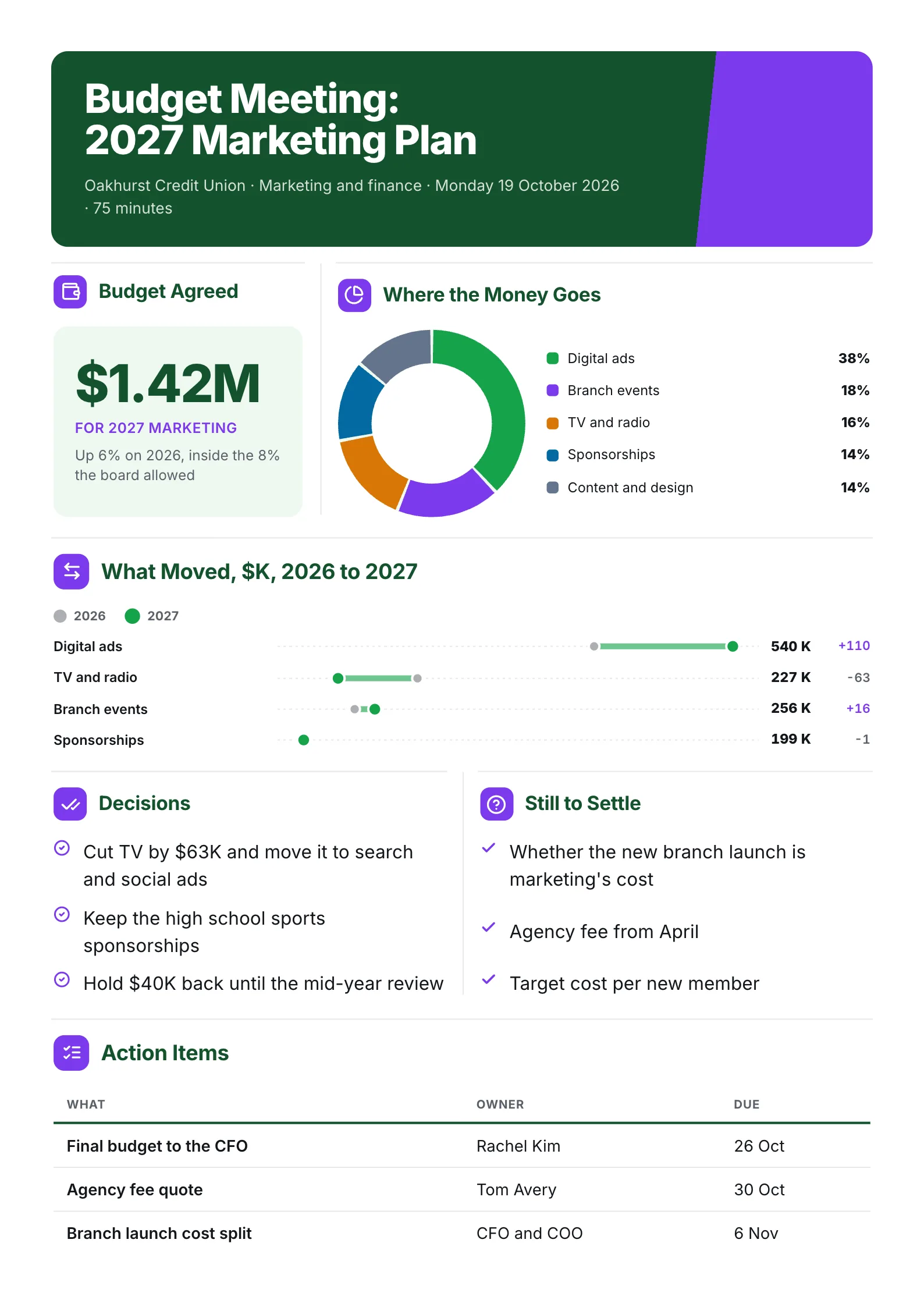
Sample names and figures. Action Items gives each task an owner and a date, from the final budget on October 26 to the cost split on November 6.
List what's still open
Most of your meetings will leave something unsettled. Give those items their own short list, separate from the decisions. That way nobody mistakes a maybe for a yes.
Under each open item, say what you need to close it and when you'll come back to it. "Who pays freight on rush orders, back on the October 14 call" is enough.
Louisville handles this in its own way. One ordinance passed a first reading, and the summary gives the date and time of the public hearing where it comes back. Four of the 7 summaries give a date like that for what happens next.
Send it within a day, with a link to the full record
Louisville's summary went out by email at 3:03 pm on the following day. It also says the video is posted within 48 hours. Jefferson's board makes the same promise of two days for its recording.
Aim for the same day if you can, and within 24 hours at the latest. People remember what they agreed while it's fresh, and they'll correct a mistake quickly if you ask them to.
Link to anything longer, like the slides, the recording or the full notes. Pipestone and Stoughton both say plainly that their summaries aren't the official minutes, and they point to where those are kept. That's a useful habit for your team too. Your summary stays short because the full record lives somewhere else.
 Edit this template
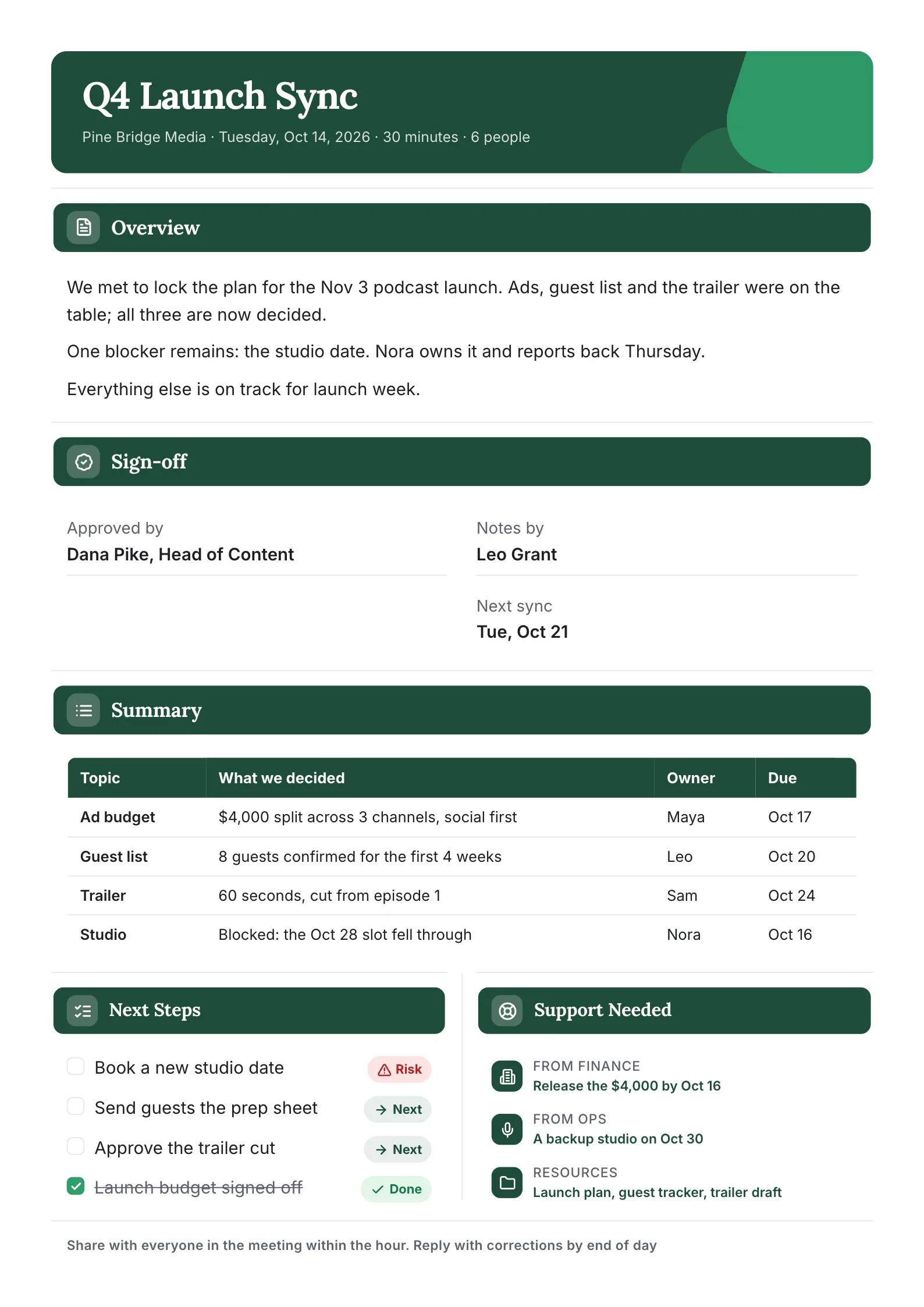
Sample names and figures. The footer asks everyone to reply with corrections by end of day.
Make the first three lines enough
Many people will read only the top of your summary. Write those lines so they could stand as the whole thing. Name the meeting and the date, the main decision, and the one thing someone needs to do.
Stoughton's school district calls its summaries "Board Bites," and some entries are a single line. "Adopted the 2026-2027 Budget" is complete. A reader who stops there still knows the most important fact.
For a bigger meeting, write a short "In short" line above everything else. Two sentences can carry the decisions that affect the most people.
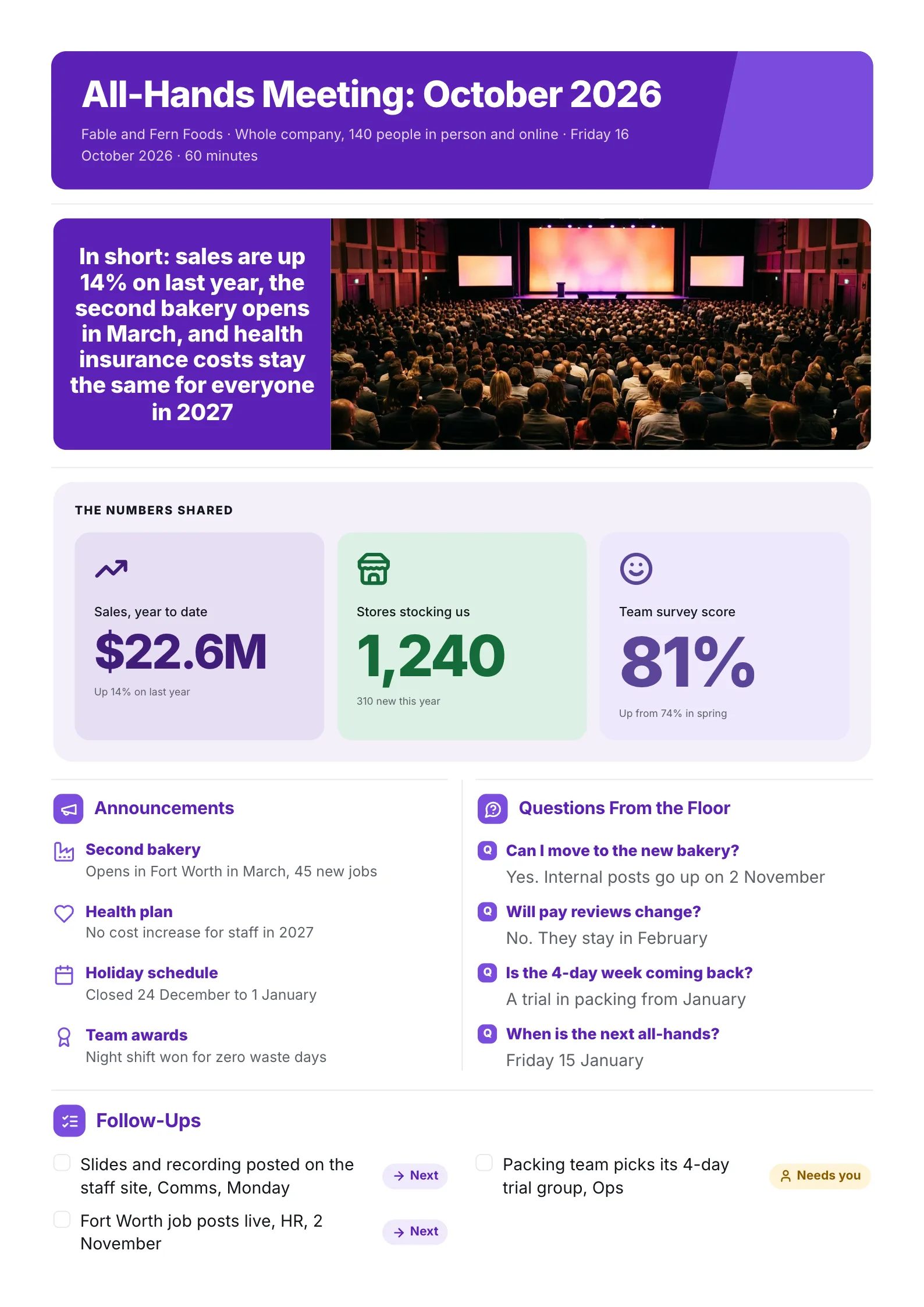 Edit this template
Sample names and figures. In short gives the sales growth, the new bakery and the health plan in one sentence.
A messy note, rewritten
Here's what your raw notes turn into once you apply the steps above. The notes on the left are the kind most of us type during a meeting.
| Raw note | In the summary |
|---|---|
| Talked about launch timing | Decided to launch on Tuesday, November 3 |
| Ads budget? | Approved $4,000 for ads, split across 3 channels |
| Sam to look at trailer | Sam cuts a 60-second trailer by October 24 |
| Studio issue | Still open: the October 28 studio slot fell through. Nora books a new one by October 16 |
| Next sync | Next meeting Wednesday, October 21 |
Each line on the right gives your reader what they need. The decisions read as decisions, and every task has a name and a date.
You can lay this out with our meeting summary designs, which already have a decisions section, an owner and due date table and a space for open items. For a fill-in template and more examples, see our meeting summary template post.
How is a meeting summary different from minutes?
No. Minutes are the formal record, often approved at the next meeting, and they follow set rules about motions and votes. A meeting summary is shorter and written for people who need to act. Two of the public summaries we read say outright that they aren't the minutes.
For most of your team meetings, a summary is all you need. If your group has a board or bylaws, keep both, with the summary pointing to the minutes.
The 7 summaries we read
| Summary | Who published it | Length |
|---|---|---|
| City Council Meeting Action Summary, February 3, 2026 | City of Louisville, Colorado | About 650 words |
| School board meeting summary, July 27, 2026 | Pipestone Area Schools, Minnesota | 1 page |
| Regular Board Meeting Summary, May 28, 2026 | Woodland Joint Unified School District, California | 2 pages |
| Board Actions, March 11, 2026 | Jefferson Elementary School District, California | 9 pages |
| Board Bites | Stoughton Area School District, Wisconsin | About 110 words per meeting |
| Board Meeting Summary, March 10, 2026 | Jordan School District, Utah | 14 topics with video links |
| Committee notes, April 15, 2026 | Oregon Racial Justice Council, Health Equity and Human Services Committee | Notes inside an 86-page packet |
We went through every summary in full on October 30, 2026. For Stoughton, we counted the most recent meeting on its page, held October 19, 2026.
Put a due date on your next summary
Look at the last meeting summary you sent and find the follow-ups. Give each one a name and a due date, which none of the 7 public summaries did. Then use a meeting summary design in MakeOnepagers for the next one, so the owner and date columns are there before the meeting starts.
Frequently asked questions
What should a meeting summary include?
The meeting's name and date, what was decided, and each follow-up named to one person, with the day it's due. Add anything still open and a link to the full notes or recording. That fits on one page for almost any meeting.
How long should a meeting summary be?
Long enough to hold the decisions and tasks, and no longer. The public ones we read run from about 110 words to 9 pages, and the 9-page one was the hardest to use. For a one-hour meeting, a few hundred words is usually plenty.
When should you send a meeting summary?
The same day if you can, and within 24 hours at most. Louisville's council sent its summary the afternoon after the meeting. Ask people to reply with corrections by a set time.
Who should write the meeting summary?
Pick one person before your meeting starts, ideally someone who isn't running it. If you lead the discussion, you'll find it hard to take good notes at the same time. Whoever writes it should also send it.




