BlogGuide
Training One‑Pager: Free Template and 3 Examples for L&D Teams
A free training one-pager template for reporting a training program on one page: completion by team, hours against plan, cost and the one gap to fix, with three examples.

By MakeOnepagers Team
Updated · 6 min read
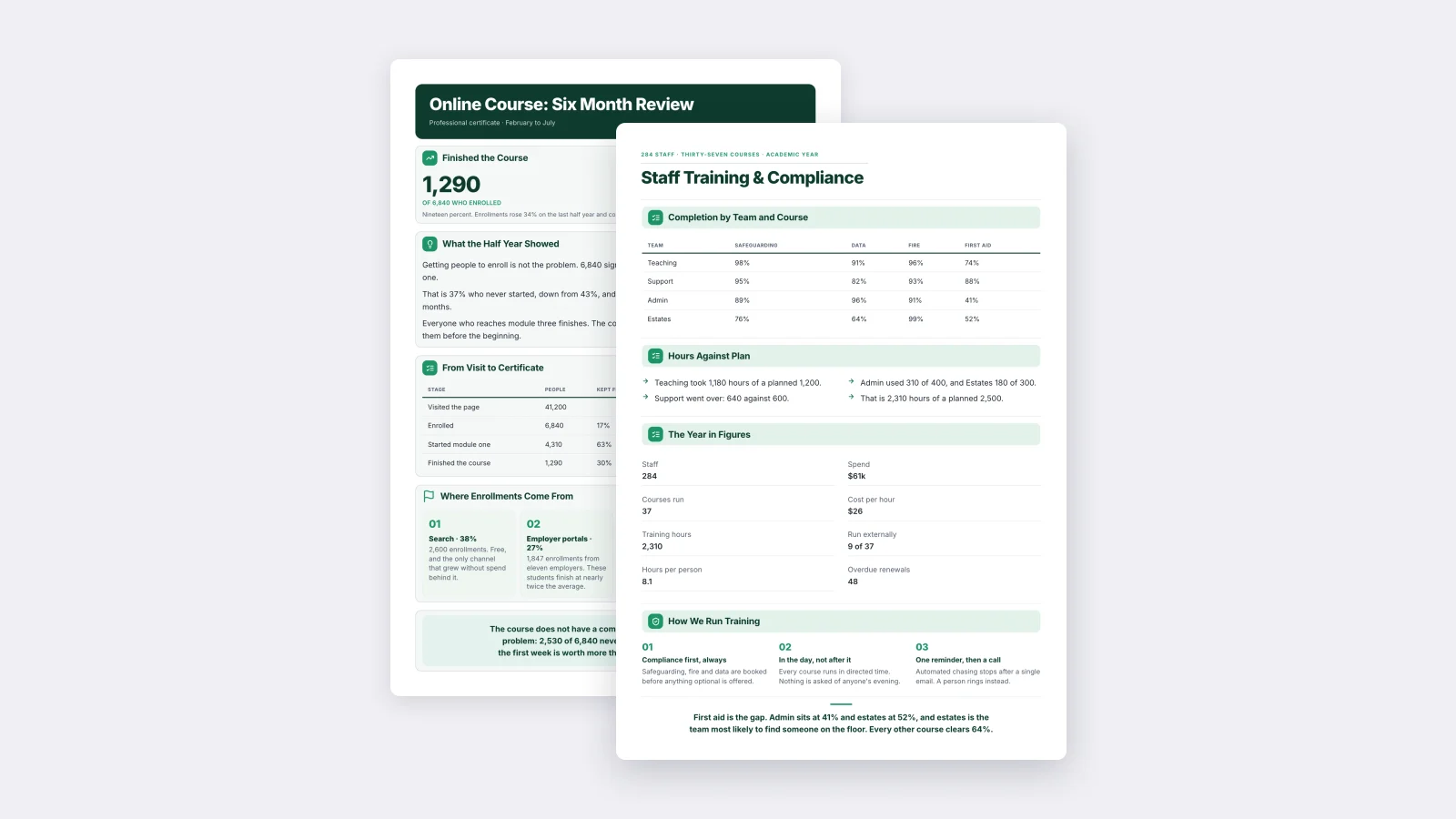
A training one-pager sums up a training program on a single page: who completed which courses, how many hours and dollars it took against the plan, and the one gap that needs fixing next. Learning and development teams, HR managers and course owners use it to report to leadership, to a board or to a funder who will not read a 20-page training report. Below is a free training one-pager template you can copy and three examples to borrow from.
One‑Pager examples
Real One-Pagers made with MakeOnepagers. Open any one to edit it as your own.
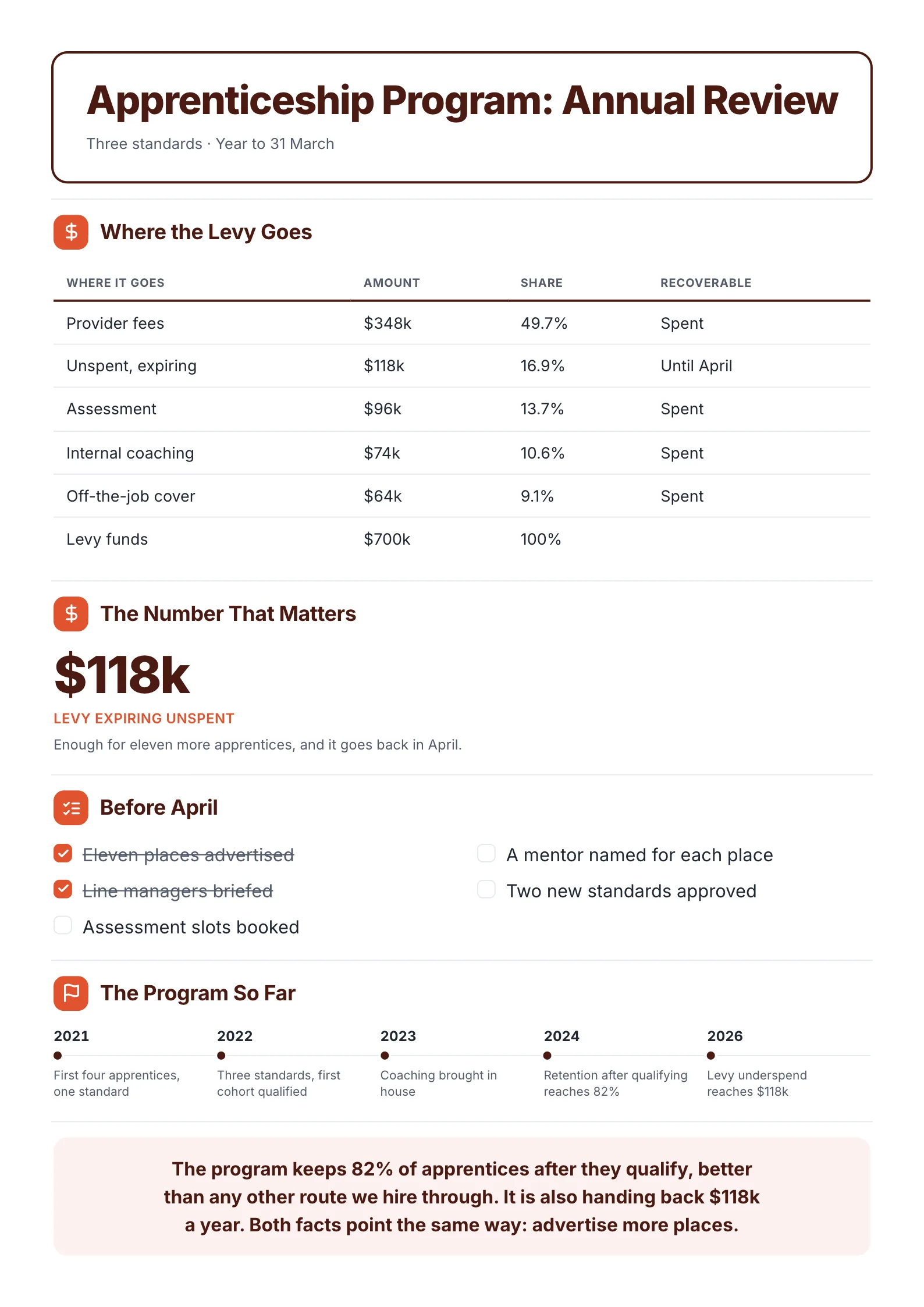
Every example was made with MakeOnepagers. The names and figures are samples, and each one opens as a template you can edit for free.
What goes on a training one-pager
| Block | What the reader wants to know | Keep it to |
|---|---|---|
| Headline and scope | Which program, how many people, which period? | One line |
| Completion | Who has done the required courses? | A table by team or a funnel by stage |
| Hours or money against plan | Did it run to budget? | Four short lines |
| The year in figures | How big is it? | Six to eight numbers |
| How it runs | What are the rules? | Three short principles |
| The finding | What should we do now? | One or two sentences |
Most training reports fail on the last row. They show every number and say nothing about them. Your reader is deciding where to put money or attention next. Tell them.
A free training one-pager template
Copy this outline, or open the example below and edit it.
- Top line: number of staff, number of courses, the period.
- Headline: [Program] training and compliance.
- Completion by team and course: a table with teams down the side and required courses across the top, as percentages.
- Hours against plan: each team's hours used against hours planned, and the total.
- The year in figures: staff, courses run, total hours, hours per person, spend, cost per hour, courses run outside, overdue renewals.
- How we run training: three rules, such as "required courses first".
- The finding: the one gap, in numbers, and why it matters.
Training one-pager example
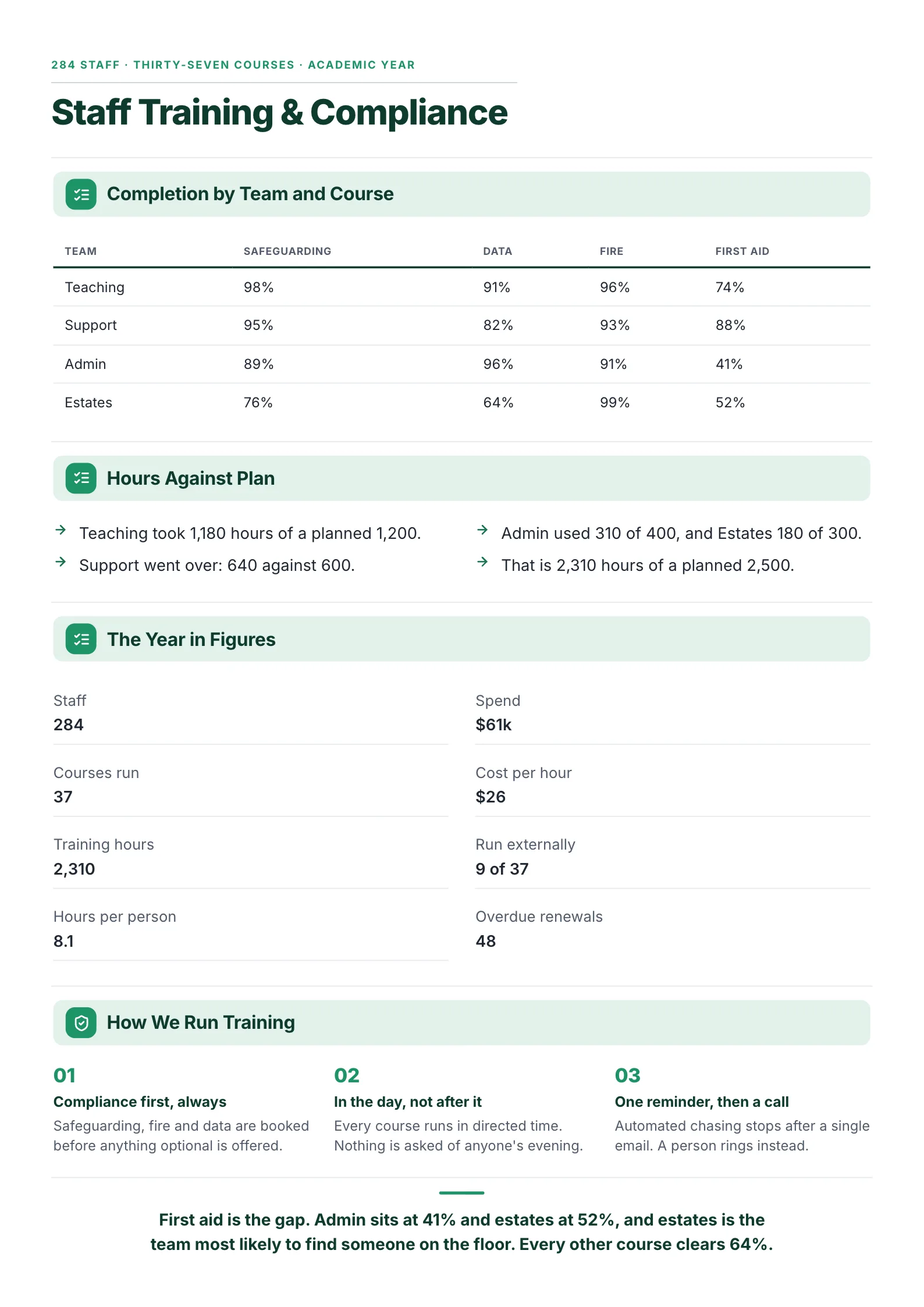 Edit this template
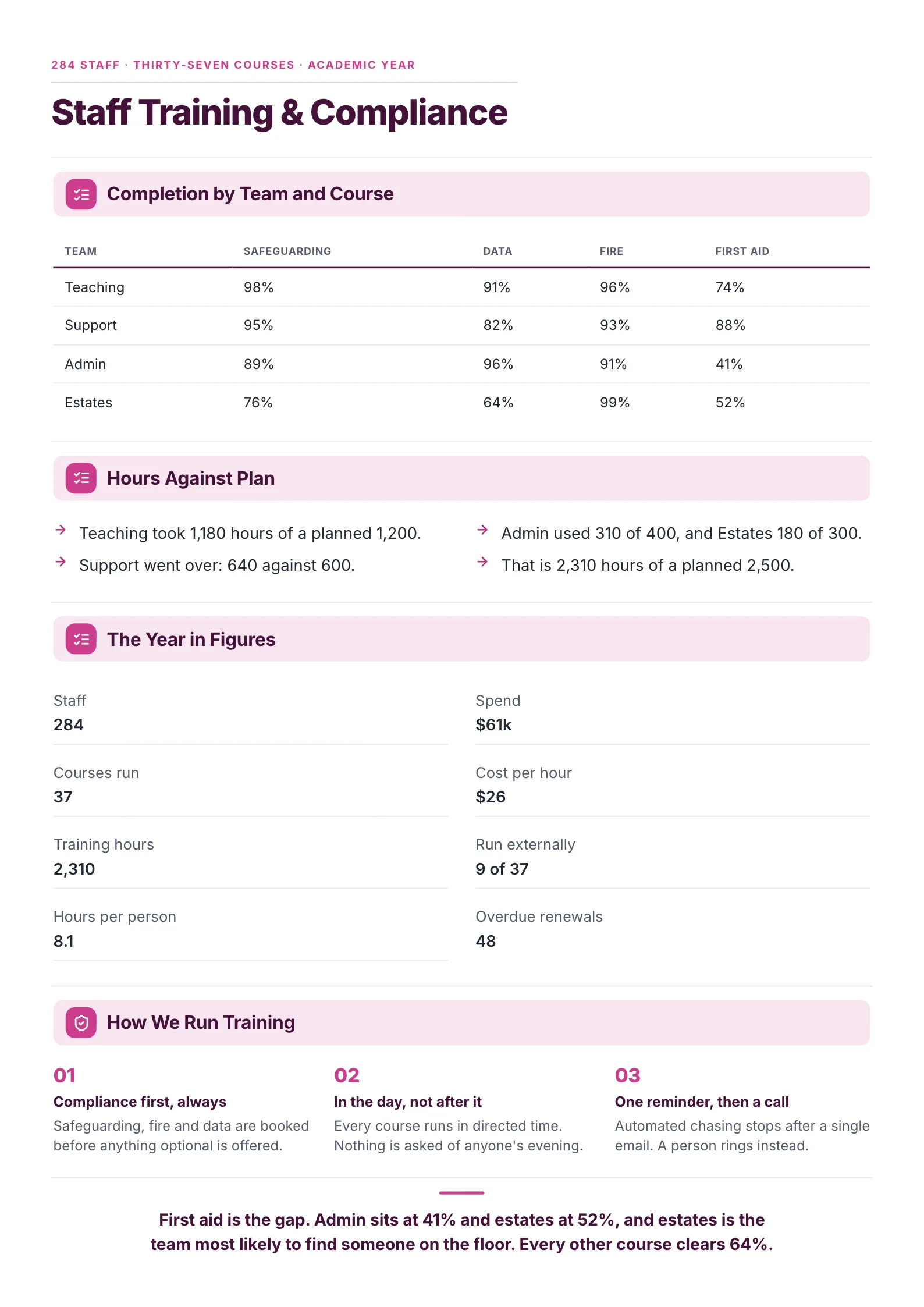
A school's staff training year: completion by team and course, hours against plan and one clear gap.
What to copy:
- Completion as a grid: four teams against four required courses. The weak cells jump out: admin at 41% for first aid, estates at 64% for data.
- Hours against plan in plain sentences: "Support went over: 640 against 600." No chart needed for four numbers.
- A finding that names the risk: "First aid is the gap ... and estates is the team most likely to find someone on the floor." It turns a percentage into a reason to act.
Open it: staff training report template.
Two more training one-pager examples
Online course review: for course owners and e-learning teams
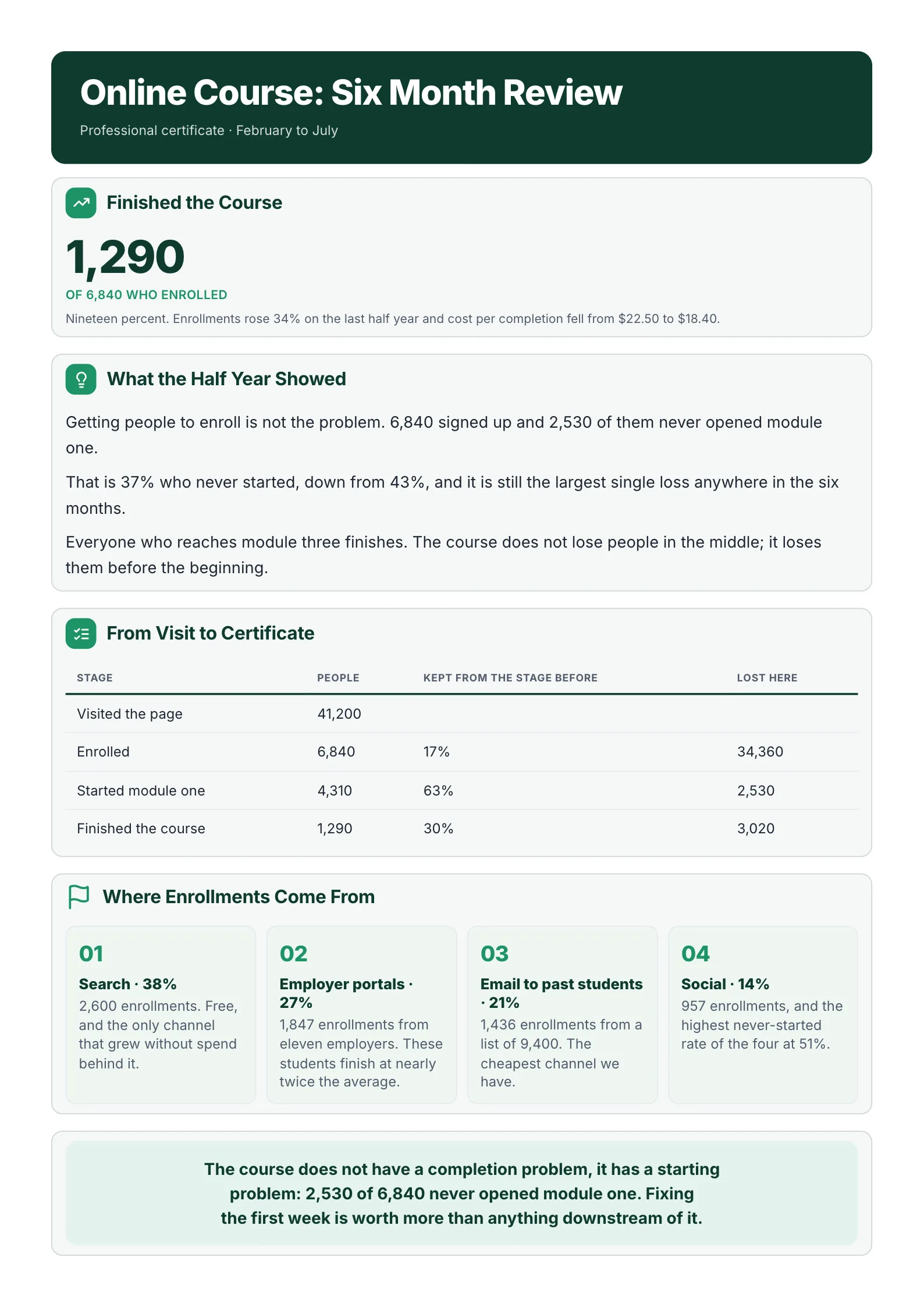 Edit this template
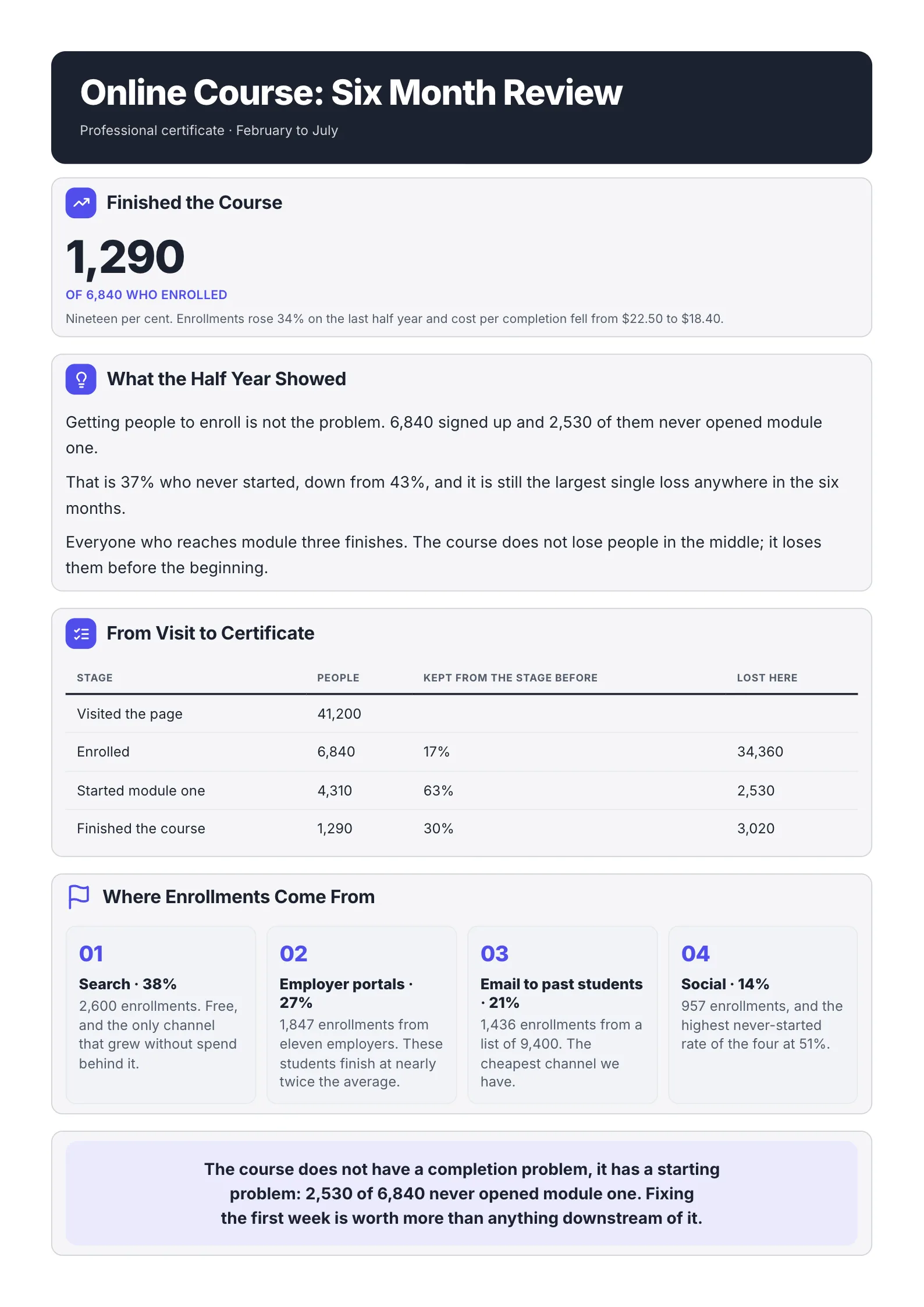
A six-month course review that finds the real problem: people who enroll and never start.
- A funnel table with "lost here": 41,200 visits, 6,840 enrolled, 4,310 started, 1,290 finished. The biggest loss is easy to spot.
- Where learners come from, with a number each: search 38%, employer portals 27%, email 21%, social 14%.
- A finding that changes the plan: "The course does not have a completion problem, it has a starting problem." Fix the first week before anything else.
Open it: online course report template.
Apprenticeship program review: for funded programs
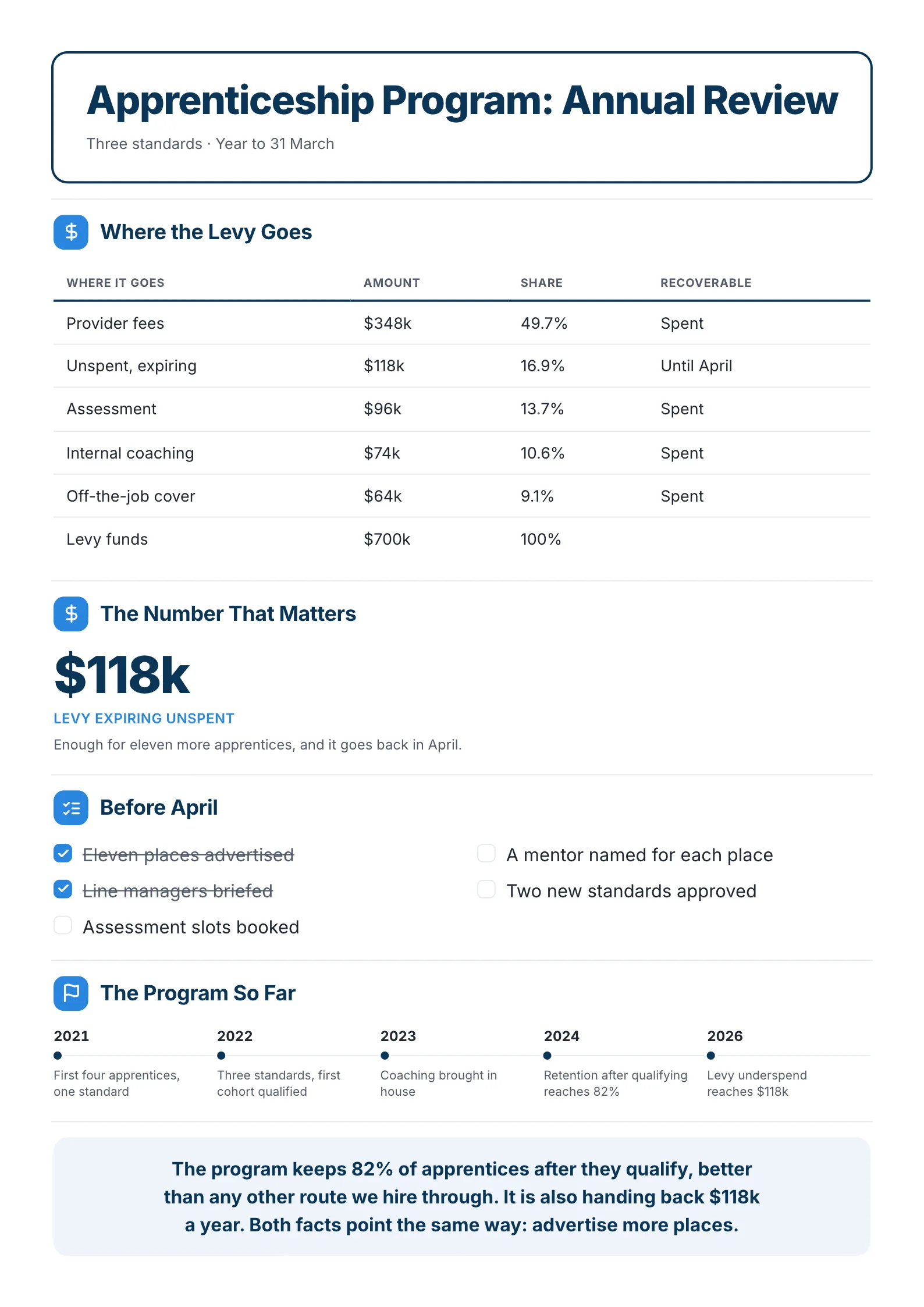 Edit this template
An apprenticeship program's year: where the money went, what is about to be lost and what to do before April.
- The money as a table: $700k split into provider fees, assessment, coaching, cover and unspent.
- One number that matters: $118k expiring unspent, "enough for eleven more apprentices". The reader knows what is at stake.
- A checklist with deadlines: places advertised and managers briefed are ticked; mentors, assessments and new standards are not.
Open it: apprenticeship program report template.
How to make a training one-pager in 5 steps
- Pull completion data for required courses from your learning system, by team.
- Put hours and spend next to the plan, so the reader sees what went over and what went under.
- Pick six to eight figures that show the size of the program: people, courses, hours, cost per hour.
- Find the one gap with the biggest risk or the biggest waste, and say it in a sentence with its number.
- Write what happens next: who fixes it, and by when.
Have a long training report, a spreadsheet export or a slide deck? Drop it into the free AI One-Pager generator and get a first training one-pager back to edit.
Training one-pager mistakes
- Averages only. "91% completion" hides the team at 41%. Show it by team.
- No plan to compare against. 2,310 hours means little until the reader sees 2,500 were planned.
- Every course listed. Thirty-seven courses do not fit. Show the required ones and summarize the rest.
- No finding. End on the gap, the risk and the next step.
- Jargon from the learning system. "Assignments in progress, overdue state" means nothing to a director. Write "48 renewals are overdue."
Make your training one-pager
Open the free staff training report template and put in your program, or drop your training report into the free AI One-Pager generator and get a finished page back. Browse every One-Pager template for more layouts.
Frequently asked questions
What is a training one-pager?
A one-page summary of a training program, used to report to leadership, a board or a funder. It shows completion, hours and cost against plan, and the main gap to fix.
What should a training report include?
The scope (people, courses and period), completion by team for required courses, hours and spend against plan, a few headline figures, and a finding with a next step.
Can a training one-pager be used for a single course?
Yes. For one course, use a funnel from enrollment to completion instead of a team-by-course grid, like the online course example above.
How is a training one-pager different from a training plan?
A training plan says what will be taught, to whom and when. A training one-pager reports what happened and what to change. Many teams use the same layout for both, with "planned" in place of "actual".